


How to Restore Data Using itemMatching() in n8n
In complex n8n automations, it is common to trim payloads for performance or clarity, then later need to reattach fields that were previously removed. The itemMatching(itemIndex: number) helper makes this pattern straightforward by allowing you to reference related items from earlier nodes in the workflow.
This guide documents a concrete workflow template that restores email addresses after the data has been reduced to only customer names. It focuses on how itemMatching() works inside a Code node, how the data flows between nodes, and what to watch out for when using this pattern in production n8n workflows.
Contents
Workflow overview
This n8n workflow demonstrates a common pattern:
- Load a full dataset from a data source.
- Reduce the payload to only the fields needed for intermediate processing.
- Later, restore specific fields (in this case, email addresses) from the original dataset using
itemMatching()in a Code node.
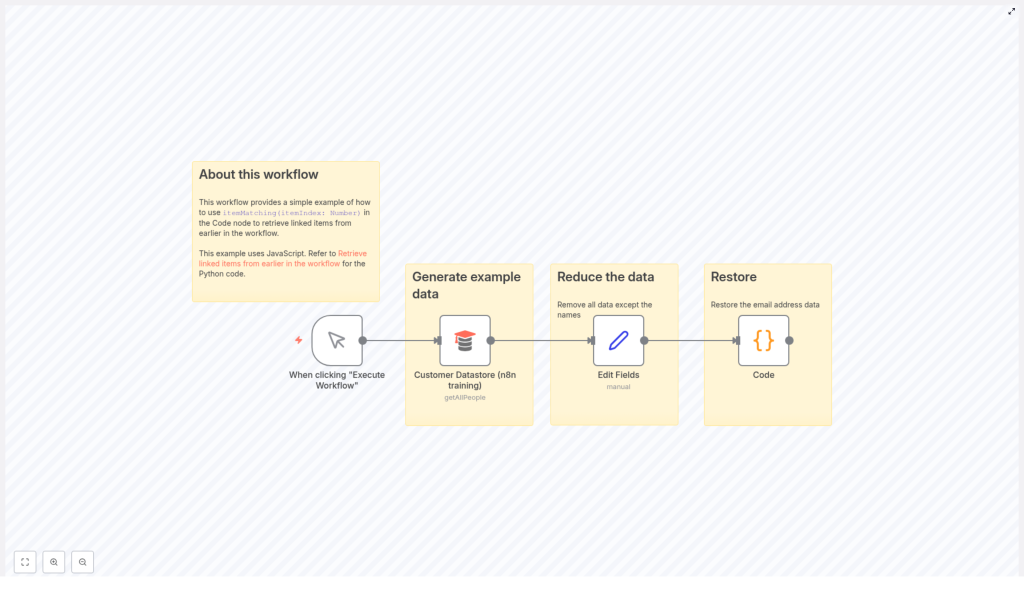
The example uses the Customer Datastore (n8n training) node as the source of customer records. The workflow then trims the data to only customer names, and finally restores the corresponding email addresses using itemMatching(itemIndex). This lets you maintain minimal payloads between nodes while still having access to the original data when required.
Workflow architecture
The workflow consists of three main stages:
- Trigger stage A manual trigger node labeled When clicking “Execute Workflow” starts the workflow execution for testing and demonstration.
- Data retrieval stage The Customer Datastore (n8n training) node fetches all customer records using the
getAllPeopleoperation. This node outputs full customer objects, including fields such asnameandemail. - Data reduction and restoration stage The Edit Fields node reduces the payload to only the
namefield. A subsequent Code node then usesitemMatching()to reattach the matchingemailvalues from the original dataset.
The key architectural idea is that the reduced items maintain positional alignment with the original items. The itemMatching(itemIndex) function leverages this index alignment to retrieve the correct source item from the earlier node output.
Node-by-node breakdown
1. Manual Trigger: “When clicking "Execute Workflow"”
Node type: Trigger Purpose: Start the workflow on demand from the n8n editor.
This node has no special configuration for this example. It simply provides a manual entry point so you can execute the workflow from the UI while testing the itemMatching() behavior.
2. Customer Datastore (n8n training)
Node type: Data source / custom training node Operation: getAllPeople
This node retrieves an example dataset of customers. Each item typically includes several attributes such as:
nameemail- Other customer-related fields depending on the training datastore
The important point for this template is that the output contains both name and email, and that all items are returned in a deterministic order. This order will later be relied upon when using itemMatching(itemIndex) to restore emails.
3. Edit Fields node (data reduction)
Node type: Edit Fields / Set-style node Purpose: Reduce the payload to only the customer names.
The output of the Customer Datastore (n8n training) node is passed into an Edit Fields node. This node is configured to keep only the name field and remove all other properties from each item.
After this step:
- Each item still represents a customer.
- The
namefield is preserved. - The
emailfield and any other attributes are intentionally removed.
The reduced items remain in the same order as the original items from the datastore node. This index preservation is critical for itemMatching() to work correctly in the next step.
4. Code node (data restoration with itemMatching())
Node type: Code Language: Python (in this example) Purpose: Reattach the email field from the original dataset using itemMatching().
The reduced items from the Edit Fields node are passed into a Code node. Inside this node, the script iterates over all current items and uses itemMatching() to access the corresponding original item from the Customer Datastore (n8n training) node.
The core logic is:
for i,item in enumerate(_input.all()):  _input.all()[i].json.restoreEmail = _('Customer Datastore (n8n training)').itemMatching(i).json.email

return _input.all();
This code:
- Loops over all items currently available to the Code node.
- For each index
i, callsitemMatching(i)on the Customer Datastore (n8n training) node reference. - Reads the
emailfield from the matched original item. - Writes that value into a new property named
restoreEmailon the current reduced item. - Returns the modified items array as the node output.
After execution, each item in the Code node output contains:
- The original
name(kept by the Edit Fields node). - A new
restoreEmailproperty holding the email retrieved from the original dataset.
How itemMatching() works in this template
itemMatching(itemIndex: number) is an n8n helper function that lets you access the item from another node that corresponds to the same logical item in the current execution.
In this workflow:
_('Customer Datastore (n8n training)')references the output of the node named Customer Datastore (n8n training)..itemMatching(i)retrieves the item from that node that matches the current indexi..json.emailreads theemailfield from that matched item.
The Python snippet is equivalent in intent to a JavaScript loop that would use the same itemMatching() helper when run inside a JavaScript-based Code node. The key is that the index i is used consistently across both the reduced items and the original items.
Configuration and setup notes
Node naming and references
The Code node uses the expression _('Customer Datastore (n8n training)'). This means:
- The node name in the workflow canvas must exactly match Customer Datastore (n8n training).
- If you rename the node, you must update this reference in the Code node accordingly.
Item order and index alignment
For itemMatching(itemIndex) to return the expected item, the following must hold:
- The number of items from the datastore node and the number of items reaching the Code node must match, or at least the indices you access must exist in both.
- The order of items must be preserved across intermediate nodes such as Edit Fields. Nodes that filter, split, or reorder items can break the index alignment.
If the order or count changes between the source node and the Code node, itemMatching() may return unexpected matches or cause index-related issues.
Supported languages in the Code node
The example is written in Python, but the same concept applies when using JavaScript in the Code node. You can:
- Use Python, as shown, if your n8n instance supports Python in the Code node.
- Use JavaScript and call
itemMatching()in a similar way from JavaScript code.
In both languages, the itemMatching() behavior and semantics are the same. Only the syntax for loops and assignments differs.
Edge cases and error handling considerations
While the template is straightforward, there are a few practical considerations when adapting it to more complex workflows:
- Missing items or mismatched indices If the number of items changes between the original node and the Code node, accessing
itemMatching(i)for an out-of-range index will not produce the intended mapping. Ensure that intermediate nodes do not filter out items unless you also adjust the logic accordingly. - Removed or renamed fields The example assumes that
emailexists on the original items. If the field name changes, or if some items do not have an email, you should account for that in your Code node logic to avoid null or undefined values being assigned. - Node rename issues If the Customer Datastore (n8n training) node is renamed, the reference inside the Code node must be updated. Otherwise, the helper
_()will not be able to resolve the node output correctly.
In more advanced implementations, you can add conditional checks in the Code node to gracefully handle missing emails or unexpected data structures before assigning values to restoreEmail.
Advanced customization ideas
Once you understand the basic pattern used in this template, you can extend it to more advanced n8n workflows:
- Restoring multiple fields Instead of restoring only
email, you can restore multiple properties from the original dataset, for examplephone,address, or internal IDs. - Selective restoration based on conditions In the Code node, you can add logic to restore emails only for certain customers, such as those matching a particular filter or status.
- Combining with other transformation nodes Use
itemMatching()in combination with other transformation nodes, such as IF, Merge, or additional Code nodes, to build complex pipelines while still keeping earlier full datasets available when needed.
The underlying pattern remains the same: keep your working payloads lean, and reattach data from earlier in the workflow using itemMatching() when required.
Why use itemMatching() in n8n?
Using itemMatching() in your n8n workflows provides several benefits:
- Maintain data integrity You can safely reduce the payload to only the fields you need for intermediate processing, while preserving the ability to restore key attributes later. This helps avoid repeated queries to external systems or duplicating heavy data structures.
- Optimized workflows Smaller payloads reduce memory usage and can simplify debugging and visualization in the n8n UI.
itemMatching()lets you keep workflows efficient without losing access to the original data context. - Flexible automation design This pattern is ideal when you need to display or manipulate only a subset of fields temporarily, but still need to reattach complete records before sending final outputs to another system or storage.
Implementation checklist for your own workflow
To implement a similar pattern in your own n8n project:
- Start with a data source node (for example, a database, API, or the
Customer Datastore) that outputs full records including the fields you plan to restore later. - Add a Set or Edit Fields node to reduce the payload to only the fields required for intermediate processing.
- Ensure that the reduced items preserve the same order and count as the original dataset.
- Add a Code node and reference the original node using
_('Node Name').itemMatching(index)inside your loop. - For each item, read the fields you want to restore (such as
email) from the matched original item and write them to the current item. - Return the modified items from the Code node and continue your workflow with the enriched data.
Additional tips and resources
- Always verify that item order is preserved between nodes when relying on
itemMatching(itemIndex). Avoid nodes that re-sort or filter items without adjusting your logic. - You can implement the same pattern using either JavaScript or Python in the Code node, depending on your preference and environment support.
- For more detailed reference material and examples, see the official n8n documentation on itemMatching().
Using itemMatching() is a powerful way to keep your n8n workflows both efficient and context-aware. By separating data reduction from data restoration, you can design automations that are easier to maintain, scale, and debug.
