


Mastering Bubble Integration with n8n
Why Connect Bubble and n8n in the First Place?
If you are building apps in Bubble and juggling data by hand, you are probably doing more clicking than you need to. Bubble gives you a visual way to build web apps without code. n8n adds the missing piece: flexible automation that connects your tools and handles repetitive work for you.
Put them together and you get a simple, powerful setup: n8n can create, update, and retrieve data from your Bubble app automatically. No more manually editing entries in the Bubble editor or wiring up complex backends just to keep your data in sync.
In this guide, we will walk through a real n8n workflow template that talks to Bubble. It creates a record, updates it, then fetches it again so you can see the full data lifecycle in action.
What This n8n – Bubble Workflow Actually Does
Let us start with the big picture. This template shows you how to:
- Create a new Bubble object of type
Doc - Update that same object with new data
- Retrieve the object again using its unique Bubble
id
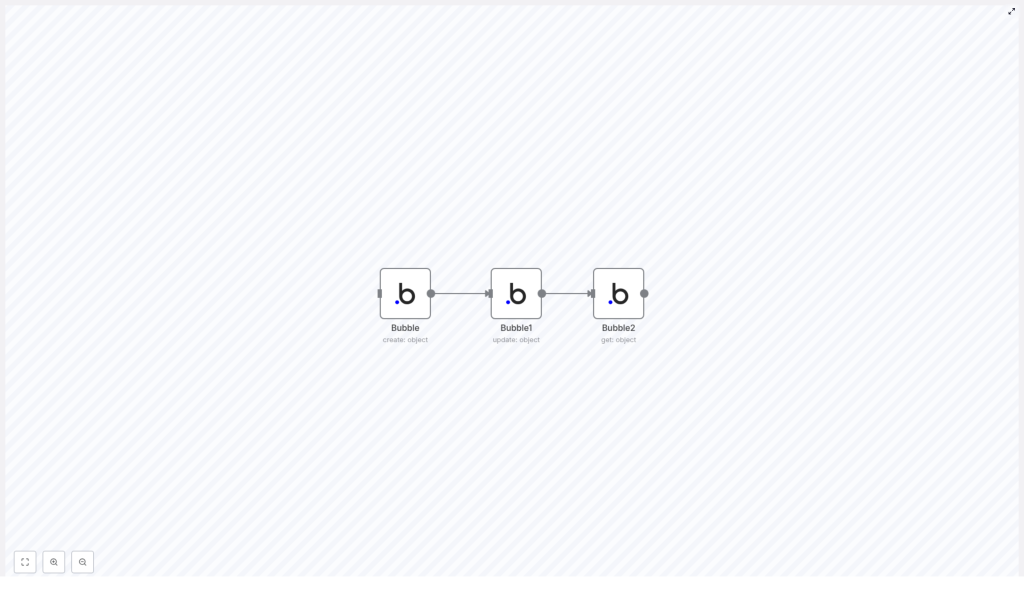
All of this happens through three Bubble nodes inside n8n. Think of it like a mini CRUD demo focused on Create, Update, and Read. Once you understand this pattern, you can easily expand it to more complex workflows, more properties, or different data types in Bubble.
When Should You Use This Template?
This workflow template is perfect if you:
- Are building a Bubble app and want to automate data operations
- Need a clear example of how n8n interacts with Bubble objects
- Want to test Bubble’s API integration without writing code
- Plan to scale up to more advanced automations later
Maybe you want to sync user data from another tool into Bubble, or update records after a form submission, or just make sure your data is always fresh. This template gives you a simple, concrete starting point for that.
Step-by-Step: How the Bubble Workflow Runs in n8n
Let us walk through each node in the workflow so you can see exactly what is happening under the hood.
1. Creating a Bubble Object (Bubble node)
The first step is handled by a node named Bubble. This node is configured to create a new object of type Doc in your Bubble database.
Here is what it does:
- Uses the Bubble integration in n8n
- Targets the object type
Doc - Sets the property key
Nameto the valueBubble
Once this node runs, Bubble creates a new entry in your database and returns the unique id of that object. That id is important, because it is what the next nodes use to know exactly which record to work with.
2. Updating the Same Object (Bubble1 node)
Next, the workflow moves to a second node, called Bubble1. This node is responsible for updating the object that was just created.
Here is the idea:
- It takes the
idoutput from the first Bubble node - Uses that
idto target the exact sameDocobject - Changes the
Nameproperty fromBubbletoBubble node
This is your example of programmatic updates in Bubble via n8n. Instead of manually editing the entry in the Bubble editor, n8n handles it for you in a repeatable way.
3. Retrieving the Updated Object (Bubble2 node)
The final step uses a third node, named Bubble2, to fetch the current state of that same object from Bubble.
Here is what this node does:
- Receives the object
idthat originated in the first node - Calls Bubble to retrieve the object using that
id - Returns the latest data, including the updated
Namevalue
This is where you can confirm that the update worked. You now have the object as it currently exists in Bubble, ready to be logged, passed to another tool, or used in later steps in your n8n workflow.
How Data Flows Through the n8n – Bubble Workflow
To really understand this template, it helps to see how the data moves from one node to the next. The magic is in how the id is passed through the chain.
The sequence looks like this:
- The
Bubblenode creates a newDocobject and outputs its uniqueid. - The
Bubble1node takes thatid, tells Bubble which object to update, and changes theNameproperty. - The
Bubble2node uses the sameidto retrieve the updated object and returns the current data.
So the whole workflow is basically a conversation with Bubble about a single object: create it, tweak it, then ask for its latest version. Once you are comfortable with this pattern, you can plug in more fields, add branching logic, or connect other services in n8n to build richer automations.
Why This Bubble – n8n Workflow Makes Your Life Easier
You might be wondering, is it really worth setting up an automation for something this simple? Here is why this pattern is so useful in real projects.
- Automation of CRUD operations
No more manual create, update, and fetch steps in Bubble for routine tasks. n8n handles the CRUD flow automatically so your Bubble data stays in sync with everything else you are using. - More efficient data lifecycle
Creating, updating, and retrieving objects all live in a single workflow. You can see the entire data lifecycle in one place, which makes debugging and scaling a lot easier. - Scales with your app
This is just the starting point. You can extend the same structure to:- Work with multiple object types, not just
Doc - Handle more properties on each object
- Integrate other tools like CRMs, forms, or messaging apps
Since n8n is highly extendable, you can keep layering on more logic without rewriting the basics.
- Work with multiple object types, not just
Putting It All Together
By connecting Bubble and n8n in this simple three-node sequence, you unlock a reliable pattern for managing your Bubble data through automation. You are not just running a demo, you are learning a reusable approach you can apply across your entire app.
Whether your Bubble project is a small side app or a more complex product, this workflow helps you:
- Control data programmatically instead of manually
- Reduce errors from manual edits
- Save time as your app and data grow
Ready to Try the Bubble – n8n Template?
If you want to see this in action without setting everything up from scratch, you can jump straight into the template. Load it into n8n, connect your Bubble credentials, and experiment with creating, updating, and retrieving your own data.
Once you have it running, try tweaking the object type, adding more fields, or chaining the workflow to other automations. That is where the real power of no-code plus automation starts to show.
