


How a Solo Marketer Turned Simple Prompts Into a Full AI Video Machine
Introduction: When Video Becomes a Full-Time Job
By the time Emma opened her laptop on Monday morning, she already felt behind.
As a solo marketer for a fast-growing startup, she had one clear directive from her founder: “We need more short-form video. YouTube, TikTok, all of it. Every day.”
She tried everything. Editing tools. Stock footage. AI video generators. But each new platform came with the same problem: it still took too long, it cost too much, and she had to manually juggle files, titles, uploads, and spreadsheets. Her calendar was full of “video tasks” and her actual strategy work kept slipping to the bottom of the list.
One evening, after exporting the same 30-second clip for the third time, she wrote in her notes app:
“There has to be a way to go from a simple idea in a spreadsheet to a finished video on YouTube and TikTok without me touching every step.”
That search led her to an n8n workflow template built around Google’s Veo3 Fast model, Fal AI, Upload-Post.com, and a simple Google Sheet. It promised something bold: cheaper AI video generation, automated uploads, and SEO-friendly titles, all triggered from a spreadsheet row.
Emma decided to test it. What followed turned her scattered video process into a fully automated AI video machine.
Rising Action: From Chaos To a Single Spreadsheet
The Moment Emma Realized the Spreadsheet Was the “Control Room”
The first surprise was how simple the control center of the whole system was. Not a complex dashboard. Not a custom app. Just a Google Sheet.
The template suggested setting it up in a very specific way, so Emma opened the example Google Sheet and duplicated it.
Each row would become a video. Each column had a job:
- PROMPT – where she would type the video description or idea. This text would feed directly into the AI model to generate the actual video content.
- DURATION – the target video length, so the Veo3 Fast model knew how long the final clip should be.
- VIDEO – initially left empty. The workflow would automatically fill this in later with the generated video link.
Emma realized something important here. She did not need to open any video tool to start creating content. All she had to do was add rows to this sheet, and the n8n workflow would handle the rest.
Her “content backlog” was now just a list of prompts and durations.
The Technical Turning Point: Connecting the AI Brains
Step 1 – Giving Veo3 Fast Access Through Fal AI
The next hurdle was the technical part that had always intimidated her: APIs and authentication. The template instructions were clear, though, so she followed them step by step.
To use Google’s Veo3 Fast model for cheaper AI video generation, the workflow relied on Fal AI. Emma created an account and grabbed her API key.
Inside n8n, the template used HTTP Request nodes to talk to Fal AI. Each of those needed the same header so the video generation requests would be authenticated correctly:
- Name: Authorization
- Value: Key YOURAPIKEY
She replaced YOURAPIKEY with her real key, saved the workflow, and felt that tiny rush of satisfaction that comes from wiring two tools together successfully.
Now, when the workflow ran, it would send the prompt and duration from her Google Sheet straight to the Veo3 Fast API via Fal AI, and the model would generate the video in the background.
Step 2 – Automating Uploads To YouTube And TikTok
Previously, Emma would export a video, upload it to Google Drive, then to YouTube, then to TikTok, then copy links back into her tracking sheet. It was repetitive and easy to mess up.
The n8n template solved that with a single service: Upload-Post.com.
She signed up for a free account. The free plan gave her up to 10 uploads per month, which was enough for testing. Once inside, she generated an upload API key that the workflow would use for publishing videos to her social profiles.
In n8n, the HTTP Request nodes that handled uploads needed another Authorization header:
- Name: Authorization
- Value: Apikey YOUR_API_KEY_HERE
She pasted in her Upload-Post.com key and then created profiles for her social accounts. Each profile had a username that the workflow would reference to decide where to upload the finished video.
There was one catch. The free plan supported multiple platforms but did not include TikTok. To push directly to TikTok, she would need to upgrade. For now, she started with YouTube and kept TikTok in mind for later.
Still, the idea of a single workflow that could publish to multiple platforms felt like a huge step up from her old copy-paste routine.
How the n8n Workflow Actually Runs Behind the Scenes
The Schedule That Quietly Does the Work
With the connections in place, Emma turned to the heart of the n8n template: the main flow.
Instead of clicking a “run” button every time she added a new prompt, she set up a Schedule Trigger node. The recommendation was simple and practical: run the workflow every 5 minutes.
That way, Emma could keep adding ideas to the Google Sheet throughout the day, and the workflow would quietly check for new rows and start generating videos without her intervention.
What Happens on Each Run
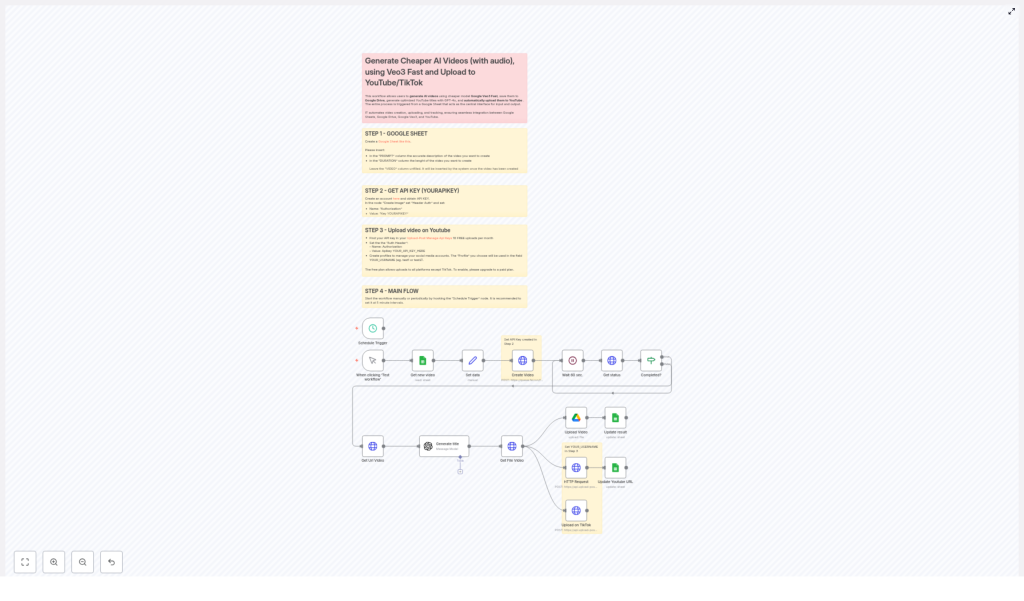
Every 5 minutes, the workflow followed a predictable sequence. Understanding this made Emma feel more in control of her automation:
- First, it checked her Google Sheet for new rows where the VIDEO column was still empty. Those were the prompts that had not yet been turned into videos.
- For each of those rows, it sent the PROMPT and DURATION to the Veo3 Fast API through Fal AI, asking the model to generate a video.
- Since video generation is not instant, the workflow did not just wait blindly. It polled the job status every 60 seconds, checking whether the video was done.
- Once the job was complete, it retrieved the final video URL and the video file itself.
- Next, it called GPT-4o to generate an optimized YouTube title based on the original prompt. Instead of Emma brainstorming titles, GPT-4o created SEO-friendly, engaging options automatically.
- The workflow then uploaded the video to Google Drive for storage and backup, and also sent it to Upload-Post.com to publish on YouTube and, if enabled on her plan, TikTok.
- Finally, it went back to the same row in the Google Sheet and updated it with the video file link and the published URLs. Her spreadsheet became both input form and performance log.
What used to be a messy trail of files, tabs, and notes was now a single, clean loop: prompt in, video out, links recorded.
Resolution: From Overwhelmed To Always Publishing
The First Time Emma Did Nothing And Videos Still Went Live
A week later, Emma opened her YouTube channel and saw something unfamiliar: a consistent stream of new videos, all with coherent, click-worthy titles.
She checked her Google Sheet. Each row that once contained only a prompt and duration was now filled with links to the generated video file and the published URLs. She could sort, filter, and track everything from one place.
For the first time, she was not spending her afternoons exporting, uploading, and copy pasting. She was planning campaigns, analyzing results, and refining prompts.
Why This n8n Template Changed Her Workflow
The benefits were not abstract. They showed up in Emma’s calendar, budget, and sanity.
- Cost-efficient video creation – By leveraging Google Veo3 Fast through Fal AI, she could generate AI videos at a lower cost than many other tools she had tried.
- End-to-end automation – From the moment she typed into the PROMPT column to the moment a video appeared on YouTube or TikTok, the workflow handled creation, storage, publishing, and tracking.
- SEO-optimized titles – GPT-4o generated YouTube friendly titles automatically. Instead of guessing what might work, she started from strong, search-aware headlines.
- Multi-platform reach – With Upload-Post.com profiles, she could distribute videos to YouTube and, on a paid plan, TikTok without logging into each platform manually.
- Simple management in Google Sheets – The sheet acted as a lightweight content management system. Her team could collaborate in a tool they already knew, without needing to learn n8n.
In other words, the n8n workflow template turned her AI video process from a scattered set of tools into a single, reliable system.
Where You Come In: Turning Your Prompts Into a Video Engine
If you recognize yourself in Emma’s story – juggling tools, fighting upload fatigue, and trying to keep up with video demand – this template gives you a clear path forward.
You can:
- Use a simple Google Sheet as your content command center.
- Connect Fal AI to access the Veo3 Fast model for cheaper AI video generation.
- Let GPT-4o handle YouTube title optimization.
- Automate uploads to YouTube and, with the right plan, TikTok via Upload-Post.com.
- Run everything on a schedule with n8n so you are always publishing, even when you are not at your desk.
Instead of manually pushing every video live, you design the system once, then focus on the ideas that go into it.
Ready to turn your prompts into a fully automated AI video workflow? Set up this n8n template, plug in your API keys, and start watching your Google Sheet quietly transform into a steady stream of published videos.
If you need help along the way, you can always tap into AI automation communities or work with professional service providers who specialize in building and customizing n8n workflows for content teams.
