


Create an RSS Feed from Baserow Blog Releases With n8n: Turn Updates Into Automation
From Constant Checking To Calm Control
If you are regularly watching Baserow release notes or blog updates, you probably know the feeling. You open the site again and again, scan for new posts, copy links, share them with your team, and try not to miss anything important. It works, but it quietly steals your time and attention.
Automation offers a different path. Instead of chasing updates, you can let updates come to you. An RSS feed is still one of the simplest and most reliable ways to stay in the loop, and with n8n you can generate that feed yourself, on your own terms.
This workflow template turns the Baserow blog releases page into a structured RSS feed that you can plug into any RSS reader or downstream automation. More importantly, it shows how you can start reclaiming your focus by automating repetitive monitoring tasks.
Shifting Your Mindset: Automation As A Growth Tool
Think of this workflow as more than a technical recipe. It is a small but powerful example of how you can:
- Transform scattered web content into structured, reusable data
- Replace manual checks with predictable, automated flows
- Free up mental space for deeper work and strategic decisions
- Build a reusable pattern you can adapt to other blogs, tools, or internal sites
Once you create your own RSS feed from Baserow releases, you will see how easily this approach extends to other sources. The same pattern can be applied to product changelogs, competitor news, or any public web page you want to track.
What This n8n Workflow Template Does
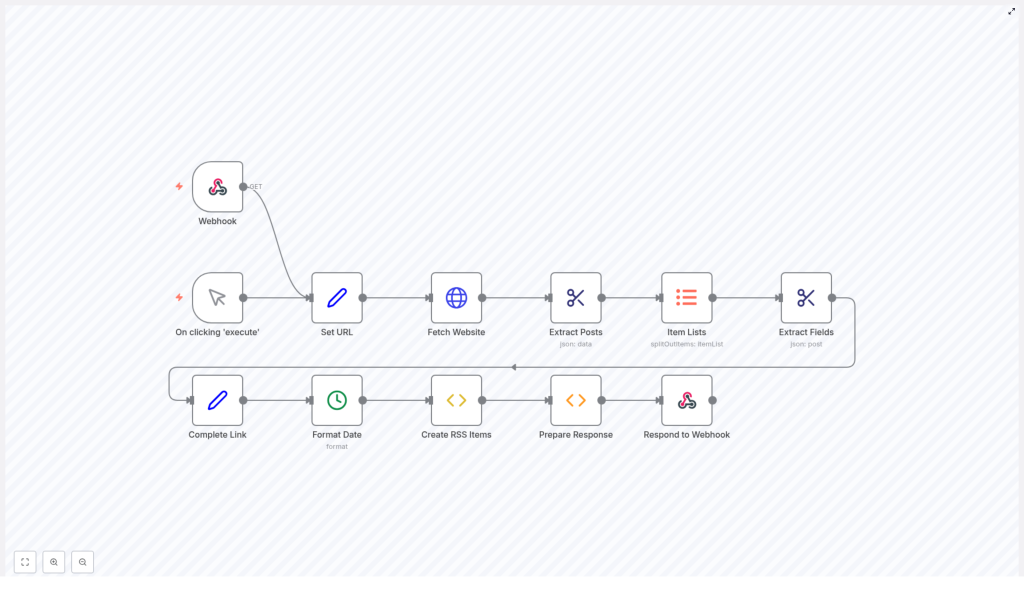
At a high level, the workflow takes the HTML from the Baserow blog releases page and carefully turns it into a clean RSS feed. Each n8n node has a clear responsibility, so you can understand, adjust, and expand the flow as your needs grow.
The core idea is simple:
- Receive a request through a webhook
- Fetch the Baserow releases blog page
- Extract each blog post from the HTML
- Pull out the date, title, link, and description for every post
- Normalize the data, format it, and assemble valid RSS XML
- Return that XML as the webhook response
Let us walk through the journey node by node so you can see exactly how it works and how you might customize it for your own use cases.
Step 1 – Triggers That Start The Journey
Every workflow needs a starting point. In this template, you have two ways to kick things off:
Webhook Trigger
The main trigger is a Webhook node. It listens for incoming HTTP GET requests on the endpoint:
/baserow-releasesWhenever this endpoint is called, n8n runs the entire workflow and responds with the latest RSS feed. This makes it easy to connect RSS readers or other tools that can fetch a URL at regular intervals.
Manual Execution For Testing
There is also a manual trigger, activated when you click Execute inside n8n. This is perfect for testing, debugging, and iterating on your automation without needing an external call every time.
Step 2 – Defining The Blog Source URL
The next part of the journey is telling the workflow where to look.
A Set node stores the base URL of the Baserow releases section:
https://baserow.io/blog/category/releaseBy centralizing the URL in this node, you make your workflow easier to maintain and extend. If the blog structure changes or you want to reuse this flow for a different category or site, you only need to adjust this one place. It is a small design choice that supports long term scalability.
Step 3 – Fetching The Website Content
With the URL ready, an HTTP Request node retrieves the page content.
This node performs an HTTP GET request to the specified URL and returns the raw HTML of the Baserow releases page. At this stage, you have all the information, but it is still unstructured. The next steps will carefully extract only what you need.
Step 4 – Turning Raw HTML Into Individual Posts
Extracting Posts With HTML Extract
The HTML Extract node is where the transformation really begins. Using the CSS selector:
.blog-listing__post-contentit selects the main container for each blog post. The node returns an array, where each item is the HTML snippet for one post.
At this point, you have a collection of posts in a structured array, which is much easier to handle than one long block of HTML.
Splitting Posts Into Individual Items
Next, an Item Lists node breaks the array into separate items so that each blog post can be processed independently. This step is key for scalability. As new posts are added to the Baserow blog, your workflow will automatically handle them one by one, without any extra work from you.
Step 5 – Extracting The Key Fields For Each Post
Now that each post is its own item, the workflow focuses on pulling out the details that matter for an RSS feed. Using selectors inside the HTML, the workflow extracts four main fields from each post:
- Date using:
.blog-listing__post-info > strong - Title using:
.blog-listing__post-title - Link from the
hrefattribute of:.blog-listing__post-title > a - Description using:
.blog-listing__post-description
This step turns messy HTML into structured data you can trust. Once you see how clean this output is, it becomes much easier to imagine connecting it to other automations, dashboards, or notifications.
Step 6 – Completing Links And Formatting Dates
Building Full URLs
Some blog links are relative, which is not ideal for RSS readers. A dedicated node completes each URL by appending the base domain to any relative path. That way, every item in your RSS feed has a fully qualified, clickable link that works anywhere.
Normalizing Dates
Consistency is essential for feeds and downstream tools. A date formatting step converts the extracted dates into a uniform format, typically:
YYYY-MM-DDThis makes your RSS feed predictable, easier to sort, and more compatible with other services that might consume it later.
Step 7 – Creating RSS Items And The Final Feed
Generating RSS Item XML
With all fields extracted and cleaned, each post is transformed into a valid RSS item. The workflow constructs an XML string that includes:
<title>– the post title<link>– the full URL<description>– the summary text<pubDate>– the formatted publication date
Every blog post becomes a self contained RSS item ready to be consumed by readers or other automation tools.
Wrapping Everything In An RSS Feed
Once all items are generated, a final preparation step wraps them into a complete RSS XML structure. This includes the root <rss> element and a <channel> section that holds metadata such as:
- Feed title
- Feed link
- Feed description
The result is a fully formed RSS feed that looks and behaves like any standard feed you would subscribe to in your favorite reader.
Step 8 – Returning The RSS Feed Through The Webhook
The final step is where your automation meets the outside world.
The workflow sends the complete RSS XML back as the response to the webhook request. It sets the content type to:
application/xmlso that any RSS reader or HTTP client knows exactly how to interpret the response.
From now on, any time the webhook URL is called, n8n will fetch the latest Baserow releases, rebuild the RSS feed, and return fresh XML. No manual updates, no missed posts, just a reliable, automated stream of information.
Why This Workflow Matters For Your Productivity
This template is more than a convenience. It is a small but meaningful shift in how you work:
- Automation instead of repetition – You no longer need to manually check for updates or copy links.
- Scalable by design – As new posts appear, they are automatically included in the feed.
- Clean separation of responsibilities – Each node has a focused task, which keeps the workflow understandable and easy to maintain.
- Ready for integration – The resulting RSS feed can be consumed by RSS readers, notification systems, internal dashboards, or other n8n workflows.
Once you experience this kind of automation, it becomes natural to look for the next repetitive task you can transform. This is how a single workflow can spark a broader culture of automation in your personal work or across your team.
Building On This Template For Your Own Growth
This n8n template is a starting point, not a limit. You can:
- Swap the URL and selectors to create RSS feeds from other blogs or documentation sites
- Add filters so only certain types of posts are included
- Trigger notifications in Slack, email, or other tools whenever a new item appears
- Store posts in a database for internal reporting or analytics
Each small improvement you make will deepen your understanding of n8n and open up new ideas for automating more of your workflow.
Take The Next Step: Try The Template
You now have a clear picture of how this workflow turns the Baserow releases page into a living RSS feed. The most valuable step is the one you take next: try it, tweak it, and make it your own.
Start by importing the template, run it with the manual trigger, then connect it to your favorite RSS reader or another n8n workflow. As you experiment, you will see how quickly automation can shift your daily work from reactive to intentional.
If you want to adapt this to your own blog, simply update the URL in the Set node and adjust the CSS selectors to match your site structure. The pattern stays the same, the destination becomes yours.
Have questions or want help customizing this automation for your specific setup? Ask, explore, and keep iterating. Every workflow you build is another step toward a more focused, automated, and impactful way of working.
