


Efficient Automation: Solve N8N Scheduling Issues
The Nightly Struggle Of A Tired Marketer
By 9:45 PM, Mia’s apartment was quiet, but her laptop was not. As the solo marketer at a growing SaaS startup, she had fallen into a nightly routine that felt more like a trap than a job.
Every evening, she opened her content calendar, brainstormed a fresh topic, wrote a short post about automation and N8N, hunted for an image, then manually queued posts for LinkedIn, Twitter (X), and Facebook. If she got distracted or a meeting ran late, the whole schedule slipped. Some nights she forgot to post entirely.
Her boss wanted consistent, educational content about automation and N8N. Mia wanted her evenings back.
She tried basic scheduling tools, but they still needed her to come up with topics, write the copy, and upload visuals. The real problem was not just posting, it was the entire content workflow – from idea to image to analytics – happening at the wrong time of day and in the wrong place.
Then one morning, while searching for “solve N8N scheduling issues” and “automate social media with AI,” she stumbled on an N8N workflow template that sounded almost too perfect: a daily automation that generated ideas, wrote posts, created images, stored everything in Google Sheets, and published to social platforms automatically.
The Discovery Of An N8N Scheduling Workflow
Mia already knew that n8n was a powerful automation tool that connected apps and services into flexible workflows. What she had not fully used yet was its scheduling power combined with AI and social media integrations.
The template she found promised to solve a very specific scheduling pain point:
- Trigger at the same time every day.
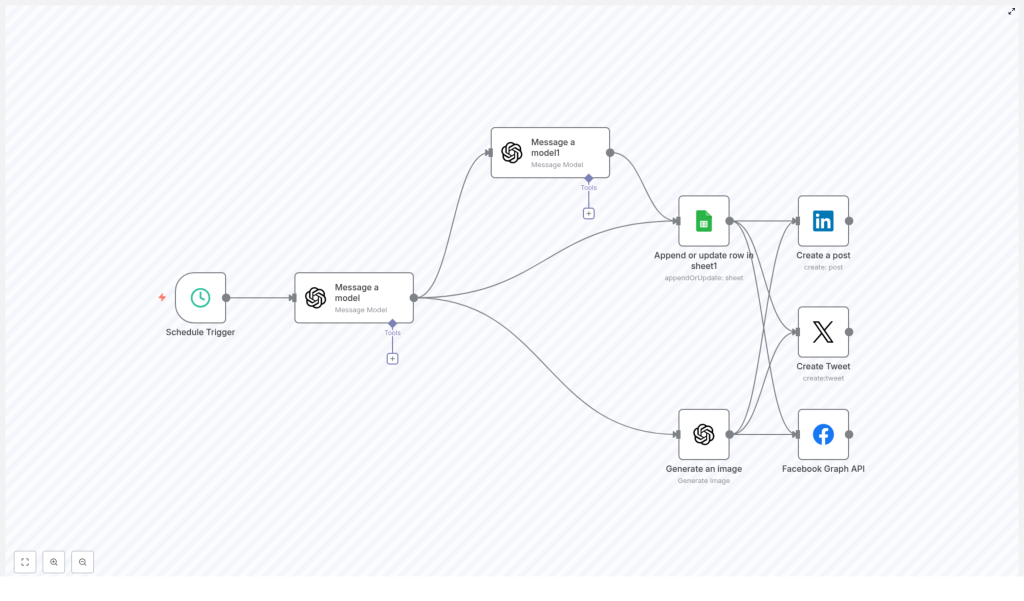
- Ask an AI model for a fresh, problem-focused N8N topic.
- Turn that topic into a social post ready for multiple platforms.
- Generate a custom anime-style image to match.
- Log everything in Google Sheets for tracking.
- Publish automatically to LinkedIn, Twitter (X), and Facebook.
It was not just about “posting later.” It was about building a fully automated content engine that ran like clockwork while she did anything but work.
Rising Action: Designing A Workflow That Never Forgets
Mia opened the template in her N8N instance and walked through each node, imagining how it would change her evenings.
The Heartbeat: A Schedule Trigger At 10 PM
The workflow started with a simple but powerful piece: the Schedule Trigger.
Instead of Mia sitting at her laptop at 10 PM, the trigger would quietly activate the workflow at that exact time every day. No reminders, no alarms, no guilt. Just a reliable, automated start.
The trigger was set to:
- Activate daily at 10 PM so the content was ready by the next morning.
The Brain: AI-Generated N8N Topics
Once the schedule fired, the next node took over: Message a Model (AI). This step used GPT-4 to generate a specific automation-related topic focused on real N8N pain points.
Instead of Mia trying to think of “one more idea about automation,” the AI would generate a title such as:
- “How to fix N8N scheduling conflicts without breaking existing workflows”
- “Reducing manual posting errors with N8N schedule triggers”
The key was that the AI was guided to stay tightly focused on N8N issues and solutions, which kept the content relevant to her audience.
The Voice: Turning Topics Into Social Posts
The next node, called Message a Model 1, took the generated topic and transformed it into a tweet-style post.
Inside this node, GPT-4 received a prompt to:
- Use solution-oriented language.
- Highlight the benefit of fixing N8N scheduling issues.
- Add relevant hashtags for discoverability.
The result was short, clear, and ready for social media. Mia realized she could adapt the same text or slightly tweak it per platform if needed, but the template already gave her a strong, consistent baseline.
The Visual Hook: Anime-Style Images On Autopilot
Next came the part that used to take Mia the most time: visuals.
The Generate an Image node created a Japanese anime style image based on the AI-generated topic. The prompt combined the theme of N8N automation with an engaging anime aesthetic that stood out in crowded feeds.
For Mia, this meant no more stock photo searches, no more last-minute Canva sessions. Every night, a fresh, on-theme image would be generated and attached to the content.
The Memory: Logging Everything In Google Sheets
Before any post went live, the workflow saved all key data using the Append or Update Row in Google Sheets node.
This step stored:
- The AI-generated topic or title.
- The social post text.
- Any relevant metadata, such as date, time, or platform.
Over time, this built a living content calendar and performance record. Mia could sort by date, filter by topic, and review what had already been published. No more guessing what she posted last week or which angles performed best.
The Finale: Cross-Platform Social Media Posting
Finally, the workflow handled the part that used to keep Mia awake: publishing.
With Social Media Posting nodes connected to LinkedIn, Twitter (X), and Facebook, the workflow automatically created and published posts to all three platforms.
In one automated pass, the content went live across:
- LinkedIn for professional reach and B2B visibility.
- Twitter (X) for quick, real-time engagement.
- Facebook for broader community presence.
What used to require three separate logins and manual uploads was now a single automated action.
The Turning Point: From Manual Chaos To Scheduled Confidence
The first night Mia turned on the workflow, she felt oddly nervous. At 9:59 PM she watched the N8N dashboard. At 10 PM, the Schedule Trigger fired.
Within seconds, the AI produced a new N8N scheduling topic. A moment later, a concise, solution-focused tweet appeared in the workflow data. The image node generated an anime-style visual that matched the theme. Google Sheets updated with a fresh row. Then the posts appeared in her LinkedIn, Twitter, and Facebook queues.
She refreshed her feeds. The content was live, on brand, and consistent with her strategy. And she had not typed a single word that evening.
Why This N8N Scheduling Workflow Matters
As the days went by, Mia realized the template did more than just save time. It changed the way she worked.
Key Benefits Of The Workflow
- Automated content generation The AI nodes created topics and posts automatically, all centered around real N8N pain points and solutions. No more nightly brainstorming.
- Cross-platform posting The workflow published to LinkedIn, Twitter, and Facebook at once, which cut her manual posting time to zero and increased consistency.
- Reliable record keeping Google Sheets became a living content log. She could track what was posted, when it went out, and how it aligned with her broader automation strategy.
- Custom visual content The anime-style images gave her brand a recognizable look that stood out in feeds and kept her visuals consistent without extra design work.
Who This Workflow Helps
Mia soon realized she was not alone. This kind of N8N scheduling automation is ideal for:
- Marketing teams that want a predictable social media pipeline.
- Social media managers tired of repetitive, manual posting tasks.
- Content creators who want to focus on strategy instead of daily execution.
- Founders or solo operators who need a constant presence without a full-time marketer.
In each case, the combination of N8N scheduling, AI content generation, image automation, and cross-platform posting solves the same core problem: manual, error-prone, and inconsistent workflows.
Resolution: A New Routine Powered By Automation
A few weeks later, Mia’s evenings looked very different. At 10 PM, she might be out with friends, reading, or already asleep. Yet her brand still published smart, consistent content about N8N automation every day.
By leveraging n8n’s Schedule Trigger with AI, Google Sheets, and social media integrations, she had solved the specific issue that used to drain her energy: tedious, manual scheduling and posting.
The workflow had become a quiet teammate that:
- Generated new, relevant ideas.
- Wrote solution-focused social posts.
- Produced unique anime-style visuals.
- Logged everything in a structured spreadsheet.
- Published across platforms with perfect timing.
Her automation was not just efficient, it was consistent. Her social presence improved, and she had more time for higher-level strategy and experimentation.
Take The Next Step: Make This Story Yours
If you see yourself in Mia’s story, you do not have to keep fighting the same nightly battle. You can use the same N8N scheduling template to build your own automated content engine.
Set up the workflow in your N8N instance, connect your AI, Google Sheets, and social accounts, and let the schedule trigger handle the rest. Watch as your content becomes more consistent, your analytics become clearer, and your evenings become your own again.
If you need guidance tailoring the workflow to your exact stack or strategy, our consulting team is ready to help you design a reliable automation system that fits your business.
