


Automate Creating SEO Product Comparison Pages Using AI & Google Sheets
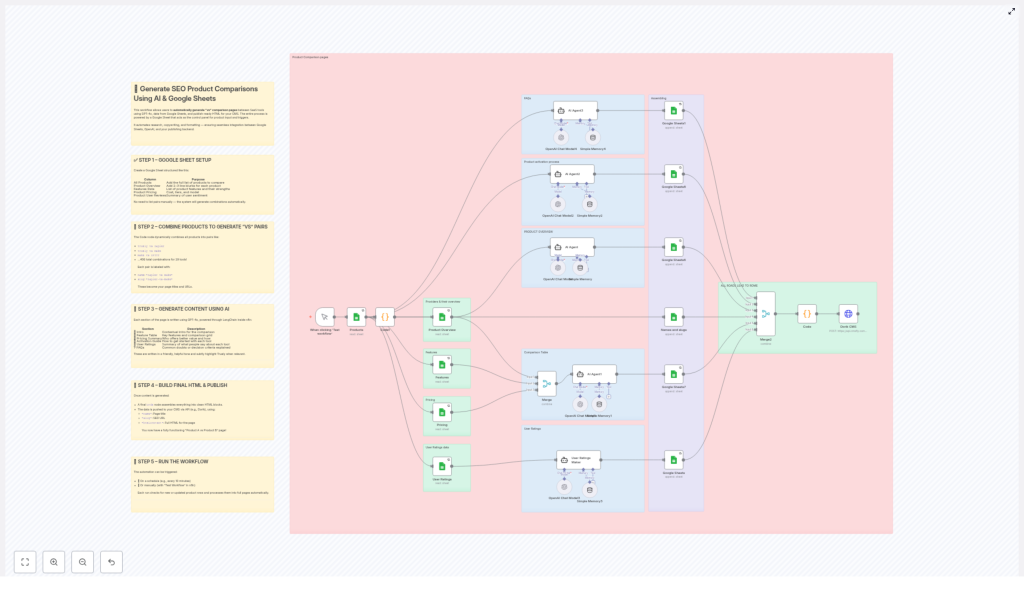
This n8n workflow template automates the creation of large-scale, SEO-focused product comparison pages (for example, “Product A vs Product B”) by combining structured data in Google Sheets with GPT-4o via LangChain. It is designed for teams that need to publish and maintain hundreds or thousands of comparison pages without manual copywriting or page assembly.
Workflow Overview
The automation performs the following high-level tasks:
- Reads product data from a structured Google Sheet that acts as a control panel.
- Generates all unique product comparison pairs programmatically.
- Uses GPT-4o (via LangChain inside n8n) to create section-by-section comparison content.
- Combines all generated sections into a single HTML document per comparison.
- Publishes each comparison page to a CMS via API (example: Dorik CMS).
- Runs manually or on a schedule to keep content fresh and updated.
The result is a fully automated pipeline that transforms tabular product data into live, SEO-optimized comparison pages.
Architecture & Data Flow
At a high level, the workflow consists of the following logical stages:
- Data Source: Google Sheets provides product-level metadata and attributes.
- Pair Generation: A
Codenode creates all unique “A vs B” combinations. - AI Content Generation: LangChain + GPT-4o nodes generate each content section.
- HTML Assembly: A final
Codenode merges sections into full-page HTML. - Publishing: An HTTP/API node sends
name,slug, andhtmlContentto the CMS. - Execution Control: A trigger (manual or scheduled) starts the workflow.
Data flows from Google Sheets into n8n, is transformed and enriched by AI, then is pushed out to the CMS as complete, formatted pages.
Google Sheets Configuration
The Google Sheet is the single source of truth for product information and is used by the workflow to generate all comparisons. Configure it with clearly defined columns:
- All Products: A canonical list of all products to be included in comparisons.
- Product Overview: Short, high-level descriptions or blurbs for each product.
- Features Data: Structured or semi-structured feature lists that highlight each product’s strengths.
- Product Pricing: Pricing details, tiers, and models (for example, freemium, subscription, enterprise plans).
- Product User Reviews: Aggregated review data or sentiment summaries that indicate user satisfaction and popularity.
The workflow does not require you to predefine every “A vs B” pair. Instead, it consumes the “All Products” list and automatically creates all unique product combinations programmatically.
Configuration Notes
- Ensure that each row represents a single product and that columns are consistently populated.
- Use stable product identifiers or names so that the pairing logic can reliably generate comparison labels and slugs.
- Keep text fields (such as features or reviews) concise but informative to give the AI enough context without overwhelming it.
Product Pair Generation (Code Node)
After reading the product list from Google Sheets, the workflow passes the data into a Code node that generates all unique “vs” pairs. This node constructs:
- Human-readable comparison name: For example,
Zapier vs Make. - SEO-friendly slug: For example,
zapier-vs-make.
The logic ensures that each pair is unique and that order is consistent, so “Zapier vs Make” and “Make vs Zapier” are not duplicated as separate pages unless you explicitly change the logic.
Typical Pair Output
- Truely vs Zapier
- Make vs IFTTT
Each pair is represented as an item in n8n, containing references to both products’ data along with the generated name and slug. These items are then processed downstream by the AI content generation nodes.
Edge Cases & Considerations
- Duplicate products: If the sheet contains duplicate product names, the code node may generate redundant pairs. Clean the source sheet to avoid this.
- Self-comparisons: The pairing logic should skip “Product A vs Product A” cases. Verify that the code node filters these out.
- Slug generation: Ensure that the slug creation logic lowercases, trims, and replaces spaces or special characters to avoid invalid URLs.
AI Content Generation with GPT-4o & LangChain
For each generated product pair, the workflow invokes GPT-4o via LangChain inside n8n to create structured comparison content. The AI nodes use the product data from Google Sheets along with the pair metadata to generate multiple sections that will later be merged into a single page.
The typical sections generated include:
- Intro: A context-setting paragraph that introduces both products, explains the comparison scenario, and highlights target audiences or core strengths.
- Feature Table: A structured, row-based comparison of key features and capabilities for each product.
- Pricing Summary: A concise comparison of pricing tiers, billing models, and overall value positioning.
- Activation Guide: Step-by-step or high-level guidance on how to get started or activate each product.
- User Ratings: A summarized view of user sentiment and review highlights, often formatted in a table or bullet list.
- FAQs: Frequently asked questions that help undecided visitors choose between the two products.
The prompts are designed to produce a friendly yet professional tone, suitable for SaaS buyers or similar audiences who need to quickly understand trade-offs and make a decision.
LangChain & n8n Integration Details
- Model: GPT-4o is used as the underlying model through LangChain.
- Context: Product overview, features, pricing, and review data from Google Sheets are passed as input variables.
- Section-by-section generation: Each content block (intro, feature table, pricing, etc.) can be generated by separate nodes or separate calls, which allows granular control and easier debugging.
Error Handling & Quality Considerations
- If the AI returns incomplete or malformed content for a section, you can:
- Introduce validation logic in n8n to check for required keys or patterns.
- Fallback to a default template or skip publishing that particular comparison.
- Ensure that rate limits and token usage for GPT-4o are monitored, especially when generating thousands of pages.
- Regularly spot-check generated content for factual consistency with your Google Sheets data.
HTML Assembly (Final Code Node)
Once all content sections for a given pair are available, a final Code node assembles them into a single HTML document. This node typically:
- Wraps each AI-generated section in appropriate HTML tags (for example,
<h2>,<p>,<table>). - Combines the sections into a coherent page layout.
- Prepares the final payload fields required by the CMS:
name– The comparison page title, such as “Zapier vs Make”.slug– The SEO-friendly URL path, such as “zapier-vs-make”.htmlContent– The fully assembled HTML string for the page body.
HTML Structure Considerations
- Use semantic headings (H2/H3) to clearly separate sections like “Features”, “Pricing”, and “FAQs”.
- Ensure that tables are valid HTML so that your CMS and front-end render them correctly.
- Include internal anchors or structured markup if your CMS or theme benefits from it.
Publishing to CMS (Dorik Example)
After assembling the HTML, the workflow publishes each page to your CMS using its HTTP API. In the reference template, Dorik CMS is used as the example target. The API request typically includes:
name– The title of the comparison page.slug– The URL-friendly identifier for the page.htmlContent– The full HTML content generated by the workflow.
n8n sends this data via an HTTP Request node (or a dedicated Dorik integration if available), which creates or updates the corresponding page in your CMS.
Integration Notes
- Configure authentication credentials in n8n for your CMS API (for example, API key or token).
- Map the
name,slug, andhtmlContentfields to the correct request body structure as required by your CMS. - Handle non-2xx responses by logging errors or routing failed items to a separate branch for manual review.
Execution & Automation Strategy
The workflow supports both manual and scheduled executions:
- Manual trigger: Run the workflow when you add new products or significantly update existing product data in Google Sheets.
- Scheduled trigger: Use a Schedule node to execute the workflow at fixed intervals, such as every 10 minutes, to continuously sync new or updated data into freshly generated comparison pages.
This flexibility ensures that your comparison content remains aligned with your latest pricing, features, and user review data without ongoing manual effort.
Scheduling Considerations
- Adjust the schedule frequency based on how often your product data changes.
- When generating a very large number of pages, consider batching or rate limiting to respect API quotas for both GPT-4o and your CMS.
Benefits & Use Cases
- Scalability: Programmatically generate hundreds or thousands of unique “Product A vs Product B” comparison pages from a single Google Sheet.
- SEO Optimization: Clean, keyword-rich URLs and structured, relevant content help improve search visibility for comparison queries.
- Time Savings: Eliminate manual page creation, formatting, and copywriting for each new comparison.
- Data-Driven Content: AI-generated copy is grounded in your Google Sheets data, keeping pricing, features, and reviews accurate and up to date.
- CMS Flexibility: While the template demonstrates Dorik CMS, the same pattern can be adapted to other CMS platforms with HTTP APIs.
Advanced Customization Ideas
Once the base workflow is running, you can extend it in several ways:
- Custom prompt tuning: Adjust LangChain prompts for different tones, verticals, or levels of technical depth.
- Selective publishing: Add filters to only generate comparisons for specific products or to skip low-priority pairs.
- Metadata enrichment: Include additional columns in Google Sheets (for example, categories, target audience, or integrations) and feed them into the AI prompts.
- Multi-language support: Duplicate branches to generate localized versions of the same comparison pages, if supported by your CMS and AI configuration.
Getting Started
To implement this automation:
- Prepare your Google Sheet with the required columns for product data.
- Import the n8n template and configure your Google Sheets and AI credentials.
- Set up your CMS API integration (for example, Dorik) and map
name,slug, andhtmlContent. - Run the workflow manually for a small subset of products to validate output quality.
- Enable scheduled runs to keep your comparison pages continuously updated.
If you want to scale your product comparison content and improve SEO without manually writing each page, this AI-powered Google Sheets and n8n workflow provides a robust, automation-first approach.
