


How to Convert XML to JSON Using an n8n Workflow Template
Overview: XML to JSON in Modern Automation Architectures
XML and JSON remain two of the most widely used formats for system-to-system data exchange. XML is a structured markup language that is verbose yet highly expressive, while JSON is a compact, human-readable format that aligns closely with modern API and web application patterns.
In contemporary integration and automation projects, JSON is typically the preferred payload format. However, many enterprise and legacy systems still expose XML-based interfaces. Bridging this gap efficiently is essential for robust automation pipelines.
Why Automate XML to JSON Conversion with n8n?
Enterprise environments often include:
- Legacy SOAP or XML-based APIs that cannot be easily modernized
- Third-party systems that only support XML responses
- Internal tools or middleware that produce XML for historical reasons
At the same time, downstream consumers such as microservices, web frontends, and analytics tools generally expect JSON. Automating XML to JSON conversion enables:
- Seamless integration between legacy XML systems and modern JSON-based services
- Improved performance and easier parsing in client applications
- Cleaner data handling in automation workflows, especially when chaining multiple APIs
Using n8n for this task allows you to standardize the transformation step, reduce manual intervention, and reuse a single configuration across many different XML payloads.
n8n as a No-Code XML to JSON Transformation Layer
n8n is an open-source workflow automation platform that enables complex data flows between systems without writing custom code. Its node-based approach is particularly suitable for repeatable transformations such as XML to JSON conversion.
This article explains a minimal yet production-relevant workflow template that:
- Accepts an XML string
- Transforms it into a structured JSON object
- Exposes the JSON for downstream processing in the same workflow
Workflow Architecture
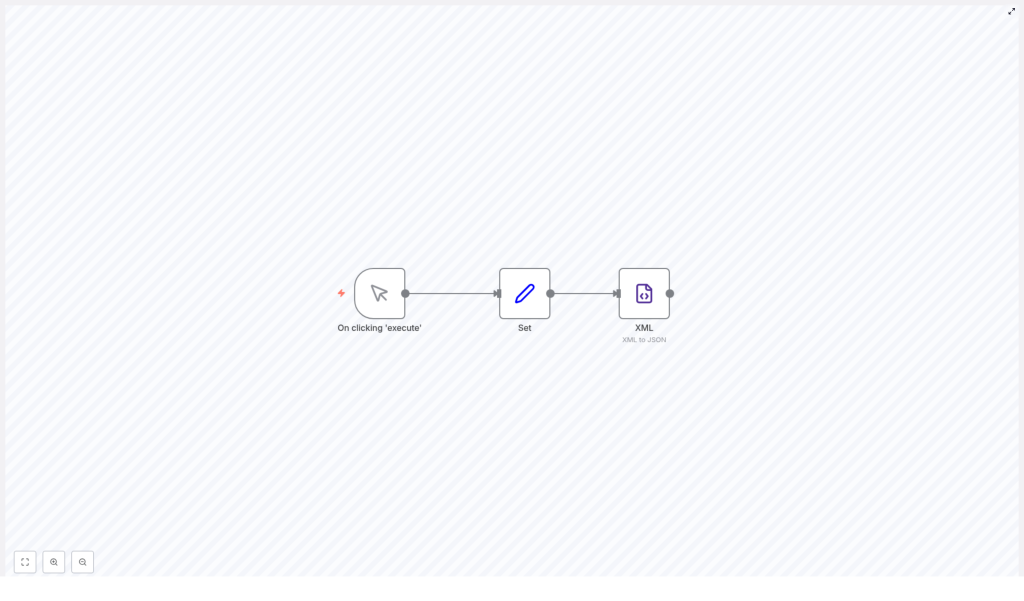
The XML to JSON template in n8n is intentionally simple so it can serve as a building block in larger automations. It consists of three core nodes:
- Manual Trigger – Used to initiate the workflow on demand during setup and testing.
- Set Node – Holds the XML payload in a dedicated field.
- XML Node – Performs the actual XML to JSON conversion with configurable parsing options.
In production, the Manual Trigger can easily be replaced by other trigger nodes such as Webhook, Cron, or a specific app trigger, while the Set node can be replaced by an HTTP Request or any other data source.
Step-by-Step Implementation in n8n
1. Configure the Trigger Node
Start by adding a Manual Trigger node. This node is ideal for initial configuration, testing, and validation of the workflow.
- Once the workflow is built, click Execute on the Manual Trigger to start a run.
- In a production scenario, you can swap this for another trigger that receives XML automatically, for example from an external API or message queue.
2. Add and Configure the Set Node
Next, insert a Set node to define the XML payload that will be converted. This node creates a field that stores the raw XML string.
In the Set node:
- Add a new field of type string.
- Name the field
xml(this will be referenced by the XML node). - Paste your XML content into the value field. For example:
<?xml version="1.0" encoding="utf-8"?>
<ORDERS05>  <IDOC BEGIN="1">  <EDI_DC40 SEGMENT="1">  <TABNAM>EDI_DC40</TABNAM>  </EDI_DC40>  </IDOC>
</ORDERS05>
This sample represents a typical structured XML document. In real workflows, this XML would usually come from an external system instead of being hardcoded.
3. Configure the XML Node for Conversion
Finally, add an XML node, which will parse the XML string and output JSON. Connect it to the Set node so it receives the xml field.
In the XML node configuration:
- Set the Input Field to
xml, matching the field name defined in the Set node. - Adjust the parsing options as follows:
- Attribute key:
$ - Merge attributes:
false - Explicit root:
true
These options control how XML attributes and the root element are represented in the resulting JSON structure. Using $ as the attribute key keeps attributes clearly distinguishable from element content, which is often preferable for downstream processing and mapping.
Best Practices for Using This Template in Larger Automations
- Abstract the conversion step: Treat this XML to JSON workflow as a reusable sub-process that can be called from multiple other workflows or integrated as a common pattern.
- Validate upstream XML: Ensure that the incoming XML is well-formed before conversion, especially when consuming external APIs or untrusted sources.
- Standardize field naming: Keep the input field name (
xml) and the structure of the resulting JSON consistent across workflows to simplify maintenance. - Chain downstream operations: Once converted, use the JSON output in additional nodes such as HTTP Request, IF, or database nodes for routing, enrichment, or storage.
Key Benefits of This n8n XML to JSON Workflow
- No-code implementation: All configuration is performed through the n8n UI, without custom scripts.
- Reusable and adaptable: Replace the XML sample in the Set node with any XML payload, or feed XML from other integrations without changing the core logic.
- Integration-ready JSON output: The resulting JSON can be consumed immediately by other nodes in the same workflow, enabling end-to-end automation chains.
- Consistent transformation layer: Centralizing XML to JSON conversion in n8n reduces duplication of parsing logic across services.
Next Steps: Deploy the Template in Your n8n Instance
To operationalize XML to JSON conversion in your environment:
- Import or recreate this workflow in your n8n instance.
- Test the configuration with the Manual Trigger and sample XML.
- Replace the Manual Trigger and Set node with your actual XML source, such as an HTTP Request node, Webhook, or app-specific node.
- Extend the workflow by adding downstream nodes that consume the JSON output for further processing, routing, or storage.
This approach enables you to integrate legacy XML-based systems into modern, JSON-centric architectures with minimal friction.
Conclusion
By leveraging n8n’s XML node in combination with a simple trigger and Set node, you can create a robust, reusable XML to JSON transformation workflow without writing any code. This pattern is ideal for automation professionals who need to normalize data formats across heterogeneous systems and build reliable, maintainable integration pipelines.
Adopting this template as a standard component in your workflows will help reduce errors, accelerate development, and ensure consistent handling of XML payloads across your automation landscape.
