


Automate LinkedIn Lead Enrichment & Email Outreach (Without Losing the Personal Touch)
If you spend a good chunk of your day hunting for LinkedIn profiles, checking company details, and then trying to write personalized emails for every lead, you know how exhausting that can get. The good news? You can hand most of that work over to automation.
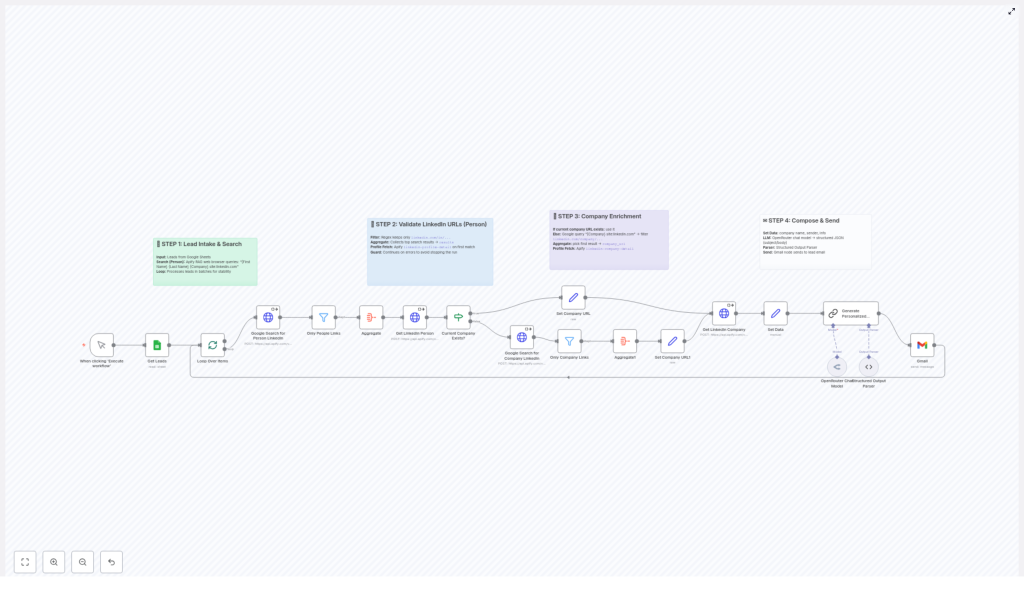
This n8n workflow template is built to do exactly that. It pulls in your leads, finds their LinkedIn profiles, enriches their company data, and then uses AI to write warm, tailored emails for you. Think of it as a smart assistant that never gets tired of research and outreach.
What This n8n Workflow Actually Does
Let’s break it down in simple terms. This workflow:
- Starts with leads from a source like Google Sheets
- Finds the right LinkedIn profile for each person
- Grabs and enriches company information from LinkedIn
- Uses AI to write personalized email subject lines and bodies
The result is a smooth, end-to-end system that takes you from raw lead data to ready-to-send, highly relevant emails.
When You Should Use This Template
This workflow is especially handy if you:
- Run outbound sales or business development and want to scale without spamming
- Have a list of leads but not enough context about them or their companies
- Spend too much time searching LinkedIn manually
- Want to personalize your email outreach but can’t write every message from scratch
If that sounds like your day-to-day, this template can seriously lighten your workload.
How the Workflow Flows (Step by Step)
Step 1 – Bring In Your Leads & Kick Off Smart Search
Everything starts with your lead list. Typically, this lives in a Google Sheet, with simple columns like:
- First Name
- Last Name
- Company
The workflow takes these fields and turns them into a targeted Google search. It combines the person’s name with their company and narrows results to LinkedIn using a query like:
[First Name] [Last Name] [Company] site:linkedin.com
That way you are not just searching the whole internet. You are giving Google a very specific instruction to find the right LinkedIn profile for each lead.
Step 2 – Filter Out The Noise And Keep Only Real Profiles
Google’s search results can include all kinds of LinkedIn pages, so the workflow needs to be picky. This is where URL validation comes in.
The workflow checks each returned URL and keeps only the ones that match the pattern for personal profiles:
https://www.linkedin.com/in/...
Anything that does not fit that pattern is ignored. This validation step is crucial because it:
- Prevents you from accidentally using company pages or random LinkedIn URLs as personal profiles
- Improves the quality of your enrichment data
- Reduces the risk of messy or mismatched lead information later on
All of this is handled automatically using regex filtering and logic inside the n8n workflow, so you do not have to double check every link by hand.
Step 3 – Enrich The Company Details For Each Lead
Once the person’s LinkedIn profile is identified, the workflow turns its attention to their company. After all, a good outreach email is not just about the person, it is also about where they work and what their business does.
Here is how it works:
- Check for a company LinkedIn URL on the profile
If the person’s LinkedIn profile already contains a link to their current company page, the workflow grabs that URL right away. - If it is missing, run a company search
No company URL? No problem. The workflow performs another Google search, this time targeting LinkedIn company pages using a pattern like:
https://www.linkedin.com/company/...
It then selects the best matching result for that company. - Enrich the company data
With the correct company LinkedIn URL in hand, the workflow enriches the company profile. This can include details like what the company does, its size, and other context that makes your outreach more relevant.
The end result is a richer, more complete picture of both the person and their organization, which makes your emails feel informed rather than generic.
Step 4 – Let AI Help You Write Personalized Emails
Now for the fun part. Once the workflow has gathered all this enriched data, it taps into AI to help you write emails that actually sound like a human wrote them.
Using OpenRouter’s chat model, the workflow:
- Combines the person’s details with their company information
- Generates personalized subject lines tailored to each lead
- Writes email bodies in a warm, conversational style
The AI uses the context from the enrichment step, so your emails can mention relevant details about the person’s role or company focus. That way, your outreach feels specific and thoughtful, not like a copy-paste blast.
You still stay in control, of course. You can review, tweak, or extend these emails, but you are no longer starting from a blank page for every single lead.
Why This Workflow Makes Your Life Easier
So what do you actually gain by using this n8n template instead of doing everything manually?
- Save Time
The workflow automates the repetitive parts of lead enrichment, like searching LinkedIn, verifying URLs, and collecting company info. Your sales or marketing team can focus on actual conversations instead of data digging. - Stay Accurate
With regex-based URL filtering and structured logic, you reduce human error. No more copy-pasting the wrong profile or mixing up companies. - Send More Relevant Outreach
AI-generated emails use real context from both the person and their company, so your messages feel tailored and thoughtful. - Improve Conversion Rates
When leads receive emails that clearly took their situation into account, they are more likely to respond, book a call, or move forward in your funnel.
Putting It All Together
This LinkedIn lead enrichment and email outreach template turns a messy, manual process into a clean, automated workflow:
- Import leads from Google Sheets
- Find and validate the correct LinkedIn profile
- Locate and enrich the company’s LinkedIn page
- Generate personalized, AI-assisted emails ready for outreach
It is a practical way to scale your lead generation while keeping your outreach human and relevant.
Ready To Try The n8n Workflow Template?
If you are ready to stop juggling spreadsheets, browser tabs, and half-written emails, this template is a great starting point. You can plug it into your n8n setup, connect it with your existing tools, and customize it as you grow.
Give it a spin and see how much smoother your lead enrichment and outreach can feel.
