


Automate Telegram Video Downloads with n8n (So You Never Copy-Paste Links Again)
Why automate Telegram video downloads in the first place?
If you often share videos in Telegram chats, you probably know the drill: copy a link, open a downloader, wait for it to process, download the file, then upload it back to Telegram. It works, but it gets old fast.
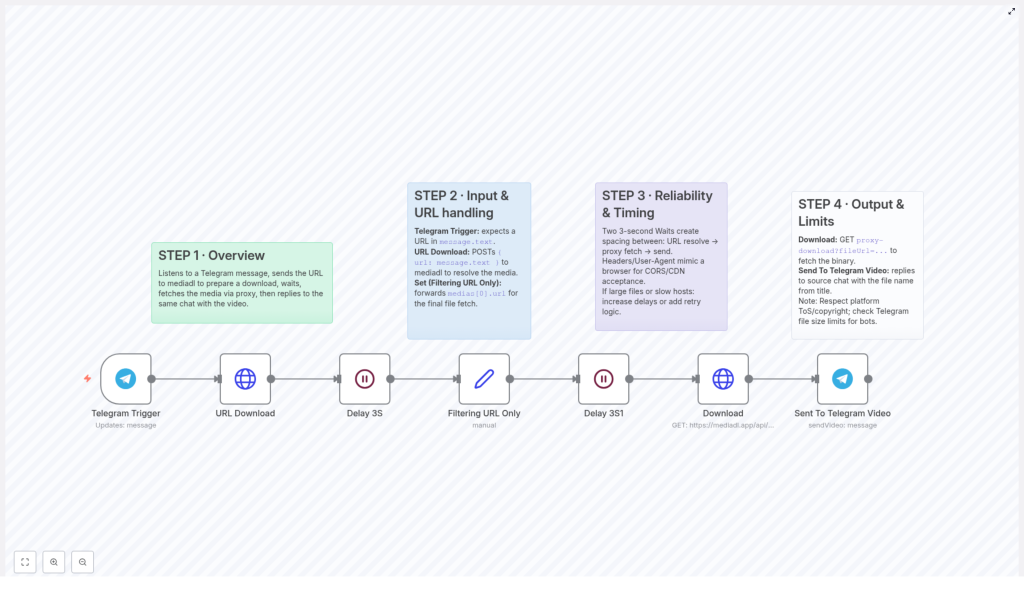
With an n8n workflow, you can turn that whole routine into a simple action: just send a message with a video URL to your Telegram bot, and the workflow does the rest. It processes the link, downloads the video through a proxy, then sends the file right back into the same chat – all on autopilot.
Let’s walk through how this template works, when you might want to use it, and how it makes your life easier if you live in Telegram all day.
What this n8n workflow template actually does
At a high level, this automation:
- Listens for new Telegram messages that contain a video or media URL
- Sends that URL to the mediadl API to resolve the actual media file
- Waits a bit to make sure everything is ready and stable
- Downloads the video via a proxy, using proper headers so it behaves like a real browser
- Sends the downloaded video back into the original Telegram chat, with a sensible filename
In other words, it turns any supported media URL into a video file in your chat, without you having to touch a downloader or manually upload anything.
When should you use this workflow?
This template is especially handy if you:
- Regularly share videos from different websites into Telegram groups or channels
- Run a Telegram community and want to quickly mirror external content as native Telegram videos
- Like to archive or forward interesting videos without juggling multiple tools
- Want a “send link, get video back” experience inside Telegram itself
If you’ve ever thought, “I wish this link would just turn into a video in the chat,” this workflow is basically that wish in automation form.
How the Telegram video download workflow is structured
Let’s break the template down into its key parts so you know exactly what is happening behind the scenes.
1. Telegram Trigger – listening for new messages
Everything starts with the Telegram Trigger node. This node is connected to your Telegram bot and wakes up whenever a new message comes in.
For this workflow, it expects the incoming message to contain a URL in message.text, typically pointing to a video or some other media resource. As soon as that message arrives, the rest of the automation kicks off.
2. Sending the URL to mediadl and extracting the real media link
Next comes the URL handling part, which is where the magic of resolving the actual media file happens.
- URL Download node: This node sends a
POSTrequest to the mediadl API. It takes the URL from the Telegram message (message.text) and passes it to mediadl, which then:- Analyzes the link
- Prepares the media for download
- Returns a structured response with one or more media URLs
- Filtering URL Only: Once mediadl responds, the workflow parses the data and picks out the first media entry, usually
medias[0].url. That URL is the direct link to the video file that will be downloaded in the next step.
So instead of you digging through page source or using a separate downloader, the workflow quietly does all that URL resolution work for you.
3. Adding smart delays for reliability
Automation is great, but if it runs too fast or hits an API before it is ready, you end up with flaky behavior. To avoid that, this template includes two intentional pauses of 3 seconds each at key points.
- First delay: This pause gives mediadl enough time to fully resolve the media URL before the workflow moves on. That way, the next node is not trying to work with incomplete data.
- Second delay: Right before the actual download, the workflow waits again. This helps avoid throttling, rate limits, or half-finished responses from the media host.
During the download, the workflow also uses proper headers and user-agent strings so it behaves more like a real browser. That can help with CORS or CDN-related restrictions, and generally makes the download more reliable.
4. Downloading the video and sending it back to Telegram
Once the direct media URL is ready and the delays have done their job, the final part of the workflow takes over.
- Download node: This node sends a
GETrequest to the proxied media URL. It:- Uses the previously resolved URL
- Applies the configured headers
- Fetches the video as binary data
- Send To Telegram Video node: With the binary file in hand, this node sends the video back into the same Telegram chat where the URL was originally posted. It attaches the video file and assigns a filename that is typically derived from the media metadata, so you do not end up with random or meaningless file names.
The end result: you drop a link in Telegram, and a short while later, a playable video appears right there in the chat.
Things to keep in mind before going all-in
As convenient as this workflow is, there are a few important points you should keep in mind:
- Respect copyright and terms of service: Always make sure you are allowed to download and redistribute the content you are working with. Follow the rules of the platforms you pull media from, and comply with copyright regulations.
- Telegram bot file size limits: Telegram bots cannot send files above certain size thresholds. If you try to download very large videos, you may hit these limits. It is a good idea to add checks or handling for oversized files in your workflow.
- Network performance and large files: For slow connections or very big files, the default 3-second delays might not be enough. You may want to:
- Increase the delay durations
- Add retry logic
- Include more robust error handling
to make the workflow more resilient.
Why this n8n Telegram video workflow makes life easier
Instead of juggling multiple tools and repeating the same steps over and over, this template lets you keep everything inside Telegram and n8n. You:
- Save time on every single video you share
- Cut out manual downloads and uploads
- Get a consistent, repeatable process that runs the same way every time
- Can extend or customize the workflow further if you want extra logic or integrations
Once you set it up, it quietly does the boring work in the background so you can focus on the content itself instead of the mechanics of moving files around.
Ready to try the template?
This n8n workflow is a neat example of how a few connected nodes can replace a surprisingly tedious daily task. By combining:
- The Telegram Trigger node
- mediadl API calls
- Timed delays for reliability
- And the Telegram video sending node
you end up with a simple loop: send URL, receive video.
If that sounds like something your future self will thank you for, go ahead and give it a spin.
Call to Action: Want to explore more ideas like this? Check out n8n automations and start building your own smart workflows for Telegram and other messaging platforms.
