


Automating Lead Sentiment Classification with Google Gemini & n8n
Imagine this…
Your Typeform is doing its job a little too well. New leads keep rolling in, your inbox is bursting at the seams, and you are stuck playing detective: Is this person actually interested, just browsing, or colder than last quarter’s coffee?
Manually reading every message, guessing the sentiment, copying data into spreadsheets, pinging sales on Slack… it is a heroic effort, but also a tiny bit soul-crushing.
Good news: you do not have to live like this.
With n8n automation and the Google Gemini Chat Model, you can automatically classify lead sentiment, neatly organize everything in Google Sheets, and notify your team in Slack – all while you focus on work that does not feel like digital paperwork.
What this n8n workflow template actually does
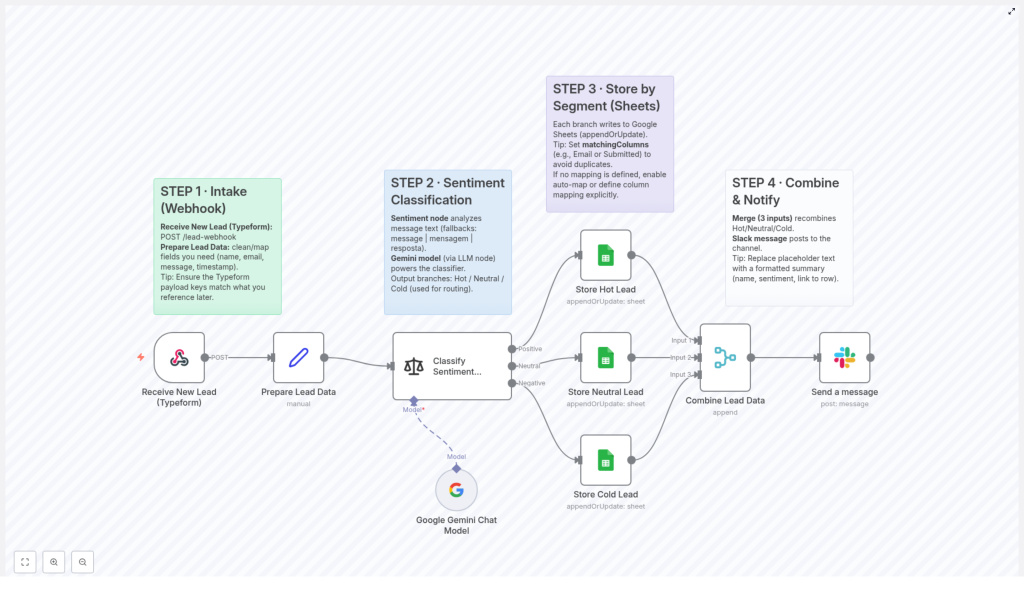
This workflow template connects your form tool (like Typeform) to n8n, then uses Google Gemini to figure out whether a lead is Hot, Neutral, or Cold. After that, it:
- Cleans and structures lead data as it arrives through a webhook
- Runs sentiment classification using the Google Gemini Chat Model via an LLM node
- Sends each lead to the right Google Sheets tab based on sentiment
- Recombines all leads into one stream and posts a Slack notification to your team
So instead of manually sorting leads, you get an automated lead triage system that works quietly in the background and does not complain about repetitive tasks.
How the workflow flows: from form to Slack ping
1. New leads enter via webhook (Typeform intake)
Everything starts when someone submits a form, for example through Typeform. That response is sent straight to n8n using a webhook.
- Receive New Lead (Typeform): The n8n webhook listens for
POSTrequests that contain your lead data. - Prepare Lead Data: Inside n8n, the workflow cleans and maps the incoming payload so that key fields like
name,email,message, andtimestampare consistent and ready for processing.
Tip: Double check that your Typeform field keys, such as message and email, match what the workflow expects. A tiny mismatch here can cause big confusion later.
2. Let Google Gemini judge the vibe (sentiment classification)
Once the data is cleaned up, the workflow passes the lead message to an LLM node that uses the Google Gemini Chat Model. This is where the magic (and the time savings) really kick in.
- The sentiment node looks for the lead’s message text in the
messagefield. If that is not available, it falls back tomensagemorresposta, so localized forms still work. - Google Gemini analyzes the text and classifies the lead as Hot, Neutral, or Cold.
- Based on this sentiment, the workflow routes each lead down the appropriate branch for storage.
In other words, you get consistent, AI powered sentiment classification instead of “I skimmed this between meetings and guessed.”
3. Automatically sort leads into Google Sheets by segment
Next up, each sentiment branch saves the lead to a separate tab or worksheet in Google Sheets. No more copy paste marathons.
- Hot Leads: High intent leads are written to a dedicated Hot Leads sheet so your sales team can jump on them quickly.
- Neutral Leads: Leads that show some interest but are not quite on fire yet go into their own worksheet.
- Cold Leads: Low intent or low engagement leads are stored separately for later nurturing or analysis.
Tip: In your Google Sheets node, use matchingColumns such as Email or Submitted timestamp to prevent duplicate entries. If you do not set explicit mappings, you can enable auto-map or manually define column mapping so that every field lands in the correct column.
4. Merge everything and ping your team on Slack
After leads are safely stored in their respective sheets, the workflow pulls them back together and lets your team know what just happened.
- A merge node is configured with three inputs to recombine Hot, Neutral, and Cold leads into a single aggregated dataset.
- A Slack integration node then posts a message to your chosen channel with a summary of the new lead.
- Tip: Customize the Slack message text. Include useful details like the lead’s name, their sentiment category, and a link to the exact Google Sheets row so your team can act fast.
The result: your sales or marketing team gets real time alerts without anyone manually crafting “Hey, new lead!” messages all day.
Why this n8n + Google Gemini workflow is worth your time
- Faster lead triage: Sentiment is classified automatically, so hot leads do not sit around waiting for someone to read them.
- Clean, organized data: Leads are segmented by interest level in Google Sheets, making follow up strategies easy to plan.
- Real time notifications: Slack alerts keep your team instantly informed whenever a new prospect comes in.
- Less manual work: You spend less time copying, pasting, and guessing, and more time actually talking to the right people.
In short, this workflow turns a messy, repetitive process into a neat, automated system that quietly does the boring parts for you.
Quick setup guide: from zero to automated lead sentiment
Here is a simplified checklist to get this template running smoothly in your n8n environment:
- Import the template into n8n.
Open n8n, import the template from the link below, and save it in your workspace. - Configure the webhook and Typeform.
Point your Typeform (or other form tool) to the n8n webhook URL. Make sure the payload includes fields likeemail,message, andtimestamp. - Check field mapping.
In the data preparation step, confirm that the workflow is mapping your payload keys correctly. Adjust names if your form uses different labels. - Connect Google Gemini in the LLM node.
Set up the Google Gemini Chat Model credentials in n8n and ensure the sentiment node is using the correct model. - Set up Google Sheets.
Create or connect three tabs or worksheets for Hot, Neutral, and Cold leads. Configure the Google Sheets node withmatchingColumnsand mapping as needed. - Configure Slack integration.
Connect your Slack account, choose the target channel, and customize the notification message so your team gets the exact information they need. - Test with a sample submission.
Submit a test lead through your form, watch the workflow run, and confirm that the lead lands in the right sheet and triggers a Slack notification.
Next steps and ideas to build on this workflow
Once this template is humming along, you can extend it further inside n8n:
- Add automatic follow up emails for Hot leads using your email provider
- Trigger CRM updates whenever a new lead hits the Hot or Neutral segment
- Schedule periodic reports based on your Google Sheets data
The core workflow already handles sentiment classification, segmentation, and notifications, so you have a solid base to build a fully automated lead pipeline.
Conclusion: let automation handle the boring bits
This n8n workflow template, powered by the Google Gemini Chat Model, takes you from raw form submissions to organized, sentiment classified leads and instant team notifications. It reduces manual lead triage, keeps your data clean, and helps your team focus on the right prospects faster.
Ready to stop manually sorting leads? Plug this template into your n8n setup, connect your tools, and let automation do the repetitive work while you handle the conversations that actually close deals.
