


Voice Assistant for Restaurant Bookings & Info (n8n Workflow Tutorial)
What You Will Learn
This guide walks you through an n8n workflow template that turns a voice assistant into a smart restaurant helper. By the end, you will understand how to:
- Use a voice assistant to take table bookings and food orders
- Store booking and order data in a PostgreSQL database in real time
- Automatically confirm bookings and orders through the voice assistant
- Provide restaurant information on demand using voice commands
- Connect both workflows to improve customer experience and reduce manual work
Why Use a Voice Assistant in Your Restaurant?
Voice technology is changing how customers interact with restaurants. Instead of calling or browsing a website, customers can simply speak to a voice assistant to:
- Reserve a table
- Place a food order
- Ask for opening hours, address, or menu details
With n8n, you can automate these interactions so that the assistant talks to your database, records the information, and responds instantly. This improves operational efficiency, reduces staff workload, and keeps customers engaged with fast, accurate answers.
Concept 1: Table Booking & Order Handling Workflow
The first workflow focuses on handling bookings and food orders through voice. Think of it as your automated front-of-house assistant that listens, records, and confirms everything for you.
What This Workflow Does
In n8n, this workflow lets your voice assistant:
- Receive table reservation and food order details via voice input
- Store all booking and order information in a PostgreSQL database
- Send an immediate confirmation back to the customer through the voice assistant
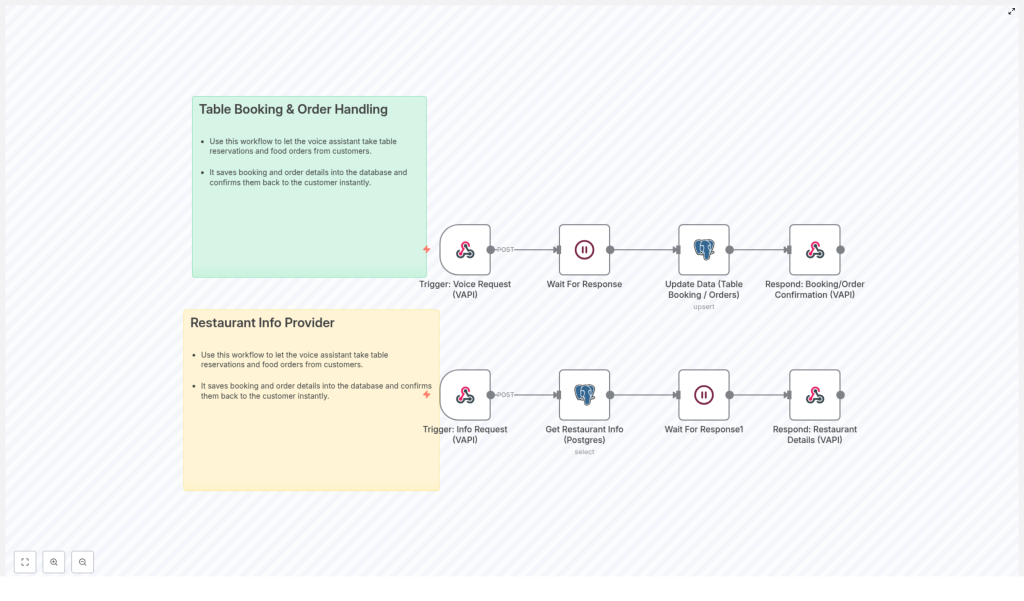
How It Works at a High Level
Behind the scenes, the workflow follows this basic logic:
- A customer speaks to the voice assistant and makes a request
- The workflow waits for the full user response to be captured
- The booking and order information is written or updated in the database
- The assistant replies with a confirmation message using the stored data
Key Components in n8n
Although the exact node names may vary in your template, the typical building blocks are:
- Trigger node – Starts the workflow when a voice request arrives
- Wait or interaction node – Pauses until the user finishes speaking or provides all required details
- PostgreSQL node – Inserts or updates booking and order records in your database
- Response node – Sends a confirmation message back through the voice assistant
Step-by-Step: Booking & Order Workflow in n8n
Use these steps as a learning path to understand or customize the template:
- Trigger the workflow from a voice request
The workflow starts whenever the voice assistant receives a booking or order command, for example, “Book a table for four at 7 PM” or “I want to order a pizza.” - Wait for the complete user response
The system waits for all necessary details, such as date, time, number of guests, and order items. This ensures the database gets full, structured information instead of partial data. - Store booking and order data in PostgreSQL
The PostgreSQL node writes the collected information into your database. Typical fields might include customer name, contact, reservation time, table size, and ordered items. This step keeps your records accurate and up to date in real time. - Send confirmation through the voice assistant
Once the data is saved, the workflow prepares a confirmation message, such as “Your table for four at 7 PM has been booked” or “Your order has been placed.” The voice assistant then delivers this message to the customer.
Concept 2: Restaurant Info Provider Workflow
The second workflow turns your voice assistant into an instant information source. Instead of staff answering basic questions, the assistant pulls information directly from your database and replies in seconds.
What This Workflow Does
This workflow enables customers to ask questions like:
- “What are your opening hours?”
- “What is your address?”
- “Do you have vegetarian options?”
The assistant then queries your restaurant info database and responds with the latest details.
Core Features
- Voice-activated requests for restaurant information
- Automated database queries to fetch up-to-date restaurant details
- Fast, spoken replies delivered through the voice assistant
High-Level Workflow Logic
The restaurant info workflow follows a simple pattern:
- The customer makes a voice request for information
- n8n triggers the information workflow
- The workflow queries the PostgreSQL database for the requested data
- The system waits briefly for the query to complete and data to process
- The assistant speaks the restaurant details back to the customer
Step-by-Step: Info Provider Workflow in n8n
Here is how the information workflow typically runs inside n8n:
- Voice request triggers the info workflow
A question like “What time do you close tonight?” is recognized by your voice system and passed to n8n as a trigger event. - Query PostgreSQL for restaurant data
The PostgreSQL node runs a query against your restaurant information table. This might include opening hours, contact details, menu descriptions, or special notes. - Wait for the query response
The workflow pauses briefly while the database returns the requested information. This ensures that the assistant uses the most current data available. - Return the answer via the voice assistant
The workflow formats the data into a clear spoken response, for example, “We are open today from 11 AM to 10 PM.” The voice assistant then delivers this directly to the customer.
Benefits of Using These n8n Voice Assistant Workflows
Combining both workflows gives your restaurant a powerful automation layer for bookings, orders, and information requests.
- Increased efficiency
Routine tasks like reservations, simple orders, and basic information queries are handled automatically, which reduces the pressure on your staff. - Improved customer experience
Customers receive quick, interactive responses without waiting on hold or browsing multiple pages, which leads to higher satisfaction. - Better data accuracy
All information is written to and read from your PostgreSQL database. This direct connection minimizes manual entry errors and keeps records consistent. - 24/7 availability
The voice assistant can respond at any time of day, so customers can book tables, place orders, or ask questions even when staff are busy or the restaurant is closed.
How to Start Using the Template in n8n
To put these concepts into practice, you can import and customize the ready-made n8n template. Once installed, you can:
- Connect the workflow to your existing voice assistant platform
- Configure the PostgreSQL node with your database credentials
- Adjust fields and messages to match your menu, opening hours, and booking rules
This gives you a working foundation that you can expand over time, for example by adding customer notifications, loyalty tracking, or integration with your POS system.
Quick Recap & FAQ
Recap
- The Table Booking & Order Handling workflow lets your voice assistant take reservations and orders, store them in PostgreSQL, and confirm them instantly.
- The Restaurant Info Provider workflow listens for information requests, queries your database, and returns up-to-date details via voice.
- Both workflows run in n8n, so you can customize the logic, messages, and database structure to fit your restaurant.
FAQ
Do I need a PostgreSQL database for this template?
Yes, this template is designed to work with PostgreSQL. The workflows read and write booking, order, and restaurant information directly into a PostgreSQL database.
Can I customize the confirmation messages?
Yes. In n8n you can edit the nodes that generate responses, so you can change the wording, include more details, or localize messages for different languages.
Is this workflow available 24/7?
The workflow itself can run at any time. As long as your voice assistant and n8n instance are active, customers can make requests around the clock.
What are the main advantages for my staff?
Staff spend less time on phone calls and repetitive questions. They can focus on in-person service while the voice assistant handles bookings, orders, and basic information automatically.
Get Started Today
Integrate these voice assistant workflows into your restaurant operations to streamline bookings, automate order handling, and deliver instant information to your customers. With n8n and a PostgreSQL database, you gain a flexible automation layer that grows with your business.
Ready to upgrade your restaurant experience? Install the n8n template, connect your voice assistant, and start automating your customer interactions today.
