


Customer Feedback Collection Workflow for Food & Restaurant (n8n Template)
1. Overview
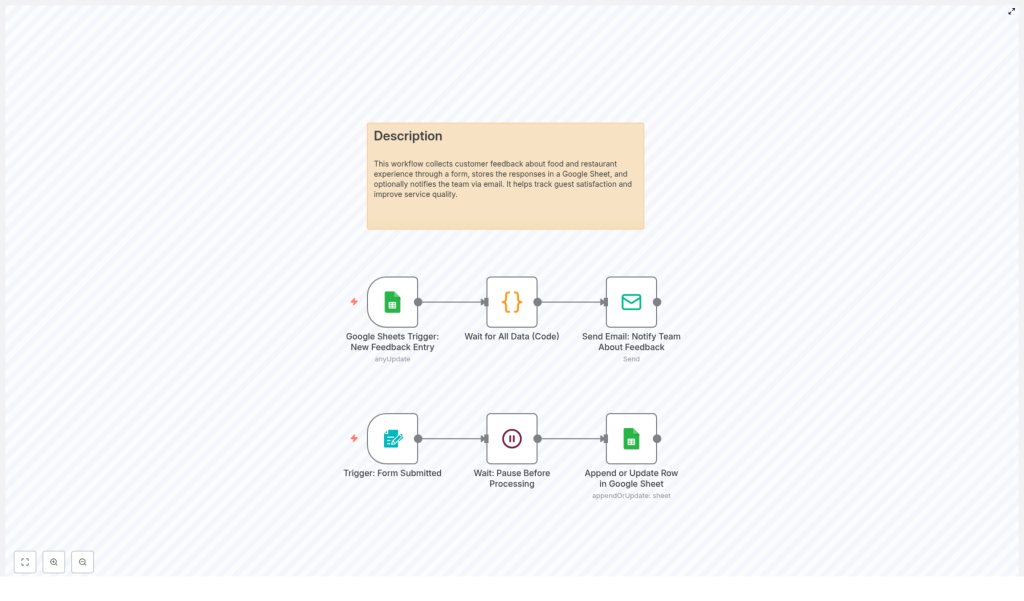
This n8n workflow template provides an end-to-end automation for collecting, storing, and acting on customer feedback in a food and restaurant context. It combines a web form, Google Sheets, and email notifications so that customer responses are captured in a structured way, persisted in a central spreadsheet, and immediately shared with your team for follow-up.
The workflow is designed for restaurants, cafes, and food service businesses that want a repeatable, low-maintenance pipeline for customer satisfaction data. It uses n8n nodes, triggers, and a small code step to coordinate the flow of information from form submission to internal notification.
2. High-Level Architecture
At a high level, the automation has two primary event sources and a sequence of processing steps:
- Form submission trigger that captures raw feedback from guests.
- Google Sheets operations that append or update a row with the submitted data.
- Google Sheets trigger that reacts to new or modified entries in the spreadsheet.
- Timed waits to ensure data consistency and avoid race conditions.
- Email notification that sends the feedback details to your team.
The workflow can be embedded into your existing customer journey, such as a QR code on receipts, a link on your website, or a post-meal follow-up message, and then runs autonomously once configured.
3. Data Flow Summary
- A customer opens the feedback form and answers questions about cleanliness, taste, staff politeness, order accuracy, food presentation, and overall dining experience.
- When the form is submitted, n8n receives the payload through the Form Submitted trigger node.
- A Wait node adds a short delay so that the data can be processed in a controlled manner.
- The workflow then writes the feedback into a Google Sheet by appending a new row or updating an existing one.
- A separate Google Sheets Trigger node detects the new or updated row.
- A code step, Wait for All Data, introduces an additional delay or synchronization point if required.
- Finally, a Send Email node sends a structured email with all feedback details to your internal team for review and action.
4. Node-by-Node Breakdown
4.1 Form Submitted Trigger
Role: Entry point for customer feedback.
Type: Trigger node (form submission / webhook style).
Input: HTTP request payload generated when a customer submits the feedback form.
Output: A single item that contains all form fields as JSON properties.
The form is typically styled and embedded in your website or shared as a link. It includes fields covering:
- Cleanliness
- Taste
- Staff politeness
- Order accuracy
- Food presentation
- Overall dining experience
Each of these responses is made available to downstream nodes as key-value pairs. The exact field names depend on how the form is configured, so ensure that the Google Sheets and email nodes reference the same keys.
4.2 Wait: Pause Before Processing
Role: Throttle and stabilize processing after a submission.
Type: Wait / Delay node.
Input: Data from the Form Submitted trigger.
Output: The same data, passed along after a configured delay.
This node introduces a short delay immediately after the form is submitted. Common reasons to use this node include:
- Preventing spikes in API calls if many customers submit feedback at the same time.
- Ensuring that any external services involved in the form pipeline have finished processing.
Use a fixed delay (for example, a few seconds) to keep the experience responsive while still managing throughput.
4.3 Append or Update Row in Google Sheet
Role: Persist feedback in a structured, queryable format.
Type: Google Sheets node (append or update mode).
Credentials: Google Sheets OAuth or service account credentials configured in n8n.
Input: Feedback data from the Wait node.
Output: Confirmation of the written row, including row index or ID.
This node writes each feedback submission into a Google Sheet. Depending on your configuration it can:
- Append a new row for every new submission.
- Update an existing row if you use an identifier to match previous entries.
Typical configuration parameters include:
- Spreadsheet ID or URL.
- Worksheet (tab) name.
- Column mapping from form fields to sheet columns.
- Update criteria if you choose to update rows instead of always appending.
Ensure that the column headers in the Google Sheet match the field names or that you explicitly map fields to columns in the node settings. This helps maintain consistent data for later analysis and reporting.
4.4 Google Sheets Trigger: New Feedback Entry
Role: Detect new or updated feedback records in the spreadsheet.
Type: Google Sheets Trigger node.
Credentials: Same Google account or service account used for the write node.
Input: Internal to Google Sheets; no direct input from other nodes.
Output: Newly created or updated row data as n8n items.
This trigger monitors the specified Google Sheet for:
- Newly appended rows that represent new feedback.
- Updated rows if your workflow is configured to modify existing entries.
You can configure:
- The specific spreadsheet and sheet tab to watch.
- Whether to react to new rows, updated rows, or both.
- The polling interval, which controls how frequently n8n checks for changes.
This separation between the initial form trigger and the Google Sheets trigger makes it easier to extend or modify the workflow later, for example by adding additional processing or reporting steps that activate whenever the sheet changes.
4.5 Wait for All Data (Code)
Role: Provide controlled timing or batch-like behavior before notifications.
Type: Code node (JavaScript) implementing a delay or synchronization step.
Input: Row data from the Google Sheets trigger.
Output: The same row data, passed downstream after processing.
This code node is used to:
- Introduce an additional wait period before sending notifications.
- Allow for any final data transformations or checks within a script.
While the template focuses on delay behavior, this node is also a natural place to add more advanced logic, such as filtering certain types of feedback, normalizing rating scales, or aggregating multiple entries before sending a summary email.
4.6 Send Email: Notify Team About Feedback
Role: Deliver feedback details to your internal team for rapid response.
Type: Email node (SMTP or integrated email service).
Credentials: Configured email account or SMTP credentials in n8n.
Input: Processed row data from the Wait for All Data node.
Output: Email sent status and metadata.
This node composes and sends an email that includes:
- Customer responses for cleanliness, taste, staff politeness, order accuracy, food presentation, and overall dining experience.
- Any additional metadata you store in the sheet, such as timestamp or location.
Typical configuration parameters:
- To: One or more team email addresses or a distribution list.
- Subject: A clear subject line like “New Restaurant Feedback Submitted”.
- Body: A formatted summary of the feedback fields, using expressions to insert values from the sheet row.
This final step ensures that your team receives real-time notifications and can quickly follow up on complaints, suggestions, or positive comments.
5. Configuration Notes & Best Practices
5.1 Credentials Setup
- Google Sheets: Configure OAuth or service account credentials in n8n and test access to the target spreadsheet before enabling the workflow.
- Email: Set up SMTP or a supported email provider, then send a test email from within n8n to verify configuration.
5.2 Form Integration
- Embed the form on your website, or share it as a link via QR codes on receipts, table tents, or digital menus.
- Confirm that each form field name aligns with the data mapping in the Google Sheets node and email node.
- Use clear labels for customers, but maintain consistent internal field keys for automation stability.
5.3 Handling Edge Cases
- Empty or partial submissions: Decide how to handle missing responses. You can allow blanks to be written to the sheet or add validation logic in the code node.
- Duplicate entries: If customers submit multiple times, use the “update row” capability with an identifier, or accept duplicates for trend analysis.
- Email failures: If the email node encounters an error, n8n can be configured to log the failure, retry, or route the item to an error workflow.
5.4 Performance & Scaling
- Adjust the Wait node duration if you experience rate limits from Google Sheets or your email provider.
- Use a reasonable polling interval on the Google Sheets trigger to balance responsiveness with API usage.
- For higher volumes, consider batching notifications in the code node before sending a single summary email to the team.
6. Operational Usage
6.1 Day-to-Day Workflow
- Distribute the feedback form link or QR code to customers after their visit.
- Allow the workflow to automatically capture submissions and write them to the Google Sheet.
- Monitor the Google Sheet periodically to review trends and historical data.
- Check your email notifications to respond quickly to issues or to acknowledge positive feedback.
6.2 Customization for Your Restaurant
- Add or modify form questions to reflect your menu, service model, or specific KPIs.
- Extend the workflow with additional nodes, such as sending feedback to a CRM, a helpdesk tool, or a dashboarding solution.
- Adjust email content and recipients based on feedback categories, for example sending complaints to a manager and compliments to a broader team list.
7. Benefits of This n8n Feedback Template
- Centralized data collection: All customer feedback is stored in a single Google Sheet that is easily accessible to authorized staff, making reporting and analysis straightforward.
- Real-time notifications: Automatic email alerts for each new entry ensure that your team can react quickly to problems or recognize excellent service.
- Scalable and customizable: The form, nodes, and data mappings can be adapted as your restaurant grows or your feedback strategy evolves.
- Improved customer satisfaction: Consistent feedback collection enables you to identify trends and continuously improve food quality, service levels, and overall ambiance.
8. Getting Started
To implement this customer feedback collection workflow in your own environment:
- Import the template into your n8n instance.
- Configure Google Sheets and email credentials.
- Map form fields to sheet columns and email content.
- Activate the workflow and share the form with your customers.
Once live, the automation will handle the full cycle of feedback intake, storage, and notification with minimal manual intervention.
9. Next Steps
If you are ready to enhance your restaurant operations with structured, automated feedback collection, you can start using this n8n template immediately. Integrate it into your existing system, monitor the results, and iterate on form questions and workflow logic as you learn more from your guests.
Deploy the workflow, connect it to your preferred feedback channels, and use the insights to continuously improve your guests’ dining experience.
