


YouTube Video Transcription Automation Workflow Explained
Imagine never manually transcribing a YouTube video again
You click on a promising YouTube video, realize it is 45 minutes long, and then remember you only needed one quote from minute 32. So you pause, rewind, type, rewind again, typo, sigh, repeat. If this sounds familiar, you are exactly the kind of person this n8n workflow template was built for.
The YouTube Video Transcription Automation Workflow automatically finds new videos from your favorite channels, grabs their metadata, pulls the transcript via an API, and stores everything neatly in a database. No more tab juggling, no more copy-pasting captions, and no more “I’ll transcribe this later” lies to yourself.
What this n8n workflow actually does
At a high level, the workflow behaves like a very organized assistant that:
- Watches selected YouTube channels for new uploads
- Skips anything too old or already processed
- Calls the
youtube-transcript.ioAPI to get transcripts - Turns those transcripts into readable text
- Saves everything into a Supabase table as a structured content queue
You end up with a searchable database of YouTube content, complete with titles, authors, publish dates, URLs, and full transcripts, ready for research, content repurposing, or feeding into other automations.
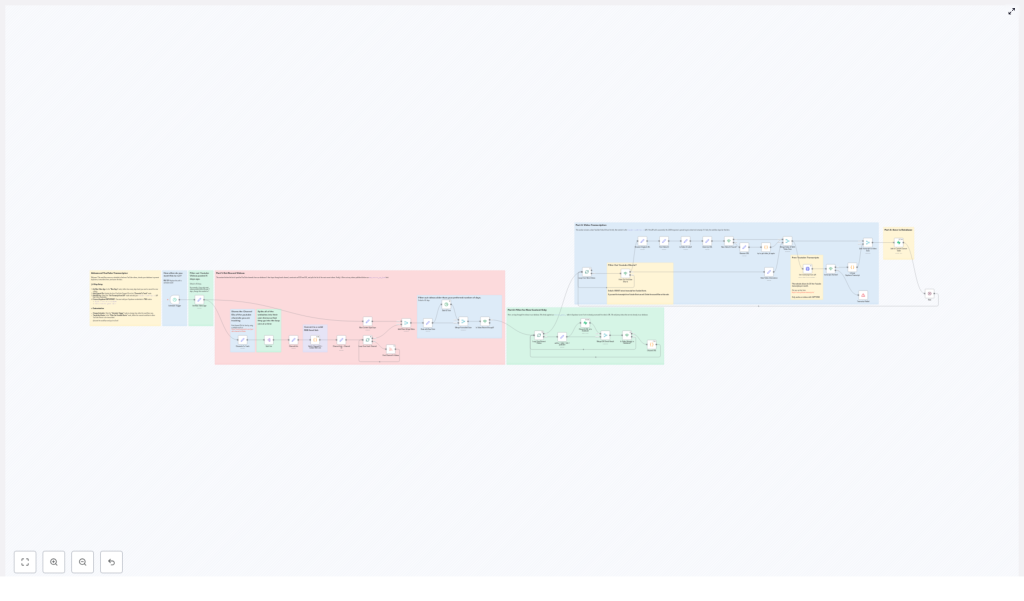
How the workflow is structured (without the headache)
Behind the scenes, the workflow is split into four logical parts. You do not have to be a developer to understand them, just mildly curious.
Part 1: Getting the latest videos from your chosen channels
The workflow starts by looking at a list of YouTube channel IDs that you want to track. You can store these IDs in a database or plug them directly into the workflow, depending on how fancy you feel.
Each channel ID is converted into a valid YouTube RSS feed URL. Those RSS feeds are then used to fetch the most recent videos for each channel. Once the videos are pulled in, the workflow filters them by age, using a configurable time window. By default, it only keeps videos that are not older than 60 days, so you are not accidentally processing content from the dinosaur era of your subscriptions.
Part 2: Filtering out videos you have already processed
Next, the workflow checks if each video is truly “new” or if you have already seen it before. It does this by comparing the video URL against existing records in a Supabase table (or a similar database setup).
If a video URL is already in the table, it is politely ignored. Only URLs that do not exist in the database move forward. This keeps you from wasting time and API calls on duplicates, which is always nice for both your sanity and your budget.
Part 3: Transcribing the video with an API
Once a video passes the “new and recent” tests, the workflow extracts a clean, validated YouTube video ID from its URL. That ID is then sent to the youtube-transcript.io API, which returns the official transcript or captions in JSON format.
If the API responds successfully, the workflow parses the raw JSON and stitches the segments together into one continuous text transcript. If the API fails, the captions are missing, or something else goes wrong, that particular video is skipped and the workflow moves on. No drama, just quiet failure handling.
There is also a handy filter to deal with YouTube Shorts. If a URL contains youtube.com/shorts, you can choose to exclude it from transcription. Prefer to transcribe Shorts too? Just disable that filter and they will be included with the rest.
Part 4: Saving everything into your database
After transcription, the workflow bundles up:
- The transcript text
- The video title
- The channel or author name
- The publish date
- The video URL
This package is then saved as a new record in a Supabase table that acts as your content queue. From there, you can:
- Index transcripts for search
- Feed them into other n8n workflows
- Use them for content curation, summaries, or analysis
Quick setup guide: how to make this your new transcription sidekick
Once you load the template into n8n, you only need to tweak a few settings. No heroic coding required.
1. Decide how far back to look for videos
In the “Max Days” node, set how many past days of videos you want to scan. The default is 60 days, but you can tighten it for fresh-only content or extend it if you are trying to build a larger archive.
2. Add the YouTube channels you want to monitor
In the “Channels To Track” node, list the YouTube channel IDs you care about. You can add, remove, or change these at any time to match your current research, niche, or obsession.
3. Plug in your transcription API key
In the “Get Transcript from API” node, enter your API key for youtube-transcript.io. This is what allows the workflow to actually request and retrieve the transcripts for each video.
4. Connect your database (Supabase)
To make the duplicate checks and content queue work, you need to add your database credentials:
- In the “Check if URL Is In Database” node, insert your Supabase credentials so the workflow can see which videos you have already stored.
- In the “Add to Content Queue Table” node, use the same Supabase credentials so new video records and transcripts can be saved properly.
5. Schedule how often the workflow should run
In the “Schedule Trigger” node, choose how frequently n8n should run this workflow. You can set it to check for new videos every hour, once a day, or any other interval that fits your use case. After that, it just quietly works in the background while you do literally anything else.
Why this workflow is worth your sanity
If you spend a lot of time researching, creating content, or analyzing YouTube videos, automating transcription is one of those upgrades you never want to undo.
- Automatic discovery: New videos from your tracked channels are found for you, no manual searching needed.
- No more manual transcription: The workflow handles the boring part so you can focus on using the content, not typing it.
- Smart filtering: Old videos are ignored based on your chosen age limit, and duplicates are skipped using the database check.
- Structured storage: Everything lands neatly in a Supabase table, ready for indexing, analysis, or downstream automations.
- Flexible filters: Customize video age limits and decide whether to include or exclude YouTube Shorts.
Next steps: turn YouTube chaos into a tidy transcript library
If you want to build a searchable content library, speed up your research, or repurpose YouTube videos into blogs, newsletters, or social posts, this n8n workflow is a solid starting point. Just customize the channel list, plug in your API and database credentials, and let it quietly gather transcripts while you work on more interesting things.
Ready to stop manually transcribing videos and start automating like a sensible human?
