


Automate Quality Control Documentation & Compliance (Without Losing Your Mind)
Ever feel like quality control paperwork is slowly taking over your day? Between inspections, compliance checks, reports, and chasing down certificates, it can start to feel like a full-time job on its own.
That is exactly where this n8n workflow template comes in. It quietly handles your quality control documentation and compliance tracking in the background, so you and your team can focus on actually improving quality, not just recording it.
In this guide, we will walk through what the template does, when it is worth using, and how each part of the workflow fits together. Think of it like sitting down with a friend who has already set it up and is showing you how it works step by step.
What This n8n Workflow Actually Does
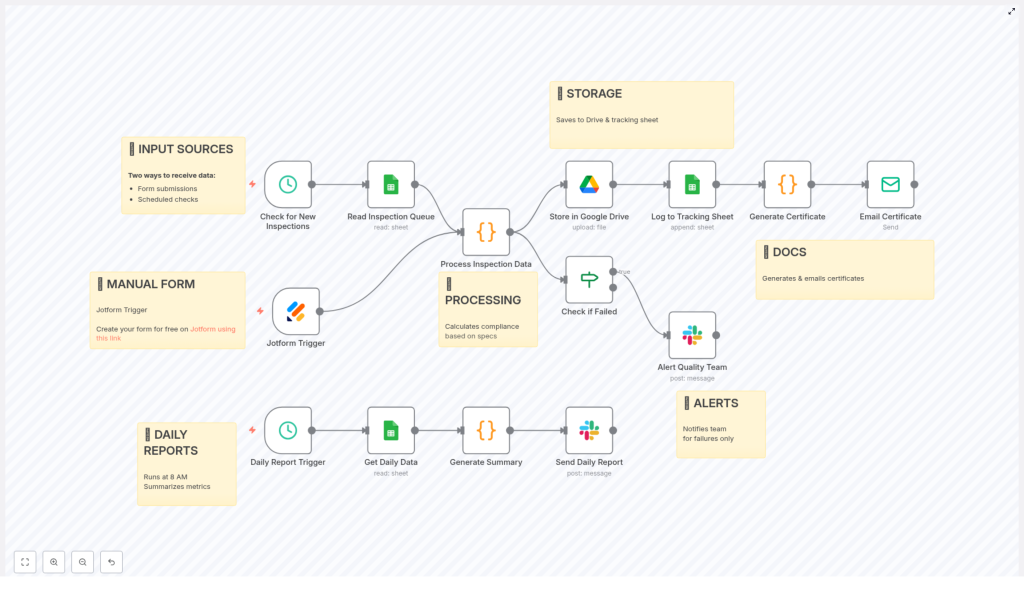
At a high level, this automation takes care of your entire quality control documentation loop, from data capture to reporting. Here is what it covers:
- Collects inspection data from forms and spreadsheets
- Checks each inspection against your product specifications
- Decides if a batch passes or fails, and logs non-conformities
- Stores all results and generates documentation
- Sends alerts when something fails
- Creates a daily quality report for your team
Instead of juggling forms, sheets, and Slack messages manually, this workflow connects everything into a single, reliable system.
When Should You Use This Template?
This n8n workflow is especially useful if:
- You run manufacturing or quality assurance processes with regular inspections
- You need to prove compliance to internal specs or external regulations
- Your team uses tools like Jotform, Google Sheets, Google Drive, and Slack
- You are tired of manually updating sheets, writing reports, and emailing results
If you are dealing with recurring inspections, repeated measurements, and ongoing quality checks, this template can become your daily companion.
Step 1: Collecting Inspection Data From Multiple Sources
The workflow starts where your inspections start: with data. It combines two input methods so nothing slips through the cracks.
1. Jotform submissions for live inspections
When an inspector finishes an inspection, they can submit results through a Jotform. That Jotform acts as a trigger in n8n.
As soon as the form is submitted, the workflow picks up the data instantly. This is perfect for on-the-floor inspections where you want results processed right away.
2. Scheduled Google Sheets checks every 15 minutes
Not all inspection data comes from a form in real time. Sometimes it lands in a spreadsheet first, especially if you have:
- Legacy systems exporting to Google Sheets
- Operators entering data in batches
- Integrations that log inspection entries into a sheet
To handle that, the workflow includes a scheduled check that runs every 15 minutes. It looks at a specific Google Sheet queue and reads any new inspection entries.
By combining Jotform submissions and scheduled sheet polling, the workflow makes sure both manual and semi-automated data flows are captured without you having to babysit them.
Step 2: Turning Raw Data Into Compliance Decisions
Once the inspection data hits the workflow, the real magic starts. The system evaluates each record against your defined specifications and decides if the batch passes or fails.
Checking measurements against specs
The workflow uses your product specifications as the reference point. For each inspection, it checks things like:
- Dimensions:
- Length: 100 to 102 mm
- Width: 50 to 52 mm
- Height: 25 to 27 mm
- Weight:
- Acceptable range: 450 g to 550 g
- Visual criteria:
- Surface finish
- Color match
- Visible defects or irregularities
The workflow evaluates each of these parameters and determines if they are within the allowed range or not.
Calculating overall compliance status
Based on those checks, the system assigns an overall compliance status:
- PASS if everything meets the specifications
- FAIL if any dimension, weight, or visual criteria is outside the defined limits
It also records detailed notes about any non-conformities it finds. That way, you do not just know that a batch failed, you know exactly why.
Step 3: Storing Data & Generating Documentation Automatically
Once a batch is evaluated, the workflow does not just stop at a pass or fail flag. It creates and organizes the documentation you need for audits, customers, and internal tracking.
Saving inspection data to Google Drive & Sheets
Every processed inspection is stored in two key places:
- Google Drive JSON reports The workflow saves a structured JSON report for each inspection in Google Drive. This gives you a precise, machine-readable record for long-term storage, integrations, or deeper analysis.
- Google Sheets tracking log The same inspection data is appended to a tracking Google Sheet. This sheet becomes your running log of all inspections, perfect for quick reviews, trend analysis, and audits.
Having both detailed JSON files and a human-friendly sheet means you get flexibility without extra work.
Creating an HTML certificate of compliance
For each inspected batch, the workflow also generates an HTML certificate of compliance. This certificate includes:
- Measurement results for key dimensions and weight
- Overall compliance status (PASS or FAIL)
- Inspector details
- Batch or product information
This is incredibly useful when customers or internal stakeholders request proof that a batch met your quality standards. Instead of manually typing up a certificate, you already have a standardized document ready to share.
Step 4: Instant Slack Alerts For Failed Inspections
Now for the part that really helps you stay ahead of problems: alerts.
Whenever the workflow flags a batch as FAIL, it immediately notifies your quality team via Slack.
The Slack alert usually includes:
- Product or batch details
- Compliance status
- Specific non-conformities detected
Instead of discovering issues hours or days later in a spreadsheet, your team sees them in real time. That means faster corrective action, fewer escapes to customers, and less time hunting for the root cause.
Step 5: Daily Quality Report At 8 AM
To keep everyone aligned on quality trends, the workflow also generates a daily summary report.
Every morning at 8 AM, a scheduled job runs and compiles key metrics, such as:
- Total number of inspections performed
- Number of passes and fails
- Overall pass rate
- Products or batches inspected
- Inspectors involved
- Common issues or recurring non-conformities
This summary is then shared with your team via Slack. It is a simple way to start the day with a clear picture of how quality is trending, where problems might be forming, and which areas deserve attention.
Why This Automated Workflow Makes Life Easier
So why bother wiring all this up in n8n? Because once it is running, it quietly solves a lot of everyday headaches.
- Better accuracy and consistency Automated compliance checks use the same rules every time, which reduces human error and keeps your decisions consistent.
- Real-time visibility With instant Slack alerts, you do not have to dig through spreadsheets to find issues. Problems come to you as they happen.
- Centralized, tidy data Google Drive and Google Sheets become your single source of truth for inspection data, certificates, and audit trails.
- Stronger customer confidence Automatically generated certificates of compliance show customers that your process is controlled and documented.
- Serious time savings No more copy-pasting values, manually writing reports, or chasing inspectors for missing data. The workflow does the repetitive work for you.
How This Fits Into Your Overall Quality Strategy
This template is not about replacing your quality process. It is about supporting it.
You still define the specifications, train inspectors, and decide on corrective actions. The workflow simply makes sure that:
- Data is captured reliably
- Compliance is calculated the same way every time
- Documentation is created and stored automatically
- Your team hears about issues fast
That combination is what really strengthens your quality control system and your compliance story.
Ready To Try It In Your Own Environment?
If you are looking to tighten up your quality control documentation and reduce manual work, this n8n workflow template is a great place to start. You can adapt it to your own dimensions, weight ranges, and visual checks, and plug it into your existing Jotform, Google Sheets, Google Drive, and Slack setup.
Once it is running, you get clearer oversight, fewer errors, and much smoother compliance tracking, all without adding more to your daily to-do list.
Curious to see how it looks in practice?
Give it a try, customize it to your process, and let automation handle the repetitive parts of your quality inspections and documentation.
