


Automate Your Quality Control Documentation & Compliance
Why Bother Automating Quality Control In The First Place?
If you work in manufacturing, you already know how much time quality control can eat up. There are forms to fill out, specs to check, reports to send, and someone always has to chase down missing data. It adds up quickly, right?
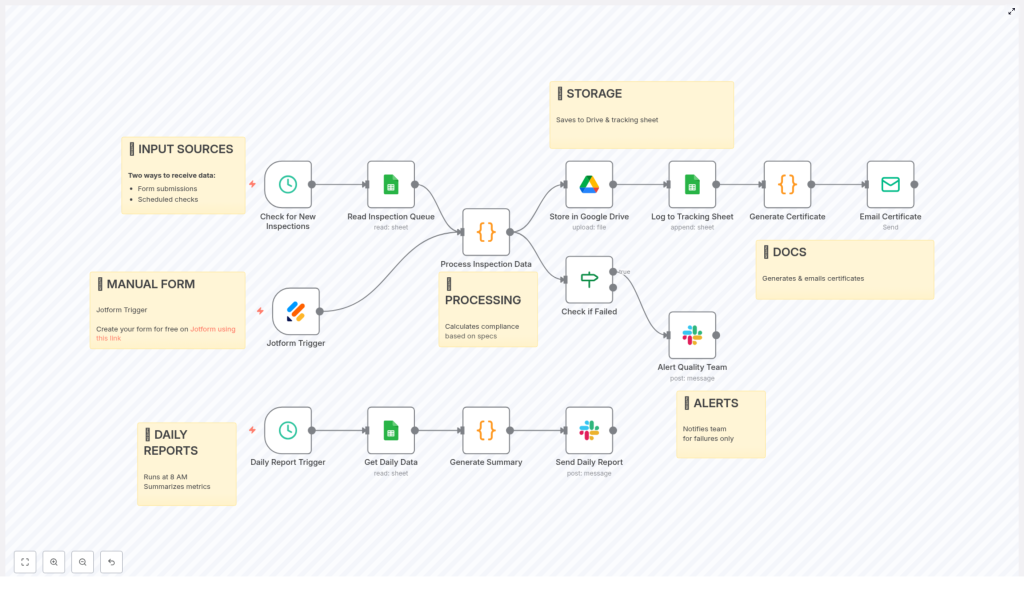
That is exactly where this n8n quality control workflow template comes in. It pulls together inspection data, checks it against your standards, alerts the right people when something is off, and keeps your documentation tidy and traceable. All automatically.
In this guide, we will walk through what the template does, when you would want to use it, and how it makes your day smoother by handling the repetitive parts of quality control for you.
What This n8n Workflow Template Actually Does
At a high level, this automation connects your inspection inputs, runs checks on them, and then handles:
- Data intake from forms and spreadsheets
- Validation and compliance checks against your specifications
- Automatic documentation in Google Drive and Google Sheets
- Real-time alerts for non-compliant inspections via Slack
- Daily summary reports so your team knows what is going on
Think of it as a digital assistant that quietly sits in the background, making sure every inspection is captured, checked, stored, and reported without you having to babysit the process.
When Is This Template A Good Fit?
You will get the most value out of this workflow if:
- You run regular product inspections with defined specs for dimensions, weight, and appearance.
- Your team uses or can use Jotform and Google Sheets for collecting inspection data.
- You want Slack notifications when something fails compliance so issues do not slip by.
- Documentation and traceability are important for audits or customer requirements.
If that sounds like your world, this template can remove a lot of manual work and reduce the risk of something getting missed.
How The Data Flows Into The Workflow
The automation is designed to catch inspection data from two main sources, so nothing falls through the cracks.
1. Manual Inspections With Jotform
Whenever an inspector submits a form, a Jotform Trigger in n8n kicks off the workflow. This is great for:
- On-the-floor inspections
- Visual checks
- Any manual data entry done by your quality team
The form data is sent directly into the workflow, which means no copy-pasting and fewer chances for typing mistakes.
2. Scheduled Checks From Google Sheets
In addition to real-time form submissions, the workflow also runs on a schedule. Every 15 minutes, it checks a Google Sheets queue for new inspection entries.
This is especially handy if:
- Inspection data is imported from machines or other systems into a sheet
- Your team logs batch inspections in a spreadsheet
By combining both triggers, you get a flexible setup that works with both manual and semi-automated data sources.
What Happens After The Inspection Data Arrives
Once the workflow receives inspection data, it does not just store it and move on. It actually processes it in a smart, structured way.
Inspection Data Processing & Compliance Checks
Each inspection record goes through a detailed processing step where the workflow:
- Parses and validates measurements and visual inspection results to make sure the data is usable.
- Calculates compliance based on your predefined specifications for:
- Dimensions
- Weight
- Appearance
- Flags non-conformities when any value falls outside the allowed range or criteria.
The result is a clear pass or fail outcome for each inspection, plus details about what did not match the required specs.
Automatic Storage, Documentation & Certificates
Once the workflow knows whether an inspection is compliant or not, it handles the documentation for you.
Structured Storage In Google Drive
Every inspection, whether it passes or fails, is saved as a JSON file on Google Drive. That gives you:
- Secure, centralized storage
- Easy access for audits or reviews
- A consistent format for all inspection records
Tracking All Inspections In Google Sheets
Alongside Drive storage, the workflow also logs each inspection in a Google Sheets tracking sheet. This sheet becomes your quick snapshot of:
- Which inspections were done
- Who performed them
- Pass or fail status
- Overall trends in quality over time
Instead of digging through folders, you can just open the sheet and see what is happening at a glance.
Automatic Certificates Of Compliance
For inspections that meet your requirements, the workflow automatically generates a certificate of compliance in HTML format. It then emails this certificate to the relevant stakeholders.
This keeps your formal documentation up to date without anyone having to manually draft or send certificates. Helpful for customers, internal teams, and compliance checks.
Real-Time Alerts When Something Fails
No one wants non-conforming products moving further down the line. That is why the template includes instant alerts.
- If an inspection fails compliance, the workflow immediately sends a detailed message to your Quality Team on Slack.
- The alert includes information about the non-conformities so the team knows exactly what went wrong.
This targeted, real-time notification helps your team react quickly, correct issues, and prevent quality problems from spreading through production or reaching customers.
Daily Quality Control Summary At 8 AM
Beyond real-time alerts, it is also useful to step back and see the bigger picture. That is where the daily report comes in.
Every day at 8 AM, the workflow automatically:
- Retrieves all inspection data from the previous day.
- Builds a summary that includes:
- Total number of inspections
- Pass and fail counts
- Overall pass rate
- List of inspected products
- Inspectors involved
- Common or recurring issues
- Sends this summary to your team via Slack, so everyone starts the day informed.
It is a simple habit boost: your team gets a quick, automated briefing that helps guide decisions and improvements.
How This Automation Makes Your Life Easier
You might be wondering if setting up an n8n workflow is worth it. Here is what you gain once it is in place:
- Less manual data entry and fewer errors from copying, pasting, or retyping inspection results.
- Consistent compliance tracking that always applies the same specifications and rules.
- Better communication through real-time Slack alerts and automatically emailed certificates.
- Actionable daily insights from the 8 AM summary report that highlight trends and recurring issues.
- Improved traceability with inspection data neatly stored in Drive and logged in Sheets.
In short, the workflow handles the repetitive, administrative side of quality control so your team can focus on solving problems and improving processes.
Ready To Try This n8n Quality Control Workflow?
If you are looking to tighten up your quality control process while saving your team time, this template is a solid starting point. It already covers:
- Data intake from Jotform and Google Sheets
- Automated validation and compliance checks
- Structured storage and tracking
- Real-time Slack alerts for failed inspections
- Daily reporting with key quality metrics
You can customize it further to match your exact specs, products, and team structure, but the core logic is ready to go.
Start building your quality control automation today, and see how much easier compliance and documentation can feel when the workflow is doing the heavy lifting for you.
