


Comprehensive Guide to the VirusTotal & Greynoise Threat Intel Workflow
Why This n8n Threat Intel Workflow Is Such a Time Saver
If you spend any time in security, you know the drill. Someone pings you with a suspicious URL, or an IP pops up in your logs, and suddenly you are juggling tools, copying data between tabs, and trying to piece together a clear picture of the threat.
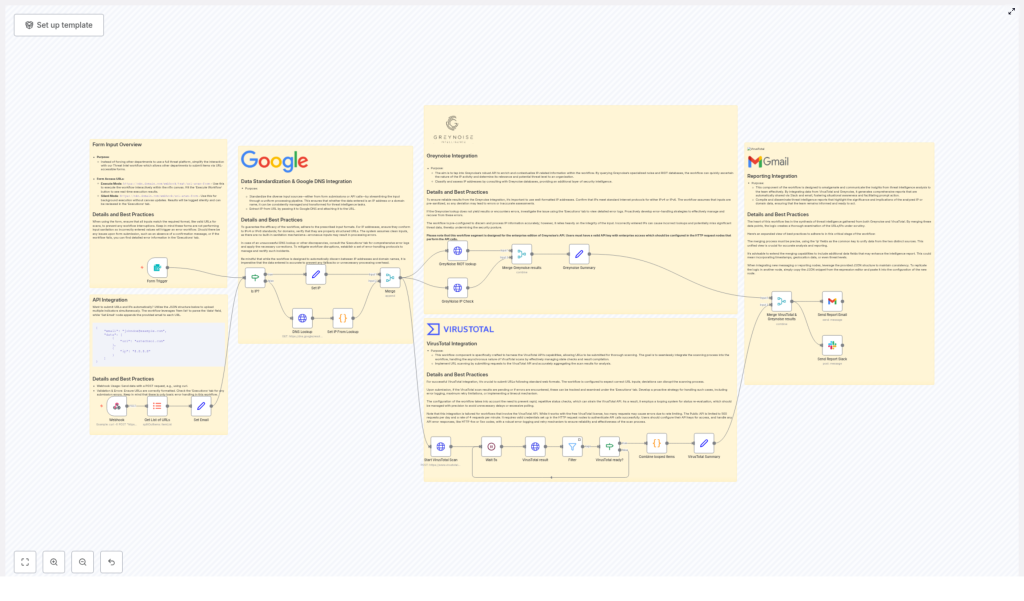
This n8n workflow template is built to take that whole manual process off your plate. It connects VirusTotal and Greynoise, automates the lookups, merges the results, and then sends clean, easy-to-read reports right to your email or Slack.
In this guide, we will walk through what the template does, when to use it, and how each part of the workflow fits together. Think of it as your friendly, step-by-step tour of a very powerful automation.
What This Workflow Actually Does
At a high level, this n8n workflow:
- Accepts URLs and IP addresses from your team via a form or API
- Figures out whether each input is a URL or IP, and runs a Google DNS Lookup when needed
- Submits URLs to the VirusTotal API and waits for the scans to complete
- Enriches IP addresses using the Greynoise API (Noise and RIOT lookups)
- Merges all that intel into a unified view, keyed by IP
- Sends personalized reports via email and concise summaries to Slack
The result is a clean, repeatable threat intelligence pipeline that works in the background while you focus on higher level security work.
When You Should Use This Template
This workflow is especially handy if you:
- Handle frequent phishing or suspicious URL reports from employees
- Need a standardized process for investigating URLs and IPs
- Want to give non-technical teams a safe way to submit indicators without exposing your full threat intel stack
- Are tired of manually querying VirusTotal and Greynoise for every single indicator
In short, if you are doing repetitive URL/IP checks and sharing results with others, this workflow can quickly become part of your daily toolkit.
Step 1 – Collecting Inputs with Forms or API
The workflow kicks off with flexible input collection. You have two main options:
- Form Trigger in n8n for interactive submissions
- JSON API submissions for automated or system-to-system integrations
That means people from different departments can send you:
- One or more URLs
- One or more IP addresses
- Their email address so they receive the results directly
The workflow automatically appends the user’s email to each item, which makes it easy to send personalized reports later on, even when you are processing multiple indicators in a batch.
Why this approach is so user friendly
- Supports batch uploads, so you are not stuck with one indicator at a time
- Keeps your threat intel tools hidden from non-security users
- Makes it simple for anyone to submit suspicious data without extra training
Step 2 – Normalizing Data & Using Google DNS
Once the workflow receives the inputs, it needs to figure out what it is dealing with. Is that string an IP address, or is it a URL that needs to be resolved?
To do that, the workflow uses regex checks to distinguish between IPs and domain URLs. For any URL-type input, it triggers a Google DNS Lookup to resolve the domain and extract the corresponding IP address.
The resolved IP is then appended to the original URL, so you end up with a richer data set for downstream analysis.
Best practices at this stage
- Validate that IPs follow proper IP address standards
- Confirm that URLs are well-formed before sending them further down the chain
- Add error handling for:
- Failed DNS lookups
- Invalid or malformed inputs
Graceful handling here means bad inputs do not break the whole workflow, and users can get clear feedback if something went wrong.
Step 3 – Scanning URLs with VirusTotal
Now comes the part everyone expects: sending URLs to VirusTotal for scanning. The template handles the asynchronous nature of VirusTotal by building a simple wait-and-check loop.
How the VirusTotal integration works
- Start Scan – The workflow submits each URL to the VirusTotal API and initiates a scan.
- Wait – It pauses for about 5 seconds to give the scan time to progress.
- Check Status – It queries VirusTotal to see if the scan status is now marked as
completed. - Filter & Aggregate – Only results with a completed status are kept and aggregated for reporting.
Working within VirusTotal’s rate limits
VirusTotal’s free API comes with some important constraints:
- 500 requests per day
- 4 requests per minute
To stay within those limits, you should:
- Implement retry logic for transient API errors
- Add logging so you can see when you are hitting rate limits
- Fine tune wait times and retry thresholds to balance speed vs. quota
This way, your workflow remains reliable even on busy days when you are scanning a lot of indicators.
Step 4 – Enriching IPs with Greynoise
While VirusTotal is handling URLs, the workflow also enriches IP addresses using Greynoise. This gives you crucial context about whether an IP is noisy on the internet, part of benign infrastructure, or linked to malicious behavior.
Two key Greynoise lookups
- Noise Context Lookup
This tells you how Greynoise classifies the IP and what kind of activity it has observed. For example, is it part of broad internet scanning, or is it something more targeted? - RIOT Lookup
This checks the IP against Greynoise’s RIOT (Rule It Out) database to identify known benign or trusted infrastructure, and helps separate signal from noise.
Greynoise access requirements
To use this part of the workflow effectively, you will need:
- Enterprise-level Greynoise API access
- Valid authentication tokens configured in n8n
Once those are in place, the workflow can automatically enrich every IP it encounters with high quality threat intel.
Step 5 – Merging Results & Building Reports
After both VirusTotal and Greynoise have done their jobs, the workflow brings everything together.
Merging by IP address
The template:
- Merges VirusTotal and Greynoise output keyed by IP address
- Combines URL scan results, blocklist information, and IP reputation data
- Prepares a consolidated view for each submitted item
This is where the magic happens. Instead of jumping between tools, you get a single, unified picture you can act on quickly.
Sending the results to your team
Once the data is merged, the workflow formats it and sends it out via:
- Email
Each recipient gets a detailed report that can include:- Scan statistics and verdicts
- Blocklist presence
- Summary of findings and potential risk
- Slack
A concise notification is posted, summarizing the outcome of the scans for quick team awareness.
So the person who submitted the suspicious URL or IP does not have to chase you for updates. The workflow keeps them in the loop automatically.
Operational Tips & Best Practices
To keep this workflow running smoothly in production, a few habits go a long way.
Input quality and validation
- Sanitize and validate inputs as early as possible
- Reject obviously invalid indicators with clear error messages
- Handle non-resolving domains with a friendly fallback explanation
Managing external APIs
- Tune wait times and retry limits for VirusTotal status checks so you do not waste quota
- Securely store and manage API credentials for both VirusTotal and Greynoise
- Rotate keys periodically and follow your organization’s secrets management practices
Monitoring and troubleshooting
- Keep an eye on execution logs in n8n for:
- Repeated API errors
- Performance bottlenecks
- Patterns of invalid input
- Adjust the workflow as your volume or threat landscape changes
Why This Workflow Makes Your Life Easier
Instead of treating each suspicious URL or IP as a mini project, this template turns the whole process into a single, automated pipeline. You get:
- Consistent, repeatable analysis across your organization
- Less context switching between tools and dashboards
- Faster response times when something looks risky
- Clear, shareable reports that non-technical stakeholders can understand
And because it is built in n8n, you can customize any part of it to match your environment, from how inputs arrive to how and where results are delivered.
Getting Started with the Template
Ready to put this into action? Here is what you will need before you hit run:
- Valid VirusTotal API credentials
- Valid Greynoise Enterprise API credentials and tokens
- Access to your n8n instance with permission to add credentials and workflows
Once those are set up, you can import the template, plug in your keys, and start testing with a few sample URLs and IPs.
Next steps
- Implement the workflow to give your security team reliable, automated threat scanning
- Share the form or API endpoint with internal teams so they can submit suspicious indicators easily
- Tune the workflow to match your alerting style, reporting format, and rate limits
If you need custom modifications or want to integrate this with other tools in your stack, it is a great idea to loop in your security automation engineer to help tailor it further.
