


How to Repurpose TikTok Videos on Autopilot (So You Never Copy-Paste Again)
If you have ever downloaded a TikTok to your phone, AirDropped it to your laptop, uploaded it to Google Drive, then manually posted it to five different platforms, you already know: this is not the life you were meant to live.
Luckily, n8n + RSS + Google Drive + Blotato can do all that boring stuff for you while you focus on creating content, not clicking buttons. This workflow template automatically:
- Detects new TikTok videos via RSS
- Downloads the video without a watermark
- Saves it neatly in a Google Drive folder
- Repurposes and posts it to multiple social media platforms using Blotato
In other words, it is a content repurposing conveyor belt that runs on autopilot instead of your patience.
What This n8n Workflow Actually Does
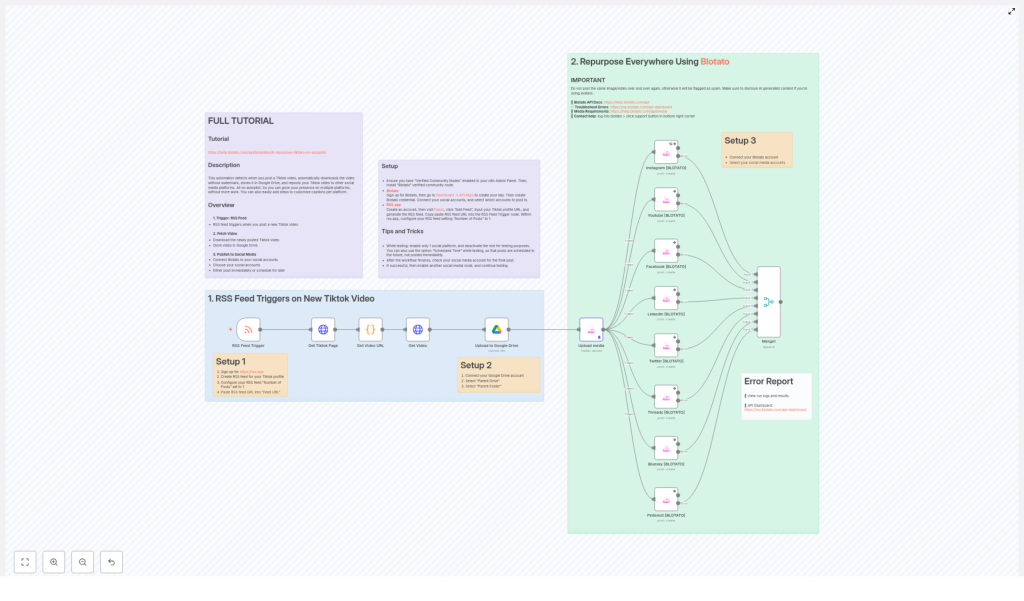
This n8n workflow template is built to repurpose TikTok videos across multiple social platforms with minimal human involvement. Here is the big-picture flow:
- Trigger: An RSS feed watches your TikTok profile for new posts.
- Fetch: When a new TikTok is detected, the workflow grabs the TikTok page and extracts the direct video URL with a script.
- Download: The video file is downloaded without a watermark.
- Store: The video is uploaded to a specific Google Drive folder.
- Repurpose: Blotato API takes over and posts the video to your connected social media accounts.
All of this happens automatically once you have done the initial setup. No more “save to camera roll, upload again, repeat on every app” routine.
Step 1 – Use an RSS Feed Trigger to Catch New TikToks
First, you need a way for n8n to know when you have posted something new on TikTok. That is where an RSS Feed Trigger node comes in.
You can use RSS.app to generate a custom RSS feed from your TikTok profile. n8n then listens to that feed and springs into action whenever a new video shows up.
Setup 1 – RSS Feed for TikTok
- Sign up for RSS.app.
- Create an RSS feed for your TikTok profile.
- Set the Number of Posts to 1 so the feed always shows only the latest video for rapid detection.
- Copy your RSS feed URL and paste it into the RSS Feed Trigger node in n8n.
Once that is in place, every new TikTok is like a starting gun for your automation workflow.
Step 2 – Retrieve and Download Your TikTok Video (Without the Watermark)
After the RSS trigger fires, the workflow fetches the TikTok page and uses script parsing to pull out the direct video URL. From there, n8n downloads the video file straight from TikTok.
The best part: the workflow is set up to remove watermarks, so you get a clean version of your content that looks professional on every platform.
No more sketchy third-party sites, no more screen recording, no more “why is there a username bouncing around the screen” energy.
Step 3 – Store Everything Safely in Google Drive
Once the video is downloaded, it is automatically uploaded to a folder in your Google Drive. This gives you a central archive of all your TikTok content, ready for reuse, editing, or backup whenever you need it.
Setup 2 – Connect Google Drive
- Connect your Google Drive account to the workflow in n8n.
- Select the appropriate Parent Drive where you want videos stored.
- Choose the specific Parent Folder that will hold your TikTok video archive.
From here on, every new TikTok gets filed away automatically, like having a super-organized assistant who never forgets to back things up.
Step 4 – Repurpose Everywhere With Blotato API
Now for the fun part: actually posting your content everywhere without lifting a finger.
Blotato is an automation tool that connects to your social media accounts and posts content on your behalf. In this workflow, once the video is safely in Google Drive, Blotato steps in to distribute it across your channels.
You can configure the workflow to upload the media and post to platforms such as:
- YouTube
- Threads
- Bluesky
Setup 3 – Blotato Posting
- Sign up and connect your Blotato account.
- Select the social media accounts where you want to post your TikTok content.
- Customize your text captions and scheduling options to match your posting style and timing.
Important: Avoid posting the exact same video too frequently on the same platform. Many platforms treat that as spam and may limit your reach or flag your account. Also, be sure to disclose AI-generated content where required by platform policies.
Resource Links:
Once configured, Blotato turns your TikToks into a multi-platform content strategy instead of a single-app moment.
Monitoring, Logs, and Error Handling
Even the best automation occasionally needs a little debugging. Fortunately, both n8n and Blotato give you clear ways to see what is going on behind the scenes.
Error Report & Monitoring
- Check your workflow run logs and results directly in the n8n platform to see whether each step ran successfully.
- Use the Blotato API Dashboard for detailed stats, API usage, and troubleshooting information.
This makes it much easier to spot issues like failed uploads, API errors, or misconfigured accounts before they turn into missed posts.
Putting It All Together
Once the workflow is fully set up, your content pipeline looks like this:
- You post a new TikTok.
- The RSS Feed Trigger in n8n detects it almost immediately.
- The workflow fetches and downloads the video without a watermark.
- The video is stored in your chosen Google Drive folder.
- Blotato uses the video to publish across your selected social platforms.
No more copy-paste marathons, no more “did I already post this on Instagram” guessing games, just consistent content distribution across your social media channels.
For a more detailed breakdown of each step and configuration option, you can follow the official tutorial here:
Next Steps: Start Automating Your TikTok Repurposing
If you are ready to retire from the manual-upload grind, this n8n workflow template is a simple way to start. Combine the flexibility of n8n with the posting power of Blotato and let automation handle the repetitive parts of your social strategy.
Use this setup to:
- Expand your presence across multiple platforms from a single TikTok
- Keep a clean, organized archive of your videos in Google Drive
- Save time and mental energy for creating content instead of re-uploading it
Ready to repurpose smarter, not harder? Spin up the n8n template and let your TikToks travel the internet while you work on your next idea.
