


Automate Voice of Customer Feedback Analysis & Routing
The Marketer Who Was Drowning in Feedback
By the time Emma opened her laptop each morning, her day already felt out of control.
As a Customer Marketing Manager at a fast-growing SaaS company, she was supposed to be the voice of the customer inside the business. In reality, she was buried in scattered feedback.
Support tickets lived in Zendesk. Sales notes were trapped in Pipedrive. Long email threads sat in Gmail. Urgent comments appeared in random Slack channels at 11:47 p.m. And when the product team asked, “What are customers actually saying about onboarding this month?” Emma could only reply with a frustrated, “Let me pull that together and get back to you.”
It took days. Sometimes weeks.
By then, the moment had passed, the opportunity was gone, and more feedback had already piled up.
Emma knew they needed a better way to handle Voice of Customer (VOC) feedback. Not just collecting it, but actually understanding it, routing it, and turning it into action. She had heard about n8n and AI-driven workflows, but everything she saw looked like a complex science project.
That changed when she discovered an n8n template for automated VOC AI analysis and routing.
Discovering an Automated VOC Workflow in n8n
One afternoon, after losing yet another hour copying Zendesk comments into a spreadsheet, Emma decided she had enough. She searched for “n8n voice of customer template” and found a workflow that promised exactly what she needed:
- Collect feedback from Gmail, Slack, Pipedrive, and Zendesk
- Use multiple AI agents to analyze and summarize it
- Automatically route the feedback to the right people and tools
It was not just a simple integration. It was a complete VOC system built on n8n, OpenAI, and the tools her team already used.
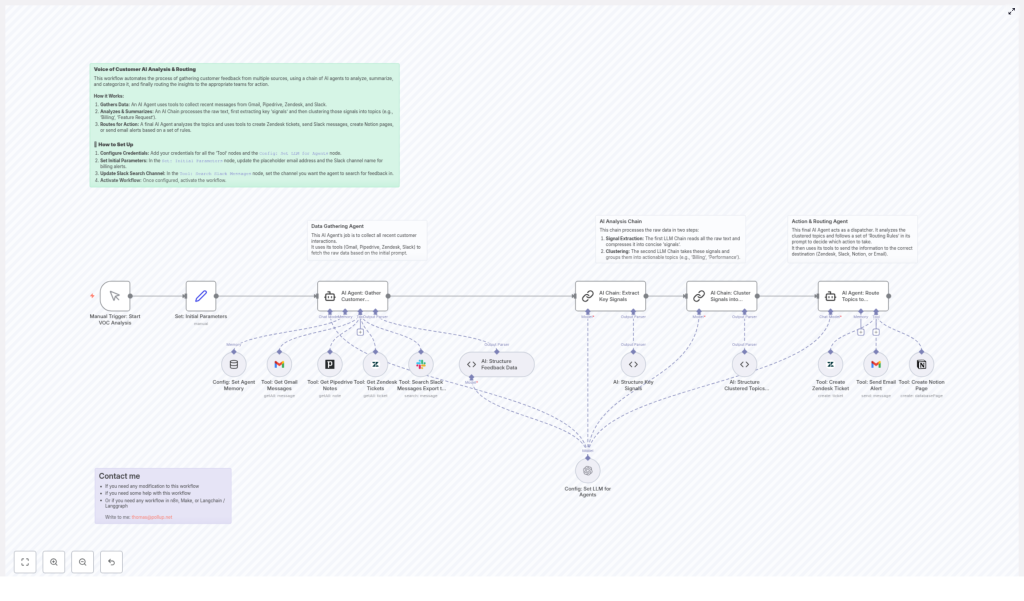
Instead of another static “how to” guide, the template walked her through a clear structure. The workflow was built in three main phases, and Emma quickly realized each one mapped directly to her daily pain points.
Phase 1 – The Data Gathering Agent That Never Sleeps
Emma’s first challenge was obvious. Feedback was everywhere. Her team could not fix what they could not see.
In the template, the solution started with a Data Gathering Agent, an AI-driven part of the workflow dedicated to pulling in customer feedback from all her core channels.
Once configured, this agent automatically collected:
- Gmail – It fetched emails sent after a specific date from her Customer Success Manager’s email address. That meant every new customer reply, complaint, or suggestion was captured without manual forwarding.
- Slack – It searched messages across defined channels to find relevant customer communications. No more scrolling through #customer-feedback and #sales-wins hoping not to miss something important.
- Pipedrive – It retrieved notes associated with customers, identified by person IDs. Sales insights stopped living in isolation and became part of the bigger VOC picture.
- Zendesk – It pulled in support tickets and related data, so recurring issues and hidden patterns could finally be connected to the rest of the feedback.
The agent relied on tools configured within n8n, each with proper credentials and session memory. This memory allowed the system to retain context across interactions, which meant it could handle ongoing conversations instead of treating every message as a random, disconnected piece of text.
For Emma, this was the first turning point. Instead of chasing feedback, the feedback came to her, already collected in one automated workflow.
Phase 2 – AI That Turns Noise Into Signals
Of course, gathering feedback was only half the battle. Emma knew from painful experience that a giant pile of raw text was not helpful. It was just a more organized version of chaos.
The second phase of the n8n template was where the real magic happened: an AI Analysis Chain that transformed unstructured feedback into clear, actionable insights.
The workflow used two sequential AI chains, each with a specific job:
Signal Extraction Chain
Emma watched as the workflow compacted long customer messages into short, precise “signals.”
Instead of copying entire email threads or Slack conversations, the AI summarized each piece of feedback into a concise sentence or two that captured the core issue or sentiment. It stripped out filler, pleasantries, and repetition, leaving only what mattered.
For example, a long Zendesk ticket about a confusing onboarding flow turned into a single signal like:
“Customer is confused about step 3 of onboarding and cannot complete initial setup without support.”
These signals became the building blocks of Emma’s VOC understanding.
Clustering Chain
Once the signals were extracted, the second chain grouped them into meaningful, actionable topics.
The AI automatically clustered similar signals under themes such as:
- Billing
- Feature Requests
- Onboarding
- Performance
Each cluster included representative examples, so Emma and her team could see not just the label, but the actual customer language behind it.
Suddenly, patterns emerged:
- Onboarding issues spiking after a new product change
- Recurring performance complaints from a specific segment
- Billing confusion tied to a recent pricing update
Instead of guessing what customers cared about, Emma had a structured, AI-assisted view of their voices, updated automatically.
Phase 3 – The Action & Routing Agent That Closes the Loop
Before this workflow, Emma’s biggest frustration was not just understanding feedback, but acting on it. Key issues died in spreadsheets, and important insights never reached the right owners.
The third phase of the template solved this with an Action & Routing Agent.
This AI agent took the clustered topics and applied preset routing rules to decide what to do next. It did not just tag feedback. It triggered real actions in the tools her team already lived in.
Depending on the topic and category, the workflow could automatically:
- Create Zendesk tickets for product or performance issues that required follow-up from support or engineering.
- Post billing or contract related issues to a dedicated Slack channel, so finance and account managers could jump in quickly.
- Generate Notion tasks for onboarding or training topics that needed documentation updates or new help center articles.
- Send email alerts to the Customer Success Manager for high-risk cases or important proposals that required a human response.
- Flag unassigned topics that did not match any predefined category, so Emma could review and refine the routing rules over time.
Behind the scenes, the agent used tools integrated with Zendesk, Slack, Notion, and Gmail inside n8n. Once configured, it ran quietly and consistently, routing feedback to the right place without Emma lifting a finger.
This was the moment the workflow truly changed her day to day. VOC was no longer a passive report. It became an active, automated system that pushed the right information to the right people at the right time.
Setting Up the Workflow in n8n
Emma was not a developer, so she worried the setup would be too complex. The actual steps turned out to be straightforward, as long as she followed them carefully.
1. Configure Credentials
First, she connected all the tools the workflow needed:
- Gmail credentials for accessing customer email threads
- Slack credentials so the workflow could search specific channels
- Pipedrive credentials to pull customer notes via person IDs
- Zendesk credentials to read and create tickets
- Notion credentials for creating tasks from feedback topics
- OpenAI LLM node credentials to power the AI agents and analysis chains
Once these were in place, the data gathering and AI analysis layers had everything they needed to run.
2. Set Initial Parameters
Next, Emma opened the “Set: Initial Parameters” node in n8n and customized it for her company.
She updated the placeholder email address with her actual Customer Success Manager’s email and specified the Slack channel for billing alerts. This ensured that sensitive topics like billing landed in the correct internal space right away.
3. Update Slack Search Channel
To avoid pulling in random Slack chatter, she configured the Slack search node to look only at the channels where customer feedback typically appeared.
She set it to search a dedicated feedback channel plus a couple of sales and success channels where customer quotes and issues were often shared.
4. Activate the Workflow
With credentials and parameters in place, Emma did a quick review of the nodes, then clicked Activate.
From that point on, the n8n workflow handled the entire journey of VOC feedback:
- Collecting it from Gmail, Slack, Pipedrive, and Zendesk
- Summarizing and clustering it with AI
- Routing it into Zendesk, Slack, Notion, or email based on rules
Her role shifted from manual collector to strategic reviewer. Instead of building reports from scratch, she could now refine rules, interpret insights, and work with product and success teams to act on what customers were saying.
How Emma’s Workflow (and Sanity) Improved
Within a few weeks, the impact was obvious.
- Faster response times – Feedback that used to sit in inboxes was now automatically processed and routed. High risk cases reached the CSM instantly, and product issues became tracked Zendesk tickets without delay.
- No more lost feedback – Because the workflow consolidated input from Gmail, Slack, Pipedrive, and Zendesk, customer concerns no longer slipped through the cracks or vanished in long threads.
- Actionable insights, not raw text – The AI clustering and signal extraction gave Emma a clear, summarized view of what customers cared about. She could tell leadership, with confidence, which themes were trending and which needed immediate attention.
- Flexible and extensible routing – As her company grew, Emma added new routing rules and integrations. The workflow adapted to new teams, new channels, and new processes without being rebuilt from scratch.
Instead of spending days collecting and cleaning data, Emma spent her time influencing roadmaps, improving onboarding, and helping the company respond faster and smarter to customer needs.
Want Help Adapting This n8n VOC Workflow?
Emma’s story is just one example of what is possible when you combine n8n, AI agents, and your existing tools into a single Voice of Customer system.
If you need help modifying this workflow, tailoring routing rules, or building additional automations with n8n, Make, Langchain, or Langgraph, you can reach out directly at:
From Raw Feedback to Real Change
This advanced automated workflow shows how AI-powered analysis and smart integrations in n8n can transform scattered, messy customer feedback into structured, actionable outcomes.
Instead of drowning in messages, you get a clear, automated system that listens, understands, and routes customer voices where they can actually make a difference.
Ready to streamline your customer feedback management?
Configure your credentials, adjust the parameters, and activate this workflow to start harnessing automated VOC analysis and routing today.
