


Personalize Marketing Emails with AI & Coupons (So You Can Stop Copy-Pasting)
Imagine This…
You open your laptop, coffee in hand, and stare at yet another spreadsheet of customers, purchases, and feedback. Your mission: write personalized marketing emails that sound human, remember what people actually bought, respond to their mood, and – if they are unhappy – win them back with a coupon.
After the third email, your creativity has left the chat. After the tenth, you are copying and pasting like a robot that needs a vacation.
This is exactly the kind of repetitive, soul-draining task that automation was invented for. Enter n8n, LangChain, and a neat workflow template that lets AI handle the heavy lifting of personalized email creation and coupon decisions.
What This n8n Workflow Actually Does
This workflow is an automated marketing assistant that:
- Grabs customer data (purchase history and feedback) from a file
- Uses AI to write personalized email headlines and body text
- Analyzes sentiment to decide if a coupon is needed
- Builds an HTML email, with or without a coupon code
- Prepares everything for sending via SMTP or your newsletter tool
So instead of manually crafting every email, you set up the workflow once and let it scale your personalization efforts while you focus on more interesting work, like strategy, testing, or finally cleaning up that dashboard.
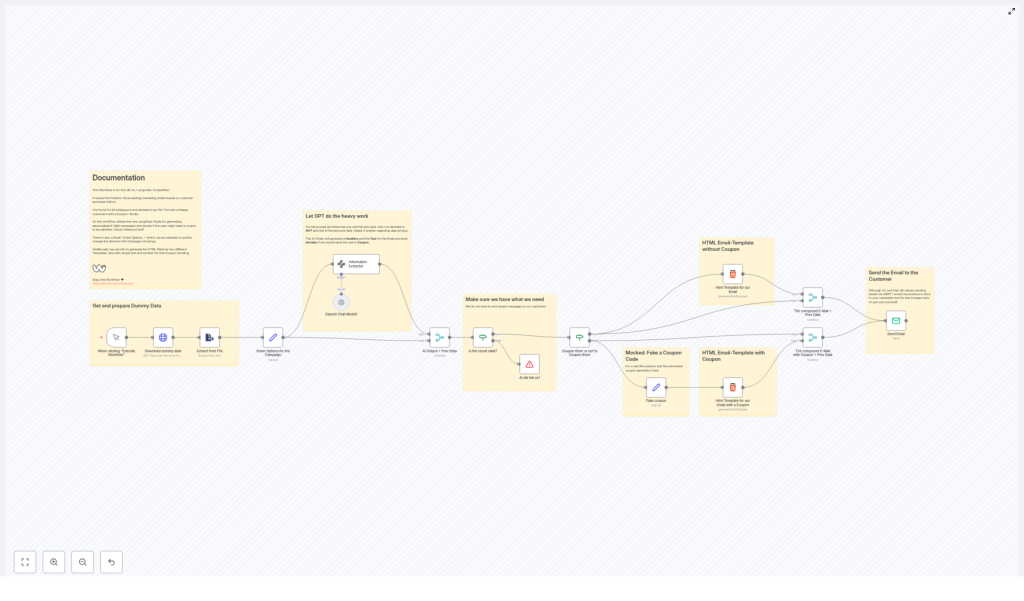
How the Workflow Flows (High-Level Overview)
Here is the journey your data takes inside this n8n + AI setup:
- Trigger & Data Load – You start the workflow manually, it downloads dummy customer data, and reads purchase history + feedback from an Excel file.
- AI-Powered Content – The workflow uses an Information Extractor and an OpenAI Chat Model node to analyze the feedback and create a personalized email headline and body.
- Content Sanity Check – It verifies that the AI output actually contains a “Headline” and “Body” before moving on.
- Coupon Logic – Based on sentiment, it decides if a coupon should be added and branches into:
- a “no coupon” email path
- a “yes coupon, please save this relationship” path
- HTML Email & Sending – It generates the final HTML email and sends it via SMTP, or hands it off to your usual newsletter platform.
Step-by-Step: Setting Up the n8n Email Personalization Workflow
1. Kick Things Off With a Trigger and Data Prep
The workflow starts with a simple trigger node that you run manually. This is your “go” button, perfect for testing or running campaigns in batches.
Once triggered, the workflow:
- Downloads dummy customer data from a provided online source
- Opens an Excel file that includes:
- Purchase history
- Customer feedback
- Extracts the relevant fields so the AI has something meaningful to work with
This gives the system context like what the customer bought and how they felt about it, which is much more useful than “Dear valued customer who may or may not remember us.”
2. Let AI Write the Email (So You Do Not Have To)
The brain of this workflow is the combo of two n8n nodes:
- Information Extractor
- OpenAI Chat Model
Together, they handle the heavy thinking:
- They read the customer feedback and purchase details
- They generate a personalized headline and email body
- They decide whether the customer is happy, neutral, or in “please fix this” territory
- Based on that sentiment, they determine if a coupon should be offered
The result is an email that sounds tailored to each customer, instead of the classic “Hi there, we value your business” that everyone knows is sent to 10,000 people at once.
3. Quality Check So You Do Not Send Blank Emails
AI is powerful, but you still want a safety net. Before anything is sent, the workflow runs a validation step.
It checks if the AI output includes both:
- Headline
- Body
If either of these is missing or empty, the workflow stops. No half-finished emails, no “Subject: [headline_here]”, and no awkwardly blank content going out to customers.
4. Decide: Coupon or No Coupon?
This is where the workflow gets strategic. Based on the sentiment analysis from the AI, it splits into two paths:
- Path 1 – Without Coupon
If the customer seems satisfied or neutral, the workflow:- Generates a clean HTML email template
- Inserts the personalized headline and body text
- Prepares a simple, well-formatted email ready to send
- Path 2 – With Coupon
If the feedback looks unhappy or negative, the workflow:- Creates a coupon code
- Merges that code into the AI-generated email content
- Builds a more persuasive HTML email that highlights the coupon
The idea is simple: keep happy customers engaged with personalized content, and use targeted coupons to turn frustrated customers into loyal ones.
5. Send the Email (Or Hand It Off to Your Newsletter Tool)
Once the HTML email is ready, the final step is delivery.
The workflow uses SMTP settings to send the emails out. n8n is fully capable of sending emails directly, but in many real-world setups it is smarter to connect this workflow to your existing newsletter or email marketing tool.
Why?
- Better opt-out handling and compliance
- Built-in tracking and analytics
- Centralized management of all campaigns
So you can use this workflow as the personalization engine, and let your usual email platform handle the sending, unsubscribes, and metrics.
Why This AI + n8n Email Setup Is Worth Your Time
Besides saving you from writing the same email 200 times in slightly different tones, there are some serious benefits:
- Highly Personalized
Every email is based on actual purchase history and feedback, not just a first name field. Customers get messages that feel relevant to their experience. - Fully Automated Workflow
Content creation, personalization, coupon logic, and email generation all run on autopilot once configured. You set it up once and reuse it for campaigns. - Smarter Customer Retention
Coupons are used strategically for unhappy customers, which helps turn negative experiences into second chances and long-term loyalty. - Easy to Customize
Want a different tone, different coupon rules, or a new campaign angle? Adjust the workflow nodes, prompts, or branching logic instead of rebuilding from scratch.
Best Practices Before You Hit “Send to All”
Automation is powerful, but a few guardrails help keep everything safe and professional.
- Protect Personal Data
Avoid sending highly sensitive personal data into AI prompts. Keep things privacy-friendly and compliant with your local regulations. - Test Thoroughly
Run the workflow on test data first. Check the AI output for tone, correctness, and formatting. Make sure the “Headline” and “Body” look good, and that coupons show up where they should. - Monitor Campaign Performance
Use your email platform’s analytics to track:- Open rates
- Click rates
- Coupon redemptions
This helps you see how well the AI-powered personalization is working in the real world.
- Keep Refining Your AI Prompts
If some emails feel too formal, too casual, or not quite on brand, tweak the prompts and settings in the AI nodes. Continuous improvement is where the real magic happens.
Wrapping Up: Turn Repetitive Work Into an Automated System
By combining n8n, LangChain, and OpenAI, you get a workflow that handles the chore-like parts of email marketing for you. It turns customer data into personalized, AI-written messages and uses coupons intelligently to repair damaged relationships and boost loyalty.
Instead of manually crafting every response, you design the system once, then let automation and AI do the repetition. Your customers get better emails, and you get your time back.
Ready to Try It Yourself?
If you are ready to level up your email marketing without burning out your typing fingers, give this AI-powered n8n workflow a spin. Use it to personalize campaigns, test coupon strategies, and scale your outreach without scaling your workload.
For more information and to access ready-to-use workflows, visit let-the-work-flow.com.
Note: The workflow image below shows a detailed visual map of the entire process.

