


IoT Device Firmware Update Planner with n8n
Keeping IoT firmware up to date can feel like a constant battle. Devices are scattered across locations, releases ship faster than ever, and every missed update can turn into a security or reliability risk. Yet behind that complexity is a huge opportunity: if you automate the planning work, you free yourself to focus on strategy, innovation, and growth instead of chasing version numbers.
The IoT Device Firmware Update Planner built with n8n is designed to be that turning point. It transforms scattered release notes, device metadata, and tribal knowledge into a structured, intelligent workflow that plans firmware rollouts for you. Under the hood it combines webhooks, text splitting, embeddings, a Pinecone vector store, an agent-driven decision layer, and a simple Google Sheets log. On the surface, it gives you clarity, control, and time back.
This article walks you through that journey: from the pain of manual firmware planning, to a new mindset about automation, and finally to a step-by-step look at how this n8n template works and how you can adapt it for your own fleet.
From chaotic updates to confident rollouts
Firmware updates are not optional. They are the foundation for:
- Security patches that protect your devices and data
- Performance improvements that keep your fleet efficient
- New features that unlock customer and business value
Handling all of this manually across hundreds or thousands of devices is risky and exhausting. Human-driven planning often leads to:
- Misconfigurations and inconsistent rollout policies
- Unnecessary downtime and support incidents
- Missed compliance requirements or incomplete audit trails
Automating the firmware update planning process with n8n changes the game. Instead of reacting to issues, you build a repeatable system that:
- Collects and indexes device metadata and firmware release notes automatically
- Uses semantic search to surface relevant history and compatibility constraints
- Lets an agent orchestrate rollout decisions, canary stages, and blocking conditions
- Logs every decision for transparent audit and operational tracking
That is more than a workflow. It is a foundation for scaling your IoT operations without burning out your team.
Adopting an automation-first mindset with n8n
Before diving into the template, it helps to shift the way you think about firmware planning. Instead of asking, “How do I push this update?” start asking, “Which parts of this decision can be automated, and how can I guide that automation safely?”
With n8n you are not replacing human judgment. You are:
- Capturing your best practices in a repeatable, visible workflow
- Letting the system do the heavy lifting of data collection and analysis
- Using agents and LLMs as assistants that propose plans you can review and refine
This template is a practical example of that mindset. It gives you a starting point you can extend, experiment with, and improve over time. The goal is not perfection on day one. The goal is to build an evolving automation system that learns with you and supports your growth.
Inside the IoT Firmware Update Planner template
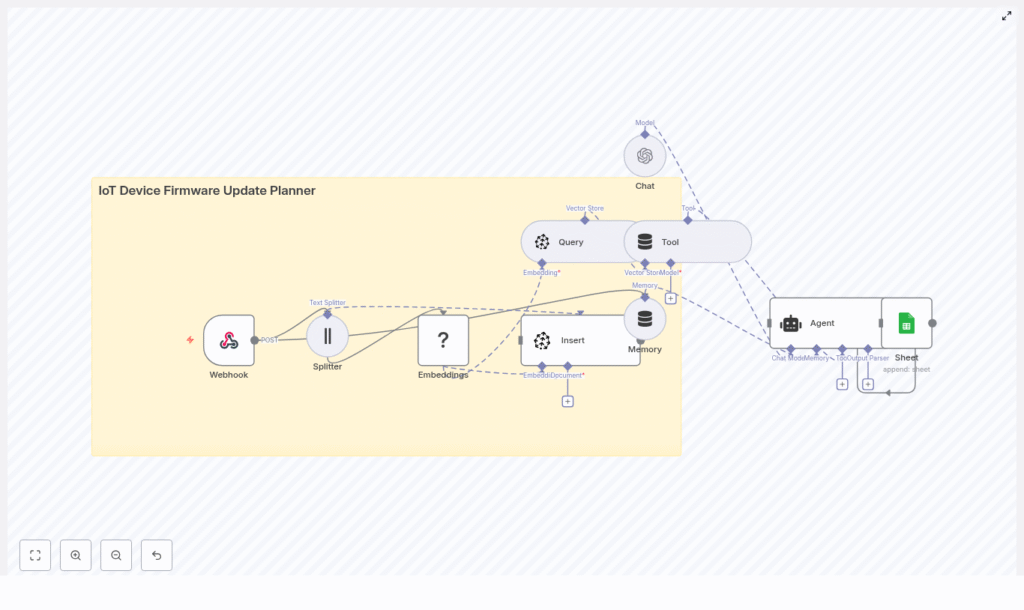
On the n8n canvas, the template looks compact and approachable, yet it connects several powerful building blocks. Here is what it includes at a high level:
- Webhook – receives POST events such as device heartbeats, new firmware releases, or admin-triggered planning requests
- Splitter – breaks long texts like release notes or device logs into smaller chunks
- Embeddings (Hugging Face) – converts those chunks into dense vector embeddings for semantic search
- Insert (Pinecone) – stores embeddings in a Pinecone index named iot_device_firmware_update_planner
- Query + Tool (Pinecone wrapper) – runs similarity search and exposes results as a tool for the agent
- Memory – keeps a buffer of conversational context for the agent
- Chat (OpenAI model or alternative LLM) – provides the language model interface for reasoning
- Agent – coordinates tools, memory, and prompts to craft a firmware update plan
- Google Sheets – appends decision logs to maintain an auditable history
Each of these nodes is configurable and replaceable. Together they form a repeatable pattern you can reuse in other automation projects: trigger, enrich, store, reason, and log.
How the workflow runs, step by step
1. Events trigger the workflow
The journey begins with the Webhook node. It listens for POST requests such as:
- A new firmware release with detailed release notes
- Device telemetry that signals outdated or vulnerable firmware
- An administrator request to generate a rollout plan for a specific device group
Each event becomes an opportunity for the system to respond intelligently instead of waiting for manual intervention.
2. Text is prepared for semantic search
Firmware release notes and device logs can be long and dense. The Splitter node breaks this content into manageable chunks, using a chunk size and overlap tuned for better recall during search. These fragments are then passed to the Hugging Face embeddings node, which converts them into vector embeddings.
This step turns unstructured text into structured, searchable knowledge that your agent can use later.
3. Knowledge is stored in Pinecone
Each embedding is inserted into a Pinecone index named iot_device_firmware_update_planner. Over time this index grows into a powerful knowledge base that can include:
- Firmware release notes and change logs
- Device capabilities and constraints
- Historical incidents and rollout outcomes
- Compatibility mappings and upgrade paths
Instead of relying on memory or scattered documents, you gain a centralized vector store that your agent can query in seconds.
4. The agent plans the rollout
When a planning request arrives, the Agent node becomes the brain of the operation. It uses:
- The Query node to perform vector similarity search in Pinecone
- The Tool wrapper to feed search results into the agent
- Memory to preserve context across turns
- The Chat (OpenAI or other LLM) node to reason about the information
Based on the semantic context and your policy prompts, the agent produces a structured firmware update plan, which may include:
- Rollout percentages and phases
- Canary groups and test cohorts
- Blocking conditions and safety checks
- Rollback steps and verification actions
This is where your operational knowledge starts to scale. The agent applies the same level of care every time, without fatigue.
5. Decisions are logged for audit and learning
Finally, the workflow appends each decision to Google Sheets or another sink of your choice. Typical log fields include:
- Timestamps and request identifiers
- Device groups or segments affected
- Summary of the recommended rollout plan
- Operator notes or overrides
These logs provide a clear audit trail and a feedback loop. You can review what the agent recommended, compare it to real outcomes, and refine your prompts or policies over time.
What you need to get started
Setting up this n8n template is straightforward. Use this checklist as your starting point:
- n8n account, either self-hosted or on n8n Cloud
- OpenAI API key for the chat agent, or another supported LLM provider
- Hugging Face API key for embeddings, or a local embedding model endpoint
- Pinecone account with an index named
iot_device_firmware_update_planner - Google Sheets credentials with permission to append rows
- Secure webhook endpoints with authentication, for example HMAC signatures or tokens
Once these are in place, you can import the template, connect your credentials, and start experimenting with a small test set of devices.
Best practices for a reliable automation journey
Secure your webhooks
Webhooks are your entry point, so protect them carefully. Validate payloads using signatures or tokens, and avoid exposing unauthenticated endpoints. This reduces the risk of accidental or malicious triggers that could disrupt your planning process.
Use version control and staging
Keep firmware metadata in a versioned datastore so you always know which release is in play. Combine that with staging groups and canary rollout strategies to limit the impact of any unexpected behavior. The agent can incorporate these patterns into its recommendations.
Limit exposure of sensitive data
When you send data to external LLM or embedding services, sanitize user or device identifiers where possible. For highly sensitive environments, consider running embeddings or language models inside your own infrastructure and updating the template to point to those endpoints.
Monitor, observe, and iterate
Automation is not “set and forget.” Track success rates, failure counts, and rollback frequency. You can:
- Use the Google Sheets log for quick visibility
- Forward logs into your observability stack such as Datadog or ELK
- Set alerts when error thresholds or rollback counts exceed expectations
These signals help you continuously refine prompts, policies, and thresholds in the workflow.
Example use cases that unlock real value
Once the template is running, you can apply it to several high-impact scenarios:
- Automated canary rollout recommendations based on device telemetry and historical incidents stored in the vector index
- Compatibility checking that flags devices requiring intermediate firmware versions before a safe upgrade
- Release note summarization that highlights relevant changes for specific device models or features
- Post-update anomaly triage by querying similar historical incidents and recommended mitigations
Each of these use cases saves time, reduces risk, and builds confidence in your automation strategy.
Security considerations for high-stakes updates
Firmware updates are powerful and potentially dangerous if mishandled. Before you let automation make or suggest rollout decisions, ensure you have strong safeguards in place:
- Use cryptographic signing for firmware artifacts and verify signatures on devices
- Segment devices by criticality and apply stricter rollout policies to sensitive groups
- Document and test rollback plans, and include those steps in the agent prompt
- Encrypt sensitive logs and tightly control access to the vector store index
These measures let you enjoy the benefits of automation without compromising safety.
Scaling your fleet and controlling costs
As your IoT fleet expands, so do your data and compute needs. The template is designed to scale, and you can keep costs under control by:
- Batching small, frequent updates into grouped embedding requests where possible
- Retaining only high-value historical documents in the Pinecone index and archiving older or low-impact content
- Using more affordable embedding models for routine or low-risk queries, and reserving premium models for critical decisions
With these practices, your automation can grow alongside your business without runaway expenses.
Testing the n8n firmware planner safely
Before you trust any automated system with production devices, validate it in a controlled environment. A simple test path looks like this:
- Use a small set of non-critical devices or a simulator as your testbed
- Post a sample firmware release note payload to the webhook
- Confirm that embeddings are generated and visible in the Pinecone index
- Ask the agent to create a rollout plan for a test device group
- Verify that the resulting decision log appears correctly in Google Sheets with all required metadata
Once you are comfortable with the results, you can gradually expand to larger groups and more complex scenarios.
Customizing and extending the template
The real power of n8n lies in how easily you can adapt workflows to your environment. This template is intentionally modular so you can evolve it step by step. Some ideas:
- Swap Hugging Face embeddings for a local or custom model endpoint
- Replace Pinecone with another vector database such as Milvus or Weaviate
- Add Slack or Microsoft Teams notifications to request human approval before a rollout proceeds
- Integrate device management platforms like Mender, Balena, or AWS IoT to trigger actual OTA jobs after the plan is approved
Each customization moves you closer to a fully integrated, end-to-end firmware management system tailored to your stack.
From template to transformation
The IoT Device Firmware Update Planner n8n template is more than a collection of nodes. It is a blueprint for how you can run safer, smarter, and more scalable firmware operations.
By combining semantic search, agent-driven decision making, and a simple yet effective audit log, you gain a system that:
- Learns from past incidents and outcomes
- Reduces operational risk and manual toil
- Frees your team to focus on innovation and higher value work
As you refine prompts, add new data sources, and connect more tools, this workflow can become a central pillar of your IoT automation strategy.
Take the next step with n8n automation
You do not need a massive project to get started. Begin small, prove the value, and grow from there.
To try the template:
- Import it into your n8n instance
- Connect your API keys for Hugging Face, Pinecone, OpenAI (or your chosen LLM), and Google Sheets
- Run it against a small, low-risk device group or simulator
- Review the agent’s plans, adjust prompts, and iterate
If you want help tailoring the workflow to your fleet or integrating it with your OTA provider, you can reach out to your internal platform team or automation specialists, or consult a step-by-step setup guide to walk through each configuration detail.
