


Automate Meeting Summaries from Google Drive Files
Imagine Never Writing Another Meeting Summary By Hand
You know that moment after a meeting when everyone vanishes from the call, and you are left staring at a wall of notes thinking, “So… now I have to turn this chaos into something readable?” If your meeting recaps are starting to feel like a part-time job, it is probably time to let automation take over.
This n8n workflow template is your new post-meeting assistant. It watches a Google Drive folder, grabs new meeting files (PDF or plain text), feeds them to AI for a structured summary, turns that into a polished HTML email, and sends it via Gmail to the right person. All while you move on to literally anything else.
What This n8n Workflow Actually Does
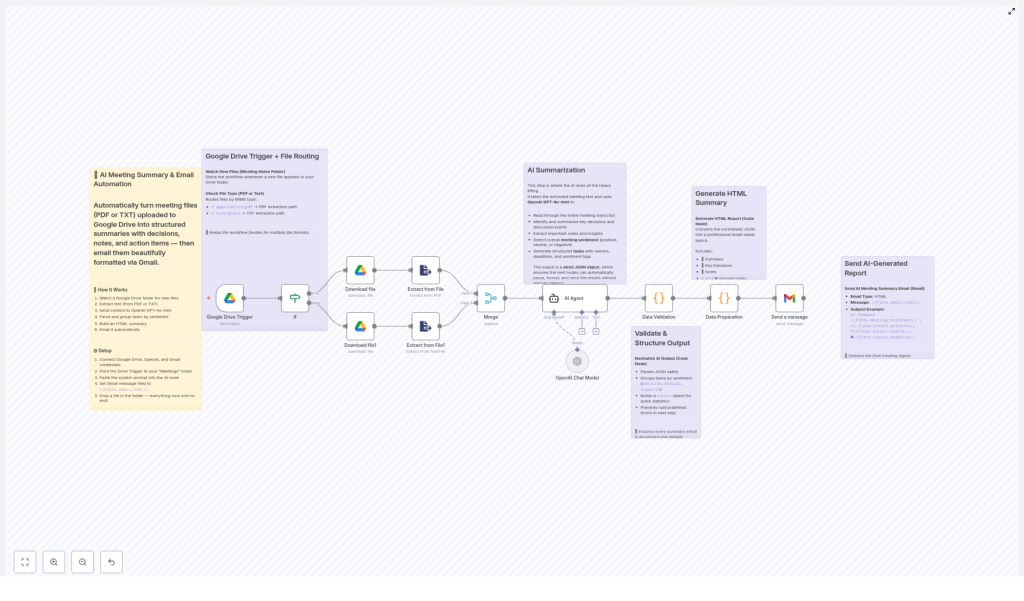
At a high level, this automation connects Google Drive, OpenAI, and Gmail inside n8n to create a fully automated meeting summary pipeline. Here is the journey your file goes on, from “just uploaded” to “beautiful summary in your inbox.”
1. Constantly Watches a Google Drive Folder
You pick a folder in Google Drive, usually something like Meetings. The n8n Google Drive trigger node keeps an eye on it. Whenever a new file lands there, the workflow wakes up and gets to work. No buttons to click, no scripts to run, no “Did I remember to send that recap?” panic.
2. Detects the File Type Automatically
Not all meeting notes look the same, and that is fine. The workflow checks the file’s MIME type and sends it down the right path:
application/pdffiles go through a PDF text extraction process.text/plainfiles are handled with plain text extraction.
This lets you mix and match formats. Whether your notes are exported from a tool as a PDF or typed into a basic text file, the workflow can handle both without complaining.
3. Extracts the Raw Meeting Text
Once the workflow knows what kind of file it is dealing with, it pulls out the actual text. That raw content becomes the input for the AI step. No copying, pasting, or hunting through documents. The text is ready for summarization automatically.
4. Summarizes Everything With GPT-4o-mini
Now for the fun part. Using OpenAI’s GPT-4o-mini, the workflow turns your messy meeting notes into a structured JSON summary. The AI is instructed to produce a very specific format that includes:
- A short summary under 40 words
- A list of key decisions made during the meeting
- Important notes and highlights from the discussion
- The overall sentiment of the meeting: positive, neutral, or negative
- An array of tasks, each with:
- Description
- Owner
- Deadline
- Assigned sentiment
The result is not just a wall of text. It is a structured JSON object that is easy to work with, reuse, and format in later steps of the workflow.
5. Validates And Normalizes The AI Output
AI is powerful, but sometimes it needs a little supervision. The workflow parses the JSON and checks that all expected keys and data types are present. It also organizes tasks by sentiment category:
- Positive tasks
- Neutral tasks
- Negative tasks
This validation step helps protect you from broken or incomplete data. If the AI tries to be a little too creative with the format, the workflow brings it back in line.
6. Builds A Polished HTML Email Summary
Once the JSON is cleaned up, the workflow converts it into a nicely formatted HTML email. The summary, decisions, notes, and tasks are laid out clearly, using inline styling that is optimized for Gmail. The result looks professional and easy to scan, even for someone who did not attend the meeting.
7. Emails The Summary To The Right Person
Finally, the Gmail node sends the formatted summary to the user who last modified the Google Drive file. That means the person who uploaded or updated the meeting notes automatically gets the recap delivered to their inbox, without needing to remember to send anything.
How To Set Up The Workflow In n8n
Getting this running is much easier than writing your next manual summary. Here is a simplified setup guide to follow inside n8n.
Step 1 – Connect Your Accounts
In n8n, connect the three services this workflow depends on:
- Google Drive for file monitoring and access
- OpenAI for GPT-4o-mini summarization
- Gmail for sending the final email summary
Make sure each account is authenticated and working correctly before moving on.
Step 2 – Configure The Google Drive Trigger
Set up the Google Drive trigger node to watch your chosen folder, for example a folder named Meetings. This is where you will drop your PDF or text meeting notes. Each new file in that folder will automatically trigger the workflow.
Step 3 – Add The AI System Prompt
In the AI summarization node that uses GPT-4o-mini, paste in the provided system prompt included with the template. That prompt tells the model exactly how to analyze the meeting notes and how to structure the JSON output, including the summary, decisions, notes, sentiment, and tasks.
Step 4 – Configure The Gmail Node
In the Gmail node, set the message body to use the HTML generated earlier in the workflow. Use the expression:
{{$json.email_html}}This pulls in the HTML email content that was created from the normalized JSON data, so your recipients get the nicely formatted summary instead of raw JSON.
Step 5 – Drop In A Test File
To test everything, place a meeting notes file into the monitored Google Drive folder. You can use either:
- A PDF file
- A plain text (
.txt) file
Once the file appears, the workflow should run, extract the text, summarize it, format the email, and send it to the last modifier of that file. If your inbox suddenly contains a polished recap, you are good to go.
Why This Automation Is Worth It
If you are still on the fence about automating your meeting summaries, here is what this n8n template gives you.
- Serious time savings by turning meeting recap creation into a fully automated process.
- Support for multiple formats, including PDF and plain text, so you are not locked into a single note-taking tool.
- Actionable task generation with tasks grouped by sentiment, which makes it easier to spot positive progress and potential issues.
- Automatic distribution through Gmail, sent directly to the relevant person who modified the meeting file.
- Easy customization with n8n nodes and OpenAI integration, so you can tweak prompts, email formatting, or routing rules as needed.
In short, less time formatting bullet points, more time doing work that actually matters.
Next Steps And Ideas For Power Users
Once you have the basic template up and running, you can extend it further inside n8n. For example, you could:
- Forward the summary to a team mailing list or shared inbox.
- Log tasks into a project management tool using additional n8n nodes.
- Store the JSON output for reporting or analytics later.
The core workflow already handles the heavy lifting, so you can build on top of it without reinventing anything.
Start Automating Your Meeting Summaries
If your calendar is full and your patience for manual summaries is empty, this template is for you. Set up the Google Drive folder, connect OpenAI and Gmail in n8n, and let the workflow quietly keep your team aligned with AI-powered insights.
Perfect for team syncs, sprint reviews, client calls, and any meeting where “We will send a summary later” usually turns into “We totally forgot.”
