


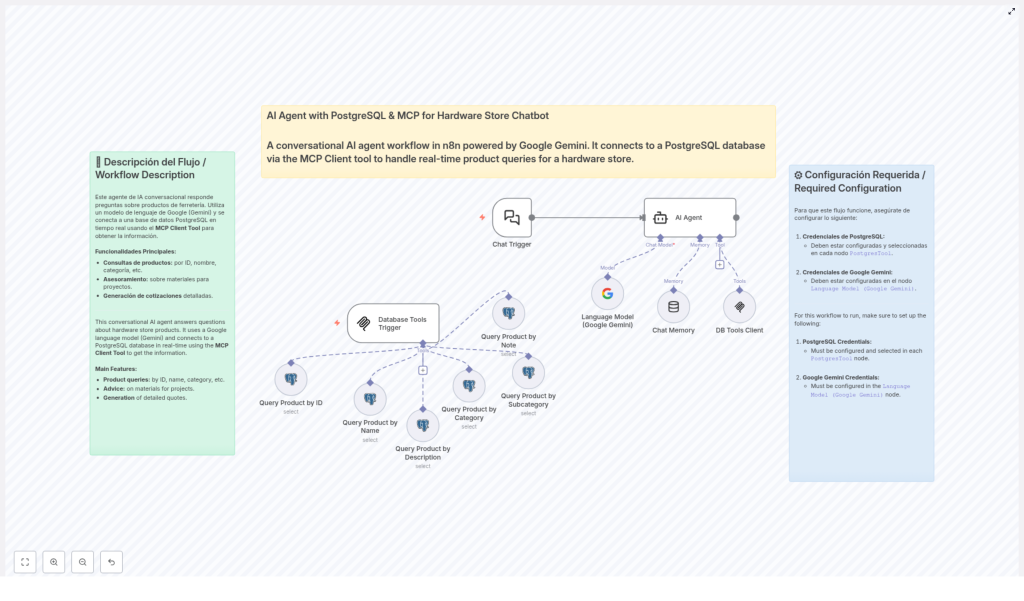
AI Agent with PostgreSQL for Hardware Store Chatbot
Imagine having your best hardware expert online 24/7
Picture this: a customer lands on your website late in the evening, wondering which drywall system they should use, how many panels they need, and what screws go with them. Instead of waiting for store hours, they just ask a chatbot, get accurate product suggestions, and even a quote – all in one conversation.
That is exactly what this n8n workflow template is built to do. It connects an AI agent powered by Google Gemini with your PostgreSQL hardware product database using the MCP Client. The result is a conversational AI that behaves like a knowledgeable hardware store assistant, answering real-time product questions and guiding customers through their projects.
What this n8n template actually does
At its core, this workflow turns your product database into a smart, interactive assistant. Instead of customers browsing endless product lists, they can just talk to the chatbot in natural language and get:
- Instant product details like price, availability, and dimensions
- Help choosing the right materials for specific projects
- Recommendations for complementary products
- Itemized quotations with quantities and totals
All of this is driven by a combination of Google Gemini for language understanding and generation, and PostgreSQL for accurate, up-to-date product data.
When should you use this workflow?
This template is a great fit if you:
- Run a hardware store or sell construction materials
- Have your product catalog stored in a PostgreSQL database
- Want to offer smarter, more interactive support on your website or chat channels
- Need customers to quickly find the right products without calling or visiting in person
If your customers often ask things like “What screws do I need for this panel?” or “Can you help me calculate materials for a ceiling?”, this workflow can take a huge load off your staff and improve the customer experience at the same time.
How the n8n workflow is structured
Let us walk through how everything connects behind the scenes. The automation is built around a few key pieces that work together inside n8n.
1. Chat Trigger – where the conversation starts
The workflow begins with a Chat Trigger. This is the entry point that receives customer questions from your chat interface. Whether someone asks about a specific product, a category, or a project, this trigger passes the message into the rest of the workflow.
2. AI Agent with Google Gemini – the brain of the assistant
Once the query is received, it is handed over to the AI Agent, which uses the Google Gemini Language Model. This is what allows the assistant to:
- Understand natural language questions
- Decide what information it needs from the database
- Generate clear, conversational responses
The AI Agent is not working alone though. It is tightly integrated with your database through a special client.
3. DB Tools Client and Database Tools Trigger – the bridge to PostgreSQL
The DB Tools Client is what connects the AI Agent to your shared PostgreSQL database of hardware products. When the AI realizes it needs product data, it uses this client to send queries to the database.
Those queries are routed through a Database Tools Trigger, which then directs them to different PostgreSQL nodes. Each node is specialized for a specific type of search, so the AI can look up products in a very flexible way.
How product search works inside the workflow
Instead of a single generic search, the template includes several PostgreSQL nodes, each tailored to a different kind of query. This gives the AI a lot of control over how it retrieves data.
- Query Product by ID – Perfect when the customer or system already knows the unique product identifier.
- Query Product by Name – Looks up products by their commercial name, such as a specific panel or screw type.
- Query Product by Description – Searches based on descriptive text, ideal when the user is not sure of the exact product name.
- Query Product by Category – Filters products by top-level categories like Paneles or Tornillería.
- Query Product by Subcategory – Allows more precise searches, for example Tablaroca or Canales.
- Query Product by Note – Searches using technical notes or additional information stored with the product.
Because the AI Agent can choose between these options, it can handle a wide range of customer questions and still return accurate, relevant results.
Key features that make this template so useful
Real-time product information
Your customers can ask things like:
- “Do you have this panel in stock and what size is it?”
- “How much does this screw cost per box?”
- “What are the dimensions and weight of this product?”
The chatbot uses live data from your PostgreSQL database, so responses include up-to-date details like availability, price, dimensions, and even complementary products that go well together.
Smart project guidance and recommendations
This is where the AI really shines. It does not just list products, it can also:
- Advise on drywall systems, ceilings, and finishing materials
- Help calculate approximate quantities for a project
- Suggest appropriate products for specific use cases
So a customer might say, “I am building a drywall partition for a 4×3 meter wall, what do I need?” and the AI can walk them through the materials they should consider.
Automatic quotation generation
Once the customer has decided what they want, the AI Agent can pull everything together into a clear quote. It can generate:
- Itemized lists of products
- Quantities for each item
- Prices and totals
This makes it much easier for customers to move from “just browsing” to “ready to buy”, without needing manual intervention from your team.
Flexible multi-criterion searching
Because the workflow supports searching by ID, name, category, subcategory, description, and notes, customers can phrase their questions naturally. Whether they know the exact product code or just have a vague description, the AI can still find what they are looking for.
Technical setup: what you need to configure
To get this template working smoothly in your own environment, there are a few technical pieces you will need to set up in n8n.
PostgreSQL credentials
Every PostgreSQL node in the workflow needs valid connection details. You will want to configure:
- Host, port, and database name
- User and password
- Any required SSL or network settings
Make sure these credentials are consistent across all nodes that access your shared hardware product database.
Google Gemini API key
The Google Gemini Language Model powers the AI Agent’s understanding and responses. To use it, you will need a valid Google Gemini API key configured in n8n. This key allows the workflow to send user messages to the model and receive natural language replies.
MCP Client Tool configuration
The MCP Client Tool is what makes real-time communication between the AI Agent and PostgreSQL possible. It works together with the Database Tools Trigger to:
- Receive data requests from the AI Agent
- Route them to the correct PostgreSQL query node
- Return the results back to the AI so it can respond to the user
Once this is set up, your AI assistant can dynamically query your product data during a conversation, instead of relying on static or outdated information.
What the customer experience feels like
From the customer’s point of view, they are not interacting with a complicated system. They are simply chatting with what feels like an expert hardware store assistant.
The AI can:
- Understand natural, everyday language
- Answer technical questions with clear explanations
- Provide technical specifications and availability
- Suggest ways to improve or complete their project
The tone remains professional but helpful, so customers feel supported rather than overwhelmed. It is like having your most knowledgeable salesperson available in every chat window, all the time.
Why this template makes your life easier
Instead of building a full AI and database integration from scratch, this n8n workflow gives you a ready-made structure that you can adapt to your store. You save time on development, reduce repetitive customer support tasks, and help customers move faster from idea to purchase.
It is especially powerful if you are already using PostgreSQL to manage your catalog, since the template is designed to plug right into that setup with some configuration.
Ready to try it in your own hardware store?
If you manage a hardware store or work with construction materials, this AI agent can become a key part of your digital customer service. You will be able to provide:
- Precise and instant product information
- Personalized recommendations for each project
- Automatic, clear quotations that customers can act on
All through a conversational AI that runs on top of n8n, Google Gemini, and your PostgreSQL database.
Want to explore how this could fit into your infrastructure or existing tools? Reach out and start modernizing your customer experience with an AI assistant tailored to hardware and construction products.
