


Automated Client Onboarding Workflow for SaaS & Agencies
What You Will Learn
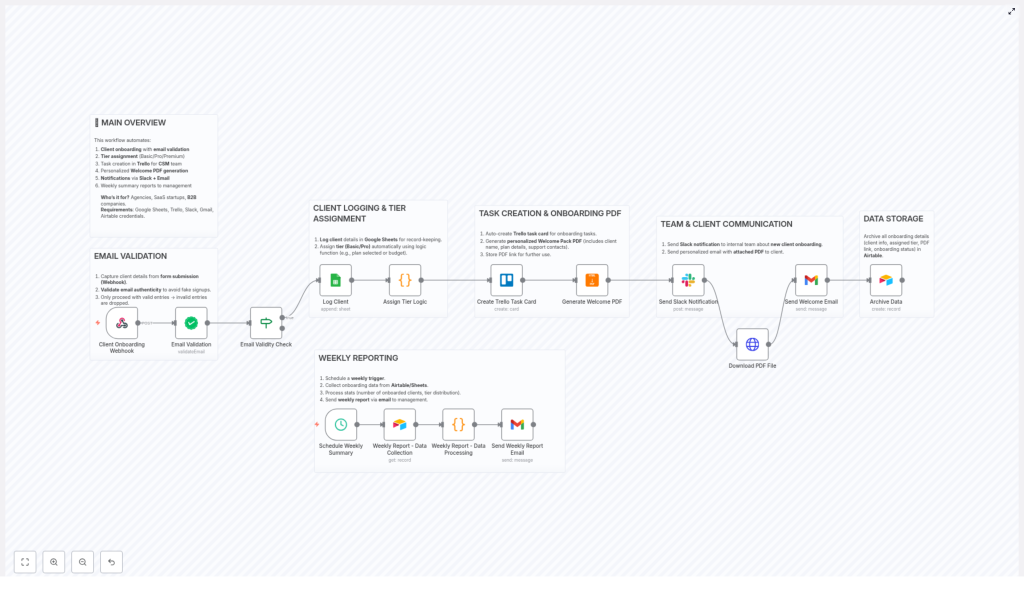
This guide walks you through an n8n workflow template that fully automates client onboarding for SaaS products, agencies, and B2B teams. By the end, you will understand:
- How the workflow captures client data and validates emails using a webhook and verification service
- How onboarding tiers and priorities are assigned based on client plans
- How Google Sheets, Trello, Slack, Gmail, and Airtable work together in the automation
- How a personalized Welcome Pack PDF is generated and delivered to the client
- How weekly onboarding reports are created and sent to management
This article is designed to be instructional and step-by-step, so you can both understand the logic and confidently adapt the template in your own n8n instance.
Workflow Overview
The automated client onboarding workflow is built in n8n and connects several common SaaS tools:
- n8n Webhook to receive client form submissions
- Email verification service to validate client emails
- Google Sheets for centralized client logging
- Trello for Customer Success task management
- Slack for internal notifications
- Gmail (or another email node) for client communication
- Airtable for structured storage and reporting
- PDF generation for personalized Welcome Packs
The goal is to move from a manual, error-prone onboarding process to a fully automated pipeline that starts with a form submission and ends with weekly reports for your leadership team.
Core Capabilities of the Template
Key Automation Features
- Client Onboarding Webhook – receives client details from your onboarding form and starts the workflow.
- Email Validation – checks the authenticity of the email to filter out spam or invalid entries.
- Automatic Tier Assignment – maps client plans (Free, Pro, Enterprise) to onboarding tiers (Basic, Standard, Premium) and sets priority.
- Client Logging in Google Sheets – keeps a live, shareable record of all onboarding clients.
- Trello Task Creation – creates onboarding task cards for Customer Success Managers with clear next steps.
- Personalized Welcome Pack PDF – generates a custom PDF with client details, plan, priority, and onboarding ID.
- Internal & Client Notifications – notifies your team in Slack and sends a welcome email with the PDF attached to the client.
- Data Archiving in Airtable – stores all onboarding data for reporting and auditing.
- Weekly Reporting – compiles weekly onboarding stats from Airtable and emails a summary to management.
How the n8n Workflow Runs: Step-by-Step
In this section, we will walk through the full onboarding flow as it happens inside n8n, from the first client form submission to the weekly summary email.
Step 1 – Start With a Webhook and Validate the Email
The automation begins when a new client submits your onboarding form. The form is connected to an n8n Webhook node, which receives fields such as:
- Client name
- Email address
- Selected plan (Free, Pro, Enterprise)
- Any additional onboarding details you include
As soon as the webhook receives the data, the next node in the flow calls an email verification service. This service checks whether the email address is valid and can be used for communication.
In practice, the workflow does something like this:
- If the email is valid, the execution continues to the next steps.
- If the email is invalid, the workflow stops or can be routed to an error-handling branch, which prevents fake or mistyped signups from entering your system.
This early validation keeps your CRM, sheets, and tools clean and avoids wasted time on bad data.
Step 2 – Log the Client and Assign Tiers in n8n
Once the email passes validation, n8n moves on to two key operations that happen in parallel logic:
- Client Logging in Google Sheets
- Tier and Priority Assignment
2.1 Log the Client in Google Sheets
An n8n Google Sheets node writes the client data into a dedicated sheet. Typical columns might include:
- Client name
- Selected plan
- Onboarding tier
- Priority level
- Onboarding ID or reference
- Timestamp
This creates a live, centralized view of all onboarding clients that can be shared with your team without giving them direct access to n8n.
2.2 Use Code-Based Logic to Assign Tiers
At the same time, a Function node or similar logic node evaluates the client’s selected plan. The logic maps plans to onboarding tiers and priority levels. A common setup is:
- Enterprise plan → Premium onboarding tier with high priority
- Pro plan → Standard onboarding tier with medium priority
- Free plan → Basic onboarding tier with lower priority
The workflow attaches these computed values to the client data, which will be used in later steps such as Trello card creation, PDF generation, and Airtable storage.
Step 3 – Create Trello Tasks and Generate the Welcome Pack PDF
With the client data enriched and stored, the workflow now focuses on making onboarding actionable for your Customer Success team and clear for the client.
3.1 Create a Trello Card for the CSM Team
An n8n Trello node automatically creates a card in your Customer Success or onboarding board. The card typically includes:
- Card title: Client name and plan
- Description: Key onboarding details, assigned tier, and any internal notes
- Labels or lists: Reflecting the onboarding tier or status (for example, “Premium”, “New”, “In progress”)
- Due dates or checklists: Optional, to guide the CSM through the onboarding steps
This ensures that every valid signup immediately appears as a task for the responsible team, without manual data entry.
3.2 Generate a Personalized Welcome Pack PDF
In parallel or right after Trello card creation, the workflow triggers a PDF generation step. Using the client data and assigned tier, n8n generates a customized Welcome Pack that can include:
- Client name
- Selected plan and onboarding tier (Basic, Standard, Premium)
- Priority level
- Onboarding ID or reference number
- Key steps for getting started
The PDF node outputs a file link or binary data, which the workflow will later attach to the client email and store in Airtable. This document sets expectations and gives the client a professional, personalized starting point.
Step 4 – Notify Your Team and Welcome the Client
After the Welcome Pack PDF is generated, the workflow moves into communication mode, targeting both your internal team and the client.
4.1 Internal Slack Notification
An n8n Slack node sends a message to a chosen channel, such as #new-clients or #onboarding. The message usually includes:
- Client name and email
- Selected plan and onboarding tier
- Onboarding ID
- Link to the Trello card or Google Sheets row
This instant notification keeps the team aligned and ensures that high-priority clients are seen and handled quickly.
4.2 Send the Welcome Email With PDF Attachment
Next, a Gmail node or similar email node sends a personalized welcome email to the client. The email typically:
- Greets the client by name
- Mentions their selected plan and what to expect from onboarding
- Includes the Welcome Pack PDF as an attachment
- Provides links or instructions for the first steps inside your product or service
This step turns the automation into a client-facing experience that feels tailored, even though it is fully automated in n8n.
Step 5 – Archive All Onboarding Data in Airtable
To keep your data structured and ready for reporting, the workflow then archives the onboarding record in Airtable.
An n8n Airtable node creates a new record that typically includes:
- Client name and email
- Selected plan and assigned onboarding tier
- Priority level
- Onboarding status
- Link to the Welcome Pack PDF
- Links or IDs for Trello and Google Sheets entries
- Timestamps and any additional metadata
This Airtable base becomes the single source of truth for all onboarding-related data, which is especially useful for audits, long-term reporting, or integration with other tools.
Step 6 – Generate Weekly Onboarding Reports
The final part of the template focuses on management reporting and ongoing visibility.
6.1 Scheduled Weekly Trigger
A Schedule node in n8n is configured to run once a week. When triggered, it starts a separate branch of the workflow dedicated to reporting.
6.2 Pull Data From Airtable
The workflow uses an Airtable node to fetch all relevant onboarding records for the reporting period. This might include all clients onboarded in the last 7 days or all clients with a specific status.
6.3 Calculate Key KPIs
A data processing node, such as a Function or Aggregate node, calculates key onboarding metrics, for example:
- Total number of new clients onboarded
- Distribution by plan (Free, Pro, Enterprise)
- Distribution by onboarding tier (Basic, Standard, Premium)
The result is a concise snapshot of your onboarding performance for the week.
6.4 Email the Report to Management
Finally, a Gmail or email node composes an email with the weekly stats and sends it to your management or leadership distribution list. The email can include:
- Summary counts and percentages
- Highlights of higher tier or Enterprise onboardings
- Optional CSV or attached report files generated from the Airtable data
This ensures that stakeholders stay informed without having to log into Airtable or n8n directly.
Benefits of Using This n8n Onboarding Template
- Efficient and scalable onboarding – Automates repetitive manual tasks so your team can handle higher volumes of clients without extra headcount.
- Improved data accuracy – Email verification and centralized logging in Google Sheets and Airtable reduce errors and keep your records clean.
- Better team coordination – Trello task creation and Slack notifications keep Customer Success and internal teams aligned on new signups.
- More personalized client experience – Customized Welcome Pack PDFs and tailored emails make the process feel high-touch, even when automated.
- Actionable reporting – Weekly summary emails with KPIs help management track onboarding performance and adjust strategy as needed.
Quick Recap
To summarize, this n8n workflow template:
- Captures client details through a webhook from your onboarding form.
- Validates emails to filter out invalid signups.
- Logs clients in Google Sheets and automatically assigns onboarding tiers and priorities.
- Creates Trello cards for Customer Success and generates a personalized Welcome Pack PDF.
- Notifies your internal team in Slack and sends a welcome email with the PDF to the client.
- Archives all onboarding data in Airtable for structured storage and analysis.
- Runs a weekly scheduled report that pulls Airtable data, calculates KPIs, and emails a summary to management.
FAQ: Implementing This Workflow in n8n
Do I need all the tools to use this template?
No, but the full value comes from using the complete stack: Google Sheets, Trello, Slack, Gmail, and Airtable. You can adapt or replace tools as long as you configure the corresponding n8n nodes.
Can I change the tier assignment logic?
Yes. The tier and priority mapping is handled by a logic or Function node. You can edit the conditions to match your own plans, tiers, and internal rules.
Is the email verification step mandatory?
Technically no, but it is highly recommended. Validating emails at the start of the workflow prevents invalid or fake signups from flowing through your entire system.
How customizable is the Welcome Pack PDF?
The PDF template can be customized with your branding, messaging, and structure. You can add or remove fields as long as the data is available in the workflow.
Can I adjust the weekly reporting schedule?
Yes. The Schedule node can be configured to run at any interval, such as daily, weekly, or monthly, depending on your reporting needs.
Get Started With This Automated Onboarding Workflow
By implementing this n8n workflow template, your SaaS or agency can:
- Save time on manual onboarding tasks
- Reduce data entry errors
- Provide a smoother, more professional onboarding experience
- Give management clear visibility into onboarding performance
Start automating your client onboarding today by connecting your tools in n8n and customizing this template to fit your process.
Need help setting up or tailoring the workflow to your stack? Our expert team can assist with implementation, customization, and optimization.
