


Introduction
High quality lead generation is a fundamental requirement for any B2B organization that aims to scale efficiently. Manual prospecting and research are not only time consuming, they are also difficult to standardize and optimize. By using n8n to orchestrate data collection, enrichment, and qualification, you can build a repeatable and measurable lead generation engine that supports your sales pipeline with minimal manual effort.
This article explains how to design an effective B2B lead generation workflow template in n8n. It walks through the complete process from initial keyword based discovery to AI powered lead qualification and CRM handoff, with a focus on automation best practices, node configuration, and robust data handling.
Why Use n8n for B2B Lead Generation?
n8n is an extensible, open source workflow automation platform that connects APIs, services, and internal tools through visual workflows. It is particularly well suited for B2B lead generation because it can:
- Integrate search, scraping, enrichment, and CRM tools in a single orchestrated pipeline.
- Run custom logic and transformations through Code and Function nodes.
- Embed AI based decision making as part of a governed, auditable workflow.
- Scale from simple experiments to production grade lead generation systems.
Instead of stitching together ad hoc scripts, n8n allows automation professionals to design and maintain a robust, version controlled lead generation workflow that is transparent and easy to adapt as the ICP or market focus evolves.
Use Case Overview: Automated B2B Lead Discovery and Qualification
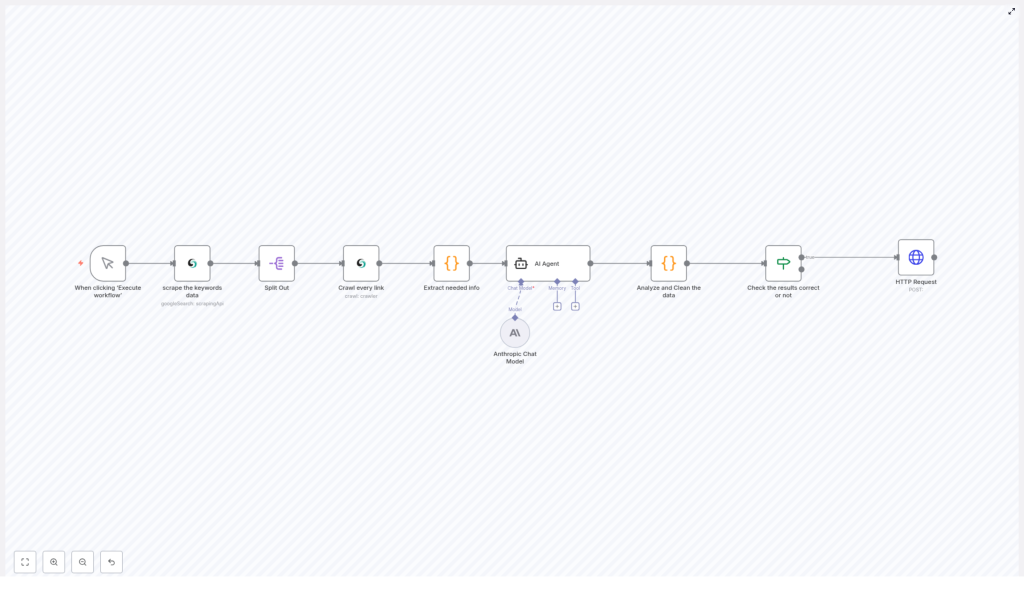
The workflow template covered in this article automates the journey from initial discovery of potential companies to delivery of validated, scored leads into downstream systems. At a high level, the process consists of the following stages:
- Discovery via keyword based search to identify candidate companies that match your ICP.
- Result decomposition and crawling to extract website content from each relevant domain.
- Data extraction and normalization to capture contact details and key company attributes.
- AI driven lead qualification using an Anthropic model via the AI Agent node.
- Validation, filtering, and routing of only qualified leads into CRM or other sales tools through HTTP requests.
The result is an end to end B2B lead generation pipeline that can be executed on demand, tuned for different verticals, and integrated with existing sales operations.
Workflow Architecture and Trigger Strategy
Manual Trigger for Controlled Execution
The template uses a manual trigger as its entry point. The workflow starts with the When clicking “Execute workflow” trigger node. This design is suitable for teams that want explicit control over when the pipeline runs, for example to launch targeted campaigns, test new ICP criteria, or avoid overloading external services.
In production, this trigger can be replaced or complemented with scheduled triggers or event based initiators, but the manual trigger is ideal for initial configuration, validation, and debugging.
Stage 1: Discover Potential Leads via Keyword Search
Scraping Keyword Based Google Search Results
The first operational step is a node that performs a Google search based on predefined B2B focused keywords. Typical examples include:
- “software companies”
- “enterprise clients”
- “marketing agencies”
- other phrases aligned with your ideal customer profile (ICP)
This node collects URLs from the organic search results that are likely to correspond to businesses in your target segment. From an automation best practice perspective, maintain your keyword set in a central location or environment variable so it can be updated without editing node logic.
Splitting Search Results for Parallel Processing
Once the search results are retrieved, a Split Out node is used to break the list of results into individual items. Each organic result is transformed into a separate execution branch so that subsequent steps can process each URL independently.
This pattern improves observability and error handling. If a single URL fails to crawl or parse, it does not block the entire batch, and you can apply conditional logic at the item level.
Stage 2: Website Crawling and Content Acquisition
Crawling Target Websites with Scrapeless
For each URL, the workflow invokes a Scrapeless crawler node. This node visits the website and collects visible content. To balance coverage and performance, the crawl is configured with a page limit so the workflow captures enough context for qualification without unnecessary depth.
Key considerations when configuring this node include:
- Respecting rate limits and robots.txt policies.
- Defining sensible depth limits to avoid irrelevant sections.
- Ensuring that the crawler focuses on content that reflects the company profile, services, and contact details.
Stage 3: Data Extraction, Cleaning, and Structuring
Transforming Raw Crawl Output in a Code Node
The raw HTML or markdown returned by the crawler is not yet suitable for AI analysis or CRM ingestion. A custom Code node is used to normalize and enrich this data. The logic in this node typically performs the following tasks:
- Cleaning the content by removing navigation menus, images, legal notices, and privacy references that do not contribute to lead qualification.
- Extracting key company metadata such as business name, email addresses, and phone numbers.
- Identifying and segmenting important sections like “About”, “Services”, and “Contact” pages.
- Building a concise, structured summary of the website content that is optimized for downstream AI consumption.
- Assessing basic content quality indicators that can later support scoring or filtering.
Implementing this logic in a Code node gives you full control over parsing and allows you to adapt quickly if website structures or target industries change.
Stage 4: AI Powered Lead Qualification
Configuring the AI Agent Node with Anthropic
With the website data cleaned and structured, the workflow leverages an AI Agent node that uses an Anthropic language model. A carefully crafted system prompt guides the model to interpret the structured content and return a standardized lead object.
The AI Agent is instructed to extract and infer key attributes, such as:
- Company name and primary domain.
- Industry and business type.
- Estimated company size, where possible.
- Relevant contact information, for example emails and phone numbers.
- Additional context that supports sales qualification.
The node also requests a lead score. This score is based on factors such as alignment with the ICP, completeness of the data, and perceived quality of the website content. Using AI at this stage allows the workflow to capture nuance that simple rule based filters might miss, while still producing a structured JSON output.
Stage 5: Validation, Normalization, and Quality Control
Analyzing and Cleaning AI Output
Following the AI Agent, the workflow includes a dedicated step to validate and normalize the AI output. A node parses the returned JSON, verifies that it conforms to the expected schema, and handles edge cases such as missing fields or malformed structures.
This layer of validation is critical for building a resilient automation. It ensures that downstream systems receive consistent, high quality data and that errors are caught early in the pipeline rather than at the CRM or sales tool level.
Conditional Filtering Based on Lead Score
Once the data is validated, a conditional node evaluates whether the lead meets predefined qualification criteria. Common conditions include:
- Lead score greater than or equal to a configured threshold.
- Successful processing flags from the previous nodes.
- Presence of mandatory fields such as company name and at least one contact method.
Only leads that satisfy these conditions are allowed to pass through to the final delivery stage. This approach prevents low quality or incomplete records from polluting your CRM and keeps sales teams focused on high potential opportunities.
Stage 6: Delivery to CRM or Sales Stack
Sending Qualified Leads via HTTP Request
The final step uses an HTTP Request node to push qualified leads to external systems. The node is typically configured to perform an HTTP POST request to:
- CRM platforms such as HubSpot, Salesforce, or Pipedrive.
- Marketing automation tools or lead nurturing workflows.
- Messaging or notification services for real time alerts to sales teams.
The payload structure can be customized to align with the target system’s API schema. This makes the workflow adaptable to different stacks while keeping the core qualification logic within n8n.
Automation Best Practices for B2B Lead Generation with n8n
- Iterate on keywords regularly so that your discovery stage reflects evolving ICP definitions, new verticals, and updated positioning.
- Optimize lead scoring thresholds based on feedback from sales. Adjust the minimum score and required attributes to balance volume and quality.
- Maintain compliance with data protection and privacy regulations when scraping websites and collecting contact information. Document your data sources and purposes.
- Monitor workflow performance using n8n’s execution logs and analytics. Track error rates, lead acceptance ratios, and processing time to identify bottlenecks.
- Version and test prompts used in the AI Agent node. Small prompt changes can significantly affect output quality, so treat them as part of your configuration management.
Benefits of an Automated n8n Lead Generation Pipeline
Implementing this workflow in n8n delivers tangible advantages for B2B teams:
- Significantly reduced manual research time and faster identification of relevant companies.
- Consistent data cleansing and structuring that improves reporting and downstream automation.
- Better ICP alignment through AI driven scoring instead of purely manual judgment.
- Seamless integration with existing sales and marketing systems via HTTP and other native n8n nodes.
Conclusion
An automated B2B lead generation workflow built on n8n, coupled with intelligent web scraping and Anthropic based AI qualification, gives your organization a scalable and repeatable engine for sourcing high intent prospects. Instead of spending hours on manual research, sales teams can focus on engagement, strategy, and closing.
The workflow template described here illustrates how to connect discovery, crawling, extraction, AI analysis, and CRM integration into a cohesive system that can be adapted to different industries and company sizes.
Implement this workflow in your n8n instance to accelerate your pipeline with structured, qualified B2B leads.
Call to Action
If you require support tailoring this lead generation workflow to your specific ICP, tech stack, or compliance requirements, consider collaborating with automation specialists or exploring n8n’s extensive community resources and documentation.
