


Automate Notion Entries with n8n Webhook Integration
A Marketer, a Messy Spreadsheet, and a Missed Opportunity
On a Tuesday afternoon, Mia stared at her Notion dashboard and sighed. As a marketing manager for a fast-growing startup, she lived inside forms, landing pages, and campaign links. Every day, new leads came in through different tools, and every day she copied and pasted their details into a Notion database so her team could keep track of everything.
Except she was always behind.
Some form submissions never made it into Notion. Interesting URLs and references got lost in chat threads. Feedback from users sat in inboxes instead of in a central place. By the time Mia finished the manual updates, it was already time to start on the next campaign.
She did not need another tool. She needed a way for the tools she already used to talk to Notion automatically.
That was the day she discovered an n8n workflow template that could capture data from a webhook and create Notion database pages on its own.
Discovering n8n and the Webhook-to-Notion Template
Mia had heard of n8n as an automation platform, but she had never tried building a workflow herself. When she came across a template titled something like “Webhook to Notion,” it sounded exactly like what she needed.
The promise was simple but powerful: send a POST request to a webhook, and have that data appear as a new page in a Notion database. No more copy-paste. No more forgotten entries.
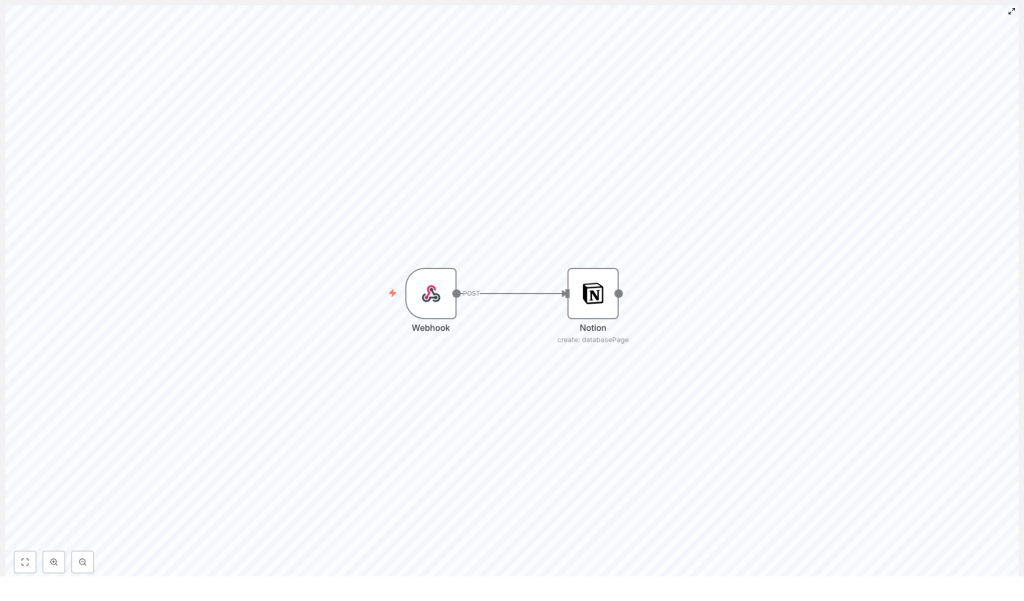
Under the hood, the workflow relied on just two main pieces:
- Webhook node that listens for incoming HTTP POST requests and receives structured data.
- Notion node that uses the Notion API to create new pages in a chosen database using that data.
If she could get those two nodes working together, her Notion workspace would finally reflect reality in real time.
Rising Action: Turning Chaos Into a Clean Data Flow
Mia decided to test the template with one of her biggest pain points: collecting form submissions from a custom landing page and logging them straight into Notion.
Step 1 – Setting Up the Webhook Node
Inside the n8n editor, she dragged a Webhook node onto the canvas. This would be the entry point for all the data she wanted to send to Notion.
She configured it carefully:
- Set the HTTP method to
POSTso her forms and tools could send data in the body of the request. - Defined a clear path, something like
webhook-to-notion, so she could easily recognize and reuse it later.
This node would now act as the receiver for any JSON payload she pushed from her forms, scripts, or other services.
Step 2 – Connecting n8n to Her Notion Database
Next, she added a Notion node and set its operation to create a new database page. This was where the magic would happen. Every time the webhook got a POST request, this node would turn the incoming data into a fresh Notion entry.
She selected the target databaseId, the specific Notion database where she wanted all her leads and notes to land.
Then she faced a small but important question: what should the title of each Notion page be? Leads could come with different kinds of data. Sometimes there was a name, sometimes only a URL, and sometimes just a short note.
To keep things flexible, Mia used an expression in the title field of the Notion node:
= {{ $json.body.title || $json.body.url || 'New Entry' }}
This simple line gave her a smart fallback logic:
- If the incoming JSON body had a
title, use that. - If not, but there was a
url, use the URL instead. - If neither was present, default to
New Entry.
No matter what kind of data came in, the Notion page would always have a usable title.
Step 3 – Linking the Nodes and Testing the Flow
With both nodes configured, Mia connected the output of the Webhook node to the input of the Notion node. This connection meant that every time the webhook received a POST request, the Notion node would automatically run and create a new page.
She activated the workflow, sent a test POST request with a JSON payload from her form tool, and refreshed her Notion database.
There it was. A brand new page, titled exactly as she expected, with the data neatly in place.
For the first time, her Notion database did not feel like a chore. It felt like a living, automated system.
The Turning Point: From Manual Entry to True Automation
Once the basic workflow was working, Mia started to see how much more she could do with the same template. The core setup – a webhook feeding into Notion – was flexible enough to support several of her daily tasks.
How She Started Using the n8n Notion Workflow
- Collecting form submissions She pointed her marketing forms to the n8n webhook URL. Every time a user filled out a form, a POST request hit the webhook and a new Notion page appeared. No more manual logging, no more forgotten signups.
- Bookmarking URLs and references When she or her teammates found an article, tweet, or resource worth saving, they sent it via a small script or integration to the same webhook. The Notion node created a database entry with the URL as the title when no other title was provided.
- Recording user feedback and issues Feedback from support tools or internal forms got posted to the webhook, then stored in a dedicated Notion database. Her team now had a structured backlog of user comments and bug reports that they could filter and prioritize.
What began as a simple experiment became a central part of her workflow. The more she used the template, the more she trusted Notion as a single source of truth, backed by n8n automation.
Strengthening the Workflow: Security, Validation, and Reliability
With more and more data flowing into Notion, Mia knew she had to think beyond just getting it to work. She needed her automation to be secure, accurate, and resilient.
Keeping the Webhook Secure
She started by tightening security around the Webhook node. Instead of accepting any incoming request, she implemented webhook secret tokens so that only trusted sources could send data.
By validating these secrets before processing the payload, she reduced the risk of unwanted or malicious requests hitting her Notion database.
Validating Incoming Data
Next, she added extra nodes between the Webhook and Notion nodes to perform data validation. These checks helped ensure that required fields were present and properly formatted before Notion tried to create a page.
For example, she could verify that an email field was not empty or that URLs followed a valid structure. This reduced errors and kept her Notion database clean and consistent.
Handling Errors Gracefully
Finally, Mia configured error workflows in n8n. If something went wrong, such as Notion being temporarily unavailable or a malformed payload, the workflow could:
- Trigger retries to attempt the request again.
- Send notifications so she knew something needed attention.
Instead of silently failing, her automation became transparent and dependable.
Resolution: A Notion Workspace That Updates Itself
Weeks later, Mia looked at her Notion space and barely recognized her old process. What used to be a tangle of spreadsheets, emails, and forgotten notes had turned into a streamlined system powered by a simple n8n webhook to Notion workflow.
Her team could trust that:
- Form submissions were logged instantly in Notion.
- Interesting links and references were captured the moment they were shared.
- User feedback and issues were organized in a single, searchable database.
Most of the work was still driven by the same two core nodes, the Webhook node and the Notion node, but now wrapped in thoughtful security, validation, and error handling. The automation saved time, reduced manual mistakes, and gave Mia the mental space to focus on strategy instead of data entry.
Start Your Own Webhook-to-Notion Journey
If you recognize yourself in Mia’s story – juggling forms, URLs, and feedback across different tools – this n8n Notion automation can do the same for you. By connecting a Webhook node to a Notion node, you can build a workflow that:
- Captures data from any tool that can send an HTTP POST request.
- Creates new pages in your chosen Notion database automatically.
- Adapts dynamically using expressions like:
= {{ $json.body.title || $json.body.url || 'New Entry' }}
Whether you are a marketer, founder, or developer, integrating n8n and Notion can transform how you organize and use your data.
Ready to set up your own webhook to Notion integration and experience effortless data management? Get started with n8n, load the template, and let your Notion workspace finally keep up with the pace of your work.
