

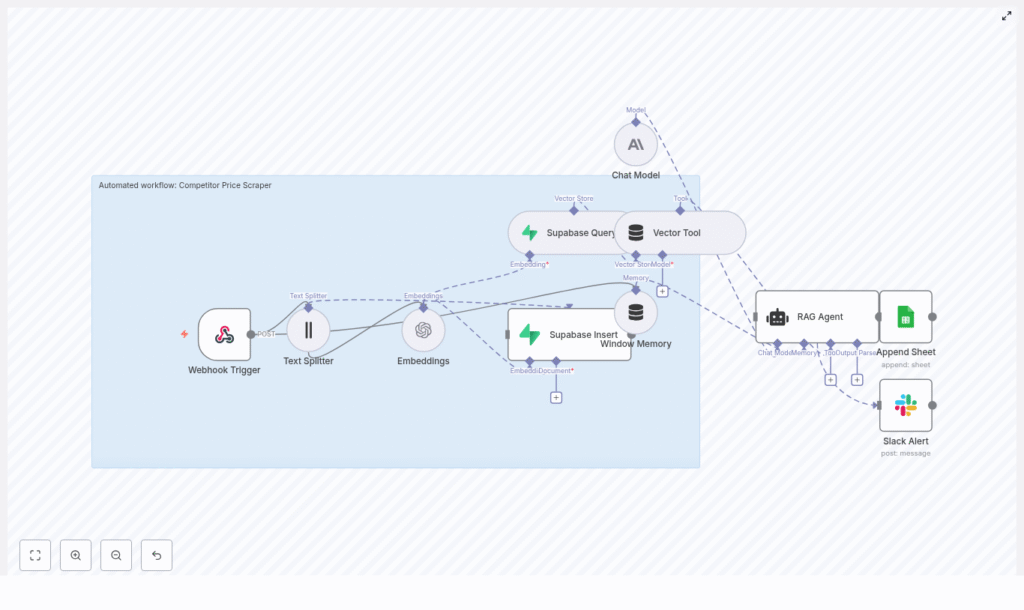
Automated Competitor Price Scraper with n8n, Supabase, and RAG
Monitoring competitor pricing at scale is a core requirement for ecommerce teams, pricing analysts, and marketplace operators. This guide documents a production-ready n8n workflow template that ingests scraped product data, converts it into vector embeddings, persists those vectors in Supabase, and exposes them to a Retrieval-Augmented Generation (RAG) agent for context-aware analysis, reporting, and alerts.
The article is organized as a technical reference, with an overview of the data flow, architecture, and node-by-node configuration, followed by setup steps, scaling guidance, and troubleshooting notes.
1. Workflow overview
At a high level, this n8n workflow performs the following tasks:
- Accepts scraped competitor product data through a Webhook Trigger (typically from a crawler or third-party scraper).
- Splits long product descriptions or HTML content into text chunks optimized for embeddings.
- Generates OpenAI embeddings for each chunk.
- Persists the embeddings and associated metadata into a Supabase vector table.
- Exposes the vector store to a RAG agent via a Supabase Vector Tool for retrieval of relevant context.
- Uses an Anthropic chat model to perform analysis, summarization, or commentary on price changes.
- Appends structured results to Google Sheets for logging, dashboards, and downstream BI tools.
- Sends Slack alerts whenever the RAG agent encounters runtime errors.
The template is designed to be production-ready, but you can easily customize individual nodes for specific pricing strategies, product categories, or internal reporting formats.
2. Architecture and data flow
The workflow can be viewed as a linear pipeline with a retrieval and analysis layer on top:
- Ingress: A
Webhooknode receives POST requests containing product metadata, pricing information, and raw text or HTML content. - Preprocessing: A
Text Splitternode segments large content into overlapping chunks to preserve local context. - Vectorization: An
Embeddingsnode calls OpenAI’stext-embedding-3-smallmodel to generate dense vector representations for each chunk. - Storage: A
Supabase Insertnode writes the vectors and metadata into a Supabase vector table (index namecompetitor_price_scraper). - Retrieval: A combination of
Supabase QueryandVector Toolnodes exposes relevant vector documents to a RAG agent. - Context management: A
Window Memorynode maintains short-term interaction history for multi-turn analysis sessions. - Reasoning: A
Chat Modelnode connected to Anthropic acts as the LLM backend for the RAG agent. - RAG orchestration: A
RAG Agentnode combines retrieved context, memory, and instructions to generate structured outputs. - Logging and observability: An
Append Sheetnode writes results to Google Sheets, while aSlack Alertnode reports errors.
Each component is decoupled so you can adjust chunking, embedding models, or storage strategies without rewriting the full pipeline.
3. Node-by-node breakdown
3.1 Webhook Trigger
The Webhook node is the entry point of the workflow.
- HTTP method:
POST - Example path:
/competitor-price-scraper
Configure your crawler, scraping service, or scheduled job to send JSON payloads to this endpoint. A typical payload should include:
{  "product_id": "SKU-12345",  "url": "https://competitor.example/product/123",  "price": 49.99,  "currency": "USD",  "timestamp": "2025-09-01T12:00:00Z",  "raw_text": "Full product title and description..."
}
Required fields depend on your downstream use, but for most price-intelligence scenarios you should provide:
product_id– Your internal SKU or a stable product identifier.url– Canonical competitor product URL.priceandcurrency– Current observed price and ISO currency code.timestamp– ISO 8601 timestamp of the scrape.raw_textor HTML – Full product title and description, or a cleaned text extraction.
Edge cases:
- If
raw_textis missing or very short, the workflow can still log price-only data, but embeddings may be less useful. - Ensure the payload size stays within your n8n instance and reverse proxy limits, especially when sending full HTML.
3.2 Text Splitter
The Text Splitter node normalizes large bodies of text into smaller, overlapping segments so embeddings capture local semantics.
- Recommended parameters:
chunkSize: 400chunkOverlap: 40
With this configuration, each chunk contains up to 400 characters, and consecutive chunks overlap by 40 characters. This overlap helps preserve continuity for descriptions that span multiple chunks.
Configuration notes:
- For shorter, highly structured content, you can reduce
chunkSizeto minimize unnecessary splitting. - For very long pages, keep
chunkSizemoderate to avoid excessive token usage when generating embeddings.
3.3 Embeddings (OpenAI)
The Embeddings node transforms each text chunk into a numeric vector using OpenAI.
- Model:
text-embedding-3-small
For each chunk, the node:
- Sends the chunk text to the OpenAI embeddings endpoint.
- Receives a vector representation.
- Combines this vector with the original content and metadata for insertion into Supabase.
Metadata best practices:
- Include
product_id,url,price,currency, andtimestamp. - Optionally add
competitor_nameor other keys used for filtering and deduplication.
Error handling: If embeddings fail due to rate limits or transient network issues, configure retries with exponential backoff in n8n, or wrap this node in error branches that route failures to Slack.
3.4 Supabase Insert & Vector Index
The Supabase Insert node persists each embedding and its metadata into a Supabase table configured for vector search.
- Index name:
competitor_price_scraper
A minimal schema for the vector table can look like:
id(uuid)content(text)embedding(vector)metadata(jsonb)created_at(timestamp)
Key points:
- Ensure the
embeddingcolumn dimension matches the OpenAI embedding model dimension. - Store the original chunk text in
contentfor inspection and debugging. - Use
metadatato store all identifying fields needed for filtering, deduplication, and analytics.
Deduplication and upserts: You can implement a composite uniqueness strategy in Supabase such as product_id + competitor_name + timestamp or rely on an upsert pattern to avoid storing multiple identical snapshots.
3.5 Supabase Query & Vector Tool
The Supabase Query node retrieves the most similar vectors for a given query embedding. The Vector Tool node then exposes this retrieval capability to the RAG agent.
Typical flow:
- The RAG agent or a preceding node constructs a query (for example, “show recent price changes for SKU-12345”).
- The workflow generates an embedding for this query or uses the RAG agent’s internal retrieval mechanism.
- The Supabase Query node runs a similarity search against
competitor_price_scraperand returns the top matches. - The Vector Tool node formats these results as context documents for the RAG agent.
Tuning retrieval quality:
- If results look irrelevant, verify that content and metadata are correctly saved and that your vector index is built and used.
- Adjust the number of retrieved documents or similarity thresholds in the Supabase Query node as needed.
3.6 Window Memory
The Window Memory node maintains a limited history of recent interactions between the analyst and the RAG agent.
This is particularly useful when:
- An analyst asks follow-up questions about a specific product or trend.
- You want the agent to maintain conversational continuity without re-sending full context each time.
Keep the window small enough to avoid unnecessary token usage while still capturing the last few turns of the conversation.
3.7 Chat Model (Anthropic)
The Chat Model node is configured to use Anthropic’s API as the language model backend for the RAG agent.
Responsibilities:
- Generate instruction-following, analysis-oriented responses.
- Interpret retrieved context, metadata, and user instructions.
- Produce concise or detailed summaries suitable for logging in Google Sheets.
The model is not called directly by most workflow nodes. Instead, it is wired into the RAG Agent node as the primary LLM.
3.8 RAG Agent
The RAG Agent node orchestrates retrieval and reasoning:
- Receives a system or user instruction, for example, “Summarize any significant price changes for this product compared to previous snapshots.”
- Uses the Vector Tool to retrieve relevant context from Supabase.
- Optionally includes Window Memory to maintain conversational continuity.
- Calls the Chat Model node to generate a structured response.
- Outputs a status summary that is passed to the Google Sheets node.
Error routing: If the RAG Agent throws an error (for example, due to invalid inputs or LLM issues), the workflow routes the error branch to the Slack Alert node for immediate notification.
3.9 Append Sheet (Google Sheets) & Slack Alert
The Append Sheet node logs structured output to a designated Google Sheet.
- Sheet name:
Log(or any name you configure)
Typical entries can include:
- Product identifiers and URLs.
- Current and previous prices, where available.
- RAG agent summaries or anomaly flags.
- Timestamps and workflow run IDs for traceability.
The Slack Alert node is used for error reporting:
- Example channel:
#alerts - Payload includes error message and optionally workflow metadata so you can triage quickly.
This pattern ensures that failures in embedding, Supabase operations, or the RAG agent do not go unnoticed.
4. Configuration and credentials
4.1 Required credentials
Before running the template, provision the following credentials in n8n:
- OpenAI API key for embeddings.
- Supabase project URL and service key for vector storage and queries.
- Anthropic API key for the Chat Model node.
- Google Sheets OAuth2 credentials for the Append Sheet node.
- Slack token for sending alerts.
Store all secrets in n8n’s credential store. Do not expose Supabase service keys to any client-side code.
4.2 Supabase vector table setup
Define a table in Supabase with at least:
id(uuid)content(text)embedding(vector)metadata(jsonb)created_at(timestamp)
Ensure the vector index (competitor_price_scraper) is created on the embedding column and configured to match the embedding dimension of text-embedding-3-small.
5. Step-by-step setup in n8n
- Import the workflow template
Create or reuse an n8n instance and import the provided workflow JSON template for the automated competitor price scraper. - Configure credentials
Add and test:- OpenAI API key.
- Supabase URL and service key.
- Anthropic API key.
- Google Sheets OAuth2 connection.
- Slack token and default channel.
- Prepare Supabase vector table
Create the table with the minimal schema described above and configure the vector indexcompetitor_price_scraper. -

