


Convert CSV to Excel: Easy Workflow Guide
That One CSV You Open “Just For a Second”
You know the drill. You download a CSV, open it in Excel, resize a few columns, hit “Save As”, pick .xlsx, and tell yourself, “This is fine, it only takes a minute.” Then you do it again tomorrow. And the next day. And suddenly your life is 30 percent “Save As” dialogs.
If you have ever thought there must be a better way, you were absolutely right. There is. It is called n8n, and it is like having a tireless robot intern that never complains about repetitive file conversions.
With a simple n8n workflow template, you can grab CSV data from the web, convert it behind the scenes, and get a ready-to-use Excel file with a single click. No more click-click-save-repeat.
Meet Your New CSV to Excel Automation Sidekick
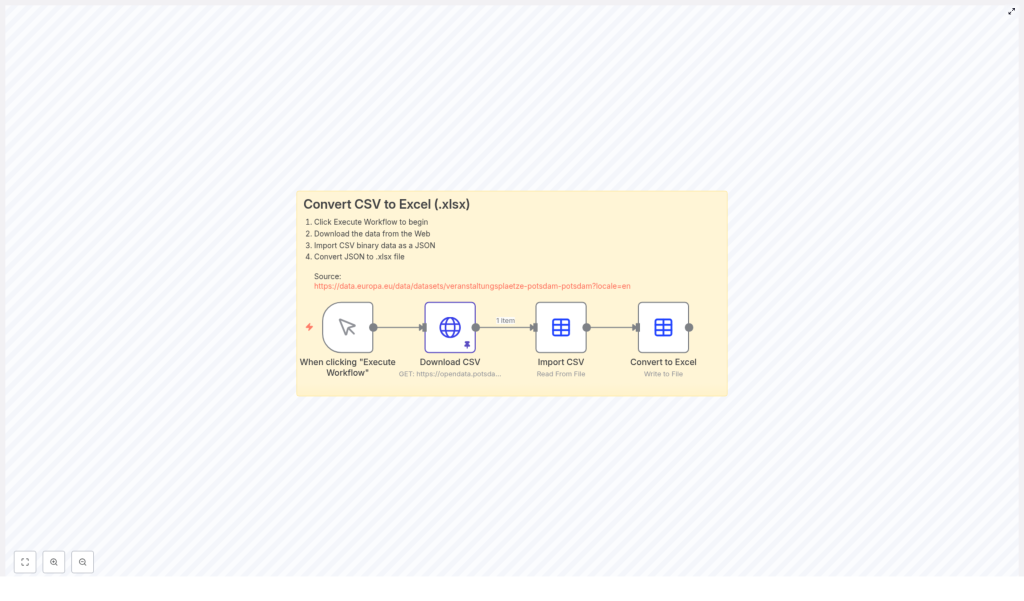
This n8n workflow template handles the full CSV to Excel journey for you so you can stop playing “manual converter” and start doing actual work:
- Downloads the latest CSV file from a specific URL
- Imports the CSV as JSON so n8n can work with it easily
- Transforms that JSON into a clean Excel file in
.xlsxformat - Lets you run everything with a single click inside n8n
In short, it turns a boring routine into a single, satisfying button press. Your future self will send you a thank you email. Automatically, of course.
How the n8n CSV to Excel Workflow Works (Without the Boring Bits)
Under the hood, this workflow is doing a few neat tricks. You do not have to be technical to use it, but it helps to know what is happening so you can customize it later if you want.
Step 1 – You Trigger the Workflow
You start the magic by clicking Execute Workflow in n8n. That one click kicks off the entire process. No “Upload file” dialogs, no digging through your Downloads folder, no guessing which version is the latest.
Step 2 – n8n Fetches the CSV from the Web
Next, the workflow automatically downloads the CSV from this URL:
veranstaltungsplaetze-potsdam CSV
That means every time you run the workflow, n8n pulls the most recent data directly from the source. No more wondering if you are still using last week’s file or if someone quietly updated the dataset while you were not looking.
Step 3 – CSV Gets Imported as JSON
Once the CSV is downloaded, n8n converts it into JSON behind the scenes. If “JSON” sounds like something only developers care about, here is why it is useful for you too:
- JSON is easier for n8n to process programmatically
- It keeps the data structured so it is ready for further automation
- It makes future upgrades simple, like adding filters or extra transformations
You never have to look at the JSON directly unless you want to. n8n handles the conversion quietly in the background while you enjoy not copying and pasting rows into spreadsheets.
Step 4 – JSON Becomes a Nice Clean Excel File
In the final step, the JSON data is turned into an Excel file in .xlsx format. The result is a tidy spreadsheet that is ready for:
- Analysis
- Reporting
- Sharing with your team
No manual conversions, no weird encoding surprises, just a proper Excel file generated automatically every time you run the workflow.
Why Bother Automating CSV to Excel in n8n?
Aside from rescuing your sanity from endless “Save As” cycles, this CSV to Excel automation gives you some very practical advantages:
- Time-saving: Skip repetitive manual conversions and spend more time on work that actually needs your brain.
- Fewer mistakes: Reduce human error that can creep in when you handle files by hand.
- Always current: The workflow always fetches the latest CSV from the source URL, so your Excel file is never out of date.
- One-click operation: Run the whole process from inside n8n with a single click, no coding skills required.
It is the kind of small automation that adds up quickly, especially if you work with recurring reports or regularly updated datasets.
Quick Start: How to Use the CSV to Excel Workflow Template
Getting this running in n8n is much easier than doing your hundredth manual conversion. Here is the simple setup flow:
- Open the workflow template in n8n using the link in the template card below.
- Take a quick tour of the nodes to see how the CSV is downloaded, imported as JSON, and then converted to Excel.
- Click Execute Workflow to run it.
- Once it finishes, download your freshly generated
.xlsxfile and open it in Excel.
That is all you need. No scripts to write, no complex configuration, just a ready-made automation that slots neatly into your daily routine.
Level Up: Ideas for Customizing the Workflow
Once you have the basic CSV to Excel conversion working, you can start turning this simple workflow into a more powerful automation hub. For example, you could:
- Schedule the workflow to run at specific times so you always have up-to-date Excel files waiting for you
- Add filters or transformations to clean or reshape the data before exporting it
- Automatically send the Excel file by email or upload it to cloud storage after conversion
This template is a great starting point for learning how n8n handles CSV, JSON, and Excel in a fully automated process. Once you are comfortable with it, you can mix in other n8n nodes and build more advanced workflows on top.
Try the n8n CSV to Excel Template
This workflow is a practical example of how n8n can take an everyday data chore and quietly handle it in the background. Instead of converting CSV to Excel over and over, you set it up once and let the workflow do the repetitive part for you.
Ready to give your file conversions a permanent vacation and reclaim a few minutes from every report cycle?
Data Source
Source: https://data.europa.eu/data/datasets/veranstaltungsplaetze-potsdam-potsdam?locale=en
Start your automated CSV to Excel conversion workflow today and turn a tedious chore into a one-click habit.
