


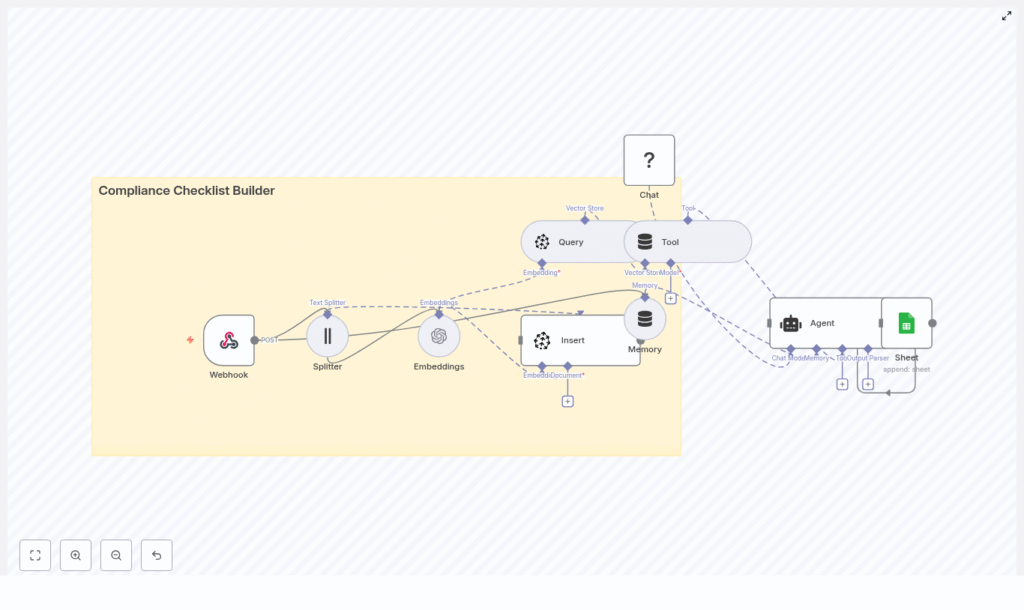
Automating compliance operations is one of the most effective ways to reduce manual effort, minimize risk of human error, and streamline audit preparation. This guide explains how to implement a Compliance Checklist Builder in n8n that leverages LangChain-style components, Pinecone as a vector database, OpenAI embeddings, and Google Sheets for logging and traceability.
The workflow transforms unstructured compliance documents into structured, searchable checklist items and automatically records the results in a Google Sheet. The outcome is an auditable, scalable system suitable for compliance, risk, and security teams.
Business case and core benefits
Compliance and risk teams routinely process large volumes of policies, contracts, regulatory bulletins, and internal standards. These documents are often long, repetitive, and difficult to translate into concrete, testable controls.
By implementing an automated checklist builder with n8n and vector search, you can:
- Convert unstructured policy text into actionable checklist items
- Index content for semantic search, not just keyword matching
- Automatically log every generated checklist item for auditability
- Improve consistency of reviews across teams and time periods
Solution architecture overview
The solution is built as an n8n workflow that receives documents, chunks and embeds their content, stores vector representations in Pinecone, and then uses an agent-style node to generate compliance checklists on demand. Outputs are written to Google Sheets for persistent logging.
At a high level, the architecture includes:
- Webhook – Ingests new documents as JSON payloads
- Text Splitter – Breaks documents into overlapping chunks
- Embeddings (OpenAI) – Converts text chunks into vector embeddings
- Pinecone Vector Store – Stores embeddings and enables semantic retrieval
- Memory & Agent (LangChain-style) – Generates checklist items using retrieved context
- Google Sheets – Logs checklist items, severity, and provenance
This architecture separates ingestion, indexing, retrieval, and generation, which makes it easier to scale and maintain.
Workflow design in n8n
1. Ingestion: create the webhook endpoint
The workflow starts with a POST Webhook node that receives raw document content and associated metadata. This node acts as the primary ingestion API for your compliance documents, whether they originate from internal tools, document management systems, or ad-hoc uploads.
Typical JSON payload:
{  "doc_id": "POL-2025-001",  "title": "Data Retention Policy",  "text": "Long policy text goes here...",  "source": "internal"
}
Key fields to include:
doc_id– Stable identifier for the documenttitle– Human-readable title for reviewerstext– Full policy or contract textsource– Origin (for example internal, legal, regulator)
Securing this webhook with an API key or authentication mechanism is critical, especially when handling confidential or regulated content.
2. Preprocessing: split documents into chunks
Long documents must be broken into smaller segments so that embedding models and downstream LLMs can process them efficiently and within token limits. Use the Text Splitter node to segment the incoming text field.
Recommended configuration:
- Chunk size: approximately 400 characters
- Chunk overlap: approximately 40 characters
The overlap helps preserve context between segments so that important information is not lost at chunk boundaries. For narrative policies, a range of 300-500 characters with 10%-15% overlap is usually effective. For very structured lists or tables, smaller chunks may better preserve individual list items or clauses.
3. Vectorization: generate embeddings
Each text chunk is then passed to an Embeddings node. In the reference implementation, an OpenAI embedding model such as text-embedding-3-small is used, but any compatible model can be configured based on your cost and accuracy requirements.
Best practices for this step:
- Standardize the embedding model across your index to maintain consistency
- Monitor embedding latency and error rates, especially at scale
- Consider a lower-cost model for bulk indexing and a higher-quality model for more sensitive tasks if needed
4. Indexing: insert vectors into Pinecone
Once embeddings are generated, the workflow uses a Pinecone Insert (vector store) node to persist the vectors into a Pinecone index. A typical index name for this use case might be compliance_checklist_builder.
When inserting vectors, attach rich metadata so that retrieval and traceability are preserved. Common metadata fields include:
doc_id– Links the chunk back to the original documentchunk_index– Sequential index of the chunk for orderingtextorsnippet– Original text segment for human reviewsource– Source system or category
Storing this metadata in Pinecone ensures that when you retrieve relevant chunks, you can immediately map them back to the right document sections and justify checklist items during audits.
Checklist generation with retrieval and agents
5. Retrieval: query Pinecone for relevant context
When a user or downstream system requests a checklist for a specific document or topic, the workflow performs a semantic search against the Pinecone index. This retrieval step identifies the most relevant chunks based on the query or document identifier.
Typical retrieval patterns:
- Query by
doc_idto generate a checklist for a specific policy - Query by free-text question to identify applicable controls across multiple documents
The Pinecone node returns the top-k most relevant chunks, which are then provided as context to an agent-style node in n8n.
6. Generation: use a LangChain-style agent to build the checklist
The retrieved chunks are fed into an Agent node that uses LangChain-style memory and prompting. The agent receives both the context excerpts and a carefully designed system prompt that instructs it to output concrete, testable checklist items.
Typical prompt snippet:
"You are a compliance assistant. Using the retrieved excerpts, produce a checklist of concise, actionable items with a severity label (High/Medium/Low) and a reference to the excerpt ID."
Key requirements you can encode into the prompt:
- Checklist items must be specific, measurable, and testable
- Each item should include a severity label such as High, Medium, or Low
- Every item must reference the original document and chunk or excerpt identifier
- If no relevant information is found, the agent should return a clear response such as
No applicable items
This retrieval-augmented generation pattern helps reduce hallucinations because the agent is constrained to operate on retrieved context rather than the entire model training corpus.
Logging, traceability, and audit readiness
7. Persisting results: append to Google Sheets
After the agent generates the checklist items, the workflow connects to a Google Sheets node. Configure this node to append rows to a sheet, for example a tab named Log. Each row should capture the essential audit trail fields:
- Timestamp of generation
doc_idand document title- Checklist item text
- Severity level
- Source reference, such as chunk index or excerpt ID
This log provides a durable, queryable record of how checklist items were derived, which is particularly useful during audits, internal reviews, or regulator inquiries.
Implementation best practices
Metadata and provenance
Consistent metadata is foundational for any compliance automation. For each embedded chunk, capture at least:
doc_idchunk_indexsourceorsource_urlwhere applicable
This metadata should be available both in Pinecone and in your Google Sheets log so that any checklist item can be traced back to its origin with minimal effort.
Chunk sizing and overlap tuning
Chunk size and overlap influence both retrieval quality and cost:
- For narrative policy text, 300-500 characters with about 10%-15% overlap usually balances context and efficiency.
- For bullet-heavy documents, contracts with enumerated clauses, or technical specs, consider smaller chunks to avoid mixing unrelated requirements.
Validate chunking by inspecting a few documents end-to-end and confirming that each chunk is semantically coherent.
Prompt engineering for reliable outputs
Design the agent prompt so that it explicitly describes the desired output format and behavior:
- Require short, verifiable checklist items
- Instruct the model to reference excerpt IDs or chunk indices
- Direct the model to state clearly when no evidence is found, for example
"If no evidence is found, return 'No applicable items'."
Iterate on the prompt with real documents from your environment to ensure that severity levels and checklist granularity meet internal expectations.
Security and privacy considerations
Compliance content often contains sensitive or confidential information. Recommended controls include:
- Protect the webhook endpoint using authentication or API keys
- Rotate OpenAI and Pinecone API keys regularly
- Consider redacting or anonymizing personal data before embedding
- Ensure that your vector store and LLM providers meet your data residency and retention requirements
Testing and validation
Before moving to production, thoroughly test the workflow with a diverse set of documents such as policies, contracts, and technical standards.
Suggested test activities:
- Unit test webhook payloads to ensure all required fields are present and validated
- Inspect text splitter outputs to confirm logical chunk boundaries
- Verify that embeddings are generated without errors and inserted correctly into Pinecone
- Run manual Pinecone queries to confirm that top-k results align with expected relevance
- Review generated checklist items with subject matter experts for accuracy and completeness
Scaling and cost optimization
As document volume and query frequency increase, observe both embedding and vector store costs.
Techniques to control cost include:
- Deduplicate identical or near-identical content before embedding
- Pre-summarize or compress extremely long documents, then embed summaries instead of raw text when appropriate
- Use a cost-efficient embedding model for bulk indexing and reserve more advanced models for critical workflows
Example end-to-end interaction
To add a new document, send a POST request to your n8n webhook URL with a payload similar to:
{  "doc_id": "POL-2025-002",  "title": "Acceptable Use Policy",  "text": "Full text of the document...",  "source": "legal"
}
The workflow will:
- Receive the payload via the webhook
- Split the text into chunks and generate embeddings
- Insert vectors and metadata into the Pinecone index
- Later, on request, retrieve relevant chunks, generate a checklist via the agent, and append the results to Google Sheets
You can trigger checklist generation from a separate UI, an internal portal, or another automation that interacts with the same n8n instance.
Next steps and extensions
The Compliance Checklist Builder described here provides a reusable blueprint for converting unstructured policy content into structured, auditable controls. Once the core workflow is operational, you can extend it in several directions:
- Expose a lightweight UI or internal portal where reviewers can request and review checklists
- Implement role-based access control and approval flows within n8n
- Integrate with ticketing tools like Jira or ServiceNow to automatically create remediation tasks from high-severity checklist items
Deploy the workflow in n8n, connect your OpenAI and Pinecone credentials, and start indexing your compliance corpus to improve review quality and speed.
Call to action: Download the sample n8n workflow JSON or schedule a 30-minute consultation to adapt this Compliance Checklist Builder to your organization’s policies and regulatory environment.
