


Contract Clause Extractor: Automate Contract Review With n8n, Embeddings, and Weaviate
Imagine this: it is 5:30 p.m., you are ready to log off, and a 47-page contract lands in your inbox with the message, “Can you just quickly check the indemnity and termination clauses?” You blink twice, question your life choices, and reach for more coffee.
Or, you could let automation do the heavy lifting.
This guide walks you through a complete contract clause extractor built with an n8n workflow, document embeddings, a Weaviate vector store, and a chat agent. It automatically slices contracts into chunks, indexes them for semantic search, extracts relevant clauses, and logs everything for auditability. In other words, it turns “ugh, another contract” into “sure, give me 10 seconds.”
What This n8n Contract Clause Extractor Actually Does
At its core, this workflow is an automated contract analysis pipeline. You send it contracts, it breaks them into smart chunks, turns those chunks into embeddings, stores them in Weaviate, and lets an AI agent pull out the exact clauses you care about.
It is especially handy for repetitive legal operations work like:
- Finding indemnity, termination, and data privacy clauses across many contracts
- Speeding up due diligence and intake reviews
- Keeping clause tagging consistent between reviewers
- Creating a searchable contract repository that behaves like “Ctrl+F on legal steroids”
The magic combo behind this template is:
- Text splitting to break contracts into semantically meaningful chunks
- Embeddings to represent the meaning of each chunk as vectors
- Weaviate vector search to quickly retrieve relevant clauses
- An AI agent to interpret the results, extract clauses, and explain them
- Logging to keep an audit trail of what was found and why
How the Workflow Is Wired Together
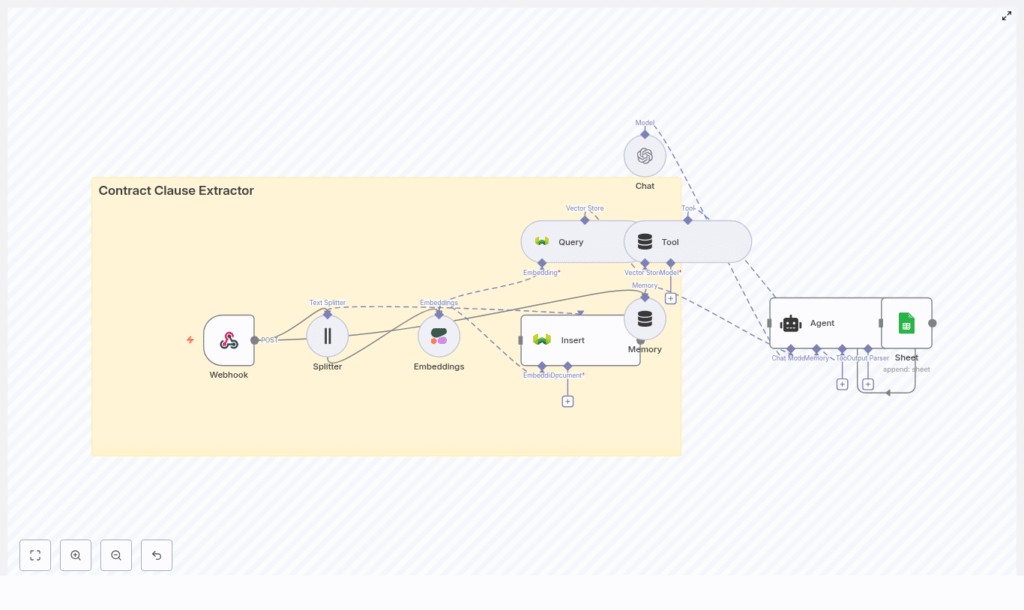
Here is the high-level architecture of the n8n contract clause extractor, from “contract arrives” to “beautifully formatted answer appears”:
- Webhook (n8n) – Receives uploaded contracts or links via HTTP POST.
- Text Splitter – Breaks long contracts into smaller, coherent chunks (chunkSize 400, overlap 40).
- Embeddings (Cohere / OpenAI) – Converts each chunk into a vector representation.
- Weaviate vector store – Indexes embeddings in a class named
contract_clause_extractorfor fast semantic retrieval. - Query + Tool – Runs semantic searches and exposes results to an AI agent.
- Memory (Buffer) – Keeps short-term context when you ask follow-up questions.
- Chat/Agent (OpenAI) – Understands your query, extracts clauses, and formats responses.
- Google Sheets Logging – Stores results for audits, reviews, and downstream workflows.
So instead of scrolling through PDFs looking for “Termination,” you send a query like “Show me the termination clauses” and let the workflow handle the rest.
Quick Setup Walkthrough in n8n
Below is a streamlined guide to configuring each part of the n8n template. You keep all the power of the original design, without needing to reverse-engineer it from scratch.
Step 1 – Webhook: Feed the Workflow With Contracts
Start with an n8n Webhook node that accepts POST requests. This is your entry point for contracts.
The webhook should be able to handle:
- File uploads such as PDF or DOCX
- Raw text payloads that contain the contract body
Before passing anything on, make sure you:
- Validate that the upload is what you expect
- Convert non-text documents to text using a PDF or DOCX parser
- Output clean text that you can safely send to the splitter node
Once that is in place, every contract sent to this webhook automatically kicks off the extraction pipeline. No more “can you just scan this one” requests.
Step 2 – Text Splitting: Chunk Size and Overlap That Actually Work
Next comes the Text Splitter. The goal is to split the document into pieces that are big enough to contain full clauses, but not so large that embeddings become noisy.
Recommended configuration:
- Chunk size: about 400 characters
- Overlap: about 40 characters
This setup helps avoid cutting a clause in half, while staying efficient for embedding and retrieval. If your contracts are very long or heavily structured, you can go one level up in sophistication and try:
- Section-aware splitting based on headings
- Splitting on numbered clauses or article markers
In short, smarter chunking tends to mean smarter search results.
Step 3 – Embeddings: Turning Clauses Into Vectors
Once you have chunks, you need to represent their meaning as vectors. That is where embeddings come in.
Use an Embeddings node with a provider such as:
- Cohere (used in the reference workflow)
- OpenAI or another embedding model that fits your accuracy, latency, and budget needs
For each chunk, generate an embedding and attach helpful metadata. This metadata will save you later when you want to trace answers back to the original contract. Useful metadata fields include:
- Document ID
- Original clause or chunk text
- Page number or location marker
- Source filename
Think of metadata as your “where did this come from” label for every vector in your store.
Step 4 – Indexing in Weaviate: Your Contract Clause Vector Store
Now that you have embeddings plus metadata, it is time to index them in Weaviate.
Set up a Weaviate class or index named contract_clause_extractor and configure the schema to store:
- The embedding vectors
- Your chosen metadata fields (source, page, clause text, etc.)
Weaviate gives you:
- Hybrid search that mixes vector and keyword search
- Filters so you can limit results to certain contract types or date ranges
- Per-class schemas to organize different document types
Use those filters when you want to narrow retrieval, for example to “only NDAs from last year” or “only vendor contracts.”
Step 5 – Querying and the AI Agent: Ask for Clauses, Get Answers
Once your data is in Weaviate, you can finally start asking useful questions like:
- “Find termination clauses.”
- “Show the indemnity language across these contracts.”
- “What are the data privacy obligations in this agreement?”
The workflow handles this by:
- Issuing a semantic query to Weaviate based on the user’s request.
- Retrieving the most relevant chunks from the
contract_clause_extractorindex. - Passing those chunks to an OpenAI chat model that acts as an agent.
The agent then synthesizes everything and returns a clean, human-readable answer. To keep it useful and predictable, use a prompt template that instructs the agent to:
- List matching clause excerpts with metadata such as filename and clause location.
- Summarize each clause in plain language.
- Flag potentially risky terms like unlimited liability or automatic renewal.
This gives you both the raw clause text and an interpretation layer, without having to read every word yourself.
Step 6 – Logging and Audit Trail in Google Sheets
Legal teams love answers, but they really love auditability.
The final step in the template appends extraction results to Google Sheets (or you can swap in a database if you prefer). Log at least:
- The original query
- IDs of the returned snippets or chunks
- Timestamps
- The agent’s summary and any risk flags
This way, reviewers can always trace “where did this answer come from” back to the original contract text. It also gives you a simple way to build dashboards and downstream workflows.
Best Practices for Accuracy, Compliance, and Sanity
To keep your contract clause extractor accurate, compliant, and generally well behaved, keep these guidelines in mind.
Make Metadata Your Best Friend
- Always store source filename, page, and clause tags.
- Use metadata to quickly jump from an extracted clause back to its original context.
Handle PII and Confidentiality Carefully
- Encrypt sensitive documents at rest.
- Restrict access to the Weaviate index and your n8n instance.
- Redact or tokenize personally identifiable information before indexing when possible.
Tune Your Chunking Strategy
- Experiment with different chunk sizes and overlaps.
- Prefer clause-aware or section-based splitting over blind character splits when you can.
Use Prompt Engineering to Avoid Hallucinations
- Tell the agent to always quote original excerpts from Weaviate results.
- Instruct it not to invent clauses that are not present in the text.
- Ask it to cite metadata like filename and location for each clause.
Balance Model Quality and Cost
- Higher accuracy models usually reduce manual review time but cost more.
- Choose a language model that fits your latency, accuracy, and budget constraints.
Where This Contract Clause Extractor Shines
Once this workflow is live, you can plug it into several legal operations and contract management processes, such as:
- Automated due diligence and intake screening Quickly surface indemnity, limitation of liability, or non-compete clauses across many documents.
- Compliance reviews Check data privacy, export control, or regulatory clauses at scale.
- Post-signature monitoring Track renewal and termination triggers without manually revisiting every contract.
- Portfolio analytics Analyze clause frequency and patterns across thousands of agreements.
Basically, anywhere you are repeatedly hunting for the same types of clauses, this template saves time and reduces “scroll fatigue.”
Troubleshooting and Optimization Tips
If your results look noisy, irrelevant, or suspiciously unhelpful, try adjusting a few knobs.
- Improve chunking Increase overlap or move to section-based splitting to keep full clauses together.
- Tighten retrieval filters Use Weaviate metadata filters to narrow by contract type, date, or source.
- Add reranking Fetch the top N results, then rerank using a cross-encoder model or a second-pass heuristic.
- Deduplicate chunks Remove identical or near-duplicate embeddings so you do not see the same clause 12 times.
- Watch for embedding drift If you change embedding providers or models, reindex your data to keep search quality consistent.
Security, Governance, and Compliance
Contracts are usually full of sensitive information, so treat this workflow like production infrastructure, not a side project running on someone’s laptop.
- Role-based access Limit who can access the n8n instance, Weaviate index, and ML API keys.
- Audit logs Track who queried what and when, using Google Sheets or a dedicated logging database.
- Data retention and backups Apply clear retention policies and encrypt backups of both documents and embeddings.
- Prompt and agent reviews Regularly review prompts, instructions, and agent behavior to avoid data leakage or hallucinated content.
Putting It All Together
By combining n8n, embeddings, and Weaviate, you turn manual contract review into a scalable, auditable, and mostly drama-free process. The pattern looks like this:
Webhook → Splitter → Embeddings → Insert in Weaviate → Query → Agent → Google Sheets
You get automated ingestion, intelligent splitting, vector indexing, semantic retrieval, and an AI agent that surfaces and explains clauses. The same pattern can be adapted for many other legal automation tasks, from NDAs to vendor agreements.
Ready to try it? Clone or build an n8n workflow using the nodes above, then test it with a few sample contracts. Iterate on chunk size, overlap, and prompts until the retrieval quality feels good enough that you are not tempted to reach for a highlighter.
If you want help getting this into production or adapting it to your specific contract templates and policies, you can reach out for a consultation or grab our implementation checklist to speed things up.
