


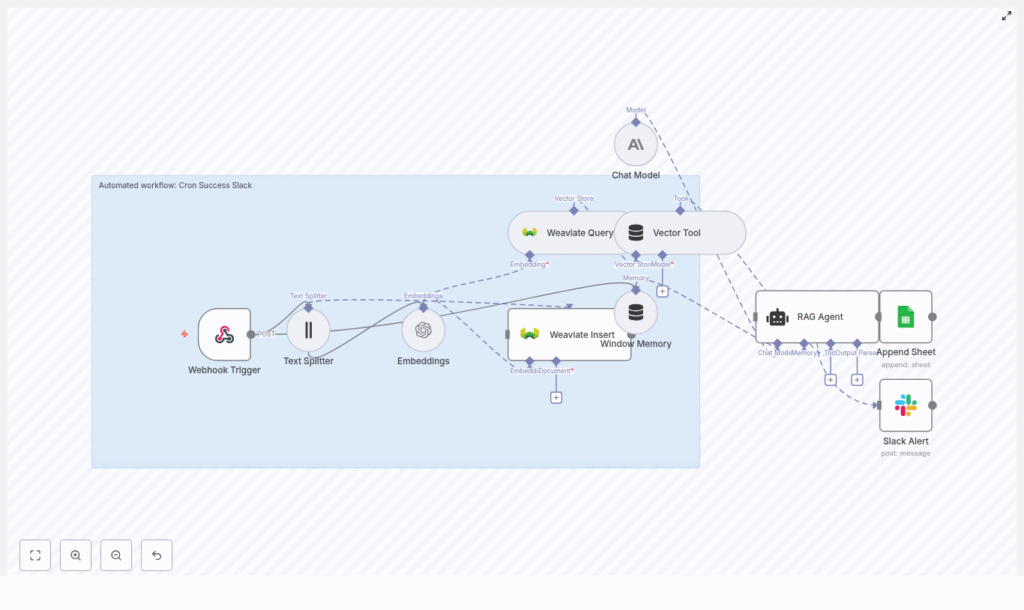
Automating cron job notifications with retrieval-augmented generation (RAG) enables richer, context-aware incident handling and long-term observability. This reference guide documents a production-ready n8n workflow template, Cron Success Slack, that integrates webhook triggers, text splitting, OpenAI embeddings, a Weaviate vector database, a LangChain-style RAG agent, Google Sheets logging, and Slack alerts.
Overview
The Cron Success Slack workflow ingests outputs from scheduled jobs via an HTTP webhook, transforms them into semantic embeddings, stores and retrieves historical context from Weaviate, and uses a chat model to generate human-readable summaries. These summaries are persisted in Google Sheets for auditing and are optionally pushed to Slack when manual investigation is required.
This documentation is intended for engineers and operators already familiar with n8n concepts such as nodes, credentials, and data routing, as well as basic vector database and LLM/RAG patterns.
Use Cases & Objectives
The workflow is designed for teams that run recurring cron jobs or scheduled tasks that emit logs, status messages, or small reports. The main objectives are to:
- Determine whether a cron execution is routine or anomalous based on historical runs.
- Attach relevant historical context, notes, or remediation guidance to each run.
- Persist structured, queryable logs in Google Sheets for audits and reporting.
- Send Slack alerts selectively, focusing human attention on runs that need action.
Architecture
The workflow is organized as a left-to-right data pipeline in n8n, with branching for success and error handling. Core building blocks:
- Webhook Trigger – Receives incoming cron job payloads via HTTP POST.
- Text Splitter – Segments long log messages into smaller chunks to optimize embedding quality.
- OpenAI Embeddings – Converts text chunks into embedding vectors.
- Weaviate Vector Store
- Insert – Persists new embeddings with metadata.
- Query – Retrieves semantically similar historical entries.
- Vector Tool – Exposes Weaviate query as a tool callable by the RAG agent.
- Window Memory – Maintains short-term conversational or event context for the agent.
- RAG Agent with Chat Model – Synthesizes a status summary using the latest payload and retrieved context.
- Google Sheets Append – Writes structured results to a sheet for long-term storage.
- Slack Alert – Posts notification messages on agent errors or when flagged by logic as needing human review.
Data Flow Summary
At a high level, the workflow executes the following sequence for each cron event:
- Cron job sends an HTTP POST to the n8n Webhook Trigger.
- Payload text is passed through the Text Splitter to create manageable chunks.
- Each chunk is processed by the OpenAI Embeddings node to generate vectors.
- Vectors and associated metadata are written into Weaviate via a Weaviate Insert node.
- In parallel or immediately after insert, a Weaviate Query node retrieves similar historical records.
- The query is exposed as a Vector Tool, which the RAG Agent can call for context.
- Window Memory and the raw payload are provided to the RAG Agent along with tool access.
- The Chat Model inside the RAG Agent generates a status summary that includes historical references.
- On successful generation, the result is appended to Google Sheets.
- On error (for example, LLM failure or tool error), an onError path sends a Slack Alert with diagnostic details.
Node-by-Node Breakdown
1. Webhook Trigger
Purpose: Entry point for cron job outputs.
- Node type: HTTP Webhook (n8n core).
- HTTP Method:
POST. - Path: Use a non-guessable path such as
/cron-success-slack.
Security considerations:
- Restrict inbound requests by IP allowlist if possible.
- Include a shared secret or validation token in the payload and validate it inside the workflow.
- Ensure HTTPS is used so logs and tokens are encrypted in transit.
The webhook output typically includes fields such as cron_job_name, status, timestamp, and a log or message body. These are passed as JSON to downstream nodes.
2. Text Splitter
Purpose: Normalize and segment large cron outputs before embedding.
- Strategy: Character-based text splitting.
- Typical parameters:
chunkSize: 400overlap: 40
This configuration balances semantic coherence and granularity. It produces overlapping text chunks so important context that falls near boundaries is not lost. The splitter node should accept the raw log text from the webhook and output an array of chunked strings.
Edge cases:
- Very small messages might not require splitting and will pass through as a single chunk.
- Very large logs may result in many chunks; consider monitoring node execution time and output size if your logs are extremely verbose.
3. OpenAI Embeddings
Purpose: Convert text chunks into numerical vectors for semantic search.
- Node type: OpenAI Embeddings.
- Model example:
text-embedding-3-small. - Credentials: Configure an OpenAI API key in n8n credentials and reference it in this node.
The node iterates over each text chunk from the Text Splitter and returns a vector per chunk. These vectors are then attached to records stored in Weaviate.
Operational notes:
- Use a cost-efficient model like
text-embedding-3-smallby default. - If semantic matches are weak, you may later switch to a larger or more capable embedding model while ensuring vector dimensions align with your Weaviate schema.
4. Weaviate Insert
Purpose: Persist embeddings and associated metadata in a vector store.
- Node type: Weaviate Insert (or equivalent custom node).
- Index name: Recommended value
cron_success_slack.
For each embedding, the node writes:
- The embedding vector produced by the OpenAI Embeddings node.
- Metadata such as:
timestampof the cron run.cron_job_nameor equivalent identifier.status(for example, success, failure, degraded).- Raw text snippet corresponding to that chunk.
Configuration notes:
- Ensure the Weaviate class schema matches the embedding dimension and includes fields for metadata like
cron_name,status, andtimestamp. - Validate that the index name in the node exactly matches the class or index name defined in Weaviate.
5. Weaviate Query & Vector Tool
Purpose: Retrieve semantically similar historical logs and expose them as a tool to the RAG agent.
- Node type: Weaviate Query.
- Query input: Embeddings or text from the current cron event.
When a new cron event is processed, the workflow queries the cron_success_slack index for similar past messages. Typical filters might use metadata such as cron_job_name or time ranges, though the exact filters depend on your Weaviate schema.
The query results are wrapped in a Vector Tool node so that the RAG agent can call this tool dynamically. The tool returns the most relevant historical entries, which the agent uses to provide context in its summary.
6. Window Memory
Purpose: Maintain short-term context across related events or agent calls.
- Node type: Window Memory (LangChain-style memory in n8n).
- Behavior: Stores the last N messages or exchanges for use by the RAG agent.
This is particularly useful when multiple cron events are related (for example, retries, follow-up runs, or sequences of dependent jobs). The memory node should be wired so that previous agent outputs and relevant payloads are available as context, without overwhelming the model.
7. Chat Model & RAG Agent
Purpose: Generate a human-readable status summary enriched with historical context.
- Node type: RAG Agent (LangChain-style) with a Chat Model.
- Chat model examples: OpenAI Chat models or Anthropic Claude.
The RAG agent receives:
- The Vector Tool that queries Weaviate.
- Window Memory for recent context.
- The raw payload from the Webhook Trigger (for example, cron job name, status, logs).
Using these inputs, the agent calls the vector tool as needed, reads the retrieved documents, and generates a concise summary. A typical output might be:
"Cron job `daily-report` completed successfully at 03:02 UTC. No errors found. Similar past runs indicate a transient delay on 2025-08-21. No action required."
System prompt configuration:
Define a system prompt to constrain and standardize the agent behavior, for example:
"You are an assistant for Cron Success Slack. Summarize status and include relevant historical context or remediation steps if needed."
This ensures that outputs remain focused on operational status, relevant history, and actionable guidance only when required.
8. Append to Google Sheets
Purpose: Persist a structured audit trail of cron runs and AI-generated summaries.
- Node type: Google Sheets Append.
- Required configuration:
- Google Sheets credentials configured in n8n.
- Target spreadsheet ID and sheet name.
On successful RAG output, the workflow appends a new row with fields such as:
timestampof the cron run.cron_job_name.- LLM-generated
status_summaryor similar field. - Additional metadata such as raw status, error flags, or job duration if available.
The resulting sheet can be used for audits, trend analysis, or export to BI tools.
9. Slack Alert on Error
Purpose: Notify engineers when the RAG agent or workflow encounters errors, or when a run requires manual attention.
- Node type: Slack node (chat.postMessage style behavior).
- Channel example:
#alerts.
Configure the onError path of the RAG agent node to trigger this Slack node. The alert should include:
- The error message or exception details from the failing node.
- An identifier or link to the workflow execution so engineers can inspect logs.
- Key payload fields such as cron job name and timestamp for quick triage.
Configuration Notes & Best Practices
Security
- Protect the Webhook Trigger with tokens or shared secrets validated inside the workflow.
- Restrict inbound traffic to known IP ranges when feasible.
- Always use HTTPS endpoints for the webhook.
- Limit access to Weaviate and OpenAI credentials using n8n credential management and appropriate network controls.
Observability & Logging
- Extend the Google Sheets schema with execution metadata such as run ID, duration, and error flags.
- Optionally forward key events to a centralized monitoring system for alerting and dashboards.
Chunking Strategy
- Start with
chunkSize: 400andchunkOverlap: 40. - For very short logs, chunking will have minimal effect and can be left as-is.
- For very long logs, consider whether all content needs to be embedded, or if you can pre-filter noise before splitting.
Embedding Model Selection
- Use
text-embedding-3-smallfor cost-effective baseline retrieval. - If similarity results are weak, test a more capable embedding model and update your Weaviate schema to match the new vector dimension.
Weaviate Schema & Queries
- Include searchable metadata fields such as
cron_name,status, andtimestampin your schema. - Use these fields to pre-filter before vector similarity search to reduce noise and latency.
Rate Limiting & Reliability
- Be aware of OpenAI and Weaviate rate limits.
- Where supported, configure retries or exponential backoff on embedding and Weaviate nodes to handle transient failures.
Testing & Validation
- Simulate webhook payloads for typical success and failure runs.
- Verify that the RAG agent summary references relevant historical entries retrieved from Weaviate.
- Check that Google Sheets rows are appended correctly and Slack alerts are triggered only when expected.
Troubleshooting
Embeddings Missing or Poor Semantic Matches
If retrieval quality is low or embeddings are not generated as expected:
- Confirm that the Text Splitter output is correctly mapped to the Embeddings node input.
- Verify that the embedding model returns vectors and that no API errors are being suppressed.
- Experiment with larger
chunkSizeor a more capable embedding model if matches remain weak.
Weaviate Insert Failures
When records fail to insert into Weaviate:
- Check Weaviate credentials and endpoint configuration in the node.
- Validate that the index or class name (for example,
cron_success_slack) exactly matches your Weaviate schema. - Ensure the vector dimension in Weaviate matches the dimension of your chosen embedding model.
Noisy or Unfocused RAG Agent Outputs
If the agent responses are verbose, irrelevant, or inconsistent:
- Tighten the system prompt to be more explicit about desired format and scope.
- Reduce the amount of window memory if older context is not needed.
- Limit the number of retrieved documents (for example, top N results) to avoid information overload.
