


Build a Currency Exchange Estimator with n8n & LangChain
Imagine having a smart little assistant that can estimate currency exchange for you, remembers past requests, uses historical context, and neatly logs everything in a Google Sheet. That is exactly what this n8n workflow template does.
In this guide, we will walk through how the Currency Exchange Estimator works, what each part of the n8n workflow does, and how to get it ready for production using:
- n8n for workflow automation
- LangChain-style agents
- Weaviate as a vector database
- Hugging Face embeddings and language model
- Google Sheets for logging and analytics
By the end, you will know exactly how this template fits into your stack, when to use it, and how it can save you from manual calculations and messy spreadsheets.
Why use an automated Currency Exchange Estimator?
If you work with money across borders, you know the pain: rates, fees, dates, policies, and customer preferences all pile up quickly. A simple “amount * rate” calculator is rarely enough.
This n8n-based Currency Exchange Estimator is great for:
- Fintech products that need consistent, auditable FX estimates
- Travel agencies and booking platforms
- Marketplaces and international e-commerce
- Internal tools for finance or operations teams
Instead of just returning a raw number, the workflow uses embeddings and vector search to pull in relevant context like historical notes, policy rules, or previous transfers. A conversational agent then uses that context to generate a human-friendly explanation and an estimated converted amount.
The result: smarter, more consistent estimates with a clear audit trail, all handled automatically by n8n.
What this n8n template actually does
At a high level, the workflow:
- Receives a request through a webhook
- Splits and embeds any long text into vectors
- Stores those vectors in a Weaviate index
- Queries Weaviate for related context
- Uses a LangChain-style agent with memory and tools to generate an estimate
- Logs the whole interaction in Google Sheets
So every time a client or internal system hits the webhook, the workflow not only returns an estimate, it also learns from that interaction for future queries.
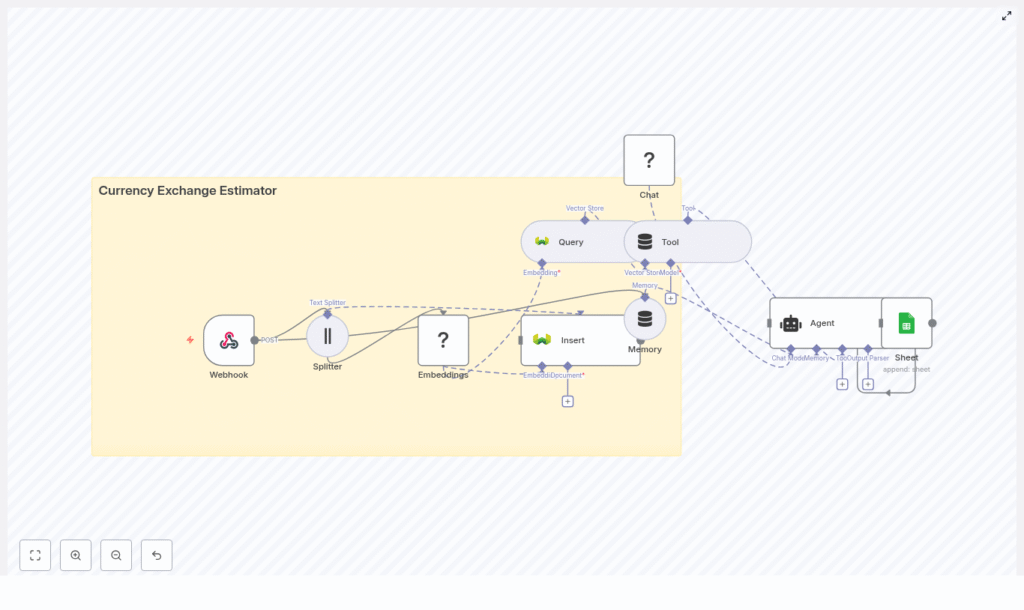
Architecture at a glance
Here is how the main pieces of the workflow fit together:
- Webhook – Receives POST requests at
/currency_exchange_estimator - Splitter – Breaks long text into smaller chunks
- Embeddings (Hugging Face) – Turns text chunks into vectors
- Insert (Weaviate) – Stores vectors and metadata in the
currency_exchange_estimatorindex - Query (Weaviate) – Finds similar past data using semantic search
- Tool (Vector Store) – Exposes Weaviate as a tool for the agent
- Memory (Buffer Window) – Keeps recent conversation or transaction context
- Chat (Hugging Face LM) – Generates human-readable responses
- Agent – Coordinates tools, memory, and the language model
- Sheet (Google Sheets) – Logs each request and response
It is modular, so you can swap out components later, like using another vector store or language model without redesigning the whole flow.
Step-by-step: How the workflow runs
1. Webhook receives and validates the request
The journey starts with the Webhook node, which listens for POST requests at /currency_exchange_estimator. A typical payload looks like this:
{  "source_currency": "USD",  "target_currency": "EUR",  "amount": 1500,  "date": "2025-08-01",  "notes": "customer prefers mid-market rate"
}
Right after the request hits the webhook, you should normalize and validate the data. That can happen in the Webhook node itself or in an initial Function node, for example:
- Check that
source_currencyandtarget_currencyare valid currency codes - Verify that
amountis a positive number - Ensure the date is in a valid format
Cleaning this up early avoids confusing downstream errors.
2. Split long text into manageable chunks
Sometimes the notes field or attached content can be long. The Splitter node helps by breaking that text into smaller chunks, for example 400 characters with a 40 character overlap.
Why bother? Because embeddings work better when they capture local context instead of trying to represent a huge block of text. Consistent chunk sizes also improve the quality of similarity search in Weaviate.
3. Turn text into embeddings with Hugging Face
Next, the Embeddings node uses a Hugging Face model to convert each chunk into a vector representation. These vectors are what the vector database uses to understand “semantic similarity.”
When picking a model:
- Smaller models are cheaper and faster
- Larger models usually give better semantic accuracy
For most currency exchange estimator use cases, a mid-sized semantic search model is a good balance between cost, speed, and relevance. It is worth benchmarking a couple of options before going to production.
4. Store vectors and metadata in Weaviate
The Insert node writes the embeddings into a Weaviate index named currency_exchange_estimator. Alongside each vector, you store structured metadata so you can filter and search more precisely later.
Typical metadata fields include:
source_currencytarget_currencyamountdateor timestamporiginal_textor notes- Source (for example “manual note” or “external API”)
- Optional confidence score
This combination of vectors plus metadata lets you do things like “find similar transfers in USD to EUR from the last 30 days” or “retrieve only notes that mention fees.”
5. Retrieve relevant context with Weaviate queries
When a new request comes in, you want the agent to reason using past knowledge. That is where the Query node comes in. It performs a semantic search against Weaviate based on the current request or a derived prompt.
The query returns the most relevant chunks and their metadata, such as:
- Recent exchange estimates for the same currency pair
- Historical notes about fee preferences or rate policies
- Internal rules or documentation embedded as text
All of this becomes “context” the agent can use to generate a better estimate.
6. Let the agent combine tools, memory, and the language model
Here is where it gets fun. The Agent node acts like the conductor of an orchestra, coordinating:
- Tool node (Vector Store) – wraps the Weaviate query so the agent can call it as needed
- Memory (Buffer Window) – keeps a window of recent conversation or transaction history
- Chat (Hugging Face LM) – the language model that turns all of this into a natural language response
The agent uses a prompt that:
- Instructs it to use the retrieved context from Weaviate
- Applies your explicit conversion rules (fees, rounding, policies)
- Refers to current or recent market rates if you provide them
A good pattern is to keep a stable, deterministic instruction block at the top of the prompt and then append variable context and user input below it. That helps keep behavior consistent even as the data changes.
7. Log everything to Google Sheets
Once the agent produces an estimate and explanation, the workflow appends a row to a Google Sheet. This gives you an easy audit trail and analytics source.
You can log fields like:
- Original request payload
- Rate used and estimated converted amount
- Any fees applied
- Timestamp
- Agent notes or reasoning summary
Over time, that sheet becomes a goldmine for QA, compliance, or optimization.
Sample request and response
Here is an example of what an incoming request might look like and what the agent could return.
Sample webhook payload
Input (POST /currency_exchange_estimator):
{  "source_currency": "GBP",  "target_currency": "USD",  "amount": 1000,  "date": "2025-08-01",  "notes": "urgent transfer, prefer lowest fee option"
}
Example agent output
Expected agent output (JSON-friendly):
{  "estimate": 1250.45,  "rate_used": 1.25045,  "fees": 2.50,  "confidence": 0.92,  "notes": "Mid-market rate used; fees estimated per policy. See log row ID 4321."
}
Your implementation can shape the response structure, but keeping it machine-readable like this makes it easy to plug into other systems.
Implementation tips and best practices
Use rich metadata for smarter filtering
When inserting embeddings into Weaviate, do not just store raw text. Include:
source_currencyandtarget_currency- Timestamp or date fields
- Source of the data (manual vs external API)
- Optional
confidenceor quality indicators
This lets you run temporal queries, restrict by currency pairs, or prioritize certain data sources when computing estimates.
Choosing the right embedding model
Embedding models are a tradeoff between cost, speed, and quality. For this workflow:
- Start with a mid-sized semantic search model from Hugging Face
- Evaluate relevance on a sample of your own data
- Only upgrade to a larger model if you truly need better recall or precision
Also keep an eye on latency. If your workflow is user-facing, slow embeddings can quickly hurt the experience.
Designing robust prompts for the agent
Prompt design matters a lot. A solid prompt for this use case should:
- Explicitly tell the agent to rely on retrieved context from Weaviate
- Spell out conversion rules, such as:
- How to apply fees
- Rounding behavior
- Fallback behavior when data is missing
- Instruct the agent to avoid making up values and to express uncertainty via a confidence score when appropriate
Keeping the rules consistent and deterministic at the top of the prompt helps reduce “hallucinations” and keeps your estimator predictable.
Security and rate limiting
Since the workflow exposes a webhook, you should secure it before going live:
- Protect the webhook using an API key, HMAC signature, or OAuth
- Implement rate limiting or throttling to prevent abuse
- If you call external FX rate APIs, cache the responses and throttle requests to stay within provider limits
Getting these basics right early saves a lot of headaches later.
Data retention and privacy
Because you are storing logs and embeddings, think carefully about retention and privacy:
- Decide how long you really need to keep logs and vector data
- Avoid storing personally identifiable information unless it is absolutely necessary
- If you must store sensitive data, encrypt it
- Make sure your setup aligns with GDPR and other regional regulations if you have EU users
Testing, monitoring, and scaling
Testing the workflow
Before you trust this estimator in production, give it a proper test run:
- Write unit tests for payload validation logic
- Run integration tests that cover the full flow:
- Webhook → Embeddings → Weaviate insert/query → Agent → Google Sheets
Feed it both “happy path” inputs and edge cases, such as missing notes, unknown currencies, or unexpected dates.
Monitoring performance and reliability
Once it is running, keep an eye on:
- Latency between nodes, especially:
- Webhook to embedding
- Embedding to Weaviate insert/query
- Weaviate to agent
- Agent to Google Sheets
- Failures when inserting or querying Weaviate
- Token usage and cost from the language model provider
Set up alerts so you know if inserts start failing or token usage suddenly spikes.
Scaling the workflow
As usage grows, you may want to tune for performance. Some options:
- Batch inserts – Group chunks into batch writes to Weaviate to boost throughput
- Asynchronous processing – Use background queues for large uploads or bulk operations
- Sharding and index tuning – For very high volume, tune Weaviate indexes and consider sharding by currency pair or region
Because the architecture is modular, you can scale individual parts without rewriting everything.
Troubleshooting common issues
Things not working quite as expected? Here are some typical problems and what to check.
- Missing or malformed embeddings
Make sure the Splitter and Embeddings nodes handle edge cases correctly, such as:- Empty strings
- Very short texts
- Special characters or unusual encodings
- Poor search relevance
Try:- Adjusting chunk size and overlap
- Experimenting with different Hugging Face embedding models
- Improving metadata filters in your Weaviate queries
- Agent hallucinations or inconsistent answers
Consider:- Tightening your prompt with explicit rules and constraints
- Emphasizing retrieved context and discouraging guessing
- Using citation-style prompts so the agent “refers” to retrieved chunks
Ideas for next steps and enhancements
Once the core estimator is working, you can extend it in a few useful directions:
- Integrate live FX rates
Connect a real-time FX rate API, cache the responses, and let the agent combine live rates with historical vector context. - Add authentication and roles
Limit who can send requests or view Google Sheets logs. Role-based access can help with compliance and internal controls. - Expose a friendly interface
Wrap the webhook with a simple web frontend, internal dashboard, or
