


Telegram AI Bot with Long-Term Memory (n8n + DeepSeek)
Building a Telegram AI assistant that can remember user preferences, facts, and context across multiple sessions turns a basic chatbot into a personalized conversational agent. This reference-style guide explains how to implement such a bot with n8n, Telegram webhooks, a DeepSeek AI agent (using an OpenAI-compatible API), and a Google Docs-based memory store.
The focus is on the technical architecture and node configuration so you can reliably reproduce, extend, and debug the workflow.
1. Solution Overview
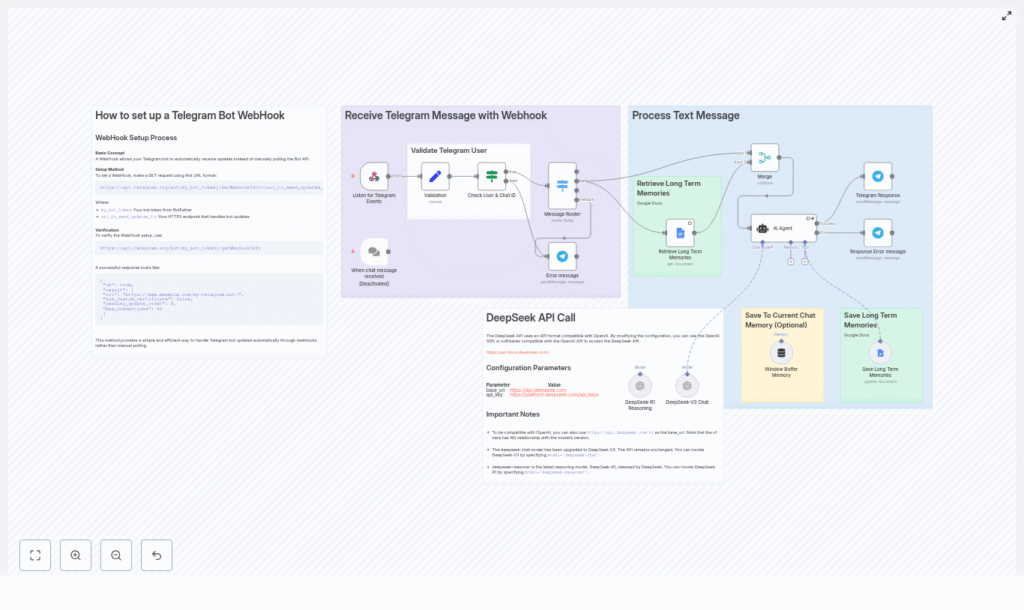
This n8n workflow connects Telegram updates to a DeepSeek-powered AI agent and augments the agent with both short-term and long-term memory:
- Telegram sends updates to an HTTPS webhook endpoint.
- n8n receives the update, validates the user and chat, and routes the payload by content type (text, audio/voice, image).
- Long-term memories are retrieved from a Google Doc and injected into the AI agent context.
- A LangChain AI Agent node (configured for DeepSeek or any OpenAI-compatible API) generates responses and decides when to persist new memories.
- A window buffer memory node maintains recent conversational turns for short-term context.
- When requested by the agent, long-term memories are appended to a Google Doc.
- Responses are returned to the user via Telegram.
This design separates concerns: Telegram transport, validation, routing, AI reasoning, and memory persistence are each handled by dedicated nodes or groups of nodes.
2. Functional Capabilities
The final automation pipeline supports:
- Receiving Telegram updates via webhook (no polling required).
- Validating user and chat identifiers before processing.
- Routing messages by type:
- Text messages
- Audio or voice messages
- Images
- Fallback path for unsupported update types
- Retrieving and using long-term memories from a Google Doc.
- Maintaining a short-term window buffer of recent messages for session context.
- Using a DeepSeek-based LangChain AI Agent for natural language responses.
- Saving new long-term memories into Google Docs via an AI-triggered tool call.
3. Prerequisites
- Telegram bot token obtained from
@BotFather. - n8n instance, either self-hosted or n8n cloud.
- DeepSeek API key (or any OpenAI-style compatible key) configured in n8n credentials.
- Google account with:
- Access to Google Docs.
- At least one Google Doc created to store long-term memories.
- Public HTTPS endpoint for the Telegram webhook, for example:
- ngrok tunnel to your local n8n instance, or
- a publicly hosted n8n deployment with HTTPS enabled.
4. High-Level Architecture
The workflow can be decomposed into the following logical components:
- Telegram Webhook Ingress
- Node types: Webhook
- Receives
POSTrequests from Telegram with update payloads.
- Validation & Access Control
- Node types: Set, If
- Extracts and validates user and chat identifiers before further processing.
- Message Routing
- Node type: Switch
- Branches the workflow based on update content (text, audio/voice, image, unsupported).
- Long-Term Memory Retrieval
- Node type: Google Docs
- Fetches stored memories from a dedicated Google Doc.
- AI Agent (DeepSeek via LangChain)
- Node type: LangChain / AI Agent
- Combines user input, short-term context, and long-term memories to generate responses.
- Uses a tool binding to trigger long-term memory writes.
- Short-Term Window Buffer
- Node type: Window Buffer Memory
- Maintains a rolling buffer of recent messages within the current session.
- Long-Term Memory Persistence
- Node type: Google Docs (tool)
- Appends concise memory entries to the Google Doc when requested by the AI Agent.
- Telegram Response Delivery
- Node type: Telegram (or HTTP Request to Telegram API)
- Sends the AI-generated reply back to the originating chat.
5. Telegram Webhook Configuration
5.1 Registering the Webhook with Telegram
Configure Telegram to deliver updates to your n8n endpoint using the setWebhook method. Replace placeholders with your bot token and public HTTPS URL:
https://api.telegram.org/bot{YOUR_BOT_TOKEN}/setWebhook?url={YOUR_HTTPS_ENDPOINT}/webhook_path
For example, if you use a Webhook node with path /wbot and an ngrok URL:
https://api.telegram.org/bot123456:ABCDEF/setWebhook?url=https://your-ngrok-domain.ngrok.io/wbot
5.2 Verifying Webhook Status
Use getWebhookInfo to confirm Telegram is pointing to the correct URL and that the webhook is active:
https://api.telegram.org/bot{YOUR_BOT_TOKEN}/getWebhookInfo
The JSON response should include:
url– current webhook endpoint.has_custom_certificate– indicates certificate usage.pending_update_count– number of updates not yet delivered.
Using webhooks instead of polling is more efficient and scales better, especially when message volume is high.
6. Node-by-Node Breakdown
6.1 Webhook Node – Listen for Telegram Events
Role: Entry point for Telegram updates.
- HTTP Method:
POST - Path: e.g.
/wbot - Response mode: Typically configured to return a basic acknowledgment or the final response, depending on your design.
Telegram sends updates as JSON in the request body. The Webhook node exposes this payload to subsequent nodes, including fields like message.text, message.voice, message.photo, and user metadata such as from.id and chat.id.
6.2 Set Node – Initialize Expected Values
Role: Prepare reference values for validation and normalize the incoming data structure.
Typical usage in this workflow:
- Initialize fields such as:
first_namelast_nameid(user or chat identifier)
- Optionally map Telegram payload fields into simpler keys for downstream nodes.
This node makes it easier to construct conditions and to debug the data being passed to the If node.
6.3 If Node – Validate User and Chat IDs
Role: Enforce access control and prevent unauthorized usage.
Common conditions include:
- Check that
chat.idmatches a known test chat or an allowed list. - Check that
from.idis in an allowed user set during early testing.
If the condition fails, you can:
- Terminate the workflow for that execution.
- Optionally send a generic rejection message.
This validation step is important to limit who can trigger the AI workflow and to protect your API quota and memory store.
6.4 Switch Node – Message Router
Role: Route updates based on the content type.
Typical Switch configuration:
- Input expression: Evaluate the structure of the Telegram update, for example:
- Check if
message.textis defined. - Check if
message.voiceormessage.audiois present. - Check if
message.photoexists.
- Check if
- Outputs:
text– for standard text messages.audio– for audio or voice messages.image– for image messages.fallback– for unsupported or unrecognized update types.
Each branch can run different preprocessing logic, such as transcription for audio or caption extraction for images. The example workflow defines these outputs but focuses mainly on the text path.
6.5 Google Docs Node – Retrieve Long-Term Memories
Role: Load existing long-term memory entries for the current user or chat.
Key configuration points:
- Credentials: Use your Google account credentials configured in n8n.
- Operation: Read from a specific Google Doc.
- Document ID: Set to the ID of the Google Doc that stores memories.
The node returns the document content as text. In the workflow, this text is later merged into the AI Agent system prompt so the model can use these memories as context.
Note: The example workflow uses a single Google Doc as a global memory store. If you later extend this, you might introduce per-user documents or sections, but that is outside the scope of the original template.
6.6 Window Buffer Memory Node – Short-Term Context
Role: Maintain a limited, recent history of the conversation for the current session.
Typical configuration:
- Window size: e.g. last 30 to 50 messages.
- Storage: In-memory within the workflow execution context.
This node feeds recent turns into the AI Agent so it can respond coherently within an ongoing conversation, without persisting every detail to long-term memory.
6.7 LangChain AI Agent Node – DeepSeek Integration
Role: Central reasoning engine that combines user input, short-term context, and long-term memories to generate responses and decide when to store new memories.
Configuration highlights:
- Model backend: Use DeepSeek via an OpenAI-compatible endpoint.
- Credentials: DeepSeek or OpenAI-style API key configured in n8n.
- System message: A detailed prompt that:
- Defines the assistant role (helpful, context-aware chatbot).
- Specifies memory management rules, including when to save new information.
- Emphasizes privacy and what should not be stored.
- Includes a block with recent long-term memories read from Google Docs.
- Tools: Bind a
Save Memorytool that maps to the node responsible for appending to the Google Doc.
Example system prompt snippet used in the workflow:
System: You are a helpful assistant. Check the user's recent memories and save new long-term facts using the Save Memory tool when appropriate.
The AI Agent node receives:
- The user’s current message (potentially after routing and preprocessing).
- The short-term window buffer context.
- The long-term memory content from Google Docs, embedded in the system prompt.
The agent can then call the configured Save Memory tool when it identifies stable preferences or important facts that should be persisted.
6.8 Google Docs Tool Node – Save Long-Term Memories
Role: Persist new long-term memory entries into the Google Doc when invoked by the AI Agent.
Typical behavior in the template:
- The AI Agent outputs a concise memory summary and a timestamp.
- The Google Docs node appends a new line in a consistent format, for example:
Memory: {summary} - Date: {timestamp}
Design guidelines enforced in the system prompt and workflow:
- Store only stable preferences, important dates, or recurring needs, for example:
Prefers vegan recipesBirthday: 2026-03-10
- Avoid saving sensitive personal information such as:
- Passwords or credentials.
- Social security numbers.
- Private health details.
- Summarize the information rather than storing entire chat transcripts.
The node is invoked only when the AI Agent decides that a new memory is worth persisting, based on its system instructions.
6.9 Telegram Response Node – Send Replies
Role: Deliver the AI-generated reply back to the user on Telegram.
Implementation options:
- Use the dedicated Telegram node in n8n, or
- Use an HTTP Request node that calls
https://api.telegram.org/bot{TOKEN}/sendMessagewith:chat_idfrom the original update.textset to the AI Agent’s response.
Ensure that the response node uses the correct chat ID so replies are routed to the originating conversation.
7. Configuration Notes & Edge Cases
7.1 Webhook and HTTPS
- The webhook URL must be HTTPS for Telegram to accept it.
- If using ngrok, ensure the tunnel is active before calling
setWebhook. - If you change the webhook path or domain, update the Telegram webhook accordingly.
7.2 Validation Logic
- During development, restrict the bot to a single test user or chat ID using the If node.
- For production, consider:
- Allowlisting multiple chat IDs.
- Logging unauthorized attempts for monitoring.
7.3 Message Routing Edge Cases
- Some Telegram updates might not contain a
messagefield (for example, callback queries). These should fall into the fallback path. - For messages with multiple media fields, define clear routing precedence (for example, prioritize text if present).
