

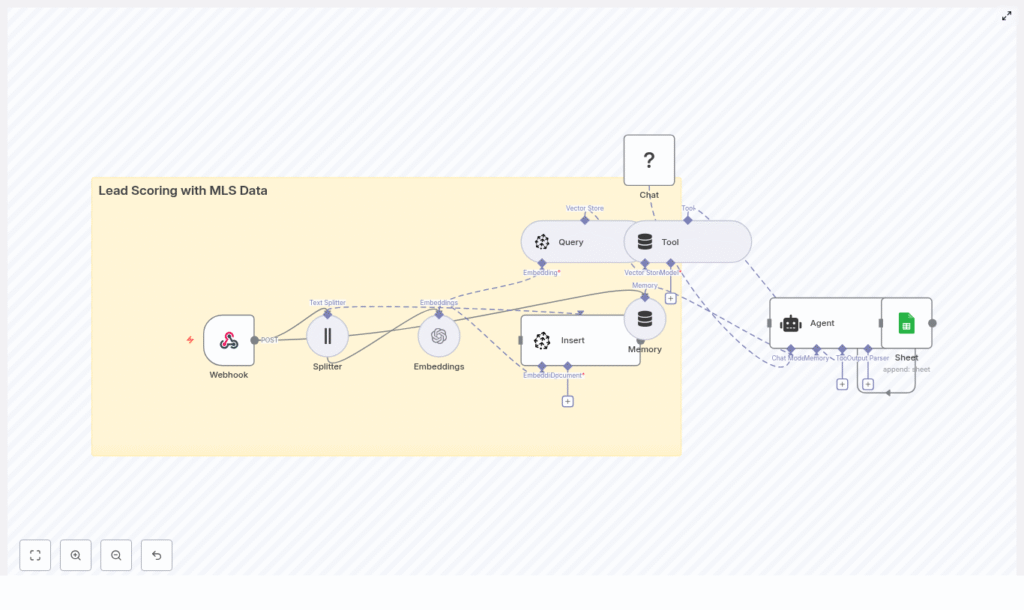
Lead Scoring with MLS Data using n8n, OpenAI Embeddings, and Pinecone
This technical guide describes how to implement an automated, MLS-driven lead scoring system using an n8n workflow template in combination with OpenAI embeddings and Pinecone vector storage. The workflow converts MLS listing data and lead interaction data into semantic vectors, persists them in Pinecone, and then queries this vector store to generate lead scores that support better prioritization and higher conversion rates.
1. Solution Overview
The workflow is designed as an end-to-end pipeline that:
- Ingests MLS listing data and lead events via an HTTP Webhook.
- Splits long, unstructured text into chunks using a Text Splitter node.
- Transforms text chunks into embedding vectors using the OpenAI Embeddings node.
- Stores vectors and associated MLS metadata in a Pinecone index.
- Runs vector similarity queries to evaluate and score new leads.
- Wraps Pinecone queries in a Tool node and maintains conversational context with a Memory node.
- Uses a Chat/Agent node (Hugging Face chat model in the template) to reason over vector results and generate a lead score.
- Persists scored leads to Google Sheets for reporting and CRM ingestion.
The template focuses on semantic lead scoring, where MLS listing descriptions, property attributes, and free-text inquiries are embedded into a vector space. This enables similarity-based matching between new leads and historically successful listings, as well as intent detection from unstructured messages.
2. Why MLS Data is Valuable for Lead Scoring
MLS (Multiple Listing Service) data is a high-signal source for real estate lead qualification. It typically includes:
- Property attributes (beds, baths, square footage, property type).
- Location and neighborhood context.
- Price history and days on market.
- Open-house activity and status changes.
- Contact and inquiry interactions tied to listings.
By embedding both MLS text fields (descriptions, agent notes, messages) and structured attributes (encoded into text or metadata), the workflow can:
- Identify semantic similarity between new leads and high-converting listings.
- Detect intent from free-text inquiries, emails, or notes.
- Combine property characteristics, behavior, and communication into a composite lead score.
- Automate lead prioritization so agents focus on the most promising opportunities.
3. Workflow Architecture in n8n
At a high level, the n8n template implements the following processing stages:
- Data Ingestion The Webhook node receives MLS listing updates and lead events (typically via HTTP POST with JSON or CSV payloads).
- Preprocessing & Chunking The Text Splitter node segments long descriptions and notes into manageable chunks for embedding.
- Vectorization The OpenAI Embeddings node turns each text chunk into a high-dimensional vector.
- Vector Storage The Pinecone Insert operation writes vectors and MLS metadata into the
lead_scoring_with_mls_dataindex. - Similarity Query For new leads, a Pinecone Query operation retrieves the most similar vectors (listings or past leads).
- Tool & Memory Integration A Tool node exposes the query capability to an LLM agent, and a Memory node maintains short-term conversational context.
- Lead Scoring Agent A Chat/Agent node (Hugging Face chat model) interprets query results, combines multiple signals, and outputs a lead score.
- Logging & Downstream Integration A Google Sheets node appends scored leads for analytics or for ingestion into a CRM.
4. Node-by-Node Breakdown
4.1 Webhook Node (Trigger)
Purpose: Entry point for MLS and lead data.
- Method:
POST - Typical payloads:
- MLS listing updates (new listings, price changes, status updates).
- Lead capture form submissions.
- Batched CSV or JSON objects containing multiple listings or leads.
The Webhook node passes through:
- Raw text fields, for example, listing descriptions, agent notes, inquiry messages.
- Structured fields, for example, MLS_ID, address, price, bedrooms, buyer intent flags, timestamps.
Configuration notes:
- Ensure the incoming payload structure is consistent, or add intermediate transformation nodes if the MLS provider or form system uses varying schemas.
- Validate required fields (e.g., MLS_ID, description) before passing to the embedding pipeline to avoid incomplete records downstream.
4.2 Text Splitter Node
Purpose: Break long text fields into smaller units suitable for embedding.
- Key parameters:
chunkSize = 400chunkOverlap = 40
The node receives long property descriptions or combined notes, then produces overlapping chunks. The overlap preserves context across chunk boundaries while keeping each chunk within a reasonable token length for the embedding model.
Edge cases:
- Very short descriptions may result in a single chunk, which is expected behavior.
- Extremely large batched payloads may require additional pagination or pre-splitting before this node to prevent memory pressure.
4.3 OpenAI Embeddings Node
Purpose: Convert each text chunk into a numerical vector representation for semantic search.
For every chunk from the Text Splitter, the OpenAI embeddings node:
- Calls a configured OpenAI embedding model.
- Outputs a high-dimensional vector associated with the original text chunk.
Recommendations:
- Use a modern OpenAI embedding model suitable for semantic search.
- Batch embedding calls where possible to reduce latency and cost.
- Monitor token usage and adjust
chunkSizeif costs are higher than expected.
Error handling considerations:
- Implement retry logic or n8n error workflows for rate-limit or transient network errors.
- Log failed embedding attempts and optionally skip problematic records instead of blocking the entire pipeline.
4.4 Pinecone Insert (Vector Store)
Purpose: Persist embeddings and MLS metadata in a Pinecone index for later retrieval.
- Index name:
lead_scoring_with_mls_data
Each vector is stored with associated metadata such as:
MLS_IDaddresspricebedroomsbuyer_intent_score(if available from upstream systems)lead_sourcetimestamp
This metadata enables:
- Filtering queries by city, price range, or other attributes.
- Computing composite scores that combine similarity with structured signals.
Configuration notes:
- Ensure the vector dimensionality in n8n matches the Pinecone index configuration.
- Normalize numeric fields (e.g., price buckets) before storing them as metadata to simplify filtering and scoring.
- Avoid storing raw PII directly in Pinecone; use hashed IDs where possible.
4.5 Pinecone Query + Tool Node
Purpose: Retrieve similar items from the vector store and expose this capability as a tool to the agent.
When a new lead arrives, the workflow:
- Generates an embedding for the lead’s text (e.g., inquiry message, search behavior summary) using the same OpenAI embedding model.
- Issues a similarity query against the
lead_scoring_with_mls_dataPinecone index. - Returns top matches (e.g., similar listings or historical leads) along with metadata.
The Tool node wraps this query operation so that the agent can:
- Call the vector search as an external function.
- Use the results as evidence when generating a lead score and explanation.
Filtering examples:
- Restrict queries to a specific city or neighborhood.
- Limit results to properties within a given price range.
Edge cases:
- If the vector store is sparsely populated (e.g., early in deployment), similarity results may be less reliable. Consider minimum match thresholds or fallback logic.
- Handle empty or malformed lead text by skipping the query or assigning a default score.
4.6 Memory & Chat Agent Nodes
Purpose: Maintain conversational context and compute lead scores using an LLM.
The Memory node provides a short-term buffer of recent interactions, which enables the agent to:
- Reference prior questions or clarifications about a lead.
- Accumulate evidence over multiple messages or updates.
The Chat/Agent node uses a chat-capable LLM (the template uses a Hugging Face chat model) to:
- Interpret Pinecone query results and their metadata.
- Combine semantic similarity with known behavioral and property signals.
- Generate a numerical lead score and optional explanatory notes.
Example signals that the agent can consider:
- Similarity to listings that historically converted.
- Contact frequency and recency of interactions.
- Budget alignment with property prices.
- Explicit intent phrases in messages.
Configuration notes:
- Ensure the prompt to the agent clearly specifies the scoring scale and which metadata fields are available.
- Use the Memory node judiciously to avoid unnecessary context bloat, especially in high-volume environments.
4.7 Google Sheets Node (Logging & Integration)
Purpose: Persist lead scores and supporting data for reporting and downstream systems.
The Google Sheets node appends a new row per scored lead with fields such as:
lead_idscoretop_similar_listing_idsnotesor explanation from the agent.timestamp
This sheet can:
- Serve as a simple reporting layer for non-technical teams.
- Act as a staging area before pushing data into a CRM or BI tool.
- Trigger additional automations based on score thresholds.
5. Lead Scoring Logic & Recommended Signals
The most effective lead scoring combines vector similarity outputs with rule-based business logic. Recommended signals include:
- Semantic similarity to high-converting listings Weight: high. Leads whose text or behavior closely matches past successful listings should rank higher.
- Search recency and number of property views Weight: medium. Recent and frequent engagement indicates active interest.
- Price alignment Weight: medium. Evaluate how well the lead’s stated budget matches the price of similar properties.
- Number of inquiries or contact attempts Weight: medium. Multiple touchpoints can signal stronger intent.
- Explicit intent keywords Weight: high. Phrases like “ready to buy” or “pre-approved” are strong purchase signals.
- Time on market and price reductions for similar properties Weight: low to medium. These can inform urgency or negotiation dynamics but are usually secondary to direct intent.
In practice, the agent can be instructed to compute a composite score that integrates these signals with the similarity results from Pinecone.
6. Best Practices for Operating the Workflow
- Normalize input fields before embedding Standardize addresses, price ranges, and property types to reduce noise in both embeddings and metadata.
- Protect sensitive data Avoid storing PII directly in vector metadata. Use hashed identifiers and keep sensitive attributes in secure, access-controlled systems.
- Optimize cost and latency Batch embedding requests and tune
chunkSizeto balance semantic fidelity with token usage. - Use Pinecone filters Apply filters by city, school district, or price bracket to increase the relevance of nearest neighbors.
- Refresh vectors periodically Re-index or update vectors when listing information changes, such as price adjustments or status updates.
- Handle API rate limits Implement rate-limiting and exponential backoff strategies for OpenAI and Pinecone to handle traffic spikes.
7. Evaluation & Performance Metrics
To assess the impact of the semantic lead scoring workflow, track:
- Lead-to-opportunity conversion rate Compare high-scored vs. low-scored leads.
- Average response time for prioritized leads
- Percentage of leads contacted within SLA

