


Starred Slack to Notion: n8n Automation Guide
Ever starred a Slack message thinking, “I’ll totally remember this later,” then watched it vanish into the black hole of your workspace? If your Slack is a graveyard of forgotten stars and your Notion is suspiciously empty, this workflow is here to save you from yourself.
With this n8n template, every starred Slack message can automatically turn into a clean, structured Notion note or a tidy log entry. No more copying, pasting, formatting, or promising yourself you’ll “do it at the end of the day.” Spoiler: you won’t.
What this n8n workflow actually does
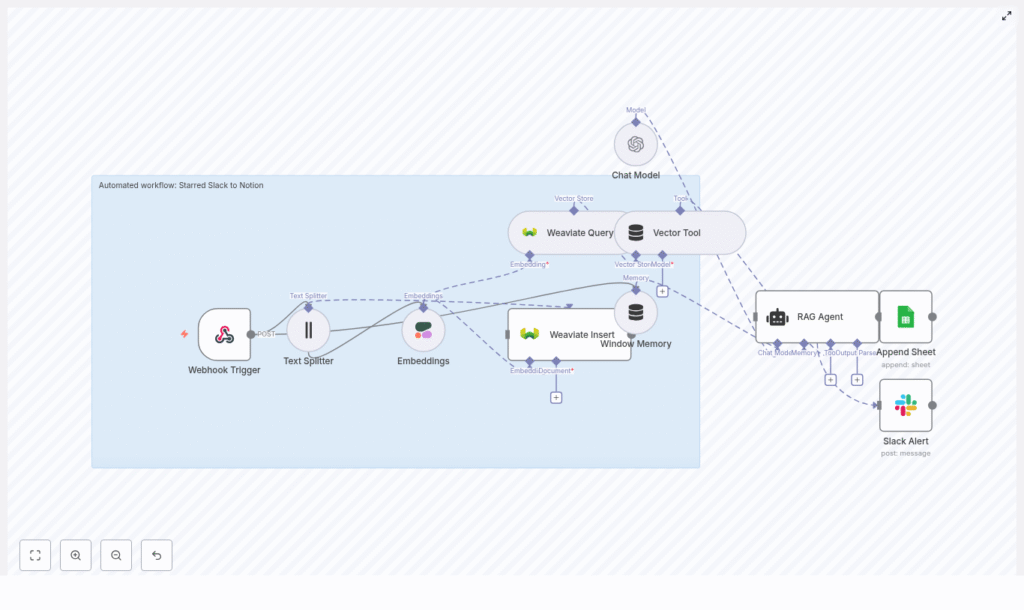
This “Starred Slack to Notion” automation takes your starred Slack messages, enriches them with embeddings and context, stores them in a vector database, and lets a RAG-enabled assistant (Retrieval Augmented Generation) help you make sense of it all.
At a high level, the workflow:
- Listens for starred Slack messages via a webhook trigger
- Splits long messages into smaller chunks for better embeddings
- Generates vector embeddings using Cohere (or another embedding provider)
- Saves those embeddings and metadata into Weaviate
- Uses RAG tools (Weaviate Query, Vector Tool, RAG Agent, Window Memory, and an OpenAI chat model) to process and enrich the content
- Logs the result in a Google Sheet or creates a Notion page with structured data
- Sends a Slack alert if something breaks so you are not debugging in the dark
In other words, you star a message, and the workflow quietly turns it into something useful while you go back to pretending you are caught up on all your channels.
How the architecture fits together
Here is the full cast of characters in this n8n template and how they play together:
- Webhook Trigger – Receives a POST request when a Slack message is starred.
- Text Splitter – Breaks long message text into smaller chunks for higher quality embeddings.
- Embeddings (Cohere) – Converts each chunk into a vector embedding so it can be semantically searched later.
- Weaviate Insert – Stores embeddings plus metadata like Slack channel, timestamp, and who starred it.
- Weaviate Query + Vector Tool + RAG Agent – Retrieves relevant context, then lets an LLM (OpenAI) summarize, categorize, or extract action items.
- Window Memory – Keeps short-term context for multi-step or conversational processing.
- Append Sheet (Log) or Notion – Either appends everything to a Google Sheet log or creates a Notion page with structured properties.
- Slack Alert – Pings you in Slack if an error occurs, so silent failures do not quietly pile up.
The result is a production-ready, extendable workflow that can grow with your stack, not just your collection of starred messages.
Before you start: what you need configured
To get this template running without tears, make sure you have the following:
- n8n instance – Self-hosted or n8n cloud.
- Slack Bot token – With scopes to read reactions or stars and send messages.
- Cohere API key – For embeddings, or an equivalent embedding provider supported by n8n.
- Weaviate endpoint and API key – Or a reachable local instance.
- OpenAI API key – For the chat model used by the RAG agent, or another LLM supported by n8n.
- Notion integration token – If writing to Notion, plus access to the target database.
- Google Sheets OAuth – If you prefer logging to a sheet instead of Notion.
Step-by-step setup: from Slack star to Notion note
1. Create the webhook trigger in n8n
First, you need a way for Slack to tell n8n, “Hey, someone starred this.”
In n8n:
- Add a Webhook node.
- Set it to accept POST requests.
- Use a path like
/starred-slack-to-notion.
In Slack:
- Create a Slack App or use an existing bot.
- Configure it to call your n8n webhook URL when a user stars a message.
- You can use event subscriptions or a reaction hook to detect star events.
Once set up, every time you star a message, Slack will send a POST to your n8n webhook, and the workflow kicks off.
2. Split long Slack messages into chunks
Some messages are short. Others are “someone pasted their entire brain into Slack.” For embeddings, shorter chunks usually perform better, so the workflow uses a Text Splitter node.
In the Text Splitter node, the template uses:
- Chunk size: 400 characters
- Chunk overlap: 40 characters
These values help keep context between chunks without making them huge. You can tweak them depending on your embedding model or typical message length.
3. Generate embeddings with Cohere
Next, each chunk is turned into a vector embedding so you can later search and retrieve similar content by meaning, not just keywords.
In n8n:
- Add a Cohere Embeddings node (or your preferred embedding provider).
- Use the model
embed-english-v3.0as in the template. - Provide your Cohere API key in n8n credentials.
The embeddings will be used by Weaviate to power semantic search and RAG retrieval.
4. Store embeddings and metadata in Weaviate
Now that you have vector embeddings, you need somewhere smart to keep them. That is where Weaviate comes in.
In the Weaviate Insert node:
- Configure an index (class) name, for example
starred_slack_to_notion. - Store each chunk as a document, including:
- The embedding vector
- The chunk text
- Metadata like Slack channel, message timestamp, and star author
- Ensure your Weaviate instance is reachable and credentials are set correctly.
At this point, your Slack stars are no longer just stars. They are searchable, structured knowledge.
5. Enable retrieval and RAG processing
Once a chunk is inserted into Weaviate, the template can optionally run retrieval-augmented generation. Translation: it looks up related content, feeds it to an LLM, and lets the model produce something smart and useful.
The RAG section of the workflow typically includes:
- Weaviate Query – Retrieves the top-k similar vectors from the vector store.
- Vector Tool – Wraps the vector store as a tool that the agent can call.
- Window Memory – Keeps short-term conversational context, helpful for multi-step enrichment or follow-up processing.
- Chat Model (OpenAI) – The LLM that generates summaries, tags, or action items.
- RAG Agent – Orchestrates the LLM and the vector tool to produce final output, like a clean note, categories, or extracted tasks.
This is where the magic happens. Instead of just storing raw text, you can have the agent:
- Summarize the starred message
- Extract key points and to-dos
- Generate tags or topics
6. Log results or create a Notion page
After the RAG Agent finishes its work, you decide where the final result lives.
Option 1: Log to Google Sheets (as in the template):
- Use an Append Sheet node.
- Append the RAG output plus metadata to a “Log” sheet for traceability and auditing.
Option 2: Create a Notion page instead:
- Replace the Google Sheets node with a Notion node.
- Create a Notion integration and share the target database with it.
- Map:
- Title field to the main note title
- Content/body to the RAG Agent’s generated summary or enriched text
- Tags to topics or categories extracted by the agent
- Channel, timestamp, and author to corresponding Notion properties
Now every starred Slack message can become a fully structured Notion page, not just another forgotten reaction icon.
Best practices for a smooth, non-chaotic workflow
To keep this automation reliable, cost effective, and friendly to your security team, keep these tips in mind:
- Secure your webhook – Use a secret or verification token so only Slack can trigger it.
- Optimize chunk size – Too large and vector quality drops, too small and you increase cost and metadata noise. Start with 400/40 and adjust.
- Limit what you store – Redact or obfuscate PII before embedding if your policies require it.
- Monitor costs – Embeddings and LLM calls add up. Use filtering and batching where possible.
- Enable onError handling – The Slack Alert node in the template lets you know immediately when something fails.
Troubleshooting when things misbehave
If your stars are not making it to Notion or your log, work through this quick checklist:
- Webhook not firing – Confirm Slack event subscriptions are set correctly and the app is sending POST requests to the correct n8n URL and path.
- Embeddings failing – Double check your Cohere API key and see if you have hit rate limits.
- Weaviate insert errors – Verify your index (schema) configuration and that your network or ACLs allow writes.
- RAG Agent output is weak – Increase retrieval top-k, ensure Window Memory has useful context, and tune the system message or prompts in the agent node.
Security and privacy: important but not boring
Vector stores feel harmless, but they can contain sensitive semantic representations of your data. Treat them like any other sensitive storage layer:
- Redact or obfuscate sensitive fields before embedding.
- Use private networking for n8n and Weaviate (VPN, private VPCs, restricted access).
- Rotate API keys regularly and apply least privilege to all integrations.
- Audit stored entries periodically and apply retention policies for old content.
Ideas for extending the workflow
Once you have the base “Starred Slack to Notion” setup running, you can start adding upgrades like a productivity-obsessed tinkerer.
- Automatic tagging – Have the RAG Agent extract topics from the content and map them to Notion tags.
- Task creation – If a message contains action items, automatically create tasks in Trello, Asana, or your favorite task manager.
- Daily digests – Aggregate all starred messages from the day and send a summary to a Slack channel or via email.
The template is modular, so you can mix, match, and extend nodes without rebuilding everything from scratch.
Testing and validation: make sure it actually works
Before trusting this workflow with your precious brain bookmarks, run through a quick test cycle:
- Manually star a test message in Slack and confirm that Slack sends a POST to your n8n webhook.
- Open n8n’s execution view and inspect each node to confirm:
- Text is being chunked correctly by the Text Splitter.
- Embeddings are generated successfully.
- Check Weaviate to ensure embeddings and metadata are inserted into the correct index.
- Verify the RAG Agent output and confirm that:
- A new row appears in your Google Sheet log, or
- A Notion page is created with the mapped properties.
Wrap up: from Slack chaos to Notion clarity
This template gives you a production-ready way to capture, enrich, and retrieve starred Slack content using n8n, Cohere embeddings, Weaviate, and a RAG-enabled assistant. Whether you prefer a simple Google Sheets log or fully structured Notion pages, the workflow is flexible enough to adapt to your stack.
Once set up, starring a Slack message becomes more than a hopeful gesture. It is a reliable pipeline into your knowledge base.
Ready to try it?
- Import the provided workflow JSON into your n8n instance.
- Add your credentials for Slack, Cohere, Weaviate, OpenAI, and Notion or Google Sheets.
- Run a few test stars in Slack and watch them appear in your log or Notion.
If you want help customizing the workflow, improving prompts, refining Notion mapping, or tightening privacy filters, you can try the template directly in your n8n instance or reach out for a tailored version.
