


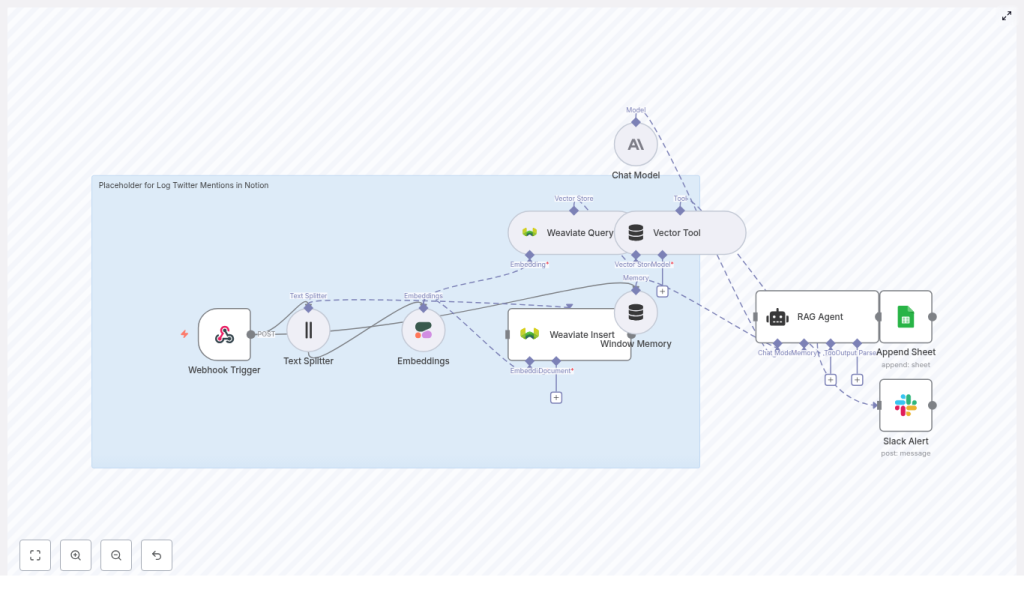
Log Twitter Mentions in Notion with n8n
This guide documents a production-ready n8n workflow template that captures Twitter mentions via webhook, enriches them with semantic embeddings, indexes them in Weaviate, applies a RAG (retrieval-augmented generation) agent for interpretation, and finally persists the processed data to Google Sheets or Notion. It also includes error reporting to Slack.
The focus here is on a detailed, technical walkthrough for users already familiar with n8n concepts such as nodes, credentials, and execution flows.
1. Workflow overview
The template implements an automated pipeline that:
- Receives Twitter mention events through a Webhook Trigger node.
- Splits tweet content into embedding-ready chunks using a Text Splitter node.
- Generates semantic vector embeddings via Cohere.
- Stores and retrieves vectors in Weaviate for context-aware retrieval.
- Uses a Chat Model and RAG Agent to summarize, classify, or interpret each mention.
- Appends structured results to Google Sheets by default, with the option to swap in Notion.
- Sends Slack alerts if any node in the execution fails.
This makes it suitable for teams that need a reliable way to log Twitter mentions, augment them with vector search, and apply LLM-based reasoning before storing them in a knowledge or tracking system.
2. System architecture
2.1 Core components
- Webhook Trigger – Entry point that receives POST requests from your Twitter-to-webhook bridge.
- Text Splitter – Preprocessing step that segments long tweets or threads into manageable text chunks for embedding.
- Embeddings (Cohere) – Generates vector representations of text for semantic search and retrieval.
- Weaviate Insert / Query – Vector database operations for storing and retrieving embedding vectors and associated metadata.
- Window Memory – Provides short-term conversational context to the RAG agent.
- Chat Model (Anthropic) + RAG Agent – LLM-based reasoning layer that interprets the mention and produces structured output.
- Append Sheet (Google Sheets) – Default persistence layer that logs processed mentions as rows.
- Slack Alert – Error notification path that posts failures to a Slack channel.
2.2 Data flow
- Twitter sends a JSON payload to the n8n webhook URL.
- The Webhook Trigger passes the payload to the Text Splitter.
- Split segments are sent to the Cohere Embeddings node.
- Generated vectors and metadata are inserted into a Weaviate index.
- A Weaviate Query retrieves relevant context vectors for the current mention.
- The retrieved context is passed into a Vector Tool and then into the RAG Agent, which uses a Chat Model with Window Memory.
- The RAG Agent outputs a structured interpretation (for example, status, type, summary) that is sent to the Append Sheet node or a Notion node.
- If any node fails, the onError path triggers the Slack Alert node to notify a specified Slack channel.
3. Prerequisites and external services
3.1 Required services
- An n8n instance (self-hosted or n8n.cloud).
- A Twitter mention forwarding mechanism:
- Twitter API v2 filtered stream, or
- A third-party service that can POST mentions to a webhook.
- Cohere API key for embeddings.
- Weaviate instance (cloud or self-hosted) for vector storage.
- Anthropic API key (or another supported chat LLM) for the RAG agent.
- Google account with access to a Google Sheet, or a Notion integration if you prefer Notion as the final store.
- Slack workspace and bot token for error notifications.
3.2 Security considerations
- Restrict access to your n8n instance and webhook URLs.
- For public-facing webhooks, configure a shared secret or signature validation and verify the payload before processing.
- Review data retention and PII handling policies for user-generated content (tweets, authors, etc.).
4. Template import and global configuration
4.1 Importing the JSON template
Import the provided JSON template into your n8n instance. The workflow graph, node connections, and default parameters are already configured. You mainly need to:
- Attach credentials to each external-service node.
- Adjust index names, sheet IDs, and paths as needed.
4.2 Key node parameters to review
- Webhook Trigger
- HTTP Method:
POST - Path: for example
log-twitter-mentions-in-notion
- HTTP Method:
- Embeddings (Cohere)
- Credential: your Cohere API key.
- Model: template uses
embed-english-v3.0(adjust only if you know the implications for vector dimension and compatibility).
- Weaviate Insert / Query
- Credential: your Weaviate instance configuration.
- Index name: template uses
log_twitter_mentions_in_notion.
- Chat Model
- Credential: Anthropic (or alternative LLM provider supported by your n8n installation).
- Append Sheet (Google Sheets)
- Credential: Google account with access to the target spreadsheet.
- Document ID: your Google Sheets document ID.
- Sheet name: target sheet tab name.
- Slack Alert
- Credential: Slack bot token.
- Channel: template uses
#alertsby default.
5. Node-by-node breakdown
5.1 Webhook Trigger
The Webhook Trigger node exposes an HTTP endpoint to receive Twitter mention events.
- Method:
POST - Path:
log-twitter-mentions-in-notion
The resulting webhook URL is typically:
https://your-n8n-domain/webhook/log-twitter-mentions-in-notionConfigure your Twitter listener (Twitter API v2 filtered stream or third-party bridge) to send JSON payloads to this URL.
Example test payload:
{  "tweet_id": "123456",  "author": "@example",  "text": "Thanks for the tip!",  "timestamp": "2025-01-01T12:00:00Z"
}
Use this payload to validate the webhook and downstream nodes before connecting real Twitter data.
5.2 Text Splitter
The Text Splitter node segments the tweet content into smaller chunks so that embedding models and the RAG agent can process long texts or threads effectively.
Typical configuration goals:
- Prevent hitting token limits for the embedding model.
- Preserve enough context by tuning chunk size and overlap.
For threaded tweets or long replies, you may increase overlap so that important context is not lost across chunks. Ensure that the input field is mapped to the tweet text (for example, text from the webhook payload).
5.3 Embeddings (Cohere)
The Embeddings node calls Cohere to generate semantic vectors for each text chunk.
- Credential: Cohere API key configured in n8n.
- Model:
embed-english-v3.0(as used in the template).
Important notes:
- Do not change the model without verifying vector dimension compatibility with your existing Weaviate schema.
- Check that the text passed to this node is not unintentionally truncated or empty, as this would produce low-quality or useless embeddings.
5.4 Weaviate Insert
The Weaviate Insert node writes the embedding vectors and accompanying metadata into a Weaviate index.
- Credential: Weaviate instance configuration (URL, API key if required).
- Index name:
log_twitter_mentions_in_notionin the template.
Typical metadata fields might include tweet ID, author, timestamp, and original text. Ensure that these fields are mapped correctly in the node parameters so you can later query by tweet ID or other attributes.
If your Weaviate instance does not yet have the schema for this index, make sure to create it with a vector dimension that matches the Cohere embedding model you are using.
5.5 Weaviate Query
The Weaviate Query node retrieves relevant context vectors from the index for the current mention.
Common use in this workflow:
- Query by similarity using the current tweet text embedding.
- Retrieve related mentions or historical context that can help the RAG agent interpret the new mention.
If you add deduplication logic later, you can also query by tweet_id before inserting new records.
5.6 Window Memory
The Window Memory node maintains a short history of interactions or context for the RAG agent. It is used to:
- Provide the Chat Model with limited conversational state.
- Support consistent classification or summarization across related mentions.
The memory window size should be chosen so that you do not exceed token limits when combined with retrieved Weaviate context and the current tweet text.
5.7 Chat Model and RAG Agent
The RAG Agent node is backed by a Chat Model (Anthropic in the template) and receives:
- The current tweet content.
- Context retrieved from Weaviate via the Vector Tool.
- Window Memory context.
The RAG Agent uses a system message to guide its behavior. The template includes:
"systemMessage": "You are an assistant for Log Twitter Mentions in Notion"You are expected to refine this prompt so the agent outputs structured data that is easy to parse, for example:
Status: Follow-Up RequiredMention Type: QuestionSummary: ...
That structure is critical for clean mapping into Google Sheets or Notion properties.
5.8 Append Sheet (Google Sheets)
The Append Sheet node is the default persistence layer. It appends a new row to a specified Google Sheet for each processed mention.
- Document ID: ID of the target spreadsheet.
- Sheet name: Name of the worksheet tab where rows should be appended.
Map the RAG Agent output and original tweet fields into columns such as:
- Tweet ID
- Author
- Full Text
- Status
- Mention Type
- Summary
- Timestamp
If you later switch to Notion, this node will typically be replaced, but the mapping logic remains conceptually similar.
5.9 Slack Alert
The Slack Alert node is connected via the workflow’s onError path. Whenever a node fails (for example, due to API errors, rate limits, or invalid input), this node posts a message to the configured Slack channel.
- Channel: template uses
#alerts.
For better debugging, customize the Slack message to include fields such as:
tweet_idauthor- Error message or node name
This makes it easier to correlate Slack alerts with specific executions in n8n.
6. Twitter integration and webhook setup
6.1 Connecting Twitter to n8n
Use either the Twitter API v2 filtered stream or a third-party automation tool to monitor mentions of your account. Configure that service to send a POST request to:
https://your-n8n-domain/webhook/log-twitter-mentions-in-notionThe payload structure should at minimum include:
tweet_idauthortexttimestamp
Run a test with the sample payload provided earlier to ensure the workflow triggers correctly and downstream nodes receive the expected fields.
7. Vector store configuration (Cohere + Weaviate)
7.1 Embeddings configuration
In n8n, configure your Cohere credentials and set the Embeddings node to use embed-english-v3.0, as in the template. If you choose a different model, verify that:
- Weaviate’s vector dimension matches the new model.
- Existing data in Weaviate is compatible with the new embeddings.
7.2 Weaviate configuration
For the Weaviate Insert and Query nodes:
- Set the
indexNametolog_twitter_mentions_in_notionor your preferred index name. - Ensure your Weaviate instance is reachable from n8n (network, credentials, TLS, etc.).
If you do not yet have a Weaviate instance, you can:
- Use Weaviate Cloud for a managed deployment, or
- Run Weaviate locally via Docker for testing.
Weaviate schema errors typically indicate mismatches in class names, index names, or vector dimensions. Check these carefully if you encounter issues.
8. RAG agent behavior and prompt design
8.1 System prompt configuration
The system message defines how the RAG Agent interprets mentions. The template uses a simple system message:
"You are an assistant for Log Twitter Mentions in Notion"For better structure and reliability, refine the prompt so the model consistently outputs fields that you can parse, such as:
- Status (for example, Follow-Up Required, Done, Ignore).
- Mention Type (for example, Question, Feedback, Bug Report, Praise).
- Short summary of the mention.
Structured outputs reduce the need for complex parsing nodes downstream and improve the quality of your Notion or Sheets records.
8.2 Using retrieved context
The RAG Agent uses:
- Current tweet text.
- Context from Weaviate Query (similar past mentions or related content).
- Window Memory state.
This enables more informed decisions about whether a mention needs follow-up or how it should be categorized. If you find the agent output irrelevant, consider:
- Strengthening the system prompt.
- Providing explicit examples of input and desired output in the prompt.
- Adjusting Weaviate Query parameters
