


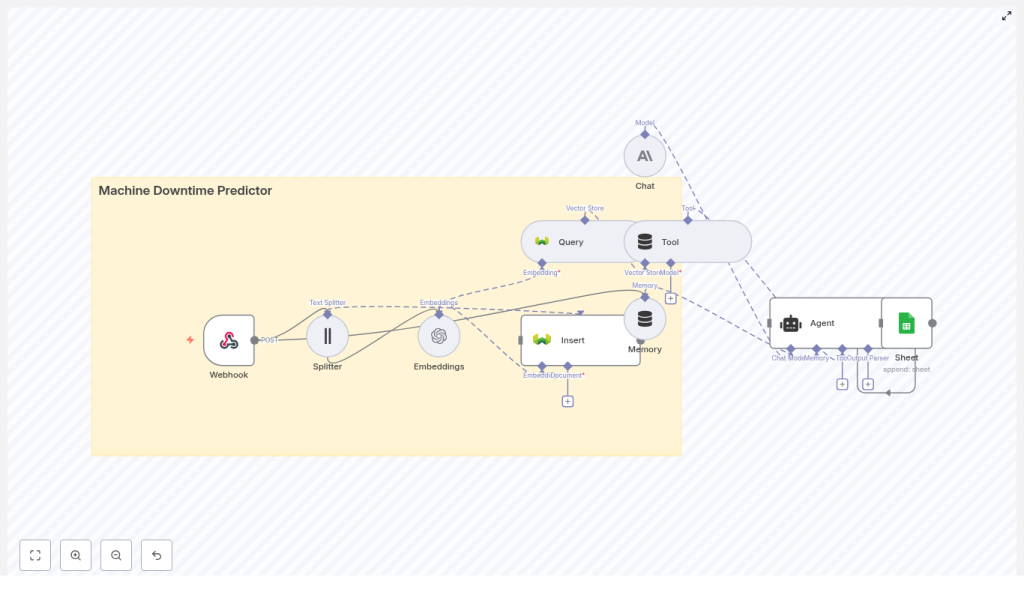
Build a Machine Downtime Predictor with n8n
Predictive maintenance helps you spot problems before machines fail, reduce unplanned downtime, and save costs. In this tutorial-style guide you will learn, step by step, how to build a machine downtime predictor in n8n using:
- n8n Webhook and workflow orchestration
- OpenAI embeddings for turning logs into vectors
- Weaviate as a vector database for semantic search
- An LLM agent (Anthropic or similar) for reasoning and recommendations
- Google Sheets for logging and auditing predictions
The workflow listens for machine logs, splits and embeds the text, stores vectors in Weaviate, retrieves similar past incidents when new events arrive, and uses an agent to summarize findings and recommend actions. Everything is coordinated inside n8n.
What you will learn
By the end of this guide, you will be able to:
- Explain how a machine downtime predictor works using embeddings and a vector database
- Set up an n8n workflow that receives machine logs through a webhook
- Split long diagnostic logs into chunks suitable for embedding
- Create and store OpenAI embeddings in a Weaviate index
- Query similar events from Weaviate when new logs arrive
- Use an LLM-based agent to analyze incidents and predict downtime risk
- Write the agent’s outputs to Google Sheets for tracking and analysis
Why build a machine downtime predictor with n8n?
Machine downtime prediction, often called predictive maintenance, gives operations teams an early warning system. Instead of reacting to breakdowns, you can:
- Detect patterns in logs that precede failures
- Compare new events to similar historical incidents
- Generate context-aware recommendations automatically
n8n is ideal for this because it is:
- Low-code – you connect nodes instead of building everything from scratch
- Flexible – easy to swap models, vector stores, or output destinations
- Integrable – works with your existing systems, APIs, and internal tools
In this template, you combine machine event logs, embeddings, and a vector database to quickly surface similar past incidents and generate informed predictions about potential downtime.
Concepts behind the workflow
Predictive maintenance using vectors
The core idea is to turn unstructured log text into numerical vectors so that similar incidents are close together in vector space. This enables semantic search such as:
- “Find past logs that look like this new vibration spike event.”
- “Show me similar temperature anomalies on the same machine type.”
You will use:
- OpenAI embeddings to convert text into vectors
- Weaviate to store and query those vectors
- An LLM agent to interpret retrieved context and suggest actions
High-level architecture
The n8n workflow follows this pattern:
- Webhook: Receives machine log data via POST
- Splitter: Breaks long logs into smaller text chunks
- Embeddings (OpenAI): Converts each chunk into a vector
- Insert (Weaviate): Stores vectors plus metadata in a vector index
- Query (Weaviate): Searches for similar events when a new log arrives
- Tool + Agent: Uses the vector store as a tool for an LLM agent to analyze incidents and recommend actions
- Memory: Keeps recent context for multi-step reasoning
- Google Sheets: Logs the agent’s output for tracking and auditing
Key workflow components in detail
1. Webhook node: entry point for machine logs
The Webhook node is where your machines or monitoring systems send data. It should receive JSON payloads securely over HTTPS and validate that the request is trusted.
A typical payload might look like this:
{  "machine_id": "M-1023",  "timestamp": "2025-09-05T10:21:00Z",  "event": "vibration spike",  "details": "Rpm: 3200, temp: 96C, anomaly_score: 0.82",  "logs": "Full diagnostic log text..."
}
In your n8n workflow, this JSON becomes the input data that will be split, embedded, and stored.
2. Splitter: preparing text for embeddings
Diagnostic logs are often long. Embedding very long text directly can:
- Hit token limits in the model
- Reduce retrieval accuracy
The template uses a character text splitter configured with:
chunkSize = 400chunkOverlap = 40
This means each chunk is about 400 characters, and each new chunk overlaps the previous one by 40 characters. The overlap preserves local context across chunks while keeping them small enough for efficient embedding.
3. OpenAI embeddings: converting text to vectors
Each log chunk is sent to an OpenAI Embeddings node. The node:
- Takes chunk text as input
- Outputs a vector representation of that text
Alongside the vector, you should keep important metadata, for example:
machine_idtimestamp- Chunk index or position
- Optionally severity, source, or other tags
This metadata is critical for tracing vectors back to the original log segments and for filtering in Weaviate.
4. Weaviate vector store: indexing and search
Weaviate stores your embeddings and lets you run semantic queries. In this template, the index name is:
machine_downtime_predictor
You configure a schema that includes fields like:
machine_idtimestampseveritysource
These fields let you filter queries. For example, you can search only within a specific machine, time range, or severity level.
5. Query + Tool: retrieving similar incidents
When a new event arrives, the workflow:
- Embeds the new log text using the same OpenAI embeddings model
- Sends that vector to a Weaviate Query node
- Retrieves the top-N most similar historical chunks, along with their metadata
The Query node is then wrapped as a Tool in n8n. This tool is available to the agent so that it can call the vector store when it needs context, for example:
- “Find similar vibration spike events for this machine in the last 30 days.”
6. Agent + Chat (Anthropic or other LLM)
The Agent node coordinates reasoning. It uses a chat-capable LLM, such as Anthropic, to:
- Summarize retrieved incidents
- Estimate the likelihood of imminent downtime
- Recommend actions like inspection, part replacement, or monitoring
The agent receives:
- Current event details from the webhook
- Similar incidents from the Weaviate tool
- Recent conversation context from the Memory node
By designing a clear prompt and giving the agent structured instructions, you can get consistent, actionable outputs.
7. Memory and Google Sheets logging
Memory allows the agent to remember recent steps in a troubleshooting session. This is useful if you run multiple queries or follow-up questions for the same incident.
The Google Sheets node then logs each agent result, typically with columns such as:
timestampmachine_ideventpredicted_downtime_riskrecommended_actionagent_summaryreferences(IDs of similar past events)
This creates a simple incident history you can analyze later or share with maintenance teams.
Step-by-step: building the n8n workflow
Now let us walk through building the workflow in n8n from scratch using the template structure.
Step 1: Create and secure the Webhook
- In n8n, add a Webhook node.
- Set the HTTP method to POST.
- Configure the path that your machines or monitoring tools will call.
- Secure the webhook:
- Use HTTPS.
- Require a header such as
x-signature. - Verify the signature with a shared secret before processing the payload.
Once configured, send a test payload like the JSON shown earlier to confirm that n8n receives the data correctly.
Step 2: Add a Splitter for the logs
- Add a Text Splitter node after the Webhook.
- Choose a character-based splitter.
- Set:
chunkSize = 400chunkOverlap = 40
- Configure it to split the
logsfield from the incoming JSON.
This ensures that even very long diagnostic logs are broken into manageable, context-rich segments for embedding.
Step 3: Generate embeddings with OpenAI
- Add an OpenAI Embeddings node and connect it to the Splitter.
- Select your embedding model in the node configuration.
- Map the chunk text from the Splitter as the input text.
- Make sure to pass through metadata such as:
machine_idtimestamp- Chunk index or any additional relevant fields
Each output item now contains an embedding vector plus metadata that identifies where it came from.
Step 4: Insert embeddings into Weaviate
- Add a Weaviate Insert node and connect it to the embeddings node.
- Set the index name to:
machine_downtime_predictor - Ensure that your Weaviate instance is configured with a schema that includes:
machine_idtimestampseverity(if available)sourceor any other useful tags
- Map the embedding vectors and metadata fields to the corresponding schema properties.
At this point, historical logs can be replayed into the webhook, embedded, and stored to build up your knowledge base of incidents.
Step 5: Query Weaviate when new events arrive
- Use the same embeddings process for incoming events that you want to analyze in real time.
- Add a Weaviate Query node connected to the embeddings output.
- Configure the query to:
- Search in the
machine_downtime_predictorindex. - Return the top-N most similar documents.
- Include both similarity scores and metadata in the response.
- Search in the
- Optionally, add filters based on
machine_id, time range, or severity.
The query results will provide context for the agent: similar past incidents, how they were classified, and what actions were recommended or taken.
Step 6: Wrap the Query as a Tool and configure the Agent
- Create a Tool node in n8n and wrap the Weaviate Query node so that the agent can call it on demand.
- Add an Agent node and connect it to:
- The Tool (Weaviate Query)
- The Memory node (if you are using conversation memory)
- The current event data from the Webhook
- Choose a chat-capable LLM such as Anthropic for the Agent.
- Design a deterministic prompt template that instructs the agent to:
- Summarize recent similar incidents from the vector store.
- Assess the likelihood of imminent failure or downtime.
- Recommend next actions with:
- Severity level
- Estimated time to failure (ETA)
This structure helps the agent produce consistent, useful outputs instead of vague suggestions.
Step 7: Append agent results to Google Sheets
- Add a Google Sheets node at the end of the workflow.
- Set it to Append rows to your incident log sheet.
- Map the following fields from the Agent output and input:
timestamp(from the event)machine_ideventpredicted_downtime_risk(for example a 0-100 score)recommended_actionagent_summaryreferences(IDs or links to similar past events from Weaviate)
This sheet becomes your running history of predictions and recommendations, which you can later analyze or integrate into dashboards and ticketing systems.
Prompt and agent design tips
Good prompt design is crucial for reliable downtime predictions. Consider the following guidelines:
- Use a structured output format, for example:
- Summary
- Risk Score (0-100)
- Recommended Action
- Confidence
- Limit the context window to what matters:
- Key machine metadata
- Top 5 similar events from Weaviate
- Reduce hallucinations by:
- Asking the agent to reference vector IDs from Weaviate.
- Encouraging it to quote short snippets from retrieved logs when relevant.
- Instructing it not to invent data that is not present in the context.
