


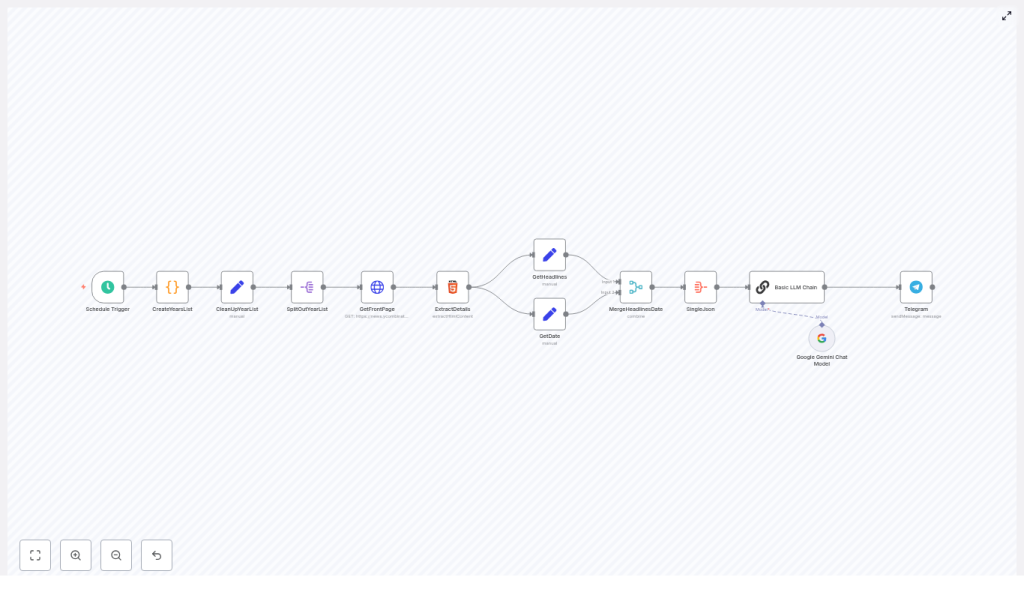
Automate “On This Day” HN Digests with n8n & Gemini
On a quiet Tuesday night, Lena stared at her blinking cursor.
She was a developer turned indie creator who ran a small Telegram channel about tech history and developer culture. Her audience loved the occasional “On This Day on Hacker News” posts she manually assembled. Those posts always got the most replies, the longest threads, and the highest engagement. But there was a problem.
They took forever to create.
Every evening she would:
- Dig through old Hacker News front pages
- Copy and paste headlines into a messy document
- Try to spot patterns or themes
- Write a short recap and format it for Telegram
One missed day became two, then a week. The audience kept asking for more “On This Day” digests, but Lena knew she could not keep doing it by hand.
“If I do this manually,” she thought, “I’ll either burn out or stop altogether.”
That night she decided she needed a fully automated workflow. Something that could:
- Look up Hacker News front pages for the same calendar date across many years
- Summarize and categorize the most interesting headlines
- Publish a clean Markdown digest straight to her Telegram channel
Her solution started with n8n and Google Gemini.
The spark: why automate “On This Day” Hacker News digests?
Lena already knew that Hacker News archives are a goldmine. Looking back at old front pages showed her:
- How conversations about AI, privacy, and open source evolved
- Which tools and startups quietly appeared years before they became mainstream
- How trends rose and fell over time
Her audience loved seeing these timelines unfold, especially when she could say things like “On this day in 2012, the first big post about X hit the front page.”
Automating this “On This Day” HN digest with n8n would let her:
- Surface short tech histories and trends for social channels automatically
- Stop wasting time on tedious research and copy paste work
- Deliver consistent, engaging content to her Telegram channel, newsletter, or blog
She did not just want a script. She wanted a reliable, end to end workflow that would run every day, even if she was offline.
Meet the toolkit: n8n, Gemini, Telegram, and Hacker News
Before she drew the first node, Lena chose her stack.
- n8n – her orchestration hub, a visual automation platform that could schedule runs, call APIs, parse HTML, and chain logic together
- Google Gemini (or any capable LLM) – the brain that would analyze headlines, group them into themes, and write a Markdown digest
- Telegram Bot API – the publishing channel, so the final digest would arrive automatically in her Telegram audience’s feed
- Hacker News front page at
https://news.ycombinator.com/front– the source for historical front page headlines
With the pieces in place, she opened n8n and started sketching the architecture on a whiteboard.
Designing the workflow: from daily trigger to Telegram digest
Lena did not want a fragile chain of ad hoc scripts. She wanted a clear pipeline, so when something broke she would know exactly where to look.
Her end to end n8n workflow would look like this:
- Scheduler – kick off the workflow once per day
- Date generator – compute the same month and day for each year she cared about
- Scraper – fetch the Hacker News front page HTML for each of those dates
- Extractor – parse headlines and the date from the HTML
- Aggregator – merge everything into a structured JSON payload
- LLM summarizer – send that JSON to Gemini with a carefully written prompt
- Publisher – post the Markdown digest to her Telegram channel
Once she had the big picture, she turned that sketch into concrete n8n nodes.
Rising action: building the n8n pipeline step by step
1. Making it daily: Schedule Trigger
The first problem was consistency. Lena wanted the digest to appear every evening at the same time, without her intervention.
She dropped a Schedule Trigger node into the canvas and configured it to run every day at a fixed hour, for example 21:00.
This node would become the heartbeat of the whole system, and every part of the workflow would start from here.
2. Time travel in code: generating the year list
Next, she needed to fetch the same calendar date across multiple years. If today was March 3, she wanted March 3 for 2007, 2008, 2009, and so on up to the current year.
She added a Code node called CreateYearsList. Inside that JavaScript node, she wrote logic to:
- Determine the current date
- Loop from a chosen start year, such as 2007, up to the current year
- Generate ISO formatted date strings like
YYYY-MM-DDfor each year on that same month and day - Handle edge cases, like starting mid year or ensuring the dates exist
The node output an array called something like datesToFetch, a clean list of date strings that the rest of the workflow could iterate over.
3. Tidying the payload: CleanUpYearList
To keep things predictable, Lena added a Set node named CleanUpYearList.
Its job was simple: normalize the date array into a single JSON key that every downstream node would expect. That small step made debugging easier later, because all the dates lived under one consistent field instead of being scattered across different structures.
4. One date at a time: SplitOutYearList
Fetching every date in one big HTTP call was not an option. She wanted each date to be handled individually so that a failure for one year would not break the entire run.
She used a Split Out node, SplitOutYearList, to iterate over the list of dates. This node took the array of datesToFetch and produced one item per date.
Now each subsequent HTTP call could work with a single date, be retried independently, and be batched with delays to respect rate limits.
5. Scraping history: GetFrontPage HTTP Request
With individual dates flowing through the pipeline, Lena wired up the HTTP Request node, GetFrontPage.
For each item, the node would call:
https://news.ycombinator.com/front?day=YYYY-MM-DD
She configured it to:
- Use the current item’s date in the
dayquery parameter - Return the raw HTML of the front page for that day
- Enable batching and add a small delay, for example 3 seconds between requests, so she would not hit rate limits
Now, for every date, she had the full HTML of the historical Hacker News front page ready for parsing.
6. Pulling out the good parts: ExtractDetails HTML node
The raw HTML was messy and noisy. Lena needed just two things:
- The list of front page headlines
- The date string that Hacker News shows on the page
She added an HTML Extract node called ExtractDetails. Inside that node she:
- Targeted the
.titlelineselector to grab the headlines - Used a selector like
.pagetop > fontto extract the date text from the page header - Configured the node to return arrays of headlines so they could be matched back to the correct date
This node turned messy HTML into structured data: arrays of titles and the associated page date for each request.
7. Giving data a home: GetHeadlines and GetDate
To keep everything clean, she used two Set nodes, GetHeadlines and GetDate.
These nodes:
- Placed the parsed headlines into a dedicated JSON field, for example
headlines - Stored the associated date into a field like
date
That small bit of structure made it much easier to merge and aggregate later. Each item now clearly said: “Here are the headlines, and here is the date they belong to.”
8. Building the master JSON: MergeHeadlinesDate and SingleJson
At this point the workflow had many items, one per date, each with its own headlines and date metadata. Gemini, however, would work best with a single structured JSON object.
Lena added a Merge node followed by an Aggregate node, often called something like MergeHeadlinesDate and SingleJson.
These nodes:
- Combined the
headlinesanddatefields by position - Aggregated all items into one JSON payload
- Produced a final structure that grouped headlines by year or date
The result was a clean JSON object that looked roughly like: an array of entries, each with a date and a list of headlines and URLs. Perfect to hand off to an LLM.
9. The turning point: letting Gemini write the digest
This was the moment Lena had been working toward. She did not want to manually read through dozens of headlines every night. She wanted an AI assistant to do the heavy lifting and produce a polished “HN Lookback” summary for her.
She added an LLM node, which in her case used Google Gemini, and named it something like Basic LLM Chain.
Inside this node she crafted a tight, explicit prompt. The instructions told the model to:
- Accept a structured JSON input that contained an array of dates and their headlines
- Scan across all years and select the top 10 to 15 most interesting headlines
- Group those headlines into themes such as Open Source, Fundraising, AI, Privacy, or Startups
- Produce a Markdown digest titled something like “HN Lookback” for that day
- Format each entry with:
- A year prefix
- A Markdown link to the original URL
- Short, readable descriptions
Conceptually, her prompt read a bit like this:
<provide the JSON>
You are a news categorizer. From the list, produce a Markdown "HN Lookback" for this day covering startYear to endYear. Choose 10-15 top headlines, group by themes, and include markdown links and prefix each entry with its year.
By being explicit about structure, count, and formatting, Lena got consistent, channel ready Markdown output that barely needed editing.
10. The payoff: publishing to Telegram
Now she needed to put that Markdown in front of her audience.
She added a Telegram node, connected it to her bot, and configured it to:
- Send messages to her chosen Telegram channel
- Use Markdown parse mode so all headings, bullets, and links rendered correctly
- Ensure the bot had permission to post, ideally as an admin
When she ran a test, the full “On This Day” Hacker News digest appeared in her channel as a neatly formatted post, complete with themes, years, and clickable links.
For the first time, she saw the entire process run end to end without touching a browser.
Keeping Gemini on track: prompt engineering in practice
After a few test runs, Lena noticed that small changes in the prompt could produce very different results. To keep the digest consistent, she refined her instructions using a few principles:
- Be strict about output format She included a clear Markdown template in the prompt and told the model to follow it exactly.
- Prioritize by interest She asked the model to favor headlines that looked historically significant, had strong engagement, or represented important shifts in tech.
- Limit the number of entries She constrained the digest to 10 to 15 headlines so the post stayed readable and scannable.
- Always include URLs and year prefixes Every bullet had the original URL as a Markdown link and a year at the start, so readers could quickly see when the story appeared.
These small tweaks made the difference between a chaotic list and a polished, repeatable format her subscribers came to expect.
Behind the scenes: scheduling, batching, and rate limits
Once the core flow worked, Lena turned her attention to reliability and respect for external services.
When scraping historical Hacker News pages, she followed a few rules:
- Batch HTTP requests She avoided hammering the site by spacing out requests, using 3 to 5 second delays between calls.
- Use retries with backoff For transient network errors, she configured retries with exponential backoff to avoid failing the entire job on a single bad response.
- Cache when possible For older dates that never change, she considered caching results so the workflow did not re scrape the same pages every time.
These safeguards made the workflow both polite and robust.
Staying safe and sane: best practices for the workflow
As she prepared to run the automation daily, Lena added a few guardrails.
- Respect Hacker News terms of service She monitored her scraping volume and kept an eye on the site’s guidelines, and considered using official APIs or archives if her usage grew.
- Validate URLs Before publishing, she checked that links did not obviously point to broken or malicious targets.
- Control LLM costs She set sensible token limits in the Gemini node and monitored usage so costs did not spike unexpectedly.
- Log outputs and add review steps She logged every digest and kept the option to insert a human approval step in n8n before posts went live.
With these in place, she felt comfortable leaving the workflow on autopilot.
When things break: how Lena debugged common issues
Not every run was perfect at first. A few early failures taught her where to look when something went wrong.
- Empty or missing headlines She discovered that if the HTML structure changed, her
.titlelineselector would fail. The fix was to inspect the latest HTML and update the selector. - Incorrect dates When the digest showed mismatched years, she traced it back to inconsistent date formatting. Ensuring every node used ISO
YYYY-MM-DDformat fixed the issue. - LLM ignoring the template If Gemini drifted from the requested format, she tightened the prompt and added a small example of the exact Markdown layout she
