


Build a Trademark Status Monitor with n8n, Pinecone & Hugging Face
Ever spent a lovely afternoon refreshing trademark databases like it is your new social feed, only to realize nothing has changed? Repetitive checks, scattered notes, and “did we already log this?” moments can turn trademark monitoring into a full-time hobby that nobody asked for.
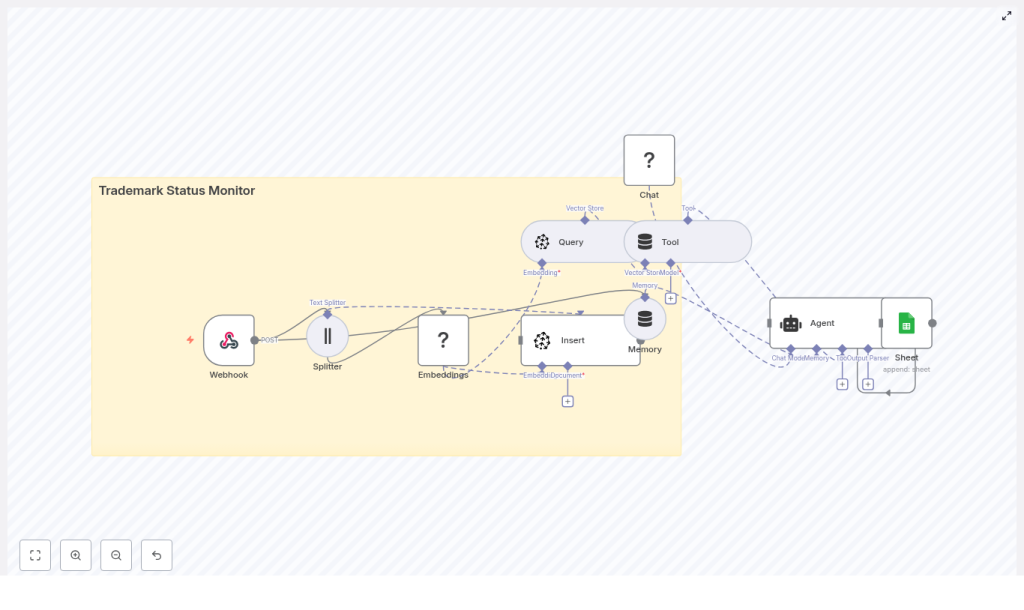
Good news: you can automate the boring parts. This guide walks you through a trademark status monitor built with n8n, Hugging Face embeddings, Pinecone, and Google Sheets. It quietly watches for updates, figures out what is new or duplicated, and logs everything neatly so your team can focus on actual legal work instead of endless copy-paste duties.
What this n8n trademark workflow actually does
This workflow acts like a very patient, very organized assistant that never forgets a status update. At a high level, it:
- Receives trademark status updates through a webhook
- Splits long text into manageable chunks for better processing
- Turns those chunks into embeddings using a Hugging Face model
- Saves the embeddings in a Pinecone vector index for future comparison
- Queries Pinecone to find similar past entries and detect duplicates or changes
- Uses a lightweight agent with tools and memory to decide what kind of update it is
- Logs the final, cleaned-up result into a Google Sheet for tracking and audits
The result: you get centralized, searchable, and scalable monitoring of trademark status changes, without manually stalking every update.
Why automate trademark status monitoring at all?
If you handle more than a handful of marks, automation goes from “nice to have” to “please save my sanity.” An automated trademark status monitor is especially useful for legal teams, brand managers, and startups who need reliable tracking without hiring a small army.
Key benefits include:
- Faster detection of changes like Office Actions, new registrations, or oppositions
- Centralized records of status updates that are searchable and easy to audit
- Scalability to hundreds or thousands of marks using embeddings and vector search
- Easy reporting thanks to Google Sheets logging that non-technical teammates can read
In short, you get real-time-ish awareness without the constant manual checking and spreadsheet chaos.
High-level n8n workflow overview
Here is the big picture of how the n8n trademark status monitor runs from start to finish:
- Webhook receives a POST request with trademark update data.
- Text Splitter breaks down long descriptions or documents into smaller chunks.
- Embeddings (Hugging Face) converts each chunk into a vector embedding.
- Insert (Pinecone) saves those vectors in a Pinecone index with useful metadata.
- Query (Pinecone) searches for similar historic entries when a new update arrives.
- Tool + Agent analyzes the results to decide if something is new, changed, or a duplicate.
- Memory keeps a short history of recent decisions to improve consistency.
- Google Sheets appends a clean, structured log entry to your tracking sheet.
Under the hood, the magic comes from combining semantic search (via embeddings and Pinecone) with a simple agent that can reason about what the update actually means.
Step-by-step setup guide
Let us walk through each key node in the n8n workflow so you can configure your own monitor without guesswork.
1. Webhook – your workflow’s front door
Start by adding a Webhook node in n8n and set it to accept POST requests. This is where your trademark updates will arrive from:
- An external API
- A scheduled scraper
- Third-party monitoring or notification services
Make sure to:
- Validate incoming payloads so you do not process garbage data
- Normalize key fields such as:
- Mark name
- Serial or registration number
- Jurisdiction
- New status text
This early cleanup keeps the rest of the workflow sane and makes later comparisons more reliable.
2. Text Splitter – breaking long text into sane pieces
Next, send your text (descriptions, Office Actions, decisions, etc.) into a Text Splitter node. Embedding very long documents in one go is like trying to drink from a fire hose, so chunking helps.
Typical configuration:
- Chunk size: about 400 characters
- Overlap: about 40 characters
The overlap is important. It preserves semantic continuity so that sentences cut between chunks still make sense to the embedding model.
3. Embeddings with Hugging Face – giving text a vector brain
Now add an Embeddings (Hugging Face) node. This node converts each text chunk into a vector representation that Pinecone can index and search.
Configuration tips:
- Pick a Hugging Face embedding model that is suitable for semantic similarity.
- Use the same model for both ingestion and querying to keep results consistent.
- Attach metadata to each embedding, such as:
- Trademark ID or serial number
- Timestamp
- Source or jurisdiction
- Any internal reference IDs
That metadata will make your life much easier when you need to filter, debug, or trace back to the original content.
4. Insert into Pinecone – building your trademark memory
With embeddings ready, use an Insert or Upsert node for Pinecone. This is where your long-term “trademark memory” lives.
Recommended setup:
- Create a Pinecone index, for example named
trademark_status_monitor. - Insert each chunk embedding as a separate vector.
- Store the metadata you attached earlier alongside each vector.
Because you save metadata with each vector, you can later perform exact match lookups or easily trace a search result back to the original update or document chunk.
5. Query Pinecone – spotting duplicates and related events
Whenever a new update comes in, you do not want to guess if it is new or just a rerun of something you already know. So you:
- Embed the incoming text using the same Hugging Face model.
- Use a Query node for Pinecone to search for the top similar vectors.
This helps you detect:
- Related historic events for the same mark
- Similar status changes
- Potential duplicates or near-duplicates
Use a conservative similarity threshold to avoid noisy matches. If you are seeing too many false positives, you can tighten the threshold or filter by metadata like jurisdiction or application number.
6. Tool & Agent – deciding what this update really means
Here is where the workflow gets smarter than a simple log collector. Wrap your vector store access into a tool and feed it into a lightweight agent.
The agent uses:
- The retrieved Pinecone results
- Recent memory from previous interactions
- The new incoming update
to perform tasks such as:
- Deciding whether the update is a genuine status change or just a duplicate notification
- Extracting structured fields like:
- Current status
- Deadlines or key dates
- Next action required
- Generating a short, human-readable summary that is suitable for logging and alerts
The result is a cleaner log and fewer “is this actually new?” questions from your team.
7. Memory – short-term context for better decisions
Add a Memory component, typically a buffer window that stores the last few interactions or decisions. This helps in cases where:
- Multiple updates arrive in quick succession for the same trademark
- You want consistent handling of similar events over a short period
Keep it short-term and avoid storing sensitive personal data in long-term memory. Think of it as your workflow’s short attention span, but in a good way.
8. Google Sheets logging – a simple, friendly audit trail
Finally, send the agent’s parsed result into a Google Sheets node and append a row to your Log sheet. A typical row might include:
- Trademark identifier (serial or registration number)
- Raw payload or a reference to it
- Normalized status
- Confidence score from the agent
- Timestamp
- Link to the original source or document
Google Sheets works well because it is easy to share, filter, and audit. Non-technical teammates can review changes without touching n8n or Pinecone.
Best practices to keep your monitor accurate and sane
Validate your inputs
Garbage in, garbage out. Always validate webhook payloads and normalize things like:
- Jurisdiction codes or names
- Date formats
- Status labels and wording
Consistent input data makes similarity search and agent reasoning far more reliable.
Tune your thresholds carefully
Pinecone similarity thresholds and agent confidence cutoffs are not “set and forget.” Watch your early results and adjust as needed:
- If you see a lot of false matches, raise similarity thresholds.
- Use metadata filters like jurisdiction and application number to narrow results.
- Log confidence scores to your sheet so you can analyze patterns later.
Use rich metadata and provenance
When storing vectors in Pinecone, include provenance details such as:
- Source URL or system
- Fetch or ingestion timestamp
- Raw text or a reference to it
This makes audits, dispute resolution, and debugging much easier, especially when someone asks “where did this status come from?” three months later.
Keep security and compliance in mind
Even the most helpful automation can become a problem if security is ignored. Make sure to:
- Protect API keys and environment variables
- Secure webhook endpoints with IP whitelisting, signed payloads, or OAuth where possible
- Restrict access to your Pinecone index
- Log administrative operations for compliance and audits
Plan for scaling
As your trademark portfolio grows, volume will increase. To keep performance and costs under control:
- Batch embeddings and Pinecone inserts when possible
- Monitor usage and costs for both the embedding model and Pinecone storage/queries
- Consider downsampling or more aggressive deduplication if you see a lot of repeated content
Testing, debugging, and tuning your workflow
Before you trust the workflow with your entire portfolio, run some controlled experiments:
- Send known test payloads to the webhook and verify the full path.
- Check that the Text Splitter is chunking as expected.
- Confirm embedding dimensions and Pinecone upsert success.
- Use the Pinecone UI to inspect inserted vectors and metadata.
- Log the agent’s decisions and confidence scores to your Google Sheet.
Use these test runs to fine-tune thresholds, adjust metadata, and refine your logging format so it fits your legal operations workflow.
Ideas to extend your trademark monitor
Once the core pipeline is running smoothly, you can build on top of it with extra automation layers:
- Alerts: Send Slack or email notifications for critical status changes like Notices of Opposition.
- Ticketing: Create tasks in your ticketing system for legal follow-up actions.
- Dashboards: Build a small dashboard to visualize trends across jurisdictions and status categories.
- Archiving: Store full original documents in cloud storage such as S3 and include links in your vector metadata.
These additions turn your monitor from “log-only” into a more proactive legal operations tool.
Costs and trade-offs to keep in mind
This setup is powerful, but it is not free. You will want to keep an eye on:
- Pinecone pricing for vector storage and query capacity.
- Embedding costs based on the Hugging Face model and provider you use.
There is a trade-off between:
- Chunk size and vector count
- Recall and precision for similarity search
- Granularity of logging and overall storage costs
Adjust chunking strategy, index configuration, and thresholds until you get a balance that fits your budget and accuracy requirements.
Wrapping up: a smarter way to watch trademarks
By combining n8n with Hugging Face embeddings, Pinecone vector search, and a simple agent, you can build a Trademark Status Monitor that is:
- Scalable across large portfolios
- Auditable and transparent
- Capable of semantic search and robust de-duplication
Instead of manually hunting for changes, you get a system that quietly tracks, compares, and logs trademark events in the background.
Next steps:
- Export the n8n workflow JSON.
- Connect your Pinecone and Hugging Face credentials.
- Run test payloads through the webhook.
- Tune thresholds and confidence levels.
- Add alerts or tickets to integrate the monitor into your legal operations.
Call to action
Ready to stop manually refreshing trademark records and let automation do the heavy lifting? Export the workflow, plug in your APIs, and start getting reliable status tracking today.
If you need help implementing this pipeline or tailoring it to your team, reach out for a consultation and hands-on setup. Your future self, and your calendar, will be grateful.
