


Build a Maintenance Ticket Router with n8n & Vector Search
Imagine if every maintenance request that came in just quietly found its way to the right team, with the right priority, without you or your colleagues having to manually triage anything. That is exactly what this n8n workflow template helps you do.
In this guide, we will walk through how to build a smart, scalable Maintenance Ticket Router using:
- n8n for workflow automation
- Vector embeddings (Cohere or similar)
- Supabase as a vector store
- LangChain tools and an Agent
- Google Sheets for logging and auditing
We will keep things practical and friendly, so you can follow along even if you are just getting started with vector search and AI-driven routing.
What this n8n template actually does
At a high level, this workflow turns unstructured maintenance requests into structured, actionable tickets that are routed to the right team. It reads the incoming ticket, understands what it is about using embeddings and vector search, checks for similar historical tickets, and then lets an Agent decide on:
- Which team should handle it
- What priority it should have
- What follow-up actions to trigger (like sending notifications or creating tickets elsewhere)
Finally, it logs the whole decision in Google Sheets, so humans can review what the automation did at any time.
When should you use a smart ticket router?
If your maintenance requests are simple and always follow the same pattern, static rules and keyword filters might be enough. But real life is rarely that neat, right?
Modern maintenance tickets usually look more like free-form messages:
- “The AC is making a weird rattling noise near the conference room on floor 3.”
- “Water dripping from ceiling above storage, might be a pipe issue.”
- “Elevator keeps stopping between floors randomly.”
These descriptions are full of context and nuance. Simple keyword rules like “if ‘water’ then Plumbing” or “if ‘AC’ then Facilities” can miss edge cases or misclassify ambiguous tickets.
This is where a vector-based approach shines. By using embeddings, you are not just matching words, you are matching meaning. The workflow compares each new request with similar past tickets and known mappings so it can route more accurately and adapt over time.
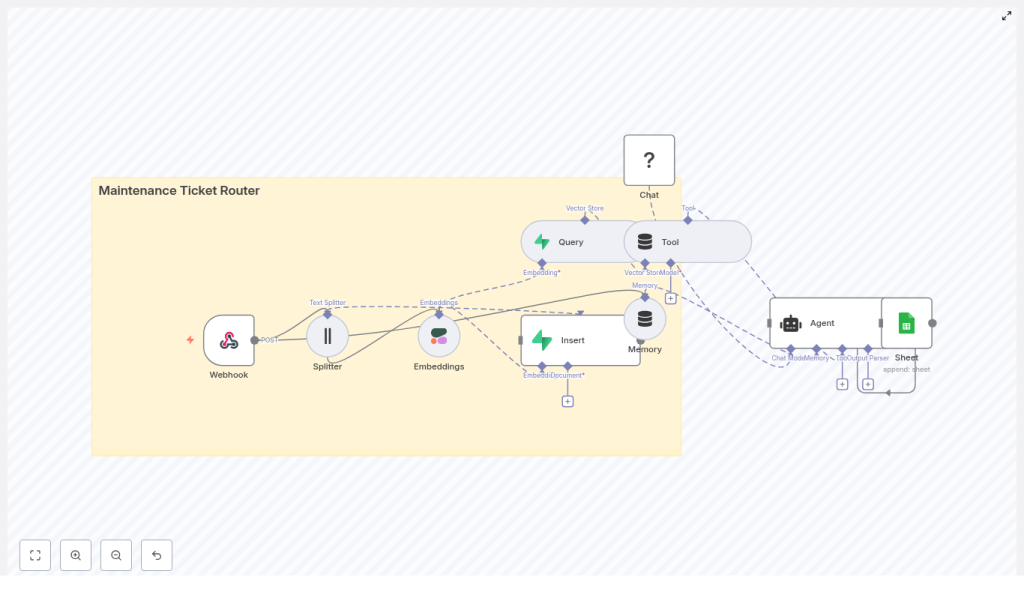
How the workflow fits together
Let us zoom out before we dive into the individual nodes. The template follows this general flow:
- Receive ticket via a Webhook in n8n.
- Split long text into smaller chunks for better embeddings.
- Generate embeddings using Cohere (or another embeddings provider).
- Store vectors in a Supabase vector store for future similarity search.
- Query similar tickets from the vector store when a new ticket arrives.
- Use a Tool and Agent (via LangChain) to decide routing and actions.
- Log the decision in Google Sheets or your preferred system.
Now let us break down each piece and why it matters.
Key components of the Maintenance Ticket Router
1. Webhook – your entry point
The Webhook node is where new tickets enter the workflow. It exposes a public endpoint that can receive data from:
- Web forms and internal tools
- IoT devices or building management systems
- External ticketing or helpdesk platforms
Security is important here. You will typically want to protect this endpoint with:
- Header tokens or API keys
- IP allowlists
- Signed requests
Everything starts here, so make sure the incoming payload contains at least an ID, a description, and some reporter metadata.
2. Text Splitter – prepping descriptions for embeddings
Maintenance requests can be short, but sometimes they are long, detailed, and full of context. Embedding very long text directly is not ideal, so the Text Splitter node breaks descriptions into manageable chunks.
Typical settings that work well:
chunkSize: around 300-500 characterschunkOverlap: around 50-100 characters
The overlap ensures that context is not lost between chunks, which helps the embeddings model understand the full picture.
3. Embeddings (Cohere or similar)
The Embeddings node is where the “understanding” happens. Here you pass each text chunk to a model like Cohere, which returns a dense vector representation of the text.
Because these vectors capture semantic meaning, you can later compare tickets based on how similar they are, not just whether they share the same words. This is the core of vector-based routing.
4. Vector Store on Supabase
Once you have embeddings, you need a place to store and search them. Supabase gives you a Postgres-backed vector store that integrates nicely with n8n.
You will use it to:
- Insert vectors for new tickets
- Query for the closest matches when fresh requests arrive
It is a cost-effective, straightforward option for small and medium workloads, and you can always switch to a more specialized vector database later if you need advanced features.
5. Query & Tool nodes – turning search into a usable tool
To make the vector store actually useful for routing, you query it whenever a new ticket comes in. The Query node retrieves the top similar tickets or mappings, along with metadata like team, confidence, and previous resolutions.
Then you wrap this query logic in a Tool node. This lets a LangChain Agent call the vector store “on demand” during its decision-making process. The Agent can then say, in effect, “show me the most similar tickets and how they were handled.”
6. Memory & Agent – the brain of the router
The Agent is powered by a language model and acts as the decision-maker. It takes into account:
- The incoming ticket content
- Search results from the vector store
- Recent history stored in Memory
- Your explicit routing rules
Memory helps the Agent keep track of recent patterns, which can be useful if multiple related tickets appear in a short time window.
Based on all of this, the Agent decides:
- Which team gets the ticket (Facilities, Plumbing, IT, etc.)
- What priority level to assign
- Which automated actions to trigger
7. Google Sheets – simple logging and auditing
Finally, the Sheet node (Google Sheets) stores the Agent’s decision. It is a simple but powerful way to:
- Keep an audit trail of routing decisions
- Build quick dashboards for supervisors
- Review and improve your prompts over time
Once you are happy with the routing logic, you can replace or complement Sheets with a full ticketing system like Jira or Zendesk via their APIs.
Step-by-step: building the workflow in n8n
Let us walk through the actual build process. You can follow these steps directly in n8n.
- Create the Webhook
In n8n, add a Webhook node and configure it with:- Method:
POST - Path: something like
/maintenance_ticket_router
Set up authentication, for example a header token or basic auth, so only trusted systems can send data.
Test it with a sample JSON payload:
{ "id": "123", "description": "HVAC unit making loud noise on floor 3", "reported_by": "alice@example.com" } - Method:
- Split long descriptions
Add a Text Splitter node and connect it to the Webhook. Configure:chunkSize: for example400chunkOverlap: for example40
This ensures each description is broken into embeddings-friendly pieces without losing important context.
- Generate embeddings
Add a Cohere Embeddings node (or your preferred embeddings provider) and feed in the text chunks from the Text Splitter.
Use a stable embeddings model and make sure each chunk gets converted into a vector. - Index vectors in Supabase
Add a Supabase vector store Insert node. Use an index name such asmaintenance_ticket_routerand store metadata like:ticket_idreported_bytimestamp- A reference to the full ticket text
Over time this becomes your historical database of tickets for similarity search.
- Query similar tickets on arrival
After embedding the new ticket, add a Query node targeting the same Supabase index. Configure it to return the top N nearest neighbors along with their metadata, for example:- Previously assigned team
- Resolution notes
- Similarity score or confidence
These results give context for the Agent’s decision.
- Set up Tool + Agent for routing decisions
Wrap the vector store query in a Tool node so your LangChain Agent can call it as needed.Then configure the Agent with a clear prompt that includes:
- The ticket description and metadata
- Search results from the vector store
- Your routing rules, for example:
- HVAC issues → Facilities
- Water leaks → Plumbing
The Agent should respond with the target team, priority, and any actions like:
- “create a ticket in Jira”
- “notify a specific Slack channel”
- Log everything in Google Sheets
Finally, add a Google Sheets node to append a row with:- Ticket ID
- Assigned team
- Priority
- Reason or rationale from the Agent
This sheet becomes your human-auditable log and a quick way to monitor how well the router is working.
Designing the Agent prompt and routing rules
The quality of your routing depends heavily on how you prompt the Agent. You want the prompt to be:
- Concise
- Deterministic
- Strict about output format
Few-shot examples are very helpful here. Show the Agent how different ticket descriptions map to teams and priorities. Also specify exactly what JSON shape you expect, so downstream nodes can parse it reliably.
An example output format might look like this:
{  "team": "Facilities",  "priority": "High",  "reason": "Similar to ticket #456: HVAC fan failure on floor 3",  "actions": ["create_jira", "notify_slack_channel:facilities"]
}
Make sure you validate the Agent’s output. You can use a schema validator node or a simple parsing guard to catch malformed responses or unexpected values before they cause issues downstream.
Security and data privacy considerations
Because this workflow touches potentially sensitive operational data, it is worth taking security seriously from the start:
- Secure the Webhook with tokens, restricted origins, or signed payloads.
- Keep Supabase and embeddings API keys safe and rotate them periodically.
- Redact or anonymize PII before creating embeddings if your policies require it.
- Limit how long you keep logs and memory in sensitive environments.
These steps help you stay compliant while still benefiting from AI-driven routing.
Testing, evaluation, and iteration
Before you trust the router in production, run a batch of historical tickets through the workflow and compare the Agent’s decisions to your existing ground truth.
Useful metrics include:
- Accuracy of team assignment
- Precision and recall for priority levels
If you see misclassifications, adjust:
- Your prompt examples and routing rules
- The number and diversity of tickets in the vector index
Adding more labeled historical tickets to the vector store usually improves retrieval quality and therefore routing decisions.
Scaling and operational tips
Once your router is working well for a small volume, you might want to scale it up. Here are some practical tips:
- Batch inserts into the vector store if you have high throughput, rather than inserting every single ticket immediately.
- Use caching for repeated or very similar queries to save on embedding and query costs.
- Monitor Supabase and model usage to keep an eye on costs; adjust chunk sizes and embedding frequency if needed.
- If you outgrow Supabase, consider a specialized vector database like Pinecone or Weaviate for advanced features such as hybrid search or very large-scale deployments.
Common pitfalls to avoid
A few things tend to trip people up when they first build an AI-driven router:
- Overfitting prompts to just a handful of examples. Make sure your examples cover a broad range of scenarios.
- Storing raw PII in embeddings without proper governance or redaction.
- Relying only on embeddings. For safety-critical routing, combine retrieval with some rule-based checks or guardrails.
Addressing these early will save you headaches later on.
Ideas for next steps and enhancements
Once you have the basic workflow running smoothly, you can start layering on more sophistication:
- Connect the Google Sheets node to your real ticketing platform (Jira, Zendesk, etc.) to auto-create tickets via API.
- Add a human-in-the-loop review step for borderline or low-confidence decisions.
- Incorporate SLAs and escalation logic directly into the Agent’s reasoning.
- Experiment with multi-modal inputs, for example photos of issues or sensor data, and store multimodal embeddings for richer retrieval.
Wrapping up
By combining n8n’s automation capabilities with embeddings, a vector store, and a language model Agent, you can build a powerful Maintenance Ticket Router that:
- Improves routing accuracy
- Reduces manual triage work
- Helps teams respond faster and more consistently
You do not have to build everything perfectly from day one. Start small: focus on logging, retrieval, and a simple prompt, then iterate as you learn from real data.
When you are ready to try this in your own environment, export the template, plug in your API keys (Cohere, Supabase, Hugging Face, Google Sheets), and run a small test set of tickets. You can also download the workflow diagram and use it as a blueprint for your own instance.
Call to action: Give this workflow a spin in n8n today. If you need a more customized setup, consider working with a workflow automation expert to tailor the router to your ticketing stack and internal processes.
