


Automate VC Funding Alerts with n8n, Perplexity & Airtable
Tracking early-stage startup funding manually is inefficient and difficult to scale. TechCrunch, VentureBeat, and other outlets publish dozens of funding-related stories every day, and high-value opportunities can be missed in the noise. This article presents a production-grade n8n workflow template that continuously monitors TechCrunch and VentureBeat news sitemaps, scrapes article content, applies AI-based information extraction, and stores structured funding data in Airtable for downstream analysis and outreach.
Why automate startup funding monitoring?
For venture capital teams, corporate development, market intelligence, and tech journalists, timely and accurate funding data is critical. Manual review of news feeds and newsletters is:
- Slow and reactive
- Prone to human error and inconsistency
- Hard to scale across multiple sources and time zones
An automated pipeline built with n8n, AI models, and Airtable provides a more robust approach:
- Faster signal detection – Identify funding announcements shortly after publication by polling news sitemaps on a schedule.
- Consistent structured output – Capture company name, round type, amount, investors, markets, and URLs in a normalized schema.
- Scalable research workflows – Feed structured records into Airtable, CRMs, or analytics tools for prioritization, enrichment, and outreach.
Workflow overview
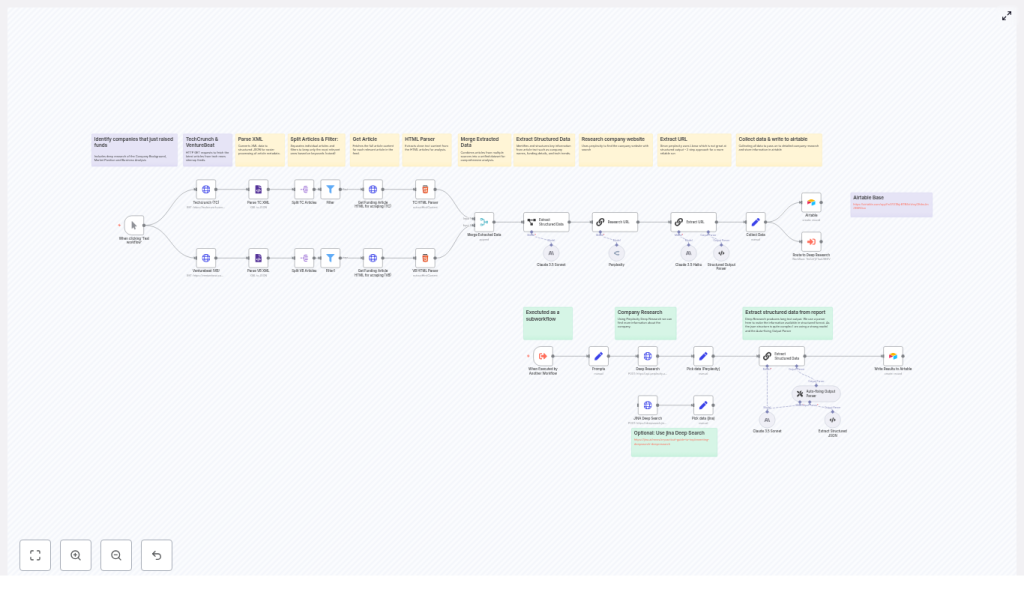
The n8n template implements a complete funding-intelligence pipeline that:
- Polls TechCrunch and VentureBeat news sitemaps.
- Parses XML into individual article entries.
- Filters likely funding announcements via keyword logic.
- Scrapes and cleans article HTML content.
- Merges articles from multiple sources into a unified stream.
- Uses LLMs (Perplexity, Claude, Llama, Jina) to extract structured funding data.
- Performs additional research to validate company websites and context.
- Normalizes and writes final records into Airtable.
The following sections provide a detailed breakdown of each stage, with a focus on automation best practices and extensibility.
Core architecture and key n8n nodes
Data ingestion from news sitemaps
The workflow begins with HTTP Request nodes that query the public news sitemaps for each source, for example:
https://techcrunch.com/news-sitemap.xmlhttps://venturebeat.com/news-sitemap.xml
An XML node then parses the sitemap into JSON. Each <url> entry becomes a discrete item that n8n can process independently. This structure is ideal for downstream filtering and enrichment.
Splitting feeds and filtering for funding-related content
Once the sitemap is parsed, the workflow uses Split In Batches or equivalent splitting logic to handle each URL entry as a separate item. A Filter node (or IF node, depending on your n8n version) evaluates the article title and URL for relevant patterns such as:
raiseraisedraised $orcloses $
This early filtering step is critical. It eliminates unrelated news and reduces unnecessary HTML scraping and LLM calls, which improves both performance and cost efficiency.
HTML scraping and content normalization
For articles that pass the filter, the workflow issues a second HTTP Request to fetch the full article HTML. An HTML node then extracts the relevant content using CSS selectors that are tuned for each source. For example:
- TechCrunch:
.wp-block-post-content - VentureBeat:
#content
The HTML node returns a clean article title and body text, stripping layout elements and navigation. This normalized text becomes the input for the AI extraction stage.
Preparing content for AI-based extraction
Merging multi-source article streams
After scraping from each publisher, the workflow uses a Merge node to combine the TechCrunch and VentureBeat items into a single unified stream. This simplifies downstream logic, since the AI step and Airtable writing logic can operate on a common schema regardless of the source.
Structuring the AI input payload
A Set node prepares a compact and clearly labeled input for the language model, for example:
article_title– the cleaned titlearticle_text– the full body textsource_url– the article URL
Using a concise and explicit payload improves prompt clarity and model performance, and keeps logging and debugging manageable.
AI-driven funding data extraction
Information extraction with LLMs
The core intelligence in this template is an LLM information extraction step. The workflow can be configured with different providers, such as:
- Anthropic Claude 3.5
- Perplexity (via OpenRouter)
- Llama-based models
- Jina DeepSearch (used in the reference template)
A carefully designed prompt instructs the model to output a structured JSON object with fields like:
company_namefunding_roundfunding_amountcurrency(if available)lead_investorparticipating_investorsmarket/industrypress_release_urlwebsite_urlfounding_yearfoundersCEOemployee_count(where mentioned)
By placing the extraction logic in a single, well-structured prompt, the workflow avoids brittle regex-based parsing and can handle a wide variety of article formats.
Schema validation and auto-fixing
LLM outputs are not always perfectly formatted. To increase robustness, the template uses an output parser or validation node that checks the model response against a JSON schema. This component can:
- Ensure numeric fields (such as funding amount) are real numbers.
- Validate date formats (for example, ISO 8601).
- Repair minor formatting issues or re-request clarification from the model.
This schema-based approach significantly improves reliability when model output is noisy or partially incorrect.
Website discovery and enrichment
Two-step enrichment strategy
Certain models, particularly some Llama variants, may be less consistent at producing perfectly structured JSON in a single pass. The template addresses this through a two-step enrichment pattern:
- Website and context discovery – One LLM call focuses on identifying the company website and other authoritative links based on the article content.
- Final structured extraction – A second extraction step consolidates all known information into the target schema, now including the verified website URL and additional context.
This staged design separates discovery from final structuring, which often yields higher accuracy and more reliable URLs.
Deep research with Perplexity
For teams that require richer context, the workflow can issue a deep research request to Perplexity. This optional step returns:
- An expanded narrative summary of the company and funding round.
- Additional market or competitive context.
- Source citations that can be stored alongside the record.
These research notes are valuable for analysts, journalists, or investors who want more than just core funding fields.
Persisting results in Airtable
Once the funding data is normalized, a final Airtable node writes each record into a configured base and table. Typical fields include:
- Company name and website
- Funding round type and amount
- Currency and date
- Lead and participating investors
- Source article URL and press release URL
- Market, founders, and other metadata
Storing results in Airtable provides a flexible interface for:
- Review and quality control.
- Tagging and prioritization by the investment or research team.
- Triggering follow-up automation, such as Slack alerts, outreach sequences, or CRM updates.
Advantages of AI-based extraction vs rule-based scraping
Traditional scraping pipelines often rely on rigid selectors and regular expressions that break when article layouts change or phrasing varies. By contrast, using modern LLMs within n8n enables the workflow to:
- Interpret context and infer missing details when they are clearly implied in the text.
- Normalize money formats such as
$5M,five million dollars, or€3 millioninto standardized numeric and currency fields. - Return citations and URLs that allow humans to quickly verify each extracted field.
This approach reduces maintenance overhead and improves resilience across different publishers and article templates.
Setup and prerequisites
To deploy this n8n workflow template, you will need:
- n8n instance (self-hosted or n8n Cloud) with permission to install and use community nodes.
- Network access to TechCrunch and VentureBeat news sitemaps (no authentication required).
- LLM API credentials for your preferred provider, such as:
- Anthropic (Claude)
- OpenRouter / Perplexity
- Jina DeepSearch
- Airtable account with a base and table configured to receive the target fields.
- Basic familiarity with n8n expressions and JavaScript for minor transformations, for example using expressions like
{{$json.loc}}in Set or Merge nodes.
Customization strategies
Adjusting coverage and sources
- Keyword tuning – Refine the Filter node conditions to match your coverage priorities. Examples include
raised,secures funding,closes $, or sector-specific phrases. - Additional publishers – Extend the workflow with more sitemaps or RSS feeds, such as The Information or Bloomberg, using the same ingestion and filtering pattern.
Deeper enrichment and downstream workflows
- Third-party enrichment – Add integrations with Crunchbase, Clearbit, or internal data warehouses to append headcount, location, or tech stack information.
- Real-time alerts – Connect Slack, email, or other notification nodes to alert sector owners when a high-value or strategic round is detected.
Troubleshooting and best practices
- Rate limiting and quotas – Respect publisher rate limits and your LLM provider quotas. Configure polling intervals, implement retry with backoff, and consider caching responses for repeated URLs.
- Reducing false positives – If non-funding articles slip through, tighten the keyword filters or introduce a lightweight classifier step that asks an LLM to confirm whether an article is genuinely a funding announcement before full extraction.
- Schema enforcement – Use JSON schema validation to ensure that numeric and date fields are correctly typed and formatted. This is particularly important if the data will feed analytics or BI tools.
Privacy, legal, and ethical considerations
The workflow should only process publicly available information. When storing or distributing data about individuals (for example, founders or executives), comply with your organization’s privacy policies and applicable regulations such as GDPR or CCPA. Always maintain clear citation links back to the original articles and sources so that any extracted claim can be audited and verified.
Conclusion and next steps
This n8n workflow template converts unstructured, real-time news coverage into a structured funding intelligence asset. It is particularly valuable for VC scouts, journalists, corporate development teams, and market researchers who need continuous visibility into which startups are raising capital and under what terms.
Deployment is straightforward: import the template, connect your LLM and Airtable credentials, tune your filters and schema, and you can move from manual news monitoring to automated funding alerts in hours instead of days.
Call to action: Use the template as-is or schedule a short working session with an automation specialist to adapt the workflow to your specific sources, sectors, and KPIs. [Download template] • [Book a demo]
