


Receive and Handle Ko‑fi Payment Webhooks with n8n
Ko‑fi is a popular platform for donations, memberships, and digital shop sales. For automation professionals, the real value emerges when these payment events are processed automatically and integrated into downstream systems. This article presents a production-ready n8n workflow template that receives Ko‑fi webhooks, validates the verification token, and routes events for donations, subscriptions, and shop orders to the appropriate logic.
The guide focuses on best practices for webhook handling in n8n, including secure token validation, structured payload mapping, type-based routing, and reliable integration patterns.
Why automate Ko‑fi webhooks with n8n?
Ko‑fi can send webhook events for each relevant transaction type, including:
- One‑time donations
- Recurring subscription payments
- Shop orders for digital or physical products
Manually processing these notifications does not scale and introduces delays and errors. With an automated n8n workflow you can:
- Immediately post thank‑you messages to collaboration tools such as Slack or Discord
- Synchronize donors and subscribers with your CRM, email marketing system, or data warehouse
- Trigger automatic fulfillment for shop orders, including license key delivery or access provisioning
By centralizing this logic in n8n, you gain a single, auditable workflow for all Ko‑fi payment events.
Workflow architecture overview
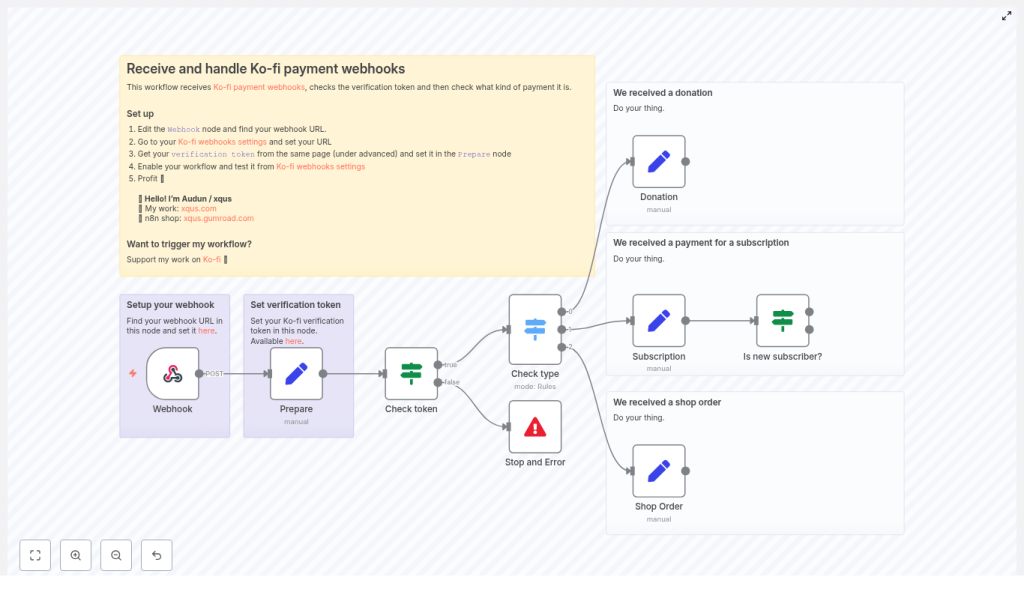
The n8n workflow is designed as a secure, extensible entry point for all Ko‑fi webhooks. At a high level it:
- Receives HTTP POST requests from Ko‑fi using a Webhook node
- Normalizes the incoming payload and stores your Ko‑fi verification token
- Validates the verification token before any business logic runs
- Routes events by type (Donation, Subscription, Shop Order) via a Switch node
- Performs additional checks for subscriptions, such as detecting the first payment
- Maps the relevant fields for each event type for use in downstream integrations
Key n8n nodes in this template
- Webhook: Entry point for Ko‑fi POST requests
- Set (Prepare): Stores the verification token and cleans up the incoming body
- If (Check token): Compares the provided
verification_tokenwith your stored value - Switch (Check type): Routes based on
body.type(Donation, Subscription, Shop Order) - Set nodes for each type: Extract and normalize key fields like amount, currency, donor name, and email
- If (Is new subscriber?): Detects first subscription payments using
is_first_subscription_payment - Stop and Error: Terminates processing for invalid or unauthorized requests
Configuring Ko‑fi and n8n
The first part of the setup connects Ko‑fi to n8n and ensures that only trusted requests are processed.
1. Create the Webhook endpoint in n8n
- Add a Webhook node to your n8n workflow.
- Set the HTTP Method to POST.
- Copy the generated webhook URL. This URL will be registered in Ko‑fi as the webhook target.
Keep the workflow in test mode or manually execute the Webhook node while you configure Ko‑fi so you can inspect example payloads.
2. Register the webhook in Ko‑fi
- In your Ko‑fi dashboard, navigate to Manage > Webhooks.
- Paste the n8n Webhook URL into the webhook configuration.
- Under the Advanced section, locate and copy the verification token.
This verification token is the shared secret that n8n will use to validate incoming requests.
3. Store and normalize data in the Prepare node
Next, add a Set node, often labeled Prepare, directly after the Webhook node. Use it to:
- Store your Ko‑fi verification token as a static value inside the workflow (or from environment variables, depending on your security model)
- Normalize the incoming payload into a consistent structure, for example under a
bodyproperty
Ko‑fi sometimes places the main payload under data depending on configuration. In the Prepare node, map the relevant fields so that later nodes can reliably access:
body.typebody.amountbody.currencybody.from_namebody.emailbody.timestamp
Standardizing the structure at this stage simplifies all downstream logic and makes the workflow easier to maintain.
Securing the webhook with token validation
4. Implement the verification token check
Before processing any business logic, validate the request using an If node:
- Compare
$json.body.verification_tokenwith the token stored in the Prepare node. - If they match, continue to the routing logic.
- If they do not match, route to a Stop and Error node.
The Stop and Error node should terminate the execution and return a clear error message. This protects your workflow from unauthorized or spoofed requests and is a critical security best practice for any webhook-based integration.
Routing events by Ko‑fi payment type
5. Use a Switch node to branch logic
Once the token is validated, add a Switch node to route processing based on $json.body.type. Configure rules for each of the standard Ko‑fi event types:
- Donation
- Subscription
- Shop Order
Each case in the Switch node should lead to a dedicated branch that handles mapping and downstream actions for that specific event category.
6. Map fields for each event type
In each branch, use a dedicated Set node to extract and normalize the payload fields you care about. A typical mapping looks like this:
Example JSON mapping in a Set node
{  "from_name": "={{ $json.body.from_name }}",  "message": "={{ $json.body.message }}",  "amount": "={{ $json.body.amount }}",  "currency": "={{ $json.body.currency }}",  "email": "={{ $json.body.email }}",  "timestamp": "={{ $json.body.timestamp }}"
}
By standardizing the data shape for each event type, you can reuse the same downstream nodes for notifications, storage, or analytics with minimal additional configuration.
Handling subscription payments
Subscription events often require more nuanced logic than one‑time donations. Ko‑fi may include a flag such as is_first_subscription_payment in the payload.
To support subscriber onboarding flows:
- Add an If node in the Subscription branch that checks
$json.body.is_first_subscription_payment. - If the flag is true, trigger first‑time subscriber actions, such as:
- Sending a welcome email
- Assigning a role in your membership or community system
- Delivering exclusive content or access credentials
- If the flag is false, route the event to your standard recurring billing logic, such as updating MRR metrics or logging payment history.
This structure keeps your onboarding logic explicit and easy to extend as your subscription offering evolves.
Typical downstream integrations
Once the Ko‑fi events are normalized, you can connect them to virtually any system supported by n8n. Common patterns include:
- Real‑time notifications: Post formatted messages to Slack or Discord channels including donor name, amount, currency, and message.
- Data synchronization: Insert or update records in Google Sheets, Airtable, or a CRM to maintain a single source of truth for supporters.
- Email automation: Send receipts or personalized thank‑you emails via SMTP, SendGrid, Mailgun, or other email providers.
- Order fulfillment: Call your fulfillment API, e‑commerce backend, or licensing system to automatically deliver products or services for shop orders.
Because all event types pass through the same template, you can maintain consistent logging, error handling, and monitoring across your entire Ko‑fi automation stack.
Security and reliability best practices
Validate the verification token for every request
Never bypass token validation. Always verify the verification_token before any action is performed. This prevents external actors from triggering your workflow or manipulating your downstream systems.
Implement idempotency for webhook processing
Webhook providers can resend events, for example after timeouts or transient errors. To avoid duplicate side effects:
- Store a unique event identifier or a composite key such as
event_idortimestamp + amount + email. - Use an If node or database lookup to check whether the event has already been processed.
- Skip or log duplicates instead of re‑executing actions like charging, fulfilling, or emailing.
Log events and processing outcomes
Maintain a secure log of incoming Ko‑fi events and their processing status. You can store this in a database, a log index, or a spreadsheet. Detailed logs help with:
- Investigating failed deliveries or integration errors
- Tracking behavior after Ko‑fi payload format changes
- Auditing supporter interactions across systems
Graceful error handling and HTTP responses
Design the workflow to return meaningful HTTP statuses to Ko‑fi:
- 200 OK for successful processing
- 400 Bad Request for invalid payloads
- 401 Unauthorized when the verification token check fails
Use the Stop and Error node to halt processing and record the error in the n8n execution history. This improves transparency and simplifies debugging.
Testing the Ko‑fi webhook workflow
Before deploying to production, validate the workflow end to end.
- Activate the workflow in n8n.
- Use the Ko‑fi dashboard webhook tester, or tools such as
curlor Postman, to send example payloads to the Webhook URL. - Ensure the
verification_tokenin the test payload matches the value stored in your Prepare node. - Test each branch individually:
- Donation events
- Subscription events, including first and subsequent payments
- Shop Order events
- Confirm that each event triggers the expected notifications, database updates, or fulfillment actions.
Troubleshooting common issues
- No workflow execution: Verify that the workflow is active and that the Webhook URL in Ko‑fi exactly matches the URL shown in n8n.
- Token validation failures: Re‑copy the verification token from Ko‑fi and ensure there is no extra whitespace or formatting in the Prepare node.
- Missing or unexpected fields: Inspect the raw webhook body in the n8n execution logs. Ko‑fi may nest the payload under a
dataproperty, so adjust your Prepare node mappings accordingly.
Advanced patterns for high‑volume setups
For more complex or high‑throughput environments, consider the following enhancements:
- Enriched notifications: Attach donor avatars or links to their Ko‑fi profile in Slack/Discord messages for more engaging recognition.
- Tier‑aware access control: Automatically assign roles or entitlements based on subscription tiers in your membership platform or community tool.
- Asynchronous processing: Use an external queue such as Redis, RabbitMQ, or a database table to enqueue heavy tasks and process them in background workflows. This keeps webhook response times low and improves reliability.
Conclusion
Automating Ko‑fi webhooks with n8n provides a robust foundation for handling donations, subscriptions, and shop orders at scale. By combining secure token validation, structured payload mapping, and type‑based routing, you can build a workflow that is both reliable and easy to extend.
To get started, create the Webhook node, configure Ko‑fi with the generated URL, store your verification token, and implement the routing logic for each event type. Once the core template is in place, you can layer on integrations with your preferred notification, CRM, email, and fulfillment systems.
After enabling the workflow, send test events from Ko‑fi and refine the downstream actions until they match your operational requirements. If you prefer a ready‑made starting point, you can export the nodes described here or use the linked template and adapt it to your infrastructure.
Call to action: If this guide was useful for your automation setup, consider supporting the author on Ko‑fi or sharing your implementation with your network. If you have questions or need help tailoring this workflow to a specific stack, feel free to reach out or leave a comment.
