


Auto Archive Promotions: n8n RAG Workflow Guide
Imagine this: your marketing team has launched its fifth promo campaign this week, your inbox is a graveyard of “Final_Final_v7” docs, and someone just asked, “Hey, do we have the copy from that Valentine’s campaign in 2022?”
If your current system involves frantic searching, random spreadsheets, and mild existential dread, it might be time to let automation rescue you. That is exactly what the Auto Archive Promotions n8n workflow template is here to do.
This guide walks you through how the template works, how it uses RAG (Retrieval-Augmented Generation), OpenAI embeddings, Pinecone, Google Sheets, and Slack, and how to set it up in a way that stops repetitive archiving tasks from eating your soul.
What this n8n workflow actually does
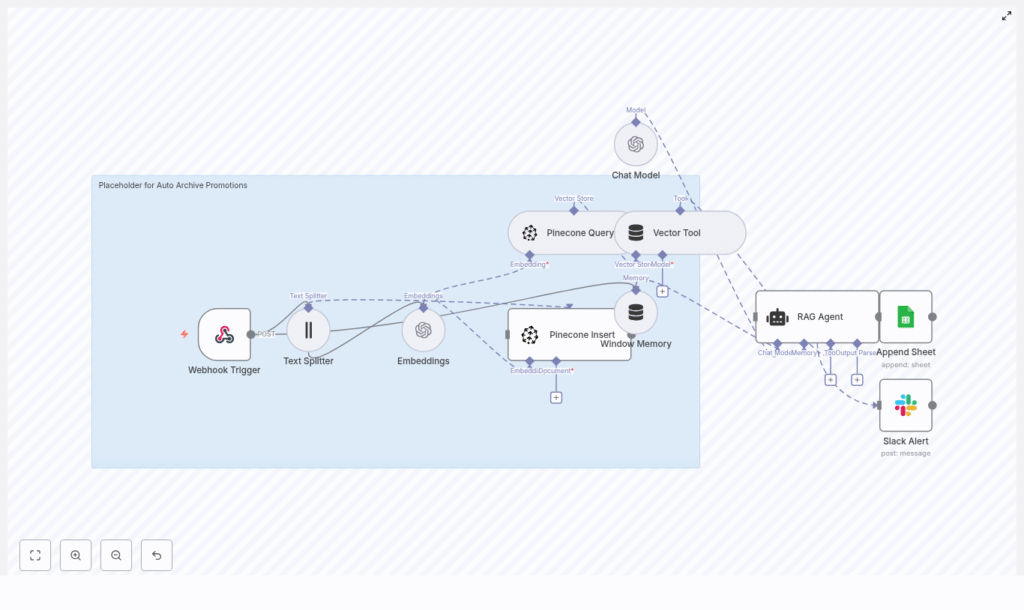
The Auto Archive Promotions workflow is built for teams that constantly produce promotional content like emails, social posts, and special offers. Instead of manually filing these into folders you will never open again, this workflow:
- Ingests promotional content via a Webhook Trigger
- Splits long text into smart chunks with a Text Splitter
- Converts each chunk into OpenAI embeddings using
text-embedding-3-small - Stores those vectors in a Pinecone index for semantic search
- Uses a RAG Agent and Window Memory to answer questions about past promotions
- Logs everything to Google Sheets for visibility
- Sends Slack alerts if something breaks so you do not have to guess where it failed
The result: your promotional content becomes searchable, auditable, and reusable, without anyone having to copy and paste text into a spreadsheet at 6 p.m. on a Friday.
The tech behind the magic
Here are the core pieces that make the Auto Archive Promotions workflow tick:
- n8n – the visual automation platform that orchestrates all the steps.
- Webhook Trigger – receives promotion payloads via HTTP POST at a specific path.
- Text Splitter – breaks long content into chunks (in this template: chunk size 400, overlap 40).
- OpenAI Embeddings – uses the
text-embedding-3-smallmodel to turn text chunks into dense vectors. - Pinecone – the vector database that stores those embeddings in the
auto_archive_promotionsindex. - RAG Agent – combines retrieved vectors with a chat model to answer context-rich questions.
- Window Memory – keeps short-term conversational context for the RAG Agent.
- Google Sheets – append-only log of processed promotions (sheet name:
Log). - Slack – sends alerts to a channel like
#alertswhen something goes wrong.
How the Auto Archive Promotions workflow runs
Step 1: Promotions arrive via Webhook
Everything starts with a Webhook Trigger node in n8n.
- The workflow listens for POST requests on the path
auto-archive-promotions. - Your marketing system or ingestion pipeline sends promotion data, such as:
- Subject or title
- Body text
- Metadata like IDs, dates, or campaign names
In other words, every time a new promotion is created, it can be automatically shipped to this endpoint instead of being lost in someone’s drafts folder.
Step 2: Text gets chopped into smart chunks
Promotional content is often longer than we remember when we wrote it. To handle this, the workflow uses a Text Splitter node.
- Configured with:
- chunkSize = 400 characters
- chunkOverlap = 40 characters
- The overlap keeps context flowing between chunks, so the model understands that “this offer” in one chunk still refers to the discount mentioned in the previous chunk.
This chunking step makes embeddings more accurate and retrieval far more useful later on.
Step 3: OpenAI turns text into embeddings
Each text chunk is then passed to the OpenAI Embeddings node using the model text-embedding-3-small.
- The model converts each chunk into a dense vector that represents its semantic meaning.
- These vectors are ideal for similarity search, which is what allows you to later ask things like “Show me promotions about free shipping” and get relevant results.
So instead of relying on simple keyword matches, your system can understand meaning, not just exact words.
Step 4: Vectors are stored in Pinecone
Once embeddings are generated, the workflow sends them to Pinecone.
- Vectors and metadata are inserted into a Pinecone index named
auto_archive_promotions. - Typical metadata includes:
- Promotion ID
- Source or channel
- Date
- A short snippet of the content for quick manual inspection
This is your long-term memory for promotional content, neatly indexed and ready for semantic search.
Step 5: RAG Agent answers questions using Pinecone
When someone needs information, the workflow does not just shrug and hand over a massive list of entries. Instead, it uses a combination of vector search and a RAG agent.
- Pinecone Query retrieves the most relevant vectors for a given query.
- A Vector Tool passes this retrieved context to the RAG Agent.
- The RAG Agent uses:
- The retrieved context from Pinecone
- A chat model, such as an OpenAI chat model
- Window Memory to keep short-term interaction context
The outcome: the agent can summarize campaigns, answer questions, and surface related promotions with relevant context, instead of giving you a random wall of text.
Step 6: Logging and alerts keep things sane
To avoid “black box” automation, the workflow keeps track of what it does and complains loudly when it cannot do it.
- On success:
- The workflow appends a row to a Google Sheet named
Log. - The sheet ID is set in the Google Sheets node configuration.
- You get an append-only audit trail of processed promotions.
- The workflow appends a row to a Google Sheet named
- On error:
- Any node failure routes to a Slack Alert node.
- A message is posted to a channel like
#alertswith details about the error. - Your team can quickly triage issues instead of discovering them days later.
Configuration tips for better results
Once the workflow is running, a few tweaks can make it go from “works” to “actually helpful.”
Dial in your text splitting
- For marketing copy, a chunk size between 300 and 500 characters with 20 to 50 characters overlap is usually a solid starting point.
- The template uses 400 and 40, which is a good balance between context and efficiency.
Store meaningful metadata
- Include details such as:
- Promotion ID
- Campaign name
- Author or owner
- Date
- Content type (email, social, landing page, etc.)
- Richer metadata makes it easier to filter, audit, and analyze promotions later.
Organize your Pinecone indexes
- Use a dedicated Pinecone index per content domain, for example:
auto_archive_promotionsfor marketing content- Another index for support articles or documentation
- This keeps vector search focused and prevents unrelated content from polluting results.
Handle rate limits gracefully
- Configure rate limiting and retries in n8n for your embedding provider.
- Use exponential backoff so your workflow does not panic when the API says “please slow down.”
Secure your webhook
- Protect the Webhook Trigger so not just anyone can POST promotions.
- Use:
- Authentication tokens
- IP allow-lists
- Other security controls appropriate for your environment
Security and privacy considerations
Embeddings and vector stores may contain sensitive content, so treat them like any other system that stores marketing and customer data.
- Avoid storing PII in plaintext either in vectors or metadata unless you have:
- Clear retention policies
- Encryption in place
- Use scoped API keys for both Pinecone and OpenAI.
- Rotate credentials regularly to reduce risk.
- Follow your organization’s data governance and compliance rules.
Automation should save time, not create new security headaches.
Why this workflow is worth the setup
Once you have Auto Archive Promotions running, the benefits add up quickly:
- Automated archival and audit trails for all promotional content.
- Semantic search to quickly find past campaigns, messaging themes, or offers.
- RAG-powered summarization and Q&A that helps marketing and compliance teams get answers without digging through folders.
- Real-time alerts when the pipeline fails so engineers can fix issues before anyone notices missing data.
Instead of recreating similar promotions from scratch, you can reuse and refine what already worked.
How to extend the Auto Archive Promotions template
The template is intentionally modular, so you can bolt on more functionality as your needs grow.
- Support attachments:
- Extract text from PDFs or images before sending content to the Text Splitter.
- Great for archiving promo decks, flyers, or visual assets with text.
- Automated classification:
- Add a classification step before indexing.
- Tag promotions by:
- Offer type
- Channel
- Urgency or priority
- Versioning:
- Store original content snapshots in an object store like S3.
- Reference those snapshots from the vector metadata for full traceability.
- Reporting:
- Use the Google Sheets
Logsheet as a data source for dashboards. - Track:
- Volume of promotions over time
- Top campaigns
- Processing latency and failures
- Use the Google Sheets
Troubleshooting: when automation gets grumpy
Issue: Missing vectors in Pinecone
If you are not seeing data where you expect it in Pinecone:
- Verify that the Embeddings node is actually returning vectors.
- Confirm the Pinecone Insert node is receiving both:
- The vector
- The associated metadata
- Double check:
- Pinecone credentials
- Index name is exactly
auto_archive_promotions
Issue: Webhook not receiving requests
If your promotions never seem to arrive in n8n:
- Confirm your POST requests are targeting
/auto-archive-promotions. - Make sure your n8n instance is reachable from the source system.
- If you run n8n locally, expose it via a secure tunnel like ngrok for external systems.
Issue: RAG Agent gives irrelevant answers
When the agent starts hallucinating about campaigns you never ran, try:
- Improving metadata richness so queries can be better filtered.
- Increasing the number of candidate vectors returned in the Pinecone query.
- Tuning the chunk overlap or chunk size for better context.
- Checking the Window Memory to ensure it is not cluttered with outdated or irrelevant context.
Quick reference: workflow variables to verify
- Webhook path:
auto-archive-promotions - Text Splitter:
chunkSize=400,chunkOverlap=40 - Embeddings model:
text-embedding-3-small - Pinecone index:
auto_archive_promotions - Google Sheet: append to sheet named
Log - Slack channel:
#alerts
Wrapping up: from manual chaos to searchable history
The Auto Archive Promotions workflow shows how n8n, embeddings, vector stores, and RAG can team up to turn messy promotional content into a structured, searchable knowledge base.
By automating ingestion, indexing, and retrieval, you:
- Cut down on manual busywork
- Improve compliance and auditability
- Unlock semantic search and AI-driven assistants for your marketing history
In short, you get to stop digging through old folders and start asking useful questions like “What promotions worked best for our last holiday campaign?” and actually get answers.
Try the template in your n8n instance
Ready to retire your “random promo archive” spreadsheet?
- Set up your OpenAI and Pinecone credentials.
- Configure your Google Sheets sheet ID for the
Logsheet. - Secure the Webhook Trigger endpoint.
If you want help implementing this workflow, extending it with attachments or classification, or integrating it into your broader automation stack, reach out to our team or subscribe to our newsletter for more n8n and AI automation guides.
