


Auto-classify Linear Bugs with n8n and OpenAI
Manual triage of incoming bug reports is slow, repetitive work that does not scale. By combining n8n, Linear, and OpenAI, you can automate the classification of bug tickets, assign them to the correct team, and only involve humans when the model is uncertain. This guide explains an n8n workflow template that operationalizes this pattern in a robust, production-ready way.
Overview of the automation workflow
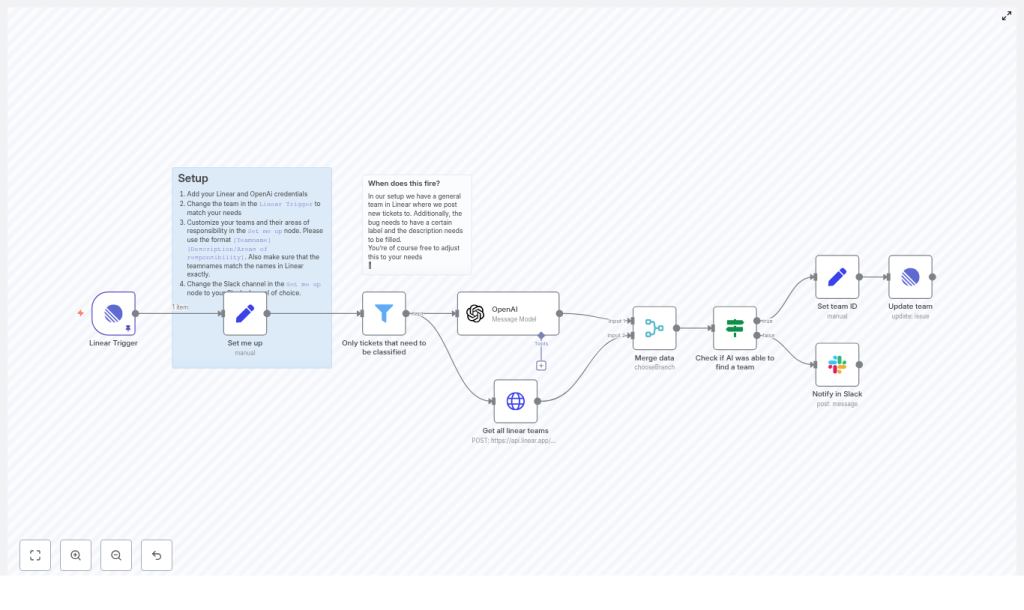
This n8n template connects Linear, OpenAI, and Slack into a single automated flow. When a bug is created or updated in Linear, the workflow evaluates whether the ticket needs classification, sends the relevant context to OpenAI, maps the AI decision to a Linear team, and either updates the issue or alerts a Slack channel if no clear assignment is possible.
At a high level, the workflow includes the following key components:
- Linear Trigger to receive issue updates from Linear in real time
- Filter node to restrict AI calls to tickets that actually require classification
- Configuration node that defines teams and responsibilities in a machine-readable format
- OpenAI node to classify the bug and select the most appropriate team
- HTTP Request node to fetch all Linear teams and their IDs via GraphQL
- Merge and decision logic to combine AI output with Linear metadata and branch accordingly
- Linear update nodes to set the team on the issue when a match is found
- Slack notification to escalate ambiguous cases to a human triage channel
Why automate ticket classification in Linear?
For engineering leaders and operations teams, automated ticket routing is a straightforward way to improve responsiveness without increasing headcount. The workflow described here delivers several benefits:
- Faster triage – tickets are classified as soon as they are created or updated, reducing queue times
- Reduced human error – consistent mapping rules and AI-based pattern recognition reduce misrouted bugs
- Focus for senior engineers – leads can focus on complex prioritization and architecture decisions instead of repetitive sorting
- Structured handoff – when the model is unsure, the workflow routes tickets to Slack for human review instead of silently failing
By pairing Linear webhooks with n8n orchestration and OpenAI classification, you gain a repeatable triage pipeline that still leaves room for human oversight where it matters.
Architecture and node responsibilities
Linear Trigger – entry point for issue updates
The workflow starts with a Linear Trigger node. This node listens for issue updates in your Linear workspace via a webhook. You can scope this trigger to specific teams or projects so that only relevant bugs enter the classification pipeline.
Configuration highlights:
- Use your Linear OAuth or API credentials for the trigger
- Define the appropriate team or project scope in line with your workspace structure
Filter node – only classify relevant tickets
Sending every issue to OpenAI would be inefficient and expensive. The Filter node ensures that only tickets that actually require classification are passed to the AI node. In the template, the filter is configured to allow issues that:
- Do not contain the placeholder description text
"Add a description here" - Are currently in a specific Triage state, identified by a state ID
- Carry a specific label, for example the
"type/bug"label, checked by label ID
These conditions can and should be adapted to your Linear configuration. Update the label IDs, state IDs, or broaden the criteria if your triage process uses different states or labels.
Configuration node – defining teams and responsibilities
The template includes a node typically named “Set me up”, which requires manual configuration. This node holds a curated list of teams and their domains of responsibility in the format:
[Teamname][Areas of responsibility]The OpenAI prompt uses this list as the closed set of allowed answers. It is important that team names in this node exactly match the team names returned by Linear. Any mismatch will prevent the workflow from mapping AI output to a valid Linear team ID.
OpenAI node – bug classification logic
The OpenAI node is responsible for deciding which team should work on the ticket. It sends a carefully structured prompt to the model that includes the team list, the ticket title, and the ticket description.
Key prompt design decisions in the template:
- A system message instructs the model to respond only with a team name from the provided list
- The team definitions and the ticket content (title and description) are included in system messages to keep instructions clear and consistent
- The expected output is exactly one team name, with no additional text, which simplifies downstream logic
For best results, use a capable model from the GPT-4 family to handle nuanced classification. If cost is a concern, you can validate performance with a smaller model first, then upgrade if accuracy is insufficient.
Fetching Linear teams with HTTP Request
Linear’s API updates issues by team ID, not by team name. To bridge this gap, the workflow uses an HTTP Request node to call Linear’s GraphQL endpoint and retrieve all teams and their corresponding IDs.
Once the list of teams is available in the workflow context, it becomes possible to map the AI-selected team name to the correct teamId for the Linear update operation.
Merge and decision branch – handling ambiguous outcomes
After both the OpenAI result and the Linear teams list are available, a Merge node combines these data streams. A subsequent decision node (typically an If node) evaluates the AI output.
In the template, the logic checks whether the chosen team is a fallback such as "Other" or another designated value that signals low confidence or no clear match. If the AI result is ambiguous or maps to this fallback:
- The workflow sends a Slack notification to a configured channel
- Human triagers can then review the ticket, assign it manually, and optionally refine the prompt or team definitions later
Set team ID and update the Linear issue
If the AI returns a valid team name that matches one of the teams retrieved from Linear, the workflow proceeds with automated assignment:
- A Set node computes the
teamIdby finding the Linear team whosenameequals the AI-selected team name - A Linear Update node then updates the issue’s
teamproperty with this ID
This direct mapping ensures that tickets are reassigned to the correct team without manual intervention, provided the AI classification and configuration are correct.
End-to-end setup checklist
To deploy this workflow in your own environment, follow the checklist below:
- Import or create the n8n workflow template in your n8n instance.
- Configure Linear credentials (OAuth or API key) for:
- The Linear Trigger node
- The Linear Update node
- The HTTP Request node used for GraphQL queries
- Add your OpenAI API key to the OpenAI node.
- Customize the “Set me up” node:
- List each team in the format
[Teamname][Responsibilities] - Ensure team names match the names defined in Linear exactly
- List each team in the format
- Update the Slack channel configuration in the same node or in the Slack node to point to your triage or incident channel.
- Adjust the Filter node to align with your Linear setup:
- Update label IDs, such as the
"type/bug"label - Update state IDs for your triage state
- Modify or extend conditions if your triage flow differs
- Update label IDs, such as the
- Run tests with a set of real or representative tickets:
- Verify that classification is correct for typical bugs
- Review cases that fall back to Slack and refine the prompt or team definitions accordingly
Prompt engineering guidelines and best practices
Effective prompt design is central to reliable automated classification. The following practices help maintain accuracy and predictability:
- Constrain the answer space by providing an explicit list of candidate teams with clear responsibilities, so the model selects from known options rather than hallucinating new ones.
- Use system messages to enforce strict output formats, for example:
"Respond with exactly one team name from the list."
- Provide clean input text for the ticket title and description. Avoid sending long raw HTML or noisy markup. Prefer concise, cleaned summaries when possible.
- Monitor and iterate by logging model predictions and periodically reviewing misclassifications. Use this feedback loop to refine the teams list, responsibilities, or prompt wording.
Example prompt structure
The template uses a system message sequence similar to the following:
<system>You will be given a list of teams in this format: [Teamname][Responsibilities]. Only answer with one exact team name from the list.</system>
<system>Teams: [Adore][...], [Payday][...], [Nodes][...], [Other][...]</system>
<system>Ticket Title: ... Description: ...</system>
The model is then asked a direct question such as: "Which team should work on this bug?". The workflow expects the model to return only the chosen team name, which downstream nodes then map to a Linear team ID.
Handling edge cases and extending the workflow
Once the core flow is stable, you can extend it to handle more advanced scenarios:
- Confidence handling – request a brief explanation or confidence indicator from the model and use that to decide whether to auto-assign or escalate to Slack.
- Multi-team routing – for bugs that span multiple domains, have the model return a ranked list of teams and either:
- Assign the top choice automatically, or
- Create additional watchers or mentions for secondary teams
- Embeddings-based matching – index historical tickets per team using embeddings and use similarity search as an additional signal for routing decisions.
- Human-in-the-loop inside Linear – instead of or in addition to Slack notifications, automatically add a comment to the Linear issue when the AI is unsure, prompting a human triager to classify it.
Security, cost management, and rate limits
As with any production automation involving third-party APIs, you should enforce basic security and cost controls:
- API key security – store OpenAI and Linear credentials securely in n8n’s credentials store and rotate them periodically.
- Cost estimation – estimate monthly OpenAI cost by:
- Measuring the average token usage per classification call
- Multiplying by the expected number of tickets per month
- Rate limiting and resilience – respect both Linear and OpenAI rate limits. Implement retry and backoff strategies in n8n for transient errors to avoid workflow failures.
Troubleshooting common issues
If the workflow does not behave as expected, the following checks usually resolve most problems:
- No team matched or incorrect assignment:
- Verify the team list in the “Set me up” node
- Confirm that team names exactly match those in Linear
- Tickets are not reaching OpenAI:
- Inspect the Filter node conditions
- Confirm that label IDs and state IDs are correct for your workspace
- OpenAI responses include extra text or are noisy:
- Tighten the system instructions to enforce the output format
- Validate model output before using it to update Linear, for example by checking that the response matches one of the known team names
Operational impact and next steps
By deploying this n8n + Linear + OpenAI workflow, you can significantly reduce manual triage workload while preserving human control over edge cases. Tickets are classified and routed consistently, Slack notifications handle uncertain scenarios, and engineering teams can focus on resolution rather than sorting.
To get started, import the template into your n8n instance, configure your credentials, define your teams and responsibilities, and run a short pilot with a subset of projects or labels. Use the results to refine prompts and conditions before rolling out more broadly.
Looking to adapt this pattern to your organization? Deploy the workflow in your n8n environment, involve your automation or platform engineering team, and share a few sanitized example tickets internally. Collaborative review of misclassifications is one of the fastest ways to converge on a robust, low-friction triage system.
