


Gmail Agent for Lawn Care Automation: A Knowledge-Driven Workflow for Professional Email Handling
Lawn care businesses that rely on email for customer communication face a recurring challenge: a high volume of repetitive inquiries that demand fast, accurate, and consistent responses. The Recap AI “Gmail Agent” n8n template addresses this challenge by combining a website-derived knowledge base with an automated Gmail workflow and Google Drive logging. The result is a robust, auditable system that responds to common questions, qualifies leads, and records every interaction for later review.
This article provides an expert-level overview of the workflow architecture, key nodes, triggers, and integrations, along with deployment guidance and best practices tailored to lawn care operations.
Business Case: Why a Gmail Agent is Strategic for Lawn Care Providers
Small and mid-sized lawn care companies typically receive a steady stream of similar emails: service area checks, quote requests, scheduling questions, and policy clarifications. Handling these manually can create bottlenecks, inconsistent messaging, and missed opportunities.
Implementing a knowledge-driven Gmail Agent with n8n delivers several strategic advantages:
- Consistent, brand-aligned communication based on a centralized, curated knowledge base rather than ad hoc replies.
- Significantly faster response times, which directly improves lead conversion rates and customer satisfaction.
- Automated compliance and quality logging through structured records of every interaction.
- Scalable support capacity that absorbs routine queries without additional headcount.
Solution Architecture: Two Primary Flows in n8n
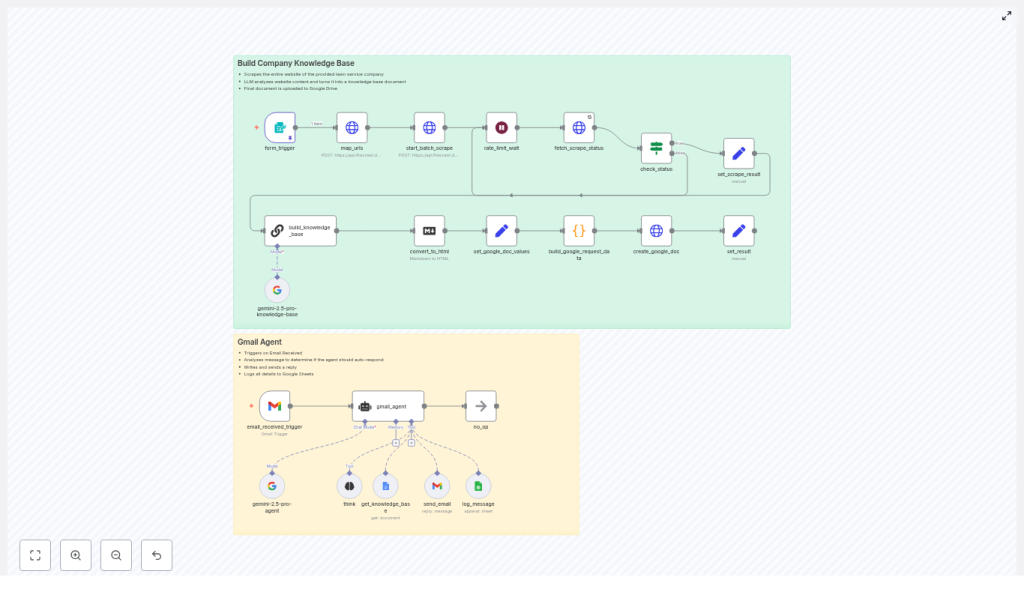
The template is structured as two complementary workflows that operate together inside an n8n-style automation environment:
- Knowledge Base Builder – Ingests and synthesizes website content into a structured “Business Knowledge Base”.
- Gmail Agent – Monitors a support mailbox, interprets incoming messages, consults the knowledge base, and replies or escalates accordingly.
These flows use a combination of scraping services, large language model (LLM) processing, and Google Workspace tools (Gmail, Google Drive, Google Sheets) to deliver an end-to-end automation.
Key Components and Integrations
1. Form Trigger for Knowledge Base Creation
The workflow begins with a Form Trigger node. An operator submits two core parameters:
- The public website URL that contains your lawn care service information.
- The Google Drive folder ID where the knowledge base document will be stored.
This trigger initiates the entire knowledge ingestion and synthesis process, and can be re-run anytime the website is updated.
2. URL Mapping and Scraping Layer
The next stage uses a combination of a site-mapping API and a batch scraper to:
- Discover relevant URLs across the target website.
- Fetch each page and extract content, typically normalized to markdown for consistency.
This layer ensures that service descriptions, coverage areas, policies, FAQs, and other text-based content are captured for downstream processing.
3. LLM-Based Knowledge Synthesis
An LLM synthesizer node processes the scraped content to create a single, consolidated “Business Knowledge Base”. Its responsibilities include:
- Deduplicating repeated information across multiple pages.
- Structuring content in a format that is usable by both agents and human staff.
- Preserving or embedding source citations so that each fact can be traced back to its origin page.
This step is central to maintaining a reliable, single source of truth for all automated responses.
4. HTML Conversion and Google Docs Storage
After synthesis, the knowledge base is converted into a suitable format and uploaded to Google Drive:
- An HTML converter node renders the generated knowledge base for document compatibility.
- A Google Docs uploader node stores the document in the specified Drive folder.
Team members can review, annotate, or extend this document at any time, which supports ongoing refinement and training.
5. Gmail Trigger and Agent Logic
The operational side of the template is driven by a Gmail Trigger node:
- The trigger listens for new incoming emails to a defined mailbox, for example
support@company.com. - When a message arrives, the workflow launches a structured analysis sequence.
The Gmail Agent then:
- Interprets the intent of the email using a multi-step reasoning process.
- Retrieves the latest version of the knowledge base from Google Drive.
- Re-analyzes the request in context of the knowledge base.
- Decides whether it has sufficient information to respond confidently.
If the conditions are met, the agent generates a professional, policy-aligned reply based solely on the knowledge base. If not, it logs and optionally escalates the email for human handling.
6. Structured Logging to Google Sheets
Every processed email is logged through a Google Sheets integration. Typical fields include:
- Timestamp of processing
- Sender email address
- Email subject
- Decision taken (auto-responded, escalated, requested more info)
- Any relevant metadata for audit or training
This structured log provides a comprehensive audit trail and a valuable dataset for continuous improvement.
End-to-End Workflow: High-Level Execution Path
The overall flow can be summarized as follows:
- Operator runs the Form Trigger with the website URL and Google Drive folder ID.
- The system maps URLs, scrapes content, and passes it to the LLM synthesizer.
- A single, deduplicated knowledge base document is generated and stored in Google Drive.
- The Gmail Trigger monitors the support mailbox and initiates the agent workflow on new emails.
- The agent consults the knowledge base, performs structured reasoning, and decides whether it can answer.
- When appropriate, the agent sends a fact-based reply and logs all details to Google Sheets.
- Emails that cannot be confidently resolved are logged and escalated for human review.
Design Principles for Safe and Reliable Automation
The template is built around several core design principles that are critical for safe deployment in production environments:
- Single source of truth
All responses are grounded exclusively in the synthesized knowledge base. This reduces the risk of hallucinations and inconsistent policy statements. - Traceability and verification
The knowledge base preserves source references so staff can quickly verify any statement and correct underlying content if needed. - Conservative response policy
The agent only replies when it can match the user’s request to reliable knowledge base content. Otherwise, it asks for clarification or routes the message to a human. - Human-in-the-loop controls
With Google Docs and Google Sheets in the loop, it is straightforward for managers to review responses, refine the knowledge base, and adjust policies over time.
Operational Benefits for Lawn Care Teams
Once deployed, this n8n workflow yields tangible operational improvements for lawn care companies:
- Faster handling of common inquiries, which increases perceived professionalism and improves the likelihood of winning new business.
- Reduced onboarding and training time, since staff can rely on a shared knowledge base rather than informal tribal knowledge.
- Better lead qualification, as the agent can collect missing details such as address, ZIP code, lawn size, and service type before escalation.
- Clear, audit-ready history of email interactions, useful for dispute resolution, service history review, and compliance reporting.
Implementation Checklist for n8n Users
Pre-requisites
- Administrative access to the company’s Google Drive and the Gmail account used for customer communications.
- A publicly accessible website with relevant text content describing services, coverage, policies, and FAQs.
- A dedicated Google Drive folder ID where the knowledge base documents will be stored and maintained.
Deployment Steps
- Import the Gmail Agent template into your n8n (or compatible) environment.
- Configure API credentials for the site-mapping and scraping services, as well as for the LLM provider.
- Run the Form Trigger with the target website URL and the designated Google Drive folder ID to generate the initial knowledge base.
- Open the generated Google Doc and verify accuracy. Add or adjust policies, edge cases, and clarifications as needed.
- Connect the Gmail Trigger to the appropriate support mailbox and define trigger conditions, such as specific labels or recipient addresses.
- Monitor the Google Sheets log during the initial rollout and periodically review sample responses for quality control.
Best Practices and Safety Recommendations
To maintain reliability and alignment with business policies, consider the following operational best practices:
- Regular knowledge base refresh
Schedule periodic re-scraping (for example monthly or after significant website updates) to keep the knowledge base synchronized with your current offerings and policies. - Explicit treatment of pricing and legal content
If you include pricing in the knowledge base, ensure it is accurate and clearly time-bound. If you intentionally omit pricing, add instructions to the knowledge base that direct the agent to request a quote or schedule an estimate rather than guessing. - Clear escalation rules
Define which topics must always be escalated, such as complaints, payment issues, or service failures. Encode these rules so the agent does not attempt to resolve sensitive matters autonomously. - Ongoing audit process
Review a sample of automated replies each week. Use findings to refine the knowledge base, adjust prompts, and update escalation logic.
Typical Email Scenarios in Lawn Care Operations
Scenario 1: Service Area Verification
A prospective customer asks whether their ZIP code, for example 64111, is within your service area. The agent queries the knowledge base section that lists service coverage, returns a clear yes or no, and provides next steps such as a link or instructions to request a quote.
Scenario 2: Pricing and Quote Requests
When a user asks about pricing and explicit pricing details are not present in the knowledge base, the agent responds with a professional acknowledgement, requests key property details (address, lawn size, service frequency), and offers to schedule an on-site or virtual estimate instead of improvising a price.
Scenario 3: Complaints or Urgent Issues
Messages that indicate a complaint, service failure, or urgent problem are not resolved by the agent directly. Instead, the workflow logs the email in Google Sheets and flags it for human intervention, ensuring that a staff member follows up with appropriate judgment and authority.
Next Steps: Deploy the Gmail Agent in Your Automation Stack
For lawn care businesses looking to reduce inbox load and elevate customer communication, this Gmail Agent n8n template provides a practical, production-ready foundation. Start by building a knowledge base from your existing website, then connect a dedicated support mailbox and enable structured logging. Within a short time, you will see more consistent responses, faster handling of routine questions, and more capacity to focus on field operations.
Need assistance with deployment? Engage your internal automation specialist or request a guided setup session to review configuration, safety checks, and policy design tailored to your specific lawn care workflows.
