


Build a Production-Grade Podcast Show Notes Generator with n8n and LangChain
Automating podcast show notes is one of the highest leverage workflows for content operations teams. It reduces manual effort, improves SEO performance, and enforces a consistent structure across episodes. This guide explains how to implement a robust podcast show notes generator in n8n using LangChain tools, Cohere embeddings, a Supabase vector store, and an OpenAI-powered agent.
The result is a production-ready pipeline that ingests podcast transcripts and outputs structured, SEO-optimized show notes that can be logged in Google Sheets or published directly to your CMS.
Use Case and Business Value
Why automate podcast show notes?
Manual creation of show notes does not scale. As episode volume and transcript length grow, human-only workflows become slow, inconsistent, and error-prone. An automated n8n workflow addresses these challenges by:
- Reducing time-to-publish: Generate show notes immediately after transcripts are available.
- Improving SEO: Enforce consistent keyword usage, headings, and summaries across all episodes.
- Increasing accessibility: Automatically produce timestamps, highlights, and resource lists.
- Enabling scale: Handle multiple shows and long-form content without additional headcount.
For teams managing multiple podcasts or large content libraries, this workflow becomes a reusable asset that standardizes show notes generation across the entire portfolio.
High-Level Architecture
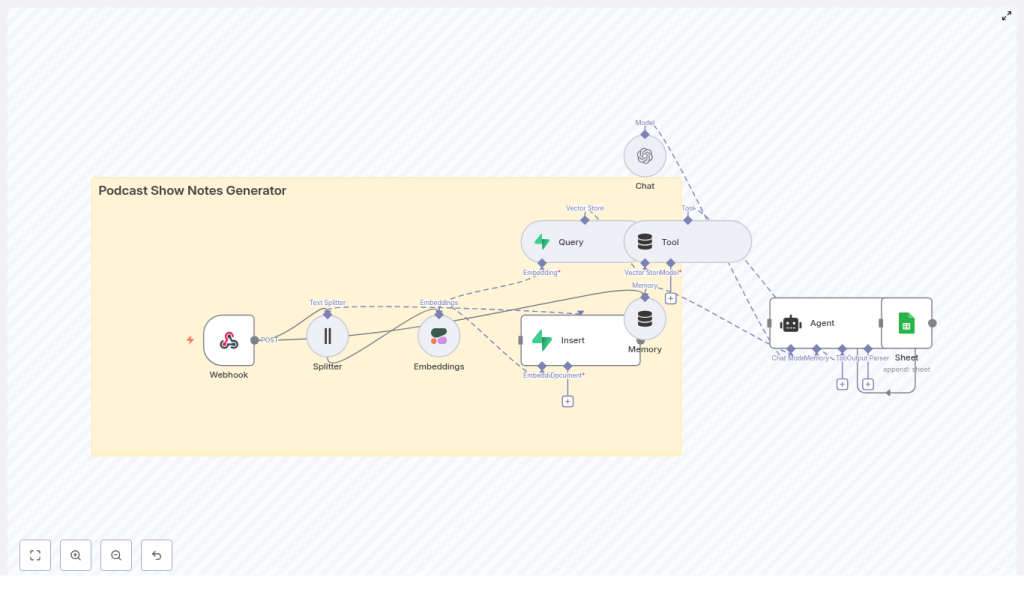
The n8n template follows a retrieval-augmented generation pattern. At a high level, the workflow:
- Accepts podcast transcripts and metadata via a Webhook.
- Splits transcripts into manageable text chunks.
- Generates semantic embeddings for each chunk using Cohere (or an alternative model).
- Stores embeddings and metadata in a Supabase vector store.
- Uses a LangChain agent with tools and memory on top of OpenAI to assemble structured show notes.
- Persists the final output to Google Sheets or your CMS via API.
Conceptually, the workflow aligns with the following node sequence:
Webhook → Text Splitter → Embeddings → Supabase Insert → Vector Query Tool → Agent (with Memory + Chat Model) → Google Sheets / CMS
Memory and chat model nodes supply episode-level context, while the vector store provides relevant transcript segments to the agent, which then composes high-quality show notes.
Prerequisites and Environment Setup
Before importing or configuring the template, ensure the following components are available:
- n8n instance (self-hosted or n8n cloud).
- OpenAI API key for the language model used by the agent.
- Cohere API key for embeddings, or an alternative such as OpenAI embeddings if you prefer a single vendor.
- Supabase project configured with a vector-enabled table for storing embeddings and metadata.
- Google Sheets account with OAuth credentials if you intend to log outputs there.
- Podcast transcript as plain text or JSON, including optional timestamps and episode metadata.
Core Workflow Design in n8n
1. Ingestion via Webhook
Begin by adding a Webhook node in n8n. Configure it to accept POST requests at a path such as /podcast_show_notes_generator.
Typical payload fields include:
title(episode title)episode_numberhostandguestinformationtranscript(full text or JSON structure)timestampsor segment markers (optional)
This node becomes the primary integration point for your existing tooling, such as transcription services or internal content pipelines.
2. Transcript Chunking with a Text Splitter
Large transcripts must be divided into smaller segments before generating embeddings. Add a Text Splitter node and configure it with parameters such as:
- Chunk size: 400-600 characters
- Chunk overlap: 40-80 characters
These values strike a balance between preserving semantic coherence and controlling embedding costs. Overlap is important to avoid splitting sentences or losing context at boundaries. Experiment within this range to match your average transcript length and desired granularity.
3. Generating Embeddings with Cohere
Next, route the chunks into a Cohere embeddings node. Each chunk should produce a vector representation suitable for semantic search and retrieval. If you prefer to standardize on OpenAI, you can substitute an OpenAI embeddings node without changing the overall architecture.
Alongside the embedding, maintain metadata that will be stored in Supabase, for example:
episode_idorepisode_numberchunk_textstart_timeandend_time(if derived from timestamps)- Tags such as
guest,topic, orsegment_type
This metadata is critical for downstream retrieval and for generating accurate timestamped highlights.
4. Vector Storage in Supabase
Create a vector-enabled table in Supabase with columns for:
idepisode_idembedding(vector field)chunk_textstart_time,end_time- Optional metadata fields such as
guest,tags, ortopics
Use an Insert node in n8n to write each embedding and its associated metadata to this table. Supabase then acts as your semantic retrieval layer whenever the agent needs context to draft the show notes.
5. Query Tools for Retrieval-Augmented Generation
When you are ready to generate show notes, the agent must access the most relevant parts of the transcript. Configure a Query node that performs a vector similarity search against the Supabase table.
Wrap this query logic as a Tool that the LangChain agent can invoke. Key configuration points:
- Filter by
episode_idto restrict results to the current episode. - Return top-k chunks, for example k = 5-10, to supply a rich yet focused context window.
- Include
chunk_textand timestamps in the response.
This retrieval step is what enables the agent to reference specific moments in the conversation and generate accurate summaries, highlights, and links.
6. Memory and Chat Model Configuration
To improve coherence across the generated show notes, configure a memory buffer (for example, windowed memory) in n8n. Store information such as:
- Host and guest names
- Series or show theme
- Episode-level metadata and recurring segments
Connect a Chat node using an OpenAI model as the language model for the agent. The combination of:
- Episode memory
- Retrieved transcript chunks from the vector store
- Structured instructions in the prompt
allows the agent to produce a well-organized show notes document that includes summaries, key takeaways, timestamps, and resources.
7. Prompt Engineering for Structured Show Notes
Prompt design is critical for consistent output. Define a prompt template that specifies the desired sections and formatting. A typical structure might include:
- Episode Title
- Short Summary (2-3 sentences)
- Key Takeaways (3-6 bullet points)
- Timestamps & Highlights (time → short description)
- Links & Resources mentioned
- SEO Keywords (optional list)
Provide the agent with:
- Episode metadata (title, host, guest, episode number).
- Retrieved transcript chunks from Supabase.
- Clear instructions on output format, for example HTML or Markdown.
This ensures the generated show notes are immediately usable in your publishing workflow without heavy post-processing.
Output and Integration Options
Google Sheets as a Lightweight CMS
The reference template writes the final show notes and associated metadata to Google Sheets using a dedicated node. This is useful when:
- You want a simple internal log of all generated notes.
- Non-technical stakeholders need easy access and review capabilities.
- You plan to connect Sheets to other tools or reporting dashboards.
Publishing Directly to a CMS
Alternatively, you can replace or extend the Sheets output with calls to your CMS:
- WordPress REST API
- Ghost or other headless CMS APIs
- Custom internal publishing systems
In such cases, the agent can be instructed to output Markdown or HTML that aligns with your CMS templates, including headings, lists, and embedded links.
Operational Best Practices
Improving Output Quality
- Optimize chunking parameters: Avoid cutting sentences in half. Adjust chunk size and overlap until chunks align with natural language boundaries.
- Align embedding and language models: When possible, use embeddings that are well aligned with your chosen LLM to improve retrieval quality.
- Preserve timestamps: Store
start_timeandend_timewith each chunk so the agent can generate precise timestamped highlights. - Use controlled prompts: Provide explicit section headings and few-shot examples to stabilize structure across episodes.
- Implement rate limiting: Queue or throttle incoming transcripts to avoid API throttling, especially during batch imports.
Security and Privacy Considerations
Podcast transcripts often contain personally identifiable information or sensitive topics. Treat them accordingly:
- Secure the webhook using authentication mechanisms such as HMAC signatures, API keys, or OAuth.
- Encrypt data at rest in Supabase and restrict access to the vector store to service accounts or tightly scoped roles.
- Limit logging: Avoid logging full transcripts or embeddings in publicly accessible logs.
Scaling and Cost Management
Embedding generation and LLM calls are the primary cost drivers. To manage cost at scale:
- Batch operations: Batch transcripts or chunk processing where possible to reduce overhead and API calls.
- Cache embeddings: Do not regenerate embeddings for unchanged transcripts.
- Use tiered models: Apply smaller, cheaper embedding models for ingestion and reserve larger LLMs for the final composition step when quality matters most.
Testing and Continuous Improvement
Before deploying to production, thoroughly test the workflow using representative transcripts. Validate:
- Timestamp accuracy: Check that highlights map correctly to the episode timeline.
- Summary quality: Ensure the short summary captures the main themes without hallucinations.
- Key takeaway relevance: Confirm that bullet points are actionable and reflect the actual conversation.
- SEO alignment: Verify that important keywords appear naturally in titles, headings, and body text.
Iterate on the prompt based on editorial feedback. Small adjustments to wording, section ordering, or examples can significantly improve consistency and perceived quality.
Prompt Template Example
The following skeleton illustrates how you might structure the agent prompt within n8n:
<Episode Metadata>
Title: {{title}}
Host: {{host}}
Guest: {{guest}}

<Context: Retrieved transcript chunks>
{{chunks}}

<Instructions>
1. Write a 2-3 sentence summary of the episode.
2. Provide 4 bullet key takeaways that reflect the most important insights.
3. Generate a timestamped highlights list (time → short note) using the provided timestamps.
4. List any resources, tools, or links mentioned in the conversation.
5. Output the final result in Markdown with clear headings and bullet lists.
Adapt this template to match your brand voice, formatting standards, and CMS requirements.
Future Enhancements and Extensions
Once the core show notes generator is stable, you can extend the workflow to cover additional content operations:
- Social content generation: Automatically create social posts or newsletter snippets from the generated show notes.
- Audio-aware timestamps: Integrate speech-to-text alignment or audio processing to refine timestamps at the sentence level.
- Multilingual support: Use translation tools and multilingual embeddings to generate show notes in multiple languages.
- Editorial review UI: Surface generated notes in an internal editor so hosts or producers can make quick adjustments before publishing.
Conclusion and Next Steps
By combining n8n, LangChain tooling, Cohere embeddings, and Supabase vector storage, you can implement a scalable podcast show notes generator that replaces hours of manual work with a repeatable, high-quality automation. The reference template encapsulates a practical n8n workflow that you can import, audit, and adapt to your own stack. It covers ingestion via webhook, transcript splitting, embeddings, vector storage, retrieval-augmented generation with an agent, and output to Google Sheets or your CMS.
To get started, import the n8n template, configure your API keys, and run a test transcript through the pipeline. From there, refine prompts, memory behavior, and integration endpoints until the workflow fits seamlessly into your content operations.
Call to action: Try the n8n podcast show notes template today, connect your OpenAI, Cohere, Supabase, and Google accounts, and generate your first episode’s show notes in minutes. For help with custom prompts, editorial rules, or CMS integration, reach out for a tailored implementation or prompt tuning engagement.
Keywords: podcast show notes generator, n8n, LangChain, Cohere embeddings, Supabase, podcast automation, vector store, retrieval augmented generation.
