


Build a Dental Voice Agent with n8n & Gemini
Every busy dental practice eventually hits the same wall: the phones never stop ringing, your team is juggling calendars and insurance questions, and patients are left waiting for callbacks. It is stressful, reactive, and it pulls focus away from the care that really matters.
What if your front desk could feel lighter, your schedule more organized, and your patients better served, all without adding more staff? That is where automation comes in.
This guide walks you through a powerful n8n workflow template – “The Recap AI – Dentist Voice Agent” – that uses Google Gemini (PaLM), LangChain-style logic, Google Calendar, and Google Sheets to handle incoming appointment requests for a dental practice. You will see not just how it works, but how it can become a stepping stone toward a more automated, focused, and growth-ready operation.
From Phone Chaos to Calm: Why a Dental Voice Agent Matters
In many practices, front-desk staff are constantly context-switching. One moment they are checking availability, the next they are hunting for an open slot, then typing patient details into a sheet or practice system. It is repetitive work, and it is exactly the kind of work that automation handles beautifully.
A dental voice agent built with n8n can:
- Check availability in your Google Calendar
- Suggest alternate appointment times
- Create one-hour appointments
- Log call and patient details in Google Sheets
All of this can be triggered from a webhook fed by your phone system or chat tool, following clear, repeatable rules. The result is a smoother experience for patients and far less manual busywork for your team.
Think of this workflow as your first big step toward a more automated, resilient front office. Once you see it in action, it becomes easier to imagine what else you can automate next.
Shifting Your Mindset: Automation as a Partner, Not a Threat
Before we dive into the architecture, it helps to frame automation the right way. This n8n template is not here to replace your team. It is here to protect their time and free their attention for the human moments that matter most.
When a voice agent handles structured tasks, your staff can:
- Spend more time helping anxious patients
- Focus on complex insurance or treatment questions
- Support clinicians more effectively
- Invest energy into growth projects instead of repetitive calls
Adopting an automation-first mindset is about asking: What can a workflow do for us so we can do more of the work only humans can do? This dentist voice agent is a concrete, practical answer to that question.
Inside the Workflow: How the n8n Dental Voice Agent Is Structured
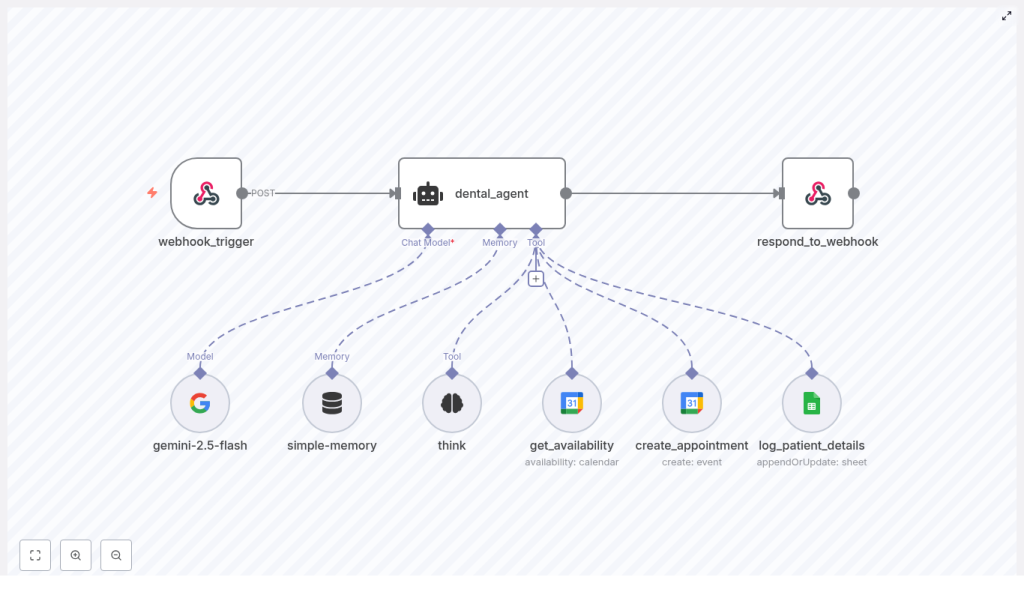
The template is built with a modular architecture that is easy to understand, audit, and extend. Each part has a clear purpose, so you can confidently tweak or expand it later.
Core Components of the Template
- Webhook trigger: Receives POST requests from your telephony or chat system.
- Agent (LangChain-like): Central decision logic that orchestrates tools and enforces rules.
- LLM (Google Gemini / PaLM): Interprets natural language and generates structured responses.
- Think tool: An internal reasoning step that the agent must use before calling any external tool.
- Google Calendar tools:
- get_availability – checks for open appointment slots
- create_appointment – creates a one-hour appointment
- Google Sheets logging: Appends patient and call details to a sheet.
- Memory buffer: Maintains short-term context across interactions via a session key.
- Respond to webhook: Returns structured JSON back to your caller or telephony system.
This architecture is intentionally transparent. You can see exactly which node does what, which makes it easier to extend the template with your own logic, additional tools, or integrations later.
Rules That Keep Your Automation Safe, Consistent, and Auditable
Powerful automation is not just about what it can do. It is about what it should do, every time. This template includes explicit constraints that keep behavior predictable and easy to review.
- Always use the think tool first The agent must call the think tool before using any external tool. This internal reasoning step:
- Improves decision consistency
- Makes the workflow easier to audit
- Reduces random or unsafe tool calls
- get_availability behavior
- Can be called multiple times
- Should try to return at least two available time slots when possible
- Search pattern: around the requested time in 30-minute or 1-hour increments
- Prioritize slots between 8:00 AM and 5:00 PM CST
- create_appointment constraint
- May be called at most once per request
- Creates a one-hour event in Google Calendar
- log_patient_details constraint
- Should be called only once
- Only used when patient name, insurance provider, and any questions or concerns are available
These rules are built into the agent instructions, so the workflow behaves like a reliable teammate, not a black box.
Your Automation Journey: Step-by-Step Implementation in n8n
Now let us walk through how you actually bring this template to life. Treat each step as a building block. Once you understand them, you can adapt, extend, and refine the workflow to fit your practice perfectly.
1. Configure the Webhook Trigger
First, connect your communication channel to n8n.
Point your telephony or chat system to the Webhook node URL. Each incoming POST request should include structured data such as:
- request_type (for example:
check_availabilityorbook_appointment) - patient_name
- requested_time
- insurance_provider (optional)
- questions_or_concerns (optional)
This payload becomes the starting point for your agent to interpret the patient request and decide what to do next.
2. Set Up Google Gemini and the Agent Logic
Next, you bring intelligence into the workflow.
- Connect Google Gemini (PaLM) as your LLM in n8n.
- Create an Agent node that receives the webhook payload.
- Define a clear system prompt that:
- Explains the agent’s role as a dental appointment assistant
- Lists the tools it can use (think tool, get_availability, create_appointment, log_patient_details)
- Describes the constraints and rules mentioned above
- Specifies the required output format so the response to the webhook is structured and predictable
- Make it explicit that the agent’s first step must always be to call the think tool.
This is where you can infuse your own office style. Adjust the prompt to match your tone, your policies, and the way you want the agent to talk about scheduling and insurance.
3. Implement Availability Checking with Google Calendar
With the agent in place, you can empower it to look up real availability.
Use the get_availability tool to query your Google Calendar. The agent should follow a structured search pattern around the requested time, for example:
- Start at the requested time
- Then check 30 minutes earlier
- Then 30 minutes later
- Then 60 minutes earlier
- Then 60 minutes later
The goal is to return two available time slots in ISO format (CST) whenever possible. If only one slot is available, the agent should return that single option.
This structured approach keeps patient conversations efficient and makes the scheduling logic transparent and debuggable.
4. Create the Appointment in Google Calendar
Once the patient (or your telephony flow) confirms a time, the agent should call create_appointment exactly once.
Key points to follow:
- Create a one-hour event for the confirmed time.
- Use a clear and consistent event summary format, for example:
Dental Appointment | {patient_name}
This small detail helps your team quickly scan the calendar and know who is coming in and why the slot was booked.
5. Log Patient Details in Google Sheets
After the appointment is booked, or whenever sufficient patient information is available, the agent should call log_patient_details to append a new row to your Google Sheet.
Include fields such as:
- Call timestamp
- Patient name
- Insurance provider
- Questions or concerns
- Appointment timestamp (if booked)
This simple spreadsheet log becomes a lightweight audit trail that you can later turn into dashboards, reports, or import into other systems.
Testing, Edge Cases, and Best Practices for a Reliable Agent
Automation becomes truly powerful when it behaves well in real-world scenarios, not just ideal ones. Use these practices to strengthen your workflow and build confidence before going live.
- Testing Simulate webhook payloads in n8n to test:
- Different request types
- Times around lunch breaks
- Requests outside business hours
This helps you refine how the agent suggests alternatives and handles rejections.
- Concurrency Two patients might try to book the same time. To avoid double-booking:
- Perform a final availability check right before calling create_appointment
- If the slot is taken, the agent should gracefully suggest new options
- Partial data Respect patient preferences and data quality:
- Do not call log_patient_details unless required information is available
- If a patient declines to share details, the agent can still suggest time slots but should skip logging
- Timezone handling This workflow assumes Central Time (CST). Always:
- Convert incoming timestamps to CST before checking availability
- Return times clearly labeled so staff and patients stay aligned
Security, Privacy, and Compliance You Can Trust
Appointment conversations may include Protected Health Information (PHI), so your automation must be handled with care.
- Use HTTPS for webhooks and secure OAuth credentials for Google APIs.
- Limit logging in Google Sheets to essential fields only. Avoid storing sensitive or clinical notes in general-purpose logs.
- If you are a HIPAA-covered practice:
- Ensure your Google Workspace is configured with a Business Associate Agreement (BAA)
- Confirm that any telephony providers also support BAAs and compliant storage
Building privacy and security into your workflow from day one means you can scale automation without compromising trust.
Growing With Automation: Scaling and Future Enhancements
This n8n template is not just a finished tool. It is a foundation you can build on as your practice and automation skills grow.
Once you are comfortable with the basic voice agent, consider extending it with:
- Speech-to-text integration Connect services like Twilio + Google Speech-to-Text so actual phone calls are converted into webhook payloads for the agent.
- Patient verification Add optional identity checks before booking, especially for new patients or high-value procedures.
- Multilingual support Adjust LLM settings and prompts to support multiple languages and better serve diverse patient communities.
- Analytics dashboard Use your Google Sheets logs as a data source for dashboards that track:
- Average time to book
- No-show patterns
- Common questions or concerns
This insight can drive better staffing decisions and patient communication strategies.
Each enhancement is another step toward a more automated, insight-driven practice that adapts quickly and serves patients with less friction.
Taking the Next Step: Start Small, Learn Fast, Automate More
Automating appointment booking with a rule-driven voice agent is a practical way to reclaim time, reduce stress, and offer a consistently high-quality patient experience. The n8n template “The Recap AI – Dentist Voice Agent” brings together:
- Agent-based logic powered by Google Gemini (PaLM)
- Reliable scheduling through Google Calendar
- Structured record-keeping with Google Sheets
- Clear rules that keep behavior safe and auditable
Your journey does not have to be complicated. Start with this template, run a few tests, and iterate. Each improvement you make will sharpen both the workflow and your own automation skills.
Ready to automate your dental front desk? Download or import the template into your n8n instance, send a few simulated webhook payloads, and watch the agent handle requests end to end. Then refine the prompts, tune the rules, and shape the conversation so it perfectly matches your practice.
As you gain confidence, you will see more and more opportunities to automate, integrate, and grow. This dental voice agent can be the first of many workflows that help your team do less manual work and more meaningful work.
Keywords: dental voice agent, n8n workflow, appointment booking automation, Google Gemini, Google Calendar integration, Google Sheets logging, dentist appointment automation template.
