


Build an AI Voice Agent Workflow with n8n
On a rainy Tuesday afternoon, Mia stared at her Telegram notifications piling up on the side of her screen. As the operations lead for a fast-growing appointment-based business, she was supposed to confirm bookings, follow up with leads, and help the sales team reach out to new prospects. Instead, she was juggling voice notes, text messages, and a calendar that never quite reflected reality.
Some customers sent Telegram voice notes asking her to call their favorite clinic. Others dropped short text messages like “Can you book me a haircut at 4 pm today near downtown?” or “Please call my dentist and move my appointment.” Every time, Mia had to listen, interpret, look up businesses on Google Maps, find phone numbers, make a call, negotiate times, then finally create a Google Calendar event. By the time she finished a few requests, new ones were already waiting.
She knew there had to be a better way. That was when she discovered an n8n workflow template that promised exactly what she needed: a voice AI agent that could listen to Telegram messages, understand what people wanted, call the right contact or business, and book appointments directly into Google Calendar.
The problem: Too many messages, not enough hands
Mia’s core challenge was simple to describe but hard to fix. She needed:
- A way to turn Telegram messages and voice notes into clear, actionable tasks.
- An assistant that could look up personal contacts or nearby businesses automatically.
- A reliable caller that could talk like a human, confirm details, and set appointments.
- Automatic Google Calendar booking once a call was successful.
Doing all of this manually was slow and error-prone. She missed calls, double-booked time slots, and sometimes forgot to update the calendar. So when she found an n8n workflow for an AI voice agent, she decided to turn this chaos into a fully automated system.
The discovery: An n8n workflow that could actually make calls
The template she found promised exactly what she had been trying to build by hand. It described a workflow that:
- Listens to incoming messages and voice notes on Telegram.
- Uses OpenAI transcription to convert audio into text.
- Normalizes both voice and text into a single input so the AI can understand it.
- Lets an AI Agent decide whether to call a personal contact or search for a business on Google Maps.
- Triggers a voice agent to make the call and then, if the call successfully books an appointment, creates a Google Calendar event.
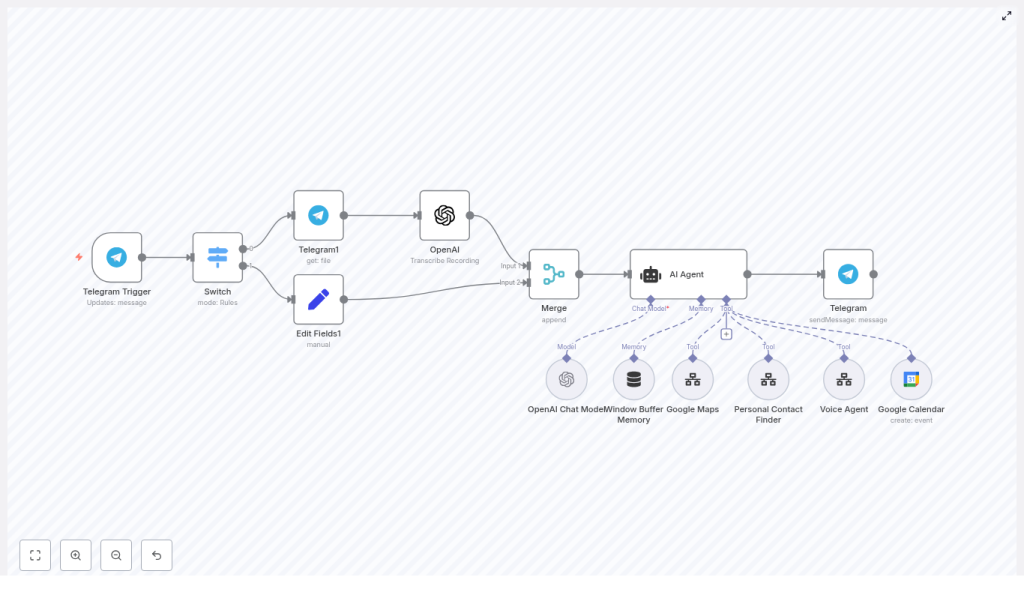
In other words, Mia could go from “Can you call this salon and book me for tomorrow?” to a completed calendar booking without lifting a finger. The workflow would handle Telegram integration, OpenAI transcription, Google Maps scraping, automated calling, and calendar booking in one coherent system.
How the workflow fits together in Mia’s world
The Telegram doorway: where every request starts
Mia began by picturing the starting point of every interaction. For her customers, it was always Telegram. So the workflow needed a reliable entry point.
She added a Telegram Trigger node in n8n. This node would sit quietly in the background, listening for two types of updates:
message.textfor regular chat messages.message.voicefor voice notes.
Right after the trigger, she connected a Switch node. That node became the traffic controller, checking whether the incoming Telegram update contained text or a voice message. From there, the story of each request would branch.
When customers speak: from voice notes to text with OpenAI
Most of Mia’s regulars preferred sending voice notes. “Hey Mia, could you book me a dentist appointment sometime next week after 3 pm?” was typical. Before, that meant she had to listen carefully and manually write down the details.
In the new workflow, the process looked different:
- The Switch node detected
message.voice. - A Telegram node downloaded the audio file from the message.
- The file was passed into an OpenAI transcription node, which converted the audio into text.
- The resulting transcription was extracted and prepared for the next step.
Text messages skipped this transcription part. They simply flowed straight ahead to the same place where all inputs would eventually meet.
The turning point: merging everything into one clear instruction
Mia knew that for her AI voice agent to work, it needed a single, consistent way of reading what customers wanted. Whether a request started as a voice note or a typed message, the AI should see just one unified payload.
That is where the Merge node came in.
She configured the Merge node to unify:
- Transcribed text from voice notes.
- Direct text messages from Telegram.
Along with the main text, she also included important metadata in the payload:
- Chat ID and user ID, so the workflow always knew who was speaking.
- The original audio URL, in case she ever needed to reference the source.
- Intent hints or context that the AI Agent could use to better understand the request.
Now, no matter how the user spoke, the AI Agent would receive a clean, single text field and a rich context. That was the moment where the workflow stopped being a simple Telegram bot and started becoming a real AI voice assistant.
Meeting the AI Agent: deciding who to call and why
With the merged payload in place, Mia connected it to the heart of the system: the AI Agent node in n8n. This node was not just a model that generated text. It acted more like a smart coordinator that could call other tools and workflows.
Inside the AI Agent, Mia wired in several tools:
- Personal Contact Finder to search her saved contacts and find phone numbers for people her customers mentioned by name.
- Google Maps Scraper to look up local businesses by city, state, industry, country, and a specified number of results, usually defaulting to 5 if the user did not specify.
- Voice Agent to actually place outbound calls using a defined context, opening message, relationship, and goal.
- Google Calendar to create calendar events, but only after a successful booking was confirmed during the call.
For example, when a user wrote, “Can you find a hair salon in downtown Seattle and book me for Friday afternoon?”, the AI Agent would:
- Use Google Maps Scraper to find a few candidate salons and their phone numbers.
- Return a short list to the user for confirmation.
- After confirmation, pass the chosen business and context to the Voice Agent.
- Once the call succeeded and a time was agreed, create a Google Calendar event.
In Mia’s mind, she now had something that behaved a bit like a human assistant, only faster and always available.
How Mia actually built it: step-by-step inside n8n
1. Wiring up Telegram in n8n
Mia started by setting up her Telegram bot token inside n8n credentials. Then she added a Telegram Trigger node and configured the allowed updates so it could receive both text and voice messages.
From the trigger, she connected a Switch node that inspected the incoming update. The logic was simple:
- If the update contained
message.voice, send it down the transcription path. - If it contained
message.text, send it directly toward the Merge node.
2. Handling transcription for voice notes
For the voice path, she added:
- A Telegram node configured to download the audio file from the voice message.
- An OpenAI transcription node (or another speech-to-text service) that accepted the downloaded file.
- Mapping logic to extract the transcription text and prepare it for merging.
This step turned every voice note into a clean text string that could be processed like any other message.
3. Normalizing everything before the AI Agent
Next, Mia used the Merge node to combine both paths. Whether the message came from the transcription branch or straight from text, the Merge node produced a single, normalized payload with:
- A unified text field.
- Chat and user identifiers.
- Optional metadata like original audio URLs and intent hints.
This normalized payload was then passed to the AI Agent node so that the agent always saw the same structure and could reason reliably.
4. Configuring the AI Agent tools
Inside the AI Agent node, Mia configured several tool integrations:
- Personal Contact Finder
The AI could ask this tool to search her contact list and return a short candidate list when a user mentioned “my dentist” or “call John” without giving a number. - Google Maps Scraper
She set up parameters such as:- City and state.
- Industry or type of business.
- Country code.
- Result count, defaulting to 5 when the user did not specify a number.
- Voice Agent
This tool received:- Context about the call goal and any constraints.
- An opening message to start the conversation.
- Details about the caller’s name and relationship.
- A fallback plan if the call did not go as expected.
- Google Calendar
Configured so that it only created events after the voice agent confirmed that an appointment had been successfully booked.
5. Building in safety rules and clear flow
To keep everything predictable and safe, Mia implemented several workflow rules directly in the template logic and prompts:
- The AI must always ask the user to confirm which contact or business to call, especially when multiple matches are found.
- Only one contact or business can be called per request, preventing accidental mass calling.
- The AI should gather context such as:
- Call goal (book, reschedule, confirm, etc.).
- Preferred timeframes or date ranges.
- A fallback plan if the first attempt fails.
- Google Calendar events can only be created after the voice agent clearly marks the call as a successful booking.
With these rules in place, Mia felt confident that her AI voice agent would act responsibly and predictably.
Best practices Mia learned along the way
Always get user confirmation before calling
At first, Mia was tempted to let the AI immediately call the top result from Google Maps or the first contact match. She quickly realized that this could lead to awkward mistakes. Instead, she had the AI Agent:
- Return a short, numbered list of candidate contacts or businesses.
- Ask the user to choose one explicitly before making the call.
This small step not only reduced errors but also helped build trust with users and respected their privacy.
Limit call attempts and define fallbacks
Mia also defined clear fallback behavior. For example:
- If the call failed, the voice agent might suggest trying again in 10 minutes.
- If no one answered, the workflow could propose an alternative time slot.
The voice agent always returned explicit success or failure statuses. That allowed the workflow to decide whether to create a calendar event, send a follow-up message, or attempt another call.
Protecting transcripts and sensitive data
Because the workflow handled real names, phone numbers, and sometimes call recordings, Mia took data security seriously. She:
- Stored transcriptions and contact data in an encrypted data store.
- Restricted access to only the systems and people who truly needed it.
- Reviewed local wiretapping and consent laws before logging any call recordings.
This made the AI voice agent not only efficient but also compliant and trustworthy.
Testing, debugging, and fine-tuning the automation
Before rolling the workflow out to her entire customer base, Mia spent time testing each piece in isolation. She created a simple plan:
- Unit test each node
She tested the Telegram Trigger with both text and voice messages, verified that the transcription node produced accurate text, and checked the Merge node’s output for different scenarios. - Use controlled sample messages
She sent predictable messages and voice notes to verify that the AI Agent responded correctly and followed the rules. - Log payloads during development
During testing, she logged full payloads to understand what was happening at each step, then removed or masked sensitive fields before moving to production logging.
Along the way, she encountered a few common issues:
- Transcription quality required tweaking audio encoding and sometimes applying noise reduction.
- Google Maps scraping consistency improved when she adjusted search queries and carefully formatted city, state, and country codes.
- AI prompt engineering made a big difference. By embedding clear system instructions and examples, she got the agent to always confirm selections, ask for context, and follow the safety rules.
How Mia now uses the AI voice agent in real life
Once the workflow was stable, Mia started using it in several ways that echoed real-world use cases:
- Appointment scheduling for services
Customers sent a quick Telegram message like “Book me a manicure tomorrow afternoon near downtown.” The AI voice agent:- Found nearby salons using Google Maps.
- Asked the customer to pick one.
- Called the chosen business via the voice agent workflow.
- Created a Google Calendar event after the appointment was confirmed.
- Outbound follow-ups for sales
Her sales team used the same system to have the AI call leads from a CRM or discover local businesses via Google Maps for outreach, then log success or failure and schedule meetings. - Personal assistant behavior
For internal use, the bot could call team members or personal contacts to relay messages or set up quick sync meetings, all starting from a simple Telegram note.
Privacy, compliance, and consent in Mia’s setup
Mia knew that automated calling could be sensitive, so she built explicit consent flows into her Telegram conversations. Before the AI voice agent ever made a call, the user was informed that:
- An automated system would place the call.
- Details might be logged for scheduling and follow-up.
- They could opt out at any time.
She stored consent records, added opt-out handling, and reviewed regulations like GDPR, CCPA, and local telecom rules. This kept her automation aligned with legal requirements and user expectations.
The outcome: from chaos to a calm, automated workflow
Within a few weeks of deploying the n8n template, Mia noticed something remarkable. Her Telegram inbox was still full, but her stress level was not. The AI voice agent quietly:
- Listened to Telegram messages and voice notes.
- Used OpenAI transcription to understand spoken requests.
- Searched contacts and businesses through the Personal Contact Finder and Google Maps Scraper.
- Placed outbound calls via the Voice Agent with clear goals and fallback plans.
- Booked appointments and wrote them into Google Calendar only when they were truly confirmed.
What had started as scattered manual work turned into a reliable, scalable n8n workflow for voice AI automation.
Next steps: build your own AI voice agent in n8n
The same architecture that saved Mia’s day is available
