


n8n + HeyGen: How One Marketer Stopped Manually Creating Talking Avatar Videos
By the third time Jenna recorded the same onboarding message, she knew something had to change.
As the only marketer at a fast-growing startup, Jenna was juggling launch campaigns, product updates, and internal announcements. Her team loved the idea of talking avatar videos for onboarding and training, but manually producing each one for every new hire, customer segment, or feature release was eating her entire week.
She would write a script, log into HeyGen, configure the avatar, wait for rendering, copy the video link, then paste it into Slack. Over and over. It was powerful, but it did not scale.
One late night, staring at a list of yet-to-be-created videos, Jenna opened her browser and typed a simple question: “How to automate HeyGen avatar videos to Slack with n8n?”
The problem: great idea, broken process
Talking avatar videos were already working for Jenna’s company. They used them for:
- Customer onboarding and product walkthroughs
- Internal training and quick how-to guides
- Announcements from leadership that felt more personal than text
The problem was not the format. It was the manual production. Every time someone needed a new video, Jenna had to:
- Take a text script from a doc, form, or Slack message
- Set up the HeyGen video with the right avatar and voice
- Wait for rendering to finish, refreshing until it was done
- Grab the final video link and share it in the right Slack channel
As the company scaled, requests multiplied. A process that felt fun at first turned into a bottleneck. The more they used HeyGen, the more Jenna became the “video machine” instead of a marketer.
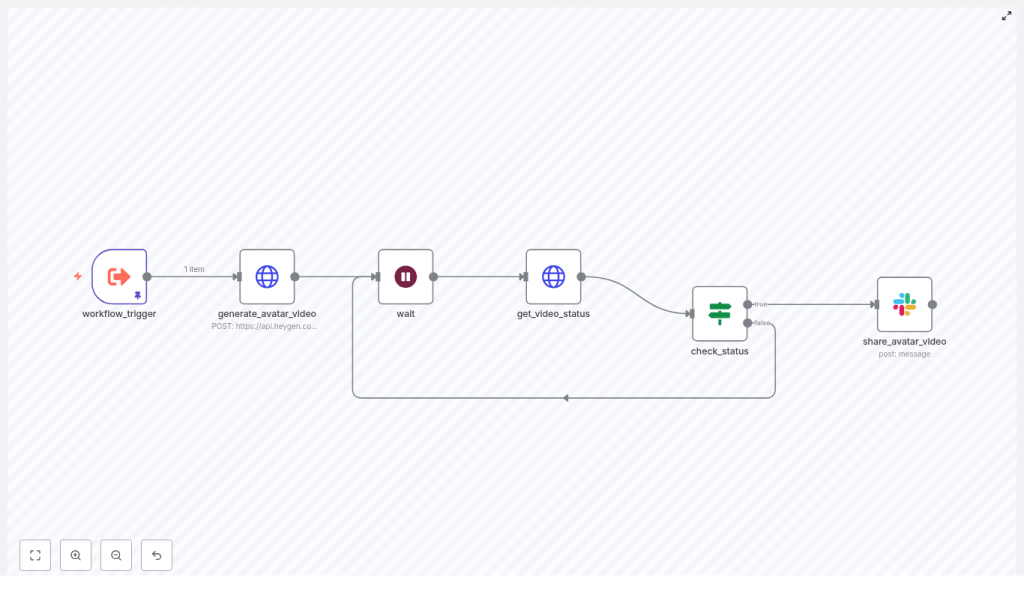
That is when she found an n8n workflow template that promised to do exactly what she needed: take a script, call HeyGen’s API, wait for the video to render, then automatically post the final link to Slack.
Discovery: an n8n workflow that could do the work for her
Jenna had heard of n8n as a flexible automation tool but had never built a serious workflow. The template she found showed a simple but powerful pattern:
- Receive a script payload
- Send it to HeyGen’s video generation endpoint
- Loop while the video renders
- Post the completed video into Slack the moment it is ready
If she could get this working, teammates could submit scripts via a form or webhook, and n8n would handle everything behind the scenes. No more manual copy-paste. No more waiting in front of a progress bar.
She decided to try it.
Setting the stage: what Jenna needed before she started
Before building anything, Jenna checked her prerequisites. The template described exactly what she would need:
- An n8n instance where she could create and run workflows
- A HeyGen API key, stored securely in n8n credentials (as HTTP Header Auth or environment credential)
- A Slack workspace with a bot token configured in n8n
- At least one sample text script to turn into a talking avatar video
Within an hour she had n8n up, her HeyGen key saved as a credential, and a Slack bot ready to post into a dedicated channel called #avatar-videos.
Rising action: building the automated talking avatar pipeline
Jenna opened the n8n editor and began to wire together the workflow. Instead of feeling like a dry list of steps, it felt like building a story engine: text goes in, a character speaks it, and the result appears in Slack.
1. The trigger: where scripts enter the story
First, she needed a way to feed scripts into the workflow. The template suggested a node called workflow_trigger.
In her case, she configured it as a webhook trigger that accepted JSON with a single key: script. That meant anyone on her team could send a POST request with text like:
{  "script": "Welcome to our platform! In this short video, we will walk you through your first steps."
}
The workflow_trigger node would then make that script available to the rest of the workflow as {{ $json.script }}.
2. The HeyGen call: turning text into a video request
Next came the part Jenna had always handled by hand: telling HeyGen to generate a talking avatar video.
She added an HTTP Request node and named it generate_avatar_video. This node would send a POST request to HeyGen’s video generation endpoint at /v2/video/generate, including the script and avatar options as JSON.
The template provided a sample body, which she adapted:
{  "video_inputs": [  {  "character": {  "type": "avatar",  "avatar_id": "YOUR_AVATAR_ID",  "avatar_style": "normal"  },  "voice": {  "type": "text",  "input_text": "{{ $json.script }}",  "voice_id": "VOICE_ID"  },  "background": {  "type": "color",  "value": "#008000"  }  }  ],  "dimension": {  "width": 1080,  "height": 1920  }
}
She replaced YOUR_AVATAR_ID and VOICE_ID with values from her HeyGen account, then used n8n’s expression editor so that input_text pulled directly from the trigger node:
{{ $json.script }}
Now, each time the workflow ran, it would send the incoming script to HeyGen and receive a response containing a video_id. That ID was the key to knowing when the video was ready.
3. The wait: giving HeyGen time to work
In the manual process, Jenna would stare at the HeyGen interface, refreshing until the video was done. The workflow needed a more patient approach.
She added a wait node after generate_avatar_video. This node paused the workflow for a short interval, such as 15 to 30 seconds, to give HeyGen time to start rendering.
The exact interval would depend on queue times and video complexity, but the idea was simple: do not hammer the API, just wait a bit before checking status.
4. The status check: polling HeyGen until completion
After the initial pause, it was time to ask HeyGen, “Is the video ready yet?”
Jenna added another HTTP Request node named get_video_status. This one called HeyGen’s status endpoint at:
/v1/video_status.get?video_id=...
Using the video_id returned from generate_avatar_video, the status endpoint would respond with data that included data.status and, once complete, a video_url.
Now she needed a way to loop until that status became completed.
5. The decision point: loop or post to Slack
To control the logic, Jenna dropped in an If node and named it check_status. This node would inspect the response from get_video_status and decide what to do next.
She configured a condition using an expression like:
{{ $json.data.status === 'completed' }}
In words, if the status equals completed, the workflow should continue to the final step. If not, it should loop back to the wait node, pause again, and then re-check the status.
This simple polling loop looked like this in her mind:
- Store
video_idfrom the generation response - Wait for 10 to 30 seconds
- Call the status endpoint with
video_id - If
data.statusiscompleted, move forward - Otherwise, go back to wait and repeat
Instead of manually refreshing a browser, n8n did the checking for her, politely and predictably.
6. The payoff: sharing the avatar video in Slack
At last, once the check_status node confirmed that the video was complete, the workflow needed to deliver the result where her team actually worked: Slack.
Jenna added a Slack node called share_avatar_video. She configured it to send a message into #avatar-videos and used the output from get_video_status to include the final video link:
Here's the talking avatar video you requested:

{{ $('get_video_status').item.json.data.video_url }}
She set the node to post as the bot user tied to her Slack credentials and added a short description so people understood what they were seeing. If she wanted to, she could later extend this to send direct messages or post to different channels based on the script content.
The turning point: from fragile script to production-ready workflow
With the core flow working, Jenna ran a test using a short sample script. The result was exactly what she had hoped:
- She sent a JSON payload with
scriptto the webhook. - n8n called HeyGen, got a
video_id, and began polling. - A few loops later, the status turned to
completed. - Seconds after that, a message appeared in Slack with the video URL.
What used to take her several minutes of manual effort now happened on its own. But she knew that for real-world use, she needed to harden the workflow.
Security and reliability: Jenna’s checklist
To make the automation safe and stable, Jenna followed a set of best practices baked into the template:
- Secure credentials: She stored the HeyGen API key and Slack token in n8n credentials, never in plaintext inside nodes. For self-hosted setups, she used environment variables.
- Responsible polling: She tuned the wait interval to avoid hitting rate limits and considered an exponential backoff strategy if the status endpoint returned errors.
- Content validation: Before sending scripts to HeyGen, she added basic checks to avoid disallowed content and aligned with HeyGen’s content moderation guidelines.
- Error handling: She added branches that would notify an internal admin channel if a video failed to generate or if no
video_idwas returned, and logged errors for later review. - Storage decisions: She decided whether to archive videos elsewhere or simply rely on the HeyGen-hosted link, depending on the use case.
At this point, the workflow was no longer a quick experiment. It was a reliable part of her marketing infrastructure.
When things go wrong: how she debugged and improved
In the first few days, Jenna encountered a few bumps. Instead of abandoning the automation, she leaned on some simple troubleshooting patterns.
- No
video_idreturned: She checked the generate_avatar_video node’s response, verified the request body, and confirmed that authentication with HeyGen was correct. Often the issue was a typo in avatar or voice IDs. - Rendering took too long: She increased the wait interval between polls and set a maximum retry count to avoid infinite loops if a video got stuck.
- Slack messages did not appear: She confirmed that the Slack credential had permission to post in
#avatar-videosand that the bot was invited to the channel. - Unexpected formatting: She tested with very short scripts first, then gradually scaled up to longer content to see how they behaved.
Each fix made the workflow more robust. After a week, she barely had to think about it.
Beyond the basics: how Jenna scaled her avatar video automation
Once the core template was stable, Jenna started to see new possibilities. The workflow was not just about replacing her manual steps. It could unlock entirely new use cases.
Some of the extensions she planned or implemented included:
- Batch generation from spreadsheets or databases: She connected the trigger to a spreadsheet, generating one video per row for personalized outreach or onboarding.
- Richer Slack messages: Instead of only sharing a URL, she experimented with attaching thumbnails or even downloading and uploading the video file directly to Slack.
- Dynamic personalization: By templating scripts, she could insert names, dates, or other dynamic data into the text before sending it to HeyGen.
- Smart routing: She created branches that sent videos to different Slack channels based on content type or priority, such as
#sales-enablementvs#product-updates.
The same structure – trigger, generate, wait, poll, post – remained, but the inputs and outputs became more flexible as her team’s needs evolved.
Jenna’s implementation checklist
If someone on her team wanted to replicate what she had done, Jenna summarized the process into a simple checklist:
- Store HeyGen API credentials in n8n credentials.
- Create a trigger node (Webhook or manual) that accepts a JSON payload with a
scriptfield. - Configure the generate_avatar_video HTTP Request node to POST to
/v2/video/generatewith the script mapped as{{ $json.script }}. - Capture the returned
video_idand pass it along in the workflow context or JSON output. - Add a wait node with a reasonable polling interval.
- Use a get_video_status HTTP Request node to call the HeyGen status endpoint with the
video_id. - Configure an If node, check_status, to test whether
data.statusequalscompletedand either continue to Slack or loop back to wait. - Finish with a Slack node that posts the video URL from get_video_status into the desired channel.
- Test end to end with a short script and review logs to catch any errors early.
Resolution: from bottleneck to invisible automation
Within a few weeks, the impact was obvious. Instead of fielding constant “Can you make this into a video?” requests, Jenna directed teammates to a simple form that fed scripts into the n8n webhook.
Minutes later, Slack would quietly post a new talking avatar video, complete with the requested message. The team got the personalized content they loved, and Jenna got her time back for strategy, experimentation, and campaigns.
The core message of her journey was simple: by combining n8n, HeyGen, and Slack, she turned a manual, repetitive process into a scalable, reliable workflow.
If you are in a similar position – whether you are a marketer, founder, or developer – you do not have to choose between powerful personalized video and your own sanity. Let an automation handle the busywork so you can focus on the message.
Start your own talking avatar workflow
You can follow Jenna’s path and build this workflow from scratch in n8n, or jumpstart the process with a ready-made template.
