


AI Sub-Agent Demo with n8n: Modular Workflow Guide
Imagine being able to sit down, type a single topic, and watch a complete, researched, SEO-friendly blog post appear on its own – title, structure, sections, citations, and even a featured image. That is the kind of leverage this n8n template is designed to give you.
This guide walks you through an AI Sub-Agent Demo workflow in n8n that connects a set of specialized AI agents and tools into one cohesive content-production pipeline. You will see how a Blog Writer Agent, Research Agent, Title and Structure Tool, Perplexity and Tavily integrations, and an image generator all work together so you can automate more, focus on higher-value work, and gradually build your own scalable content engine.
The starting point: content overload and scattered tasks
If you create content regularly, you know how fragmented the process can feel:
- Researching a topic across multiple tabs
- Trying to find the right angle and SEO-friendly title
- Outlining, drafting, and editing each section
- Searching for or generating images that match your story
- Keeping everything consistent and ready to publish
Each step on its own is manageable, yet together they quickly consume time and energy. The more you publish, the harder it becomes to stay consistent without burning out or dropping quality.
This is where automation with n8n and a modular AI workflow can completely change how you work. Instead of doing every step manually, you can design a system that handles the heavy lifting and lets you step in as the editor, strategist, and creative director.
Shifting your mindset: from manual work to modular automation
Powerful automation rarely starts as a single massive, perfect workflow. It grows from small, well-defined pieces that you can test, refine, and reuse. This template embodies that mindset by using a modular AI sub-agent architecture rather than one giant prompt that tries to do everything.
In this approach, each part of the process has a clear responsibility:
- Search and research
- Title and structure generation
- Section writing
- Image generation
- Memory and context handling
Instead of a monolithic prompt that quickly becomes brittle, you get a collection of focused agents and tools that you can evolve step by step. That modularity is what turns this template into a long-term asset for your content automation strategy.
Why a modular AI sub-agent architecture unlocks growth
Breaking your workflow into sub-agents and tools gives you multiple advantages that compound over time:
- Clear separation of concerns for easier debugging, experimentation, and iterative improvement.
- Flexibility to swap models or tools like Perplexity, Tavily, OpenAI, Anthropic, or Replicate without rewriting your entire workflow.
- Reusability of components across other n8n workflows, such as repurposing the Research Agent or Image Tool for different projects.
- Better observability and cost control, since each node has a focused role and you can monitor where time and tokens are being spent.
With this architecture, your automation becomes something you can steadily refine instead of something you fear touching. Each improvement to a sub-agent benefits everything that uses it.
From idea to output: how this n8n template supports your journey
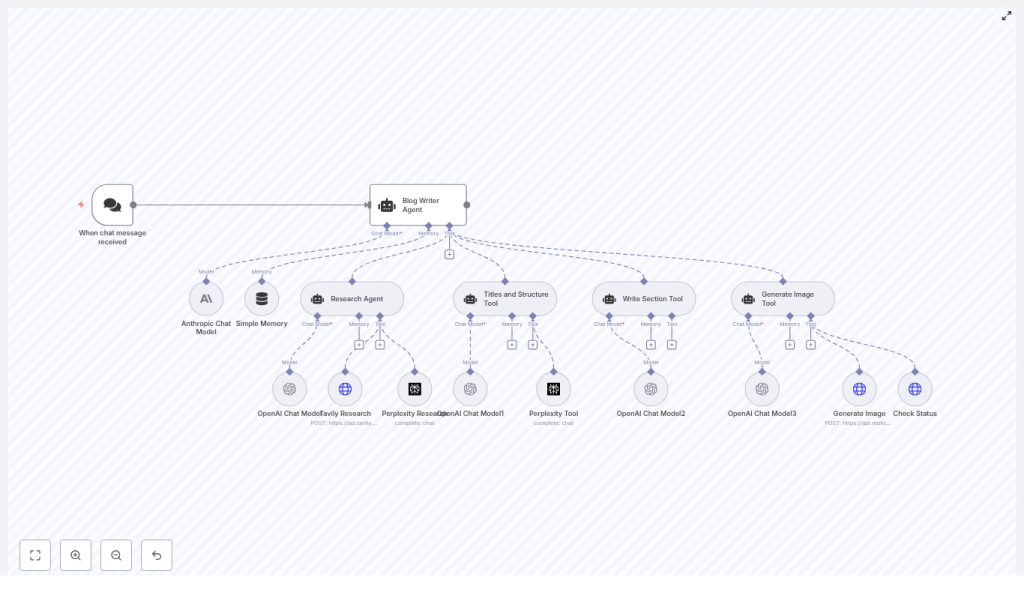
The AI Sub Agent Demo template connects a chat-based trigger to a central Blog Writer Agent, which then coordinates a network of specialized tools and sub-agents. Think of it as your automated editorial team, working together behind the scenes every time a new topic comes in.
Key nodes and what they do for you
- When chat message received – A webhook or chat trigger that starts the workflow whenever a user sends a topic or keyword.
- Blog Writer Agent – The orchestrator that calls research, structure, drafting, and image tools to assemble a complete blog post.
- Anthropic Chat Model and multiple OpenAI Chat Model nodes – The language models that handle reasoning, drafting, and refinement for different sub-tasks.
- Simple Memory – A buffer memory node that keeps a rolling window of recent context so the system can handle multi-turn conversations and edits.
- Research Agent + Tavily Research + Perplexity Research – A research trio that pulls in fresh, grounded information and sources for accurate, citation-ready content.
- Titles and Structure Tool – Generates SEO-optimized titles, H2 and H3 headings, and a concluding section outline using Perplexity and an LLM.
- Write Section Tool – Drafts each H2 or H3 section based on research, prompts, and memory, iterating until the quality is acceptable.
- Generate Image Tool + Generate Image (Replicate) + Check Status – Creates a featured image prompt, sends it to Replicate, and polls until the final image URL is ready.
All of these pieces work together to turn a single input message into a publish-ready blog post. The beauty is that you can tune or replace any part as your needs evolve.
Walking through the workflow: step-by-step execution
To really see the potential, it helps to understand what happens under the hood when the workflow runs. Here is the typical path from trigger to final output.
- Trigger the workflow
A chat message or webhook event hits the When chat message received node. This carries the topic or keyword that you want to write about into the workflow. - Let the Blog Writer Agent orchestrate
The Blog Writer Agent receives the topic and calls the Titles and Structure Tool. This tool uses Perplexity and an LLM to propose a compelling, SEO-friendly title and a structured outline of H2 and H3 headings, including a conclusion. - Research each section
For each section in the outline, the Blog Writer Agent calls the Research Agent. That agent uses Tavily and Perplexity nodes to gather current information, summaries, and source links so your content is grounded in real data rather than guesswork. - Draft the content
The Write Section Tool takes the research output, the section heading, and the memory context, then uses the configured language models to write each section. It can iterate until the content reaches the quality level defined in the prompts. - Generate a featured image
Once the text draft is ready, the Generate Image Tool creates an image prompt and sends it to the Generate Image node powered by Replicate. The Check Status node then polls the job until the image is complete and returns a final image URL to embed. - Compile the final article
The Blog Writer Agent brings everything together: H1 title, introduction, body sections, conclusion, and featured image URL. The result is an HTML-ready blog post that you can publish directly or send to platforms like WordPress.
Once you understand this flow, you can start to tweak each stage to match your voice, brand, and publishing workflow.
Agents and tools: how the pieces fit together
Agents vs tools in n8n
In this template, it helps to distinguish between agents and tools:
- Agents are higher-level entities that use language models to plan and execute tasks end to end. The Blog Writer Agent and Research Agent are examples. They decide what to do and which tools to call.
- Tools are specialized connectors or actions, such as HTTP requests, Perplexity queries, Tavily searches, or image generation calls. They perform specific operations on behalf of agents.
By designing clear, concise tool contracts, you make your system easier to maintain and extend. When you want to improve performance or switch providers, you often only need to change the tool node, not the entire agent logic.
Perplexity and Tavily for grounded research
The Perplexity and Tavily integrations are crucial for keeping your AI-generated content accurate and trustworthy. Instead of relying purely on model memory, these tools:
- Fetch up-to-date information from the web
- Provide summaries and structured results
- Return original source links for citations and verification
The Research Agent aggregates this data, then sends both summarized content and source URLs back to the Blog Writer Agent and Write Section Tool. This lets you include citations and reduces the risk of hallucinated facts.
Using memory to support longer interactions
The Simple Memory node acts as a rolling context buffer. It stores a limited window of recent interactions so the workflow can:
- Handle iterative edits and clarifications
- Maintain context across multiple turns
- Keep prompts within a manageable size for cost and performance
In this template, the contextWindowLength is set to 10. You can adjust this value to balance relevance against token usage. A larger window keeps more history at a higher cost, while a smaller one is cheaper but more focused.
Configuring the template for your own automation journey
Before you run this workflow in your n8n instance, take a moment to configure the essentials. This is where you align the template with your tools, budget, and brand.
- API keys and credentials
Add credentials for OpenAI, Anthropic, Perplexity, Tavily, and Replicate in n8n. Make sure each node references the correct credential entry. - Trigger and chat integration
Configure the webhook URL and connect it to your preferred chat interface, such as Slack, Discord, or a custom chat UI. This is how you will send topics into the workflow. - Model selections
Adjust the model choices for each Chat Model node. For example, you might use gpt-4.1-mini or gpt-4.1-nano for drafts and reserve larger models or Anthropic variants for more complex reasoning, depending on your latency and cost targets. - Image generation style
Tune the Replicate prompt style, aspect ratio, megapixels, and steps so that the generated images match your visual identity. - Research depth and memory size
Configure Tavily and Perplexity search limits, as well as the memory window size, to keep runtime and data volume aligned with your needs.
These adjustments turn a generic template into a workflow that truly reflects your goals and constraints.
Optimizing your n8n AI workflow for scale and quality
Once the template is running, you can start optimizing. The goal is to keep improving quality while protecting your time and budget.
- Use smaller models for early drafts
Start with cheaper, faster models for initial content and reserve higher-capacity models for final polishing or complex reasoning steps. - Keep sub-agent prompts narrow
Give each agent a focused, specific responsibility. Narrow prompts reduce hallucinations and produce more consistent results. - Control research intensity
Limit search depth and number of results when speed or cost is a concern. For recurring topics, consider caching frequently used sources. - Log outputs for learning and reuse
Store research snippets, generated text, and image URLs. This helps with auditing, prompt tuning, and building a knowledge base for future workflows. - Manage rate limits
Use rate limiting or queues for external APIs so your workflow stays stable even as you scale up content production.
Think of optimization as an ongoing process. Every small improvement you make to a node or prompt can pay off across dozens or hundreds of future articles.
Troubleshooting: turning roadblocks into refinements
As you experiment with automation, occasional issues are normal. They are also valuable signals that help you strengthen your system.
- Missing API keys or 401 errors
Double-check that all credentials are correctly added in n8n and that each node is using the right credential entry. - Long runtimes or timeouts
Reduce research depth, limit search results, or switch to faster model variants. For larger jobs, consider splitting the work into smaller batches. - Hallucinated or inaccurate facts
Lean more heavily on the Research Agent, ensure citations are included, and verify that Tavily and Perplexity are configured correctly. - Image generation failures
Check your Replicate quota, confirm the selected model, and review prompt parameters. The polling logic in Check Status should handle temporary delays gracefully.
Each resolved issue moves your workflow closer to a stable, production-ready content pipeline.
Security and privacy: building automation you can trust
As you scale your n8n workflows, it is important to protect both your data and your users.
- Treat all API keys and credentials as sensitive information.
- Use environment variables or n8n’s credentials storage rather than hardcoding keys.
- Restrict access to your n8n instance and logs to only those who need it.
- Define data retention policies for generated content, research snippets, and logs.
- If you process personal data, ensure compliance with regulations like GDPR and CCPA.
Good security practices let you scale confidently without compromising trust.
Bringing it all together: your next step in automation
The AI Sub Agent Demo template is more than a one-off workflow. It is a modular blueprint for building production-ready content pipelines in n8n. By separating research, structure, drafting, and image generation into coordinated sub-agents and tools, you gain a system that is easier to understand, improve, and scale.
Every time you run it, you reclaim time that you can invest back into strategy, creativity, and growth. Over time, this becomes a powerful advantage for you or your business.
Call to action: Import the AI Sub Agent Demo template into your n8n instance, plug in your API keys, and run a sample topic. Watch the full automated blog generation flow in action, then start tweaking it to match your voice and workflow. From there, keep experimenting, extending, and integrating it with your CMS or other systems so it becomes a cornerstone of your automated content strategy.
