


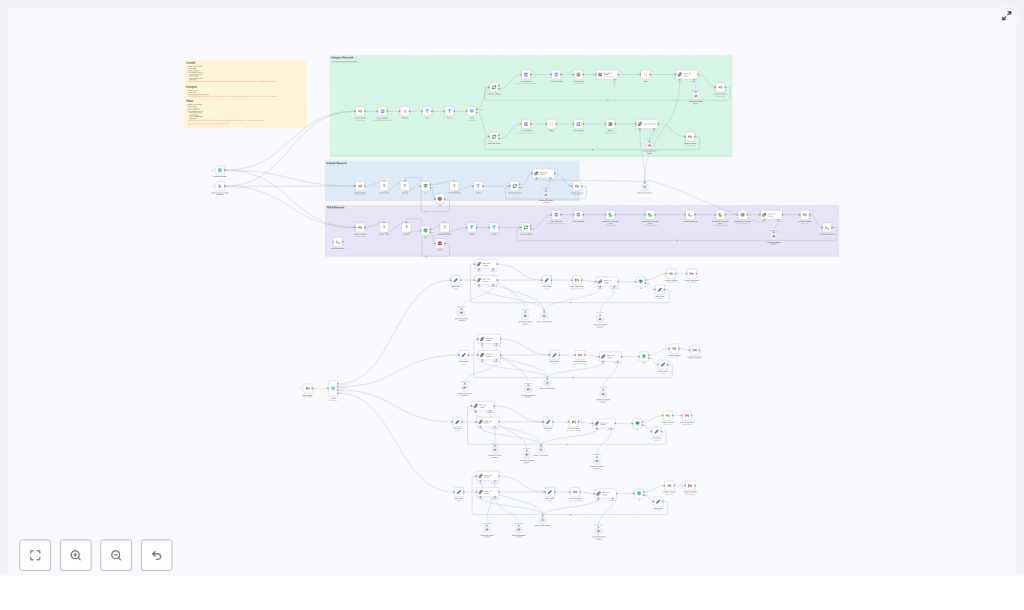
Automate Social Listening with n8n: Instagram, TikTok, LinkedIn
Social media is full of content ideas, but manually checking Instagram, TikTok, and LinkedIn every day is time consuming and inconsistent. This guide walks you through an n8n workflow template that automates social listening, analyzes posts with OpenAI, and stores structured ideas in Airtable.
You will learn how to:
- Automatically discover high performing posts on Instagram, TikTok, and LinkedIn
- Use OpenAI inside n8n to score content and generate repeatable frameworks
- Store all insights in Airtable so your team can turn them into new content
- Apply best practices for reliability, scalability, and compliance
What this n8n workflow does
At a high level, the workflow:
- Reads social listening targets from an Airtable “Inspiration” table
- Scrapes public posts from Instagram, TikTok, and LinkedIn using RapidAPI and Apify
- Filters and enriches posts with extra data like transcripts or image text
- Uses OpenAI to score how “viral” each post is and extract idea frameworks
- Saves the results into Airtable “Ideas” tables for your content pipeline
This turns scattered social posts into a structured, searchable research system that runs on autopilot.
Why automate social listening with n8n?
Doing social research by hand has several problems:
- It is slow to check multiple platforms every day
- It is inconsistent, since different people analyze content differently
- It does not scale well as you add more keywords, competitors, or platforms
Automating the process with n8n and this template helps you:
- Continuously discover trends by tracking viral posts and formats
- Standardize analysis with LLM prompts that score and summarize content the same way every time
- Centralize insights in Airtable so marketing, product, and growth teams can collaborate
- Turn winning posts into frameworks you can reuse across your own channels
Core components of the workflow
The n8n template connects several tools into one pipeline:
- Scrapers and APIs
- RapidAPI endpoints for Instagram and TikTok
- Apify actors for LinkedIn post search and TikTok search runs
- n8n
Orchestrates everything: triggers, branching, filters, batching, and error handling. - OpenAI
Used for:- Transcribing audio when you download video or sound
- Running LLM prompts to score content and generate idea frameworks
- Airtable
- “Inspiration” table: inputs like keywords, usernames, and platform settings
- “Ideas” tables: outputs like viral scores, strengths, and frameworks
- File and CLI tools
Temporary file storage and tools like FFmpeg when you need to convert audio formats for transcription.
How the n8n workflow runs: step-by-step
Step 1 – Trigger the workflow and load inputs
The automation can start in two common ways:
- A scheduled trigger in n8n (for example, every 2 hours or once per day)
- A manual “Execute workflow” run when you want to test or refresh ideas
Once triggered, the workflow:
- Queries an Airtable “Inspiration” table
- Reads configuration fields such as:
- Target keywords or usernames
- Platform flags (Instagram, TikTok, LinkedIn)
- Minimum likes, views, or plays to qualify as “interesting”
- Date range or recency filters, such as “past 7 days”
These inputs tell the workflow which content to look for and what counts as a “top” post.
Step 2 – Scrape content from each platform
Based on the configuration, the workflow branches to different scraping steps.
Instagram scraping
- Uses RapidAPI Instagram endpoints
- Searches for posts by username or shortcode
- Splits the returned list of posts into individual items for per-post processing
LinkedIn scraping
- Runs an Apify actor that searches LinkedIn posts
- Applies keyword and date filters
- Pulls the resulting dataset items into n8n for further filtering and analysis
TikTok scraping
- Uses either:
- An Apify TikTok scraper, or
- RapidAPI TikTok endpoints
- Collects:
- Post metadata (description, stats, timestamps)
- Music information
- Optional video or audio downloads for transcription
By the end of this step, n8n has a list of raw posts from each platform, all flowing into the same automation.
Step 3 – Filter and enrich posts
Next, the workflow cleans and enriches the data so only high value posts move forward.
Filtering logic
Using n8n filter nodes, the workflow:
- Removes posts that do not meet your minimum likes or plays
- Applies any extra conditions you set, such as:
- Minimum view count
- Specific content types (for example, only reels or only carousels)
Branching by post type
After filtering, the workflow branches based on what type of post it is:
- Reels or short videos
- Carousels
- Standard LinkedIn posts
Each branch can have specific enrichment steps, such as:
- Carousel posts
- Count the number of slides
- Extract the first slide image for OCR or visual analysis
- Video or reel posts
- Extract audio manifests
- Convert audio to MP3 using FFmpeg or similar tools
- Prepare the file for transcription with OpenAI
- All posts
- Download thumbnails if you want image analysis
- Normalize basic fields like dates, metrics, and captions
This step ensures that each post has the richest possible context before it reaches the LLM.
Step 4 – Analyze posts with OpenAI in n8n
Once captions, transcripts, and image text are ready, the workflow passes them into OpenAI nodes or code nodes that call the OpenAI API.
Format specific prompts
The workflow uses different prompts for each content type so the analysis is tailored:
- One prompt for TikTok videos
- One prompt for Instagram carousels
- One prompt for LinkedIn posts
Each prompt is designed to return a structured JSON response that is easy to store in Airtable.
Typical prompt inputs
The LLM receives a combination of:
- Caption or post text
- Transcript of audio, when available
- First image text from a carousel or thumbnail (if you are using OCR)
- Engagement metrics such as likes, views, or shares
Expected LLM outputs
The model is instructed to return a concise JSON object that includes:
viral_scoreon a 1-100 scaleprimary_strengthsdescribing what works well in the postframework_1,framework_2,framework_3:- Each framework is 1-2 sentences
- Each includes a clear action step
- Each is kept under roughly 200 characters for Airtable fields
Because the response format is strict JSON, n8n can map each key directly into Airtable without extra parsing logic.
Step 5 – Save structured ideas into Airtable
After analysis, the workflow creates new records in one or more Airtable “Ideas” tables.
Typical fields include:
- Post ID and source platform
- Original caption or post text
- Transcript or script text (if available)
- Viral score from the LLM
- Primary strengths of the post
- Idea frameworks (framework_1, framework_2, framework_3)
This turns social content into an editorial-ready queue. Your team can sort by viral score, filter by platform, and immediately start adapting the frameworks into your own posts, videos, or carousels.
Key design patterns and strategies in this template
Format specific LLM prompts
Instead of one generic prompt, the workflow uses separate prompts for:
- TikTok videos
- Instagram carousels
- LinkedIn posts
Each prompt explicitly asks for:
- A numeric viral_score (1-100)
- A short list of primary_strengths
- Three concise frameworks that can be implemented directly
This structure keeps the analysis consistent and optimized for Airtable fields.
Batching and splitting in n8n
To avoid rate limits and timeouts, the workflow uses n8n’s batching tools:
- splitInBatches nodes to process posts in small groups
- splitOut to handle items one by one when needed
This pattern spreads heavy operations like LLM calls and media downloads over time, which helps you stay within RapidAPI, Apify, and OpenAI limits.
Best practices for a stable social listening pipeline
- Respect platform terms
Only use APIs and actors that comply with each platform’s policies. Avoid scraping private data or personal identifiers. - Manage rate limits
Use batching and wait nodes in n8n to space out calls. Monitor usage dashboards on RapidAPI, Apify, and OpenAI, and scale concurrency gradually. - Keep data clean
Normalize:- Date formats
- Numeric metrics like likes and views
- Missing or empty captions and transcripts
- Iterate on prompts and thresholds
Adjust:- Minimum engagement thresholds
- Prompt wording
- Scoring logic
based on early results. The pipeline improves quickly when you review outputs and refine rules.
Troubleshooting common n8n workflow issues
1. Missing audio or invalid audio manifests
Some endpoints return audio manifests that contain encoded entities or broken paths.
Recommended approach:
- Decode HTML entities such as
&in URLs - Validate
BaseURLpaths before downloading audio - Add checks in n8n code nodes:
- If the audio URL is invalid or missing, skip the transcription step
- Fail gracefully instead of breaking the whole run
2. LLM hallucinations or inconsistent JSON output
Sometimes the model may return text that is not valid JSON or includes extra commentary.
To reduce this:
- Use structured output parsers if available
- Include strict JSON examples in the prompt
- Add a validation node in n8n:
- Check if the response is valid JSON
- If not, retry with a clearer system message that reinforces the format rules
3. Rate limits and timeouts
Heavy scraping and LLM usage can hit limits quickly if not controlled.
Mitigation strategies:
- Use splitInBatches to process a few posts at a time
- Insert wait nodes between batches
- Monitor:
- RapidAPI quota usage
- Apify actor runs
- OpenAI token and request usage
Security, compliance, and ethics
When automating social listening, treat privacy and compliance as core requirements:
- Only collect and store public content
- Avoid linking scraped content to personally identifiable information (PII)
- Review the terms of service for:
- TikTok
- RapidAPI, Apify, and OpenAI
before running large scale workflows
- If you build a product on top of this pipeline:
- Provide clear consent flows
- Offer a takedown mechanism for creators who want their content removed
Where this n8n social listening template is most useful
This setup is especially valuable for:
- Agencies that monitor competitor content and cross platform trends
- Creators who want automated idea generation based on what is already performing
- Product and growth teams tracking feature related chatter and viral user experiences
Quick recap
This n
